
Lacnooe HXF-G8-17-2835-WW-D-6
Contents
Lacnooe G8 LED Bulb Instruction Manual
Model: HXF-G8-17-2835-WW-D-6
G8 Led Bulb Dimmable, 3W T4 Led Bulb, 20-25W Halogen Equivalent, Warm White 3000K, 120V Puck Light Bulbs for Under Cabinet Light, Under Counter Kitchen Lighting, 6-Pack Warm White-6 Pack
1. Product Overview
The Lacnooe G8 LED Bulb is an energy-efficient and long-lasting replacement for traditional 20-25W G8 halogen bulbs. Designed for various applications including under cabinet lighting, puck lights, and desk lamps, these bulbs offer smooth dimming capabilities and a warm white light (3000K) to create a comfortable atmosphere. They are engineered for high brightness with low power consumption, contributing to significant energy savings.

Image: Lacnooe G8 LED Bulbs (6-pack)
2. Key Features
- Energy Saving: Consumes only 3W while providing brightness equivalent to 20-25W halogen bulbs, saving up to 90% on energy costs.
- Smooth Dimming: Features an improved dimmable driver for stable performance, allowing brightness adjustment from 0% to 100% without flicker or buzzing noise. Compatible with most LED dimmers.
- Ultra-Long Life: Constructed with high-quality LED chips, a high-light-transmitting PC cover, and a ceramic body for optimal heat dissipation, ensuring a longer lifespan and reduced maintenance.
- Cozy Warm Light: Provides instant full brightness with no flicker or buzzing. A Color Rendering Index (CRI) of 85Ra ensures vivid and clear color presentation, while the 3000K warm white light creates a pleasant and warm ambiance.
- Wide Application: Suitable for standard G8 base fixtures, commonly used in under cabinet lighting, under counter lights, microwave ovens, puck lights, desk lamps, and pendant lights.

Image: Smooth Dimming from 0-100%

Image: Internal Components and Design
3. Installation and Setup
These G8 LED bulbs are designed for easy installation into any standard G8 bi-pin socket. Before installation, ensure the power to the fixture is turned off to prevent electrical shock.
- Verify Compatibility: Confirm your fixture uses a G8 base. The Lacnooe G8 LED bulb has a bi-pin flat base (3mm/0.12 inch pin width) designed to fit perfectly. Please check the dimensions of your existing bulb and fixture to ensure proper fitment.
- Power Off: Turn off the main power supply to the light fixture at the circuit breaker or wall switch.
- Remove Old Bulb: Carefully remove the existing G8 halogen bulb from the socket. Allow hot halogen bulbs to cool completely before handling.
- Insert New Bulb: Gently insert the two pins of the Lacnooe G8 LED bulb into the G8 socket. Ensure the pins are aligned correctly and push firmly until the bulb is securely seated. Do not force the bulb into the socket.
- Restore Power: Once the bulb is installed, restore power to the fixture.

Image: G8 LED Bulb Dimensions and Base Comparison
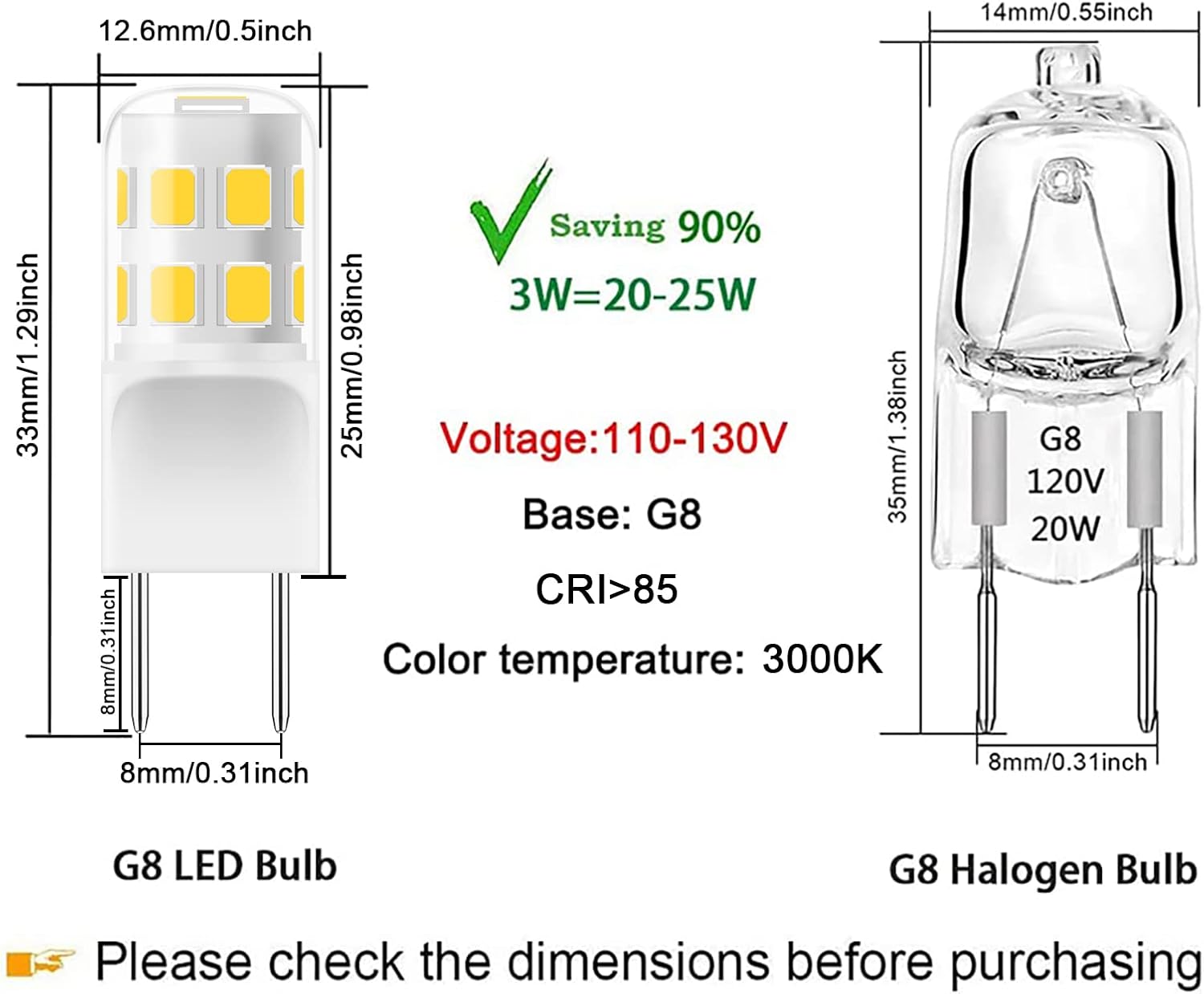
Image: Detailed Dimensions of G8 LED and Halogen Bulbs
4. Operation
The Lacnooe G8 LED bulbs are designed for straightforward operation. Once installed, they provide instant full brightness without any warm-up time.
- Standard Use: Simply turn on the light switch to illuminate the area.
- Dimming Functionality: If connected to a compatible LED dimmer switch, you can adjust the brightness from 0% to 100% to suit your preference. Ensure your dimmer is specifically designed for LED lighting to achieve optimal performance and avoid flickering.
- Eye Protection: These bulbs are designed to be flicker-free and glare-free, providing comfortable and eye-protective illumination.

Image: Eye Protection Feature
5. Maintenance
Lacnooe G8 LED bulbs require minimal maintenance due to their long lifespan and durable construction.
- Cleaning: Ensure the bulb is cool and the power is off before cleaning. Wipe the bulb gently with a soft, dry cloth. Do not use liquid cleaners or abrasive materials.
- Replacement: Replace bulbs only when they reach the end of their operational life. Always ensure the power is off before attempting to replace a bulb.
6. Troubleshooting
If you encounter issues with your Lacnooe G8 LED bulbs, consider the following common solutions:
- Flickering: If the bulbs flicker, especially on a dimmable circuit, check your light fixture's switch. Some fixtures have high and low settings. Ensure the switch is set to the high setting. This often resolves flickering issues. Also, ensure your dimmer switch is compatible with LED bulbs.
- Not Lighting Up:
- Verify that the power to the fixture is on.
- Ensure the bulb is securely seated in the G8 socket. Gently push the pins to ensure good contact.
- Check if the pins on the LED bulb are slightly smaller than your original halogen bulb. Some users have found that gently bending the pins slightly closer together can improve contact in certain sockets.
- Test the bulb in another compatible fixture if possible to rule out a fixture issue.
- Buzzing Noise: While these bulbs are designed to be silent, a buzzing noise can sometimes occur if the dimmer switch is not fully compatible with LED technology. Consider upgrading your dimmer to an LED-specific model if buzzing persists.

Image: Flicker Comparison
7. Specifications
| Attribute | Value |
|---|---|
| Brand | Lacnooe |
| Light Type | LED |
| Special Feature | Dimmable, Energy Efficient, Flicker-Free, Long Lasting, Mini Size |
| Wattage | 3 watts |
| Bulb Shape Size | T4 |
| Bulb Base | G8 |
| Incandescent Equivalent Wattage | 20-25 Watts |
| Light Color | Warm White |
| Voltage | 120 Volts |
| Color Temperature | 3000 Kelvin |
| Brightness | 300 Lumen |
| CRI (Color Rendering Index) | 85Ra |
| Material | Ceramic, Polycarbonate (PC) |
| Product Dimensions | 0.5"W x 1.39"H |
| Indoor/Outdoor Usage | Indoor |
8. Warranty and Support
For warranty information and customer support, please refer to the product packaging or contact Lacnooe directly through their official website or the retailer where the product was purchased. Please have your model number (HXF-G8-17-2835-WW-D-6) and purchase details ready when contacting support.
Note: No official seller videos were available for inclusion in this manual.
Ask a question about this manual
Ask about setup, troubleshooting, compatibility, parts, safety, or missing instructions. Manuals+ will review the question and use this page’s manual context to help answer it.