Introduction
Thank you for choosing the KIMISO KMS-1002 4-inch Rechargeable Bluetooth Speaker. This portable speaker is designed to provide high-quality audio playback from various sources, including Bluetooth-enabled devices, FM radio, USB drives, Micro SD cards, and auxiliary input. Its compact design and rechargeable battery make it ideal for enjoying your favorite music anywhere.
Key features include:
- 4-inch speaker diameter for clear sound.
- 5W (RMS) power output.
- Multiple connectivity options: Bluetooth, USB, Micro SD, and 3.5mm Auxiliary input.
- Integrated FM radio tuner.
- Rechargeable battery for portable use.
Safety Information
Please read and follow these safety guidelines to ensure proper operation and prevent damage to the device or injury to yourself:
- Do not expose the speaker to water, moisture, or extreme temperatures.
- Avoid dropping or subjecting the speaker to strong impacts.
- Do not attempt to disassemble or repair the speaker yourself. Refer all servicing to qualified personnel.
- Keep the speaker away from heat sources and direct sunlight.
- Use only the specified charging cable and power adapter (if included) to charge the device.
- Clean the speaker with a soft, dry cloth. Do not use abrasive cleaners or solvents.
Product Overview
Familiarize yourself with the speaker's components and controls.
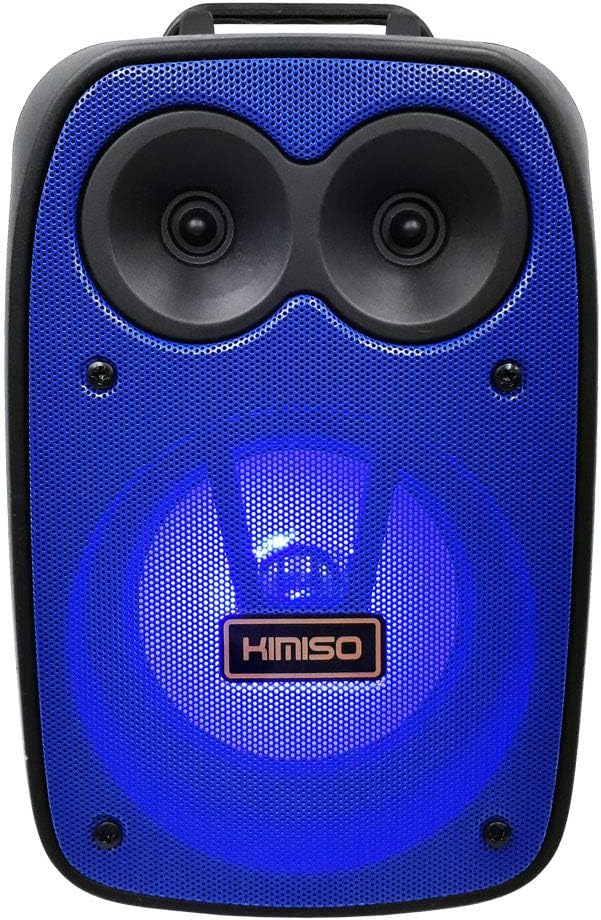
Figure 1: Front view of the KIMISO KMS-1002 speaker. The speaker features a blue grille with a prominent KIMISO logo and two smaller speaker cones above a larger one, all illuminated by blue LED lights.
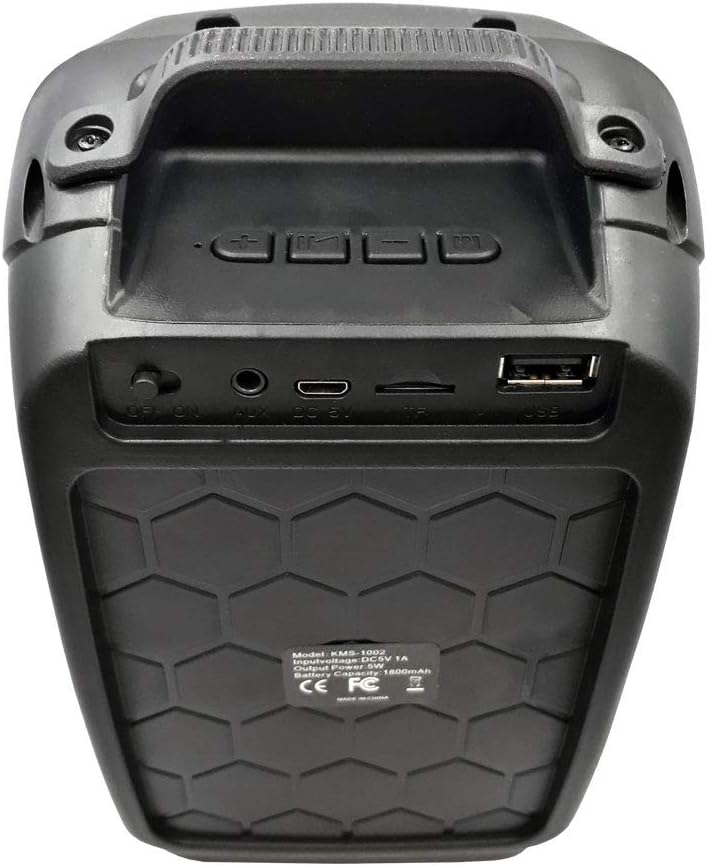
Figure 2: Rear panel of the KIMISO KMS-1002 speaker. From left to right, it shows an ON/OFF switch, an AUX input port, a DC 5V charging port, a TF (Micro SD) card slot, and a USB port. Above these are control buttons for volume, track navigation, and mode selection.
Controls and Ports:
- ON/OFF Switch: Powers the speaker on or off.
- DC 5V Port: For charging the speaker using the provided USB cable.
- AUX Input: Connect external audio devices via a 3.5mm audio cable.
- TF (Micro SD) Card Slot: Insert a Micro SD card for direct music playback.
- USB Port: Insert a USB flash drive for direct music playback.
- Mode Button: Switches between Bluetooth, FM Radio, USB, Micro SD, and AUX modes.
- Volume/Track Buttons: Adjust volume (short press) or navigate tracks/stations (long press).
- Play/Pause Button: Plays or pauses audio playback. In FM mode, long press to auto-scan stations.
Setup
1. Charging the Speaker
- Connect the charging cable to the DC 5V port on the speaker (refer to Figure 2).
- Connect the other end of the charging cable to a compatible USB power source (e.g., a USB wall adapter, computer USB port).
- The charging indicator (if present) will illuminate. Allow approximately 3-4 hours for a full charge. A full charge provides approximately 5 hours of playback time.
- Once fully charged, disconnect the charging cable.
2. Powering On/Off
- To power on the speaker, slide the ON/OFF switch (refer to Figure 2) to the "ON" position. You will hear an audible prompt.
- To power off the speaker, slide the ON/OFF switch to the "OFF" position.
Operating Instructions
1. Bluetooth Mode
- Ensure the speaker is powered on. It will automatically enter Bluetooth pairing mode, indicated by a flashing LED light and an audible prompt.
- On your mobile device (smartphone, tablet, laptop), enable Bluetooth and search for available devices.
- Select "KMS-1002" from the list of found devices.
- Once paired, the speaker will emit an audible confirmation, and the LED light will stop flashing.
- You can now play audio from your device through the speaker. Use the speaker's volume/track buttons or your device's controls to manage playback.
2. FM Radio Mode
- Press the Mode button repeatedly until you hear the FM radio prompt.
- To auto-scan and save available FM stations, long press the Play/Pause button. The speaker will scan and store stations automatically.
- Use the Volume/Track buttons (short press for volume, long press to change stations) to navigate through the saved stations.
3. USB Playback Mode
- Insert a USB flash drive containing MP3 audio files into the USB port (refer to Figure 2).
- The speaker will automatically switch to USB mode and begin playing music. If not, press the Mode button to select USB mode.
- Use the Volume/Track buttons and Play/Pause button to control playback.
4. Micro SD Card Playback Mode
- Insert a Micro SD card containing MP3 audio files into the TF (Micro SD) card slot (refer to Figure 2).
- The speaker will automatically switch to Micro SD mode and begin playing music. If not, press the Mode button to select Micro SD mode.
- Use the Volume/Track buttons and Play/Pause button to control playback.
5. Auxiliary (AUX) Input Mode
- Connect one end of a 3.5mm audio cable (not included) to the AUX input port on the speaker (refer to Figure 2).
- Connect the other end of the audio cable to the headphone jack or audio output of your external device.
- Press the Mode button to select AUX mode.
- Control playback and volume primarily from your external device.
Maintenance
- Cleaning: Use a soft, dry, lint-free cloth to clean the speaker's exterior. Do not use liquid cleaners, aerosols, or solvents.
- Storage: When not in use for extended periods, store the speaker in a cool, dry place, away from direct sunlight and extreme temperatures.
- Battery Care: To prolong battery life, avoid fully discharging the battery frequently. Charge the speaker regularly, even if not in use, to maintain battery health.
Troubleshooting
| Problem | Possible Cause | Solution |
|---|---|---|
| Speaker does not power on. | Battery is discharged. | Charge the speaker for at least 3-4 hours. |
| No sound. | Volume is too low or muted. Incorrect mode selected. | Increase volume on both the speaker and the connected device. Press the Mode button to select the correct input source. |
| Cannot pair via Bluetooth. | Speaker not in pairing mode. Device Bluetooth is off. Speaker is too far from device. | Ensure speaker is in Bluetooth mode (flashing LED). Enable Bluetooth on your device. Move speaker closer to your device (within 10 meters). |
| FM radio reception is poor. | Weak signal. | Try repositioning the speaker. In some cases, connecting a 3.5mm audio cable (even without an external device) can act as an antenna. |
| USB/Micro SD playback not working. | Incorrect file format. Drive/card not properly inserted. | Ensure files are in MP3 format. Reinsert the USB drive or Micro SD card firmly. Press the Mode button to select the correct input. |
Specifications
| Model Name | KMS-1002 |
| Brand | KIMISO |
| Speaker Type | Subwoofer |
| Speaker Size | 4 Inches |
| Maximum Speaker Output Power | 5 Watts (RMS) |
| Connectivity Technology | Bluetooth, USB, Micro SD, Auxiliary (3.5mm) |
| Wireless Communication Technology | Bluetooth |
| Audio Output Mode | Stereo |
| Control Method | Tactile buttons |
| Power Source | Electric Cable (Rechargeable Battery) |
| Average Battery Life | 5 Hours |
| Product Dimensions | 13.5 x 9.2 x 20.8 cm |
| Product Weight | 600 g |
| Compatible Devices | Laptop, MP3 Player, Smartphone, Tablet, Television, Game Console |
Warranty and Support
Specific warranty information for the KIMISO KMS-1002 speaker is not provided in this manual. Please refer to your purchase documentation or contact your retailer for details regarding warranty coverage and customer support.
For technical assistance or inquiries, please contact the vendor or manufacturer through the contact information provided at the point of purchase.


