
1. Introduction
This manual provides essential information for the safe and efficient operation, maintenance, and troubleshooting of your PARKSIDE PASD 4 A1 Cordless Screwdriver. Please read these instructions carefully before using the device for the first time and keep them for future reference. This tool is designed for general purpose screwing tasks.
1.1 Safety Information
- Always wear appropriate personal protective equipment, such as safety glasses.
- Ensure the workpiece is securely fastened before operation.
- Do not expose the tool to rain or wet conditions.
- Keep children and bystanders away while operating a power tool.
- Use only the specified charger for the battery.
- The included bits are insulated for up to 1000V. Always verify power is off before working on electrical components.
2. Product Overview
The PARKSIDE PASD 4 A1 is a compact cordless screwdriver featuring a torque pre-selection function and an integrated lithium-ion battery. It comes with a set of insulated special bits and a USB Type-C quick charger.
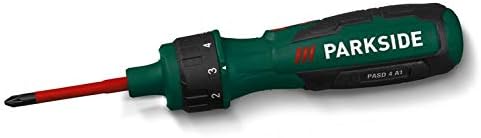
Figure 2.1: The PARKSIDE PASD 4 A1 Cordless Screwdriver. Note the ergonomic design, soft grip, and the torque selection dial located near the chuck.
2.1 Components and Included Accessories
- PARKSIDE PASD 4 A1 Cordless Screwdriver
- 6 Insulated Special Bits (max 1000 V)
- USB Type-C Quick Charger
- Storage Case

Figure 2.2: The PARKSIDE PASD 4 A1 screwdriver kit, showing the screwdriver, insulated bits, and charger neatly organized within its durable storage case.
3. Setup
3.1 Charging the Battery
- Connect the USB Type-C quick charger to the charging port on the screwdriver.
- Plug the charger into a suitable power outlet.
- Allow approximately 60 minutes for a full charge. The charging indicator (if present) will show the charging status.
- Disconnect the charger once the battery is fully charged.
Note: The screwdriver is equipped with an integrated 4V / 1.5 Ah Lithium-Ion battery. It is recommended to fully charge the battery before first use.
3.2 Inserting and Removing Bits
- Ensure the screwdriver is switched off.
- Insert the desired insulated special bit firmly into the bit holder until it clicks into place.
- To remove a bit, pull it straight out from the bit holder.
4. Operating Instructions
4.1 Torque Pre-selection
The screwdriver features 6 adjustable torque levels, allowing you to match the torque to the specific application and material. This prevents overtightening and damage to screws or workpieces.
- Locate the torque selection dial near the front of the screwdriver.
- Rotate the dial to select one of the 6 torque settings. A lower number indicates lower torque, suitable for delicate materials or small screws. A higher number provides more torque for larger screws or tougher materials.
4.2 Forward/Reverse Rotation
The screwdriver is equipped with a rocker switch for easy direction changes.
- Push the rocker switch to the left for forward (clockwise) rotation, used for tightening screws.
- Push the rocker switch to the right for reverse (counter-clockwise) rotation, used for loosening screws.
- When the switch is in the center position, the screwdriver is locked, preventing accidental activation.
4.3 LED Work Light
The screwdriver includes two integrated LED lights to illuminate the work area, improving visibility in dimly lit conditions. The lights activate automatically when the screwdriver is in operation.
4.4 Manual Torque Override
For situations requiring higher torque than the battery-powered operation provides, the screwdriver can be used manually. The maximum manual torque is 8 Nm.
5. Maintenance
5.1 Cleaning
- Always disconnect the charger and ensure the tool is off before cleaning.
- Wipe the tool's housing with a clean, damp cloth. Do not use harsh chemicals or abrasive cleaners.
- Keep ventilation openings free from dust and debris.
5.2 Storage
When not in use, store the screwdriver and its accessories in the provided storage case in a dry, cool place, away from direct sunlight and out of reach of children.

Figure 5.1: The durable storage case for the PARKSIDE PASD 4 A1, designed for secure transport and protection of the tool and its accessories.
6. Troubleshooting
| Problem | Possible Cause | Solution |
|---|---|---|
| Screwdriver does not turn on. | Battery is discharged. | Charge the battery using the provided USB Type-C charger. |
| Screwdriver lacks power. | Battery is low or torque setting is too low. | Recharge the battery. Increase the torque setting on the dial. |
| Bit slips or strips screw head. | Incorrect bit size or torque setting too high/low. | Ensure the correct bit is used for the screw. Adjust the torque setting. |
| LED work light not functioning. | Tool not in operation. | The LED lights activate only when the screwdriver is actively driving or removing a screw. |
7. Technical Specifications
- Model: PASD 4 A1
- Battery: Integrated 4 V Lithium-Ion (1.5 Ah)
- No-load Speed: n0 215 min-1
- Torque Pre-selection: 6 levels
- Max. Torque (Manual): 8 Nm
- Max. Torque (Battery Operation): 0.4 Nm
- Charger: 60 min USB Type-C Quick Charger
- Housing Material: Polyamide, Glass Fiber (PA6 + GF30)
- Dimensions (approx.): 17 x 4.2 x 4 cm
- Weight (approx., with battery): 218 g
- Included Bits: 6 insulated special bits (max 1000 V)
8. Warranty and Support
For warranty claims, technical support, or service inquiries, please refer to your purchase documentation or contact the retailer where the product was purchased. Keep your proof of purchase for any warranty-related matters. Do not attempt to repair the device yourself, as this may void the warranty and pose safety risks.


