
Introduction
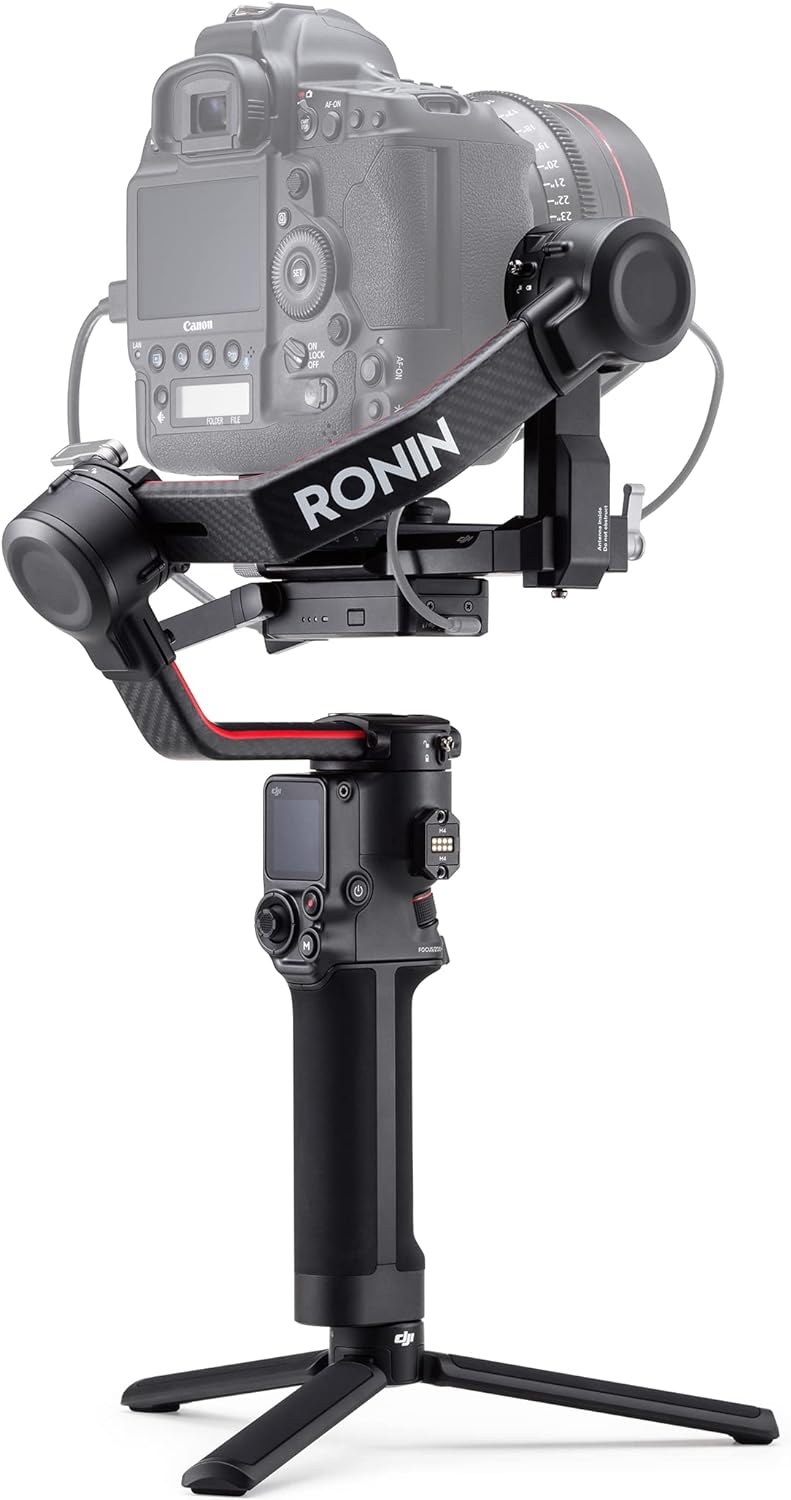
The DJI RS 2 is a professional 3-axis gimbal stabilizer designed for DSLR and mirrorless cameras. It provides advanced stabilization features and control options to enhance filmmaking. This manual provides essential information for the safe and effective operation, setup, and maintenance of your DJI RS 2 Combo.
1. Setup
1.1 Unboxing and Components
Carefully unpack all items from the carrying case. Verify that all components listed below are present.

Image: A comprehensive view of all components included in the DJI RS 2 Combo package, neatly arranged. This includes the gimbal, various cables, quick-release plates, a phone holder, focus motor, and the carrying case.
- DJI RS 2 Gimbal × 1
- Carrying Case × 1
- BG30 Grip × 1
- USB-C Power Cable (40 cm) × 1
- Lens-Fastening Strap × 1
- Extended Grip/Tripod (Metal) × 1
- Quick-Release Plates (Arca-Swiss/Manfrotto) × 1
- Briefcase Handle × 1
- Camera Riser × 1
- Phone Holder × 1
- Focus Motor × 1
- Focus Motor Rod Mount Kit × 1
- Focus Gear Strip × 1
- Image Transmitter × 1
- Cold Shoe to 1/4''-20 Adapter × 1
- USB-C Power Cable (20 cm) × 1
- Mini-HDMI to HDMI Cable (20 cm) × 1
- Mini-HDMI to Mini-HDMI Cable (20 cm) × 1
- Mini-HDMI to Micro-HDMI Cable (20 cm) × 1
- Multi-Camera Control Cable (30 cm) × 5 (USB-C × 2, Sony Multi × 1, Micro-USB × 1, Mini-USB × 1)
- Hook-and-Loop Strap × 3
- D-Ring Camera Screw 1/4"-20 × 2
- RSA Port Cover × 1
- Pan Axis Sleeve × 1
- M4 Screw (10 mm) × 6
- Allen Wrench (3 mm) × 1
- Screw 1/4"-20 × 1
1.2 Assembly
- Attach the BG30 Grip to the gimbal body.
- Mount the Extended Grip/Tripod to the bottom of the BG30 Grip.
- Unfold the gimbal arms and lock them into position.
- Attach the Quick-Release Plate to your camera.
- Mount the camera onto the gimbal using the Quick-Release Plate. It is recommended to use the Ronin Quick-Release Plates.
1.3 Balancing the Gimbal
Proper balancing is crucial for optimal performance and to prevent motor strain. The DJI RS 2 features carbon fiber construction for strength and lightness, but precise balancing is still required.

Image: A detailed view of the DJI RS 2 gimbal's carbon fiber arms and camera mounting area, emphasizing its robust yet lightweight design.
- Unlock each axis (tilt, roll, pan) one by one.
- Adjust the camera position on the quick-release plate until it is balanced on the tilt axis.
- Adjust the roll arm until the camera remains level when tilted.
- Adjust the pan arm until the camera remains stable when rotated horizontally.
- Utilize the fine-tune balancing knob for precise adjustments.
- For zoom lenses, balance at approximately halfway through the focal range.
1.4 Camera Connection and App Requirements
The DJI RS 2 is compatible with a wide range of DSLR and mirrorless cameras. For full functionality, download the DJI Ronin App.
- Ronin App Requirements: iOS 11.0 or above, Android 7.0 or above.
- Connect your camera to the gimbal using the provided multi-camera control cables.
2. Operating
2.1 Power On/Off
- To power on, press and hold the power button on the BG30 Grip until the indicators light up.
- To power off, press and hold the power button until the indicators turn off.
2.2 Gimbal Modes and Features
The DJI RS 2 offers various intelligent features for dynamic cinematography.
- Titan Stabilization Algorithm: Provides enhanced smoothness for footage.
- SuperSmooth Mode: Compensates for micromovements and increases motor torque, effective for lenses up to 100mm equivalent focal length.
- ActiveTrack 3.0: Intelligent tracking technology accessible via the touchscreen. Requires the RavenEye Image Transmission System.
- RavenEye Image Transmission System: Transmits 1080p video up to 656 ft (200m) with 60ms latency, enabling remote monitoring and control of camera parameters.
- Time Tunnel: Combines Roll 360 with Hyperlapse for unique visual effects.
2.3 Touchscreen Interface

Image: A detailed view of the DJI RS 2's 1.4-inch full-color touchscreen, showing its graphical user interface for adjusting parameters and accessing features like ActiveTrack 3.0.
The integrated 1.4-inch full-color touchscreen allows for quick adjustment of parameters and access to Ronin app features, including ActiveTrack 3.0.
2.4 Professional Mounting Options
The DJI RS 2 can be integrated with various professional filmmaking accessories such as cars, jibs, or sliders, allowing for remote control.

Image: A filmmaker using the DJI RS 2 gimbal with a camera, demonstrating a professional dual-handle setup for stable and controlled camera movement.
3. Maintenance
3.1 Cleaning and Storage
- Wipe the gimbal body with a soft, dry cloth. Avoid using liquid cleaners.
- Store the gimbal in its carrying case in a dry, cool environment when not in use.
3.2 Battery Care
The BG30 grip provides a maximum runtime of 12 hours and can be charged independently. It supports PD and QC 2.0 charging protocols. For optimal charging, use 24W chargers compatible with these protocols.
- Charge the battery fully before first use.
- Avoid completely draining the battery.
- Store the battery with a partial charge (around 50%) if not used for extended periods.
4. Troubleshooting
- Gimbal Vibrating/Unstable: Ensure the camera is properly balanced on all three axes. Check for any loose connections or obstructions.
- Camera Not Responding: Verify that the camera control cables are correctly connected and that the camera is listed as compatible. Check Ronin app settings.
- RavenEye Connectivity Issues: Ensure the Image Transmitter is correctly installed and powered. Check for interference and ensure devices are within range.
- Battery Not Charging: Confirm the USB-C power cable and charger are functioning correctly and meet the PD/QC 2.0 24W specification.
5. Specifications
| Feature | Detail |
|---|---|
| Product Dimensions | 10.2 x 10.4 x 2.8 inches (2.8"D x 10.4"W x 10.2"H) |
| Item Weight | 2.87 pounds (2.9 Pounds) |
| Item Model Number | CP.RN.00000094.01 |
| Batteries | 2 Lithium Polymer batteries required (included) |
| Payload Capacity | Up to 10 lbs (4.5 kg) |
| Construction Material | Carbon Fiber |
| Touchscreen | 1.4-inch Full-Color |
| Operating Frequency | 2.4000 GHz - 2.4835 GHz |
| UPC | 190021027206 |

Image: A diagram illustrating the physical dimensions of the DJI RS 2 gimbal, including its height, width, and depth, for reference.
6. Warranty and Support
For detailed warranty information and technical support, please refer to the official DJI website or contact DJI customer service. Keep your purchase receipt for warranty claims.
Additional support resources, including firmware updates and detailed tutorials, are available on the DJI Support Page.