Important Safety Instructions
When using electrical appliances, basic safety precautions should be followed, including the following:
- Read all instructions before using the appliance.
- Do not operate the oven if the door or door seals are damaged.
- Do not heat liquids or other foods in sealed containers as they are liable to explode.
- Only allow children to use the oven without supervision when adequate instructions have been given so that the child is able to use the oven in a safe way and understands the hazards of improper use.
- Do not use corrosive chemicals or vapors in this appliance.
- Do not operate this appliance if it has a damaged cord or plug, if it is not working properly, or if it has been damaged or dropped.
- Always ensure the turntable is properly seated before operation.
Product Overview
The TOSHIBA ML2-EM12EA(BS) is a 1.2 Cubic Feet, 1100-watt countertop microwave oven designed for efficient and convenient cooking. Its black stainless steel finish and diamond-cut design offer a stylish addition to any modern kitchen. Key features include a Smart Cook Sensor for optimal heating, 12 auto menus for popular foods, and an ECO mode for energy saving.

Figure 1: Front view of the TOSHIBA ML2-EM12EA(BS) Countertop Microwave Oven.
Key Features:
- Smart Cook Sensor: Automatically detects moisture and heat for optimal cooking results, ensuring food retains its texture.
- 12 Auto Menus: Pre-programmed settings for popular foods such as pizza, potato, vegetables, and more.
- Effortless Operation: One-touch start for 1-6 minutes, and a +30s button for quick additions to cooking time.
- Compact Design, Large Capacity: 1.2 Cu Ft capacity with a 12.4-inch turntable, suitable for a 12-inch pizza or a whole chicken.
- Mute Function: Eliminates beeping noises for quiet operation, ideal for late-night use.
- ECO Mode: Reduces standby power consumption for energy efficiency.
- Defrost Options: Includes 1lb defrost and custom defrost by weight or time.
- Memory Function: Allows users to save frequently used cooking routines.
- Child Safety Lock: Prevents unintended operation by children.
Installation & Setup
Proper placement and ventilation are crucial for the safe and efficient operation of your microwave oven.
Placement:
- Place the microwave on a flat, stable surface that can support its weight and the heaviest food item likely to be cooked in it.
- Ensure the microwave is not placed near heat sources such as a stove or radiator.
Clearance:
Maintain adequate space around the microwave for proper ventilation. Do not block air vents.

Figure 2: Recommended minimum clearance for proper ventilation. Allow 3 inches (7.5cm) on the sides, 1 inch (2.5cm) at the back, and 3 inches (7.5cm) above the unit.
- Minimum 3 inches (7.5 cm) of free space on both sides.
- Minimum 1 inch (2.5 cm) of free space at the rear.
- Minimum 3 inches (7.5 cm) of free space above the unit.
Operating Instructions
Familiarize yourself with the control panel and various cooking functions to maximize your microwave's utility.
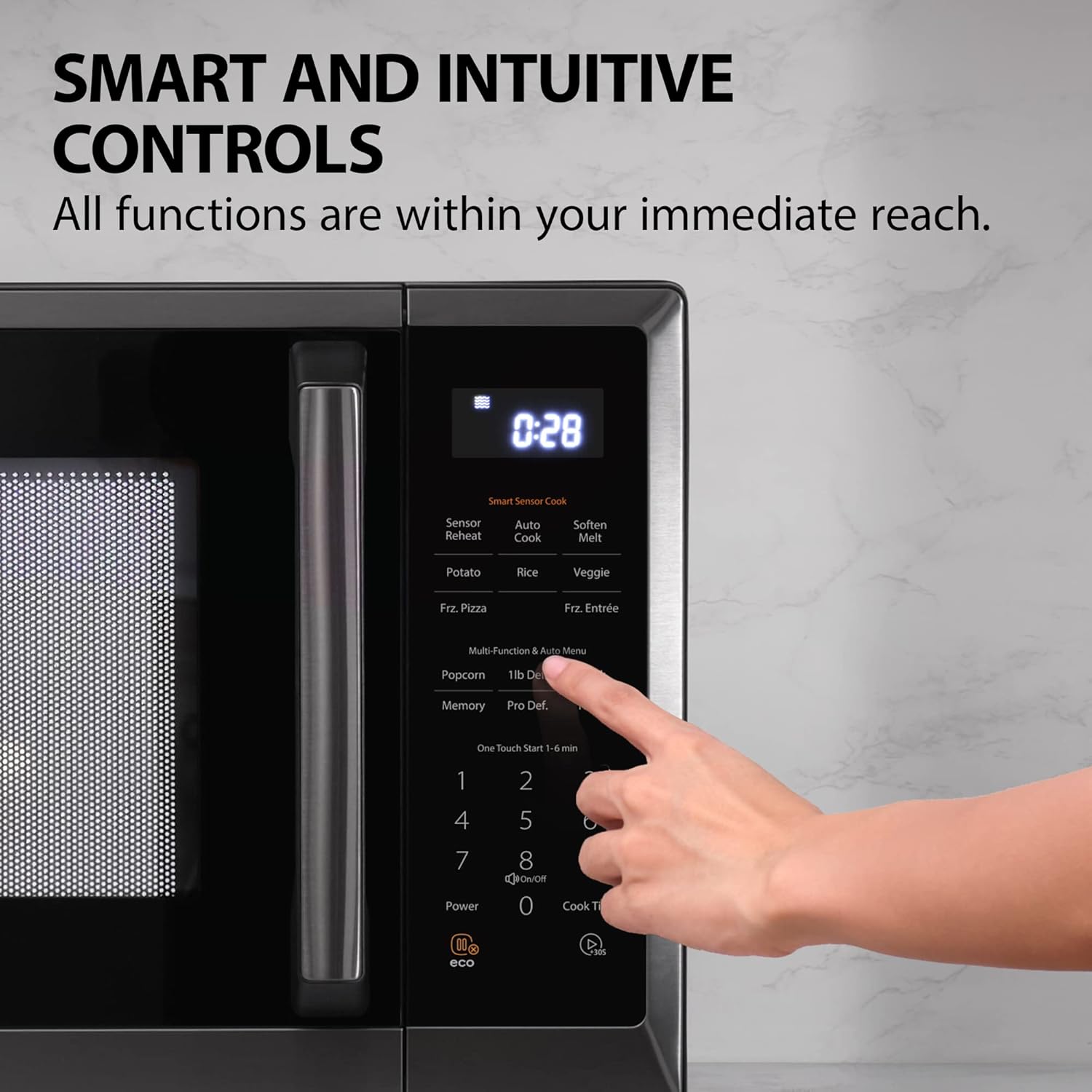
Figure 3: Smart and intuitive control panel for easy operation.
Basic Operation:
- One-Touch Start: Press any number from 1 to 6 for instant cooking at 100% power for that many minutes.
- Add 30 Seconds: Press the 'Start/+30Sec' button to add 30 seconds to the cooking time.
- Setting Cook Time: Enter desired cooking time using the number pad, then press 'Start/+30Sec'.
- Power Level: Press 'Power Level' button, then use the number pad (1-10) to select desired power.
Smart Cook Sensor:
The Smart Cook Sensor automatically adjusts cooking time and power for optimal results.
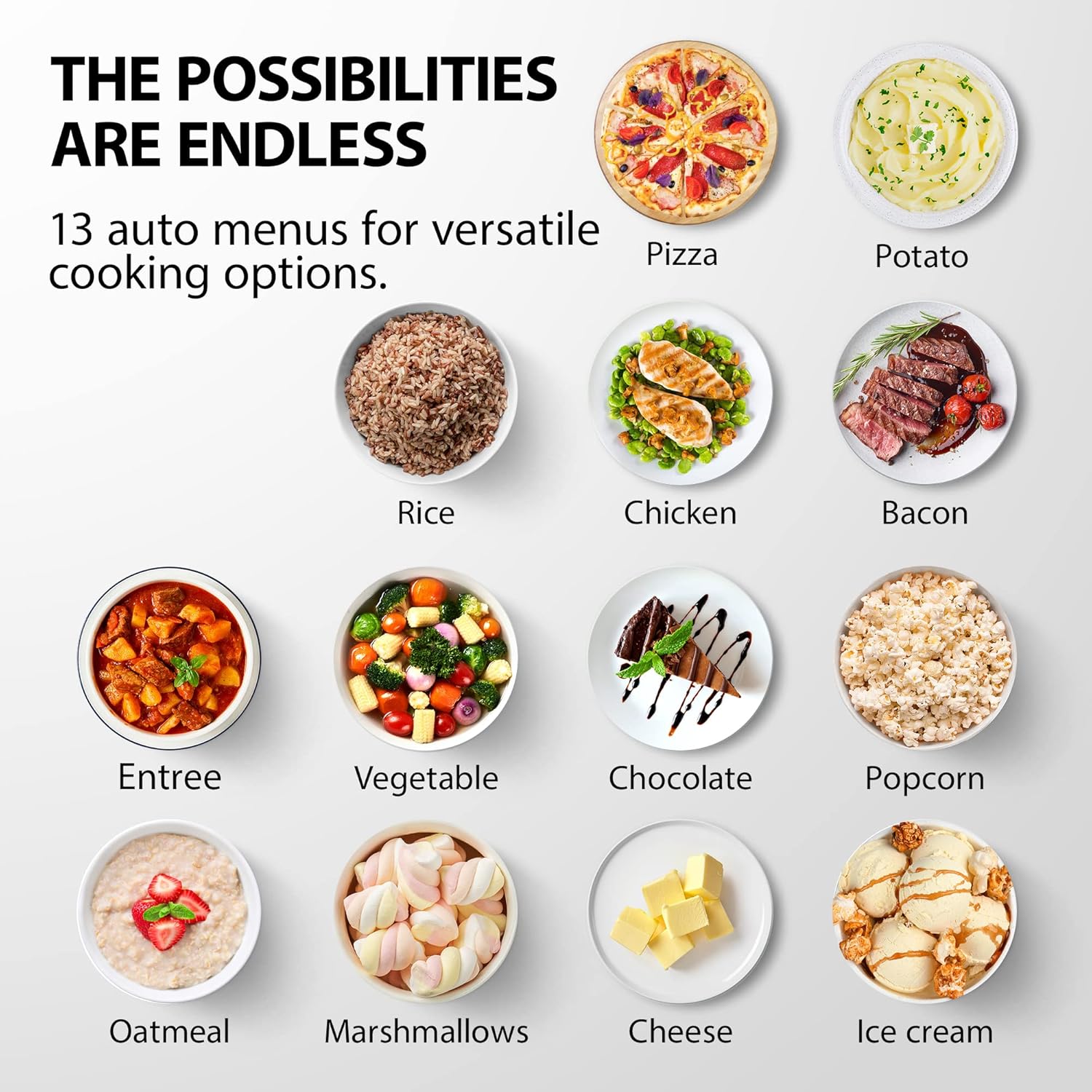
Figure 4: Smart Sensor ensures optimal cooking by detecting moisture and heat.
- Sensor Reheat: Place food in the microwave and press 'Sensor Reheat'. The oven will detect the food's temperature and reheat it appropriately.
- Auto Menus: Utilize the 12 pre-programmed auto menus for specific food items like pizza, potato, rice, and vegetables.
Defrost Functions:
- 1lb Defrost: Press the '1lb Defrost' button for quick defrosting of 1 pound of food.
- Custom Defrost: Press 'Custom Defrost', enter the weight of the food using the number pad, then press 'Start/+30Sec'.
Special Features:
- Mute Function: To mute the microwave's beeping sounds, press and hold the '8' button for a few seconds. Repeat to unmute.
- ECO Mode: Press the 'ECO' button to activate energy-saving mode, reducing power consumption when not in use.
- Child Safety Lock: To activate, press and hold the 'Stop/Cancel' button for 3 seconds. The display will show 'LOC'. To deactivate, press and hold 'Stop/Cancel' again for 3 seconds.

Figure 5: Mute button eliminates beeping, perfect for quiet operation.
Maintenance & Cleaning
Regular cleaning ensures optimal performance and extends the lifespan of your microwave oven.

Figure 6: Easy to clean and maintain interior surfaces.
- Interior Cleaning: Wipe the interior cavity with a dry or damp soft cloth after each use. For stubborn stains, use a mild detergent.
- Turntable: The 12.4-inch glass turntable is removable for easy cleaning. It can be washed by hand with soap and water or placed in the dishwasher.
- Waveguide Cover: Gently wipe the waveguide cover (located inside the oven cavity) with a damp cloth. Do not remove it.
- Exterior Cleaning: Clean the exterior surfaces with a soft, damp cloth. Avoid abrasive cleaners.
Troubleshooting
If you encounter any issues with your microwave oven, refer to the following common troubleshooting tips:
- Oven not starting: Ensure the power cord is securely plugged into an electrical outlet. Check if the door is fully closed. Verify that the child safety lock is not activated.
- Food not heating: Check if the cook time and power level are set correctly. Ensure the door is securely closed.
- Unusual noise during operation: Check if the turntable is correctly placed on its support. Ensure there are no obstructions preventing the turntable from rotating freely.
- Display not working: Unplug the microwave for a few minutes, then plug it back in to reset the display.
For persistent issues, please contact customer support.
Specifications
| Feature | Specification |
|---|---|
| Brand | TOSHIBA |
| Model Number | ML2-EM12EA(BS) |
| Capacity | 1.2 Cubic Feet |
| Wattage | 1100 watts |
| Voltage | 110 Volts |
| Product Dimensions (W x D x H) | 20.5 x 17.1 x 12.8 inches |
| Item Weight | 33.5 pounds |
| Turntable Diameter | 12.4 inches |
| Color | Black Stainless Steel |
| Special Features | Humidity Sensor, Mute+ECO |
| Installation Type | Countertop |
| Material | Metal |
Warranty & Support
For warranty information or technical support, please refer to the warranty card included with your product or visit the official TOSHIBA website. Keep your purchase receipt for warranty claims.
For further assistance, you may contact TOSHIBA customer service.


