
Introduction
Thank you for choosing the CCA C16 In-Ear Earphones. These earphones are designed to deliver a high-quality audio experience with a balanced sound signature, suitable for music enjoyment and monitoring. This manual provides essential information for setting up, operating, maintaining, and troubleshooting your C16 earphones.

Image: The CCA C16 In-Ear Earphones, featuring their distinctive blue and silver design, connected by a braided cable. The inline remote is visible on the cable.
Package Contents
Please ensure all items are present in your package:
- 1 pair of CCA C16 In-Ear Earphones
- 1 Detachable Audio Cable (with optional microphone/remote)
- 1 Packaging Box
Product Overview
The CCA C16 earphones feature a sophisticated design with multiple balanced armature drivers for precise sound reproduction. The housing is constructed from a zinc alloy coating with a resin cavity, ensuring durability and comfort.
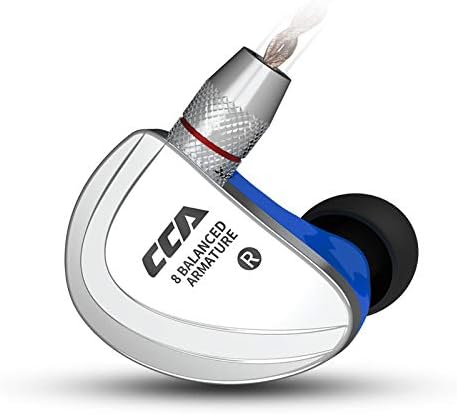
Image: A detailed view of one CCA C16 earbud, showcasing its ergonomic design and the brand's emblem.
Driver Configuration:
- 2 x 22295 Balanced Armature Drivers (for bass frequencies)
- 2 x 29689 Balanced Armature Drivers (for mid frequencies)
- 4 x 30095 Balanced Armature Drivers (for high frequencies)
This multi-driver setup, combined with electronic multisegment crossover, ensures a wide frequency response and detailed audio output.

Image: An exploded view diagram illustrating the placement and type of balanced armature drivers within the CCA C16 earbud, including bass, mid, and high-frequency drivers.
Setup
Connecting the Detachable Cable:
- Identify the left (L) and right (R) earbuds. The cable connectors are also marked L and R.
- Align the 2-pin connector on the cable with the corresponding receptacle on the earbud. Ensure the pins are correctly oriented.
- Gently push the connector into the earbud until it is securely seated. Do not force it.
- Repeat for the other earbud.

Image: A visual guide demonstrating the process of connecting and disconnecting the detachable 2-pin cable to the CCA C16 earphones, emphasizing the correct orientation for left and right earbuds.
Wearing the Earphones:
- Insert the earbuds into your ears, ensuring a snug and comfortable fit. The cable is designed to loop over the top of your ear for secure placement.
- Adjust the cable behind your ear for optimal comfort and stability. A proper seal is crucial for noise isolation and sound quality.
Operating Instructions
Connecting to an Audio Source:
Plug the 3.5mm gold-plated jack of the earphone cable into the headphone port of your audio device (smartphone, tablet, computer, audio player, etc.).
Using the Inline Remote (if applicable):
If your cable includes an inline remote with a microphone, you can control playback and calls as follows:
- Short Press: Play/Pause music, Answer/End call.
- Double Press: Skip to the next song.
- Triple Press: Go back to the previous song.
- Long Press: Reject incoming call.
Note: Volume control is not integrated into the cable remote. Adjust volume directly on your audio device.

Image: An illustration detailing the various functions of the inline remote control found on the CCA C16 earphone cable, providing instructions for music playback and call management.
Maintenance
- Cleaning: Gently wipe the earphones and cable with a soft, dry cloth. Do not use harsh chemicals or abrasive materials.
- Ear Tips: Regularly remove and clean the ear tips with mild soap and water, then dry thoroughly before reattaching. This prevents wax buildup and maintains hygiene.
- Storage: When not in use, store your earphones in a clean, dry place, preferably in a protective case, to prevent tangling and damage.
- Cable Care: Avoid sharp bends or excessive pulling on the cable, especially near the connectors, to prolong its lifespan.
Troubleshooting
| Problem | Possible Cause | Solution |
|---|---|---|
| No sound or distorted sound |
|
|
| Poor noise isolation |
|
|
| Microphone not working |
|
|
Specifications
| Brand | CCA |
| Model | C16 |
| Headphone Type | In-Ear Monitor (IEM) |
| Connection Type | Wired (3.5mm Jack, 2-pin detachable cable) |
| Driver Configuration | 8 Balanced Armature Drivers per side (16 total) |
| Impedance | 27 Ω |
| Sensitivity | 105 dB |
| Frequency Response | 20-40000Hz |
| Cable Length | 1.2 m ± 3 cm |
| Plug Type | 3.5mm Gold-Plated |
| Material | Zinc Alloy Coating, Resin Cavity, Aluminum Alloy Sound Port |
| Color | Blue |
| Microphone Function | Optional (depending on cable) |
| Cable Volume Control | No |
Warranty and Support
The CCA C16 earphones come with a 1-year warranty from the date of purchase. This warranty covers manufacturing defects. Please retain your proof of purchase for warranty claims.
For technical support, warranty claims, or any questions regarding your CCA C16 earphones, please contact CCA customer service through the retailer where you purchased the product or visit the official CCA website for contact information.
Important: Do not attempt to repair the earphones yourself, as this may void the warranty.