
1. Product Overview
The DEWENWILS Outdoor Photocell Countdown Timer (Model HODT13C) is a weatherproof light timer designed for outdoor use, featuring a built-in photocell sensor and multiple timing options. It includes a 2-foot extension cord with three grounded outlets, making it ideal for controlling holiday decorations, landscape lighting, and string lights. This device simplifies the management of your outdoor electrical appliances by automating their on/off cycles based on ambient light or a set schedule.

Figure 1: DEWENWILS Outdoor Photocell Countdown Timer (Model HODT13C)
This image displays the main unit of the DEWENWILS outdoor timer, showing the timer dial, power indicator, photocell sensor, and the attached 2-foot extension cord terminating in a three-outlet power strip. The design is compact and suitable for outdoor environments.
2. Safety Information
- UL Listed: This product is UL Listed, ensuring it meets rigorous safety standards for electrical products.
- Outdoor Use Only: Designed for outdoor use. Ensure all connections are secure and protected from direct water exposure.
- Weatherproof Design: The unit is weatherproof, but it is recommended to mount the timer at least 2 feet off the ground vertically to prevent water accumulation and ensure optimal performance.
- Cover Unused Outlets: Always cover any unused outlets to protect them from water, dust, and potential short-circuits.
- Electrical Rating: Do not exceed the maximum electrical rating of 15A/1875W. Overloading the timer can cause damage or create a fire hazard.
- Temperature Range: Operates effectively in temperatures between -40℉ (-40℃) to 140℉ (60℃).
- Grounding: Ensure the timer is plugged into a properly grounded outlet. The three-pronged plug is designed for safety.
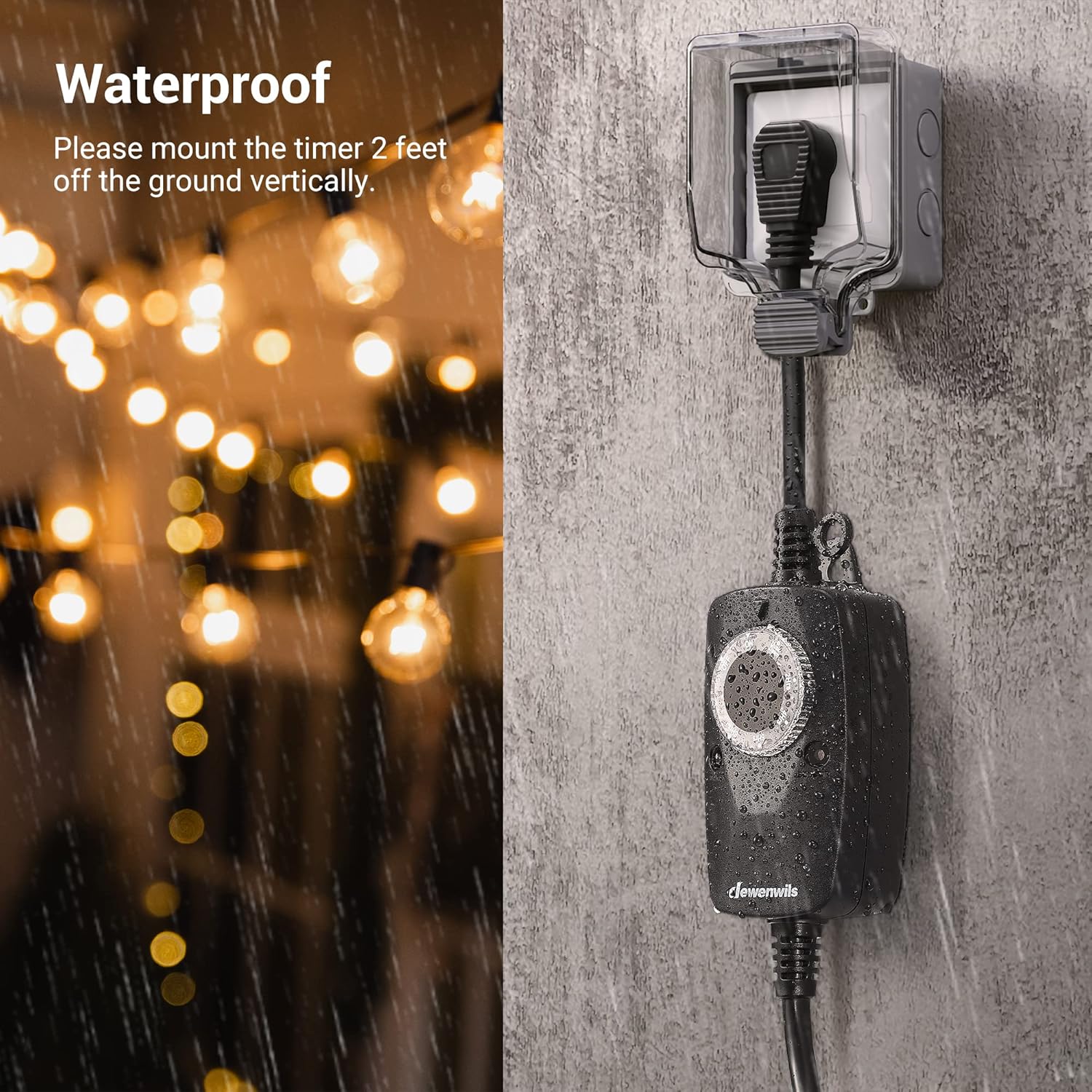
Figure 2: Recommended Mounting for Weather Protection
This image illustrates the recommended vertical mounting of the timer at least 2 feet off the ground, showing its weatherproof design in a rainy outdoor setting. This helps ensure long-term durability and safe operation.
3. Setup Instructions
- Unpack the Timer: Carefully remove the timer from its packaging.
- Choose a Location: Select an outdoor location with access to a grounded power outlet. Ensure the photocell sensor (located on the front of the timer) is not obstructed and can receive natural daylight. Avoid placing it near artificial light sources that might interfere with the dusk-to-dawn function.
- Mount the Timer (Optional but Recommended): For best results and longevity, mount the timer vertically at least 2 feet off the ground using the integrated hanging hole. This helps protect it from standing water.
- Plug in the Timer: Insert the timer's plug into a grounded outdoor electrical outlet.
- Connect Appliances: Plug your outdoor lights or other electrical devices into the three grounded outlets on the timer's extension cord. The outlets are spaced 0.85 inches apart to accommodate larger adapters.

Figure 3: 2-Foot Extension Cord for Flexible Placement
This image highlights the 2-foot extension cord, demonstrating how it provides flexibility in placing the timer unit away from the main power outlet, allowing for optimal positioning of the photocell sensor.

Figure 4: Three Grounded Outlets
This image shows the three grounded outlets on the timer's power strip, illustrating the spacing that allows for multiple devices, including those with larger plugs, to be connected simultaneously.
4. Operating Instructions
The DEWENWILS timer offers multiple scheduling options controlled by a simple dial. Once set, the timer will repeat the chosen schedule daily until unplugged.
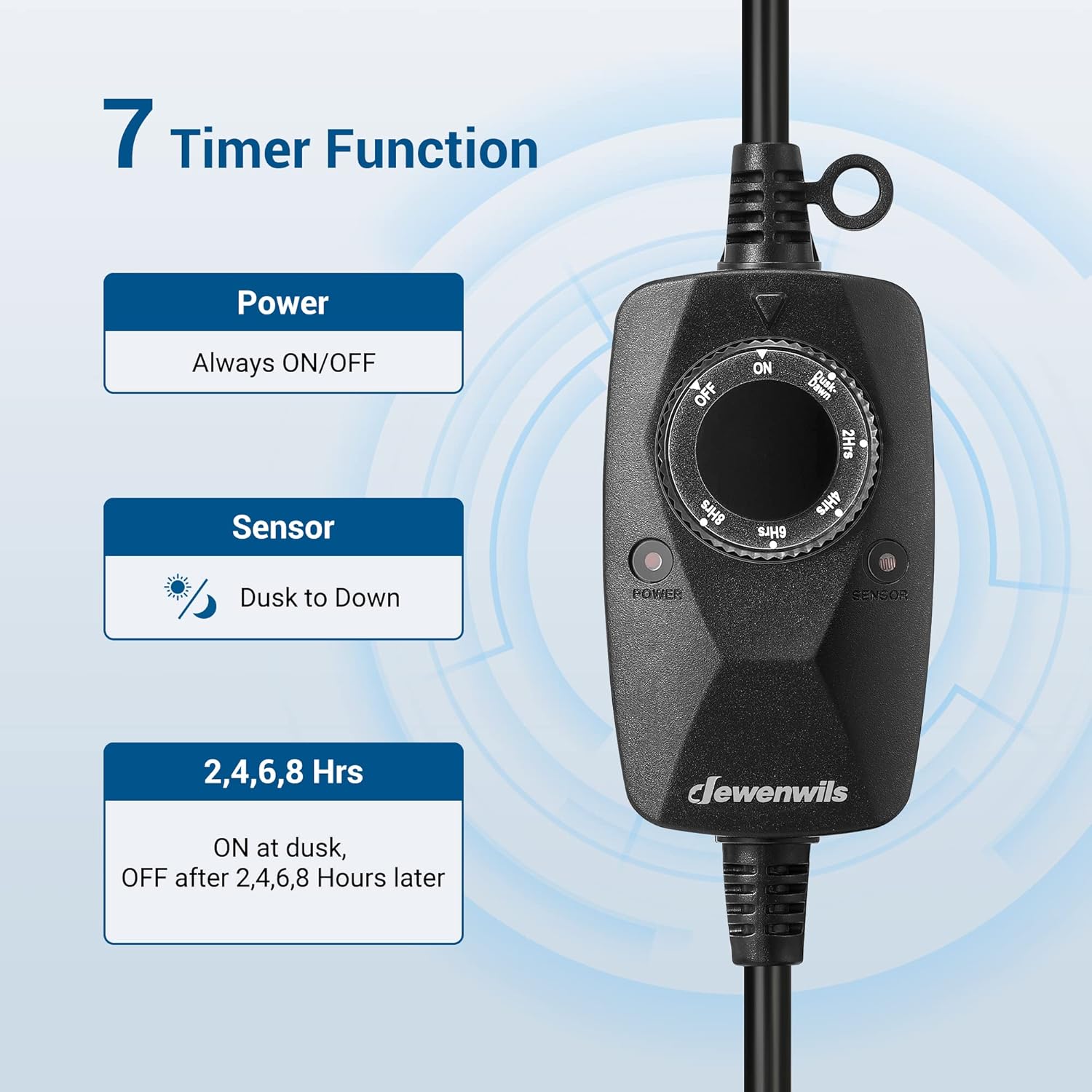
Figure 5: Timer Dial Functions
This image provides a close-up of the timer's rotary dial, clearly showing the various settings available for programming, including ON, OFF, DUSK-DAWN, and countdown options (2H, 4H, 6H, 8H).
Setting the Timer:
Rotate the dial clockwise or counter-clockwise to select your desired mode:
- ON: The connected devices will remain continuously on.
- OFF: The connected devices will remain continuously off.
- DUSK-DAWN: The timer will automatically turn on at dusk and turn off at dawn, based on the ambient light detected by the photocell sensor.
- 2H / 4H / 6H / 8H (Countdown Modes): The timer will turn on at dusk and remain on for the selected duration (2, 4, 6, or 8 hours), then turn off.

Figure 6: Dusk to Dawn Operation
This image visually explains the 'Dusk to Dawn' functionality, showing outdoor string lights automatically illuminating as darkness falls and turning off when daylight returns, emphasizing the convenience of the photocell sensor.
5. Maintenance
- Regular Cleaning: Periodically wipe the timer and cord with a damp cloth to remove dirt and debris. Do not immerse in water.
- Inspect for Damage: Before each use, inspect the cord, plug, and outlets for any signs of damage, fraying, or corrosion. Do not use if damaged.
- Protect Unused Outlets: Ensure the covers on unused outlets are securely closed to maintain weatherproof integrity.
- Proper Storage: When not in use for extended periods, store the timer in a dry, cool place away from direct sunlight and extreme temperatures.

Figure 7: Durable Weatherproof Cord
This image highlights the robust construction of the 15A SJTW 14/3C gauge power cord, emphasizing its weatherproof and heavy-duty characteristics suitable for various outdoor conditions.
6. Troubleshooting
| Problem | Possible Cause | Solution |
|---|---|---|
| Devices do not turn on. |
|
|
| Devices do not turn off. |
|
|
| Timer not responding to light changes. |
|
|
7. Specifications
- Model Number: HODT13C
- Brand: DEWENWILS
- Voltage: 125 Volts (AC)
- Max Current: 15 Amps
- Max Power: 1875 Watts
- Total Power Outlets: 3 (Grounded)
- Cord Length: 2 Feet (approx. 0.6 meters)
- Cord Type: SJTW 14/3C Gauge
- Operating Temperature: -40℉ to 140℉ (-40℃ to 60℃)
- Special Feature: Weatherproof, Photocell Sensor
- Certifications: UL Listed
8. Warranty and Support
DEWENWILS products are manufactured to high-quality standards. This product comes with a standard manufacturer's warranty against defects in materials and workmanship. For specific warranty details, technical support, or assistance with your product, please refer to the warranty card included with your purchase or visit the official DEWENWILS website. You may also contact DEWENWILS customer service directly for further assistance.
Contact Information: Please refer to the packaging or the official DEWENWILS website for the most current contact details.