
1. Safety Information
Caution: To prevent skin cuts and irritations, and to prevent bacterial growth, ensure the shaver is cleaned and maintained properly. Do not use the shaver near water while it is charging. Always disconnect the shaver from the power supply before cleaning it with water.
2. Product Overview and Features
The Braun Series 5 M1000s is a cordless electric shaver designed for a close and comfortable shave. It incorporates several features for enhanced performance and user convenience.
- 3 Flexible Blades: The shaver features three flexible blades that adapt to your facial contours, ensuring efficient contact with the skin for a smooth shave.
- EasyClean System: This system allows for quick and easy cleaning of the shaver head without the need to remove it, simplifying maintenance.
- Precision Trimmer Attachment: An included attachment for precise trimming of mustaches and sideburns.
- Li-Ion Battery: Equipped with a powerful Li-Ion battery, providing up to 50 minutes of shaving time on a full charge, which typically lasts up to 3 weeks. A 5-minute quick charge is sufficient for one full shave.
- Wet & Dry Use: The shaver is 100% waterproof, allowing for comfortable dry shaving or refreshing wet shaving with foam or gel.

Image Description: A front view of the Braun Series 5 M1000s cordless electric shaver. It is black with blue accents, featuring the "EasyClean" label and "S5" model indicator. The shaver head with its flexible foil blades is clearly visible at the top.

Image Description: A close-up of a hand demonstrating the flexibility of the shaver's three blades. The image highlights how the shaver head adapts to contours, with an overlay indicating "3 Esnek Bıçaklar" (3 Flexible Blades).
3. Setup
3.1 Charging the Shaver
- Ensure the shaver is switched off.
- Connect the power cord to the shaver and then plug it into an electrical outlet.
- The charging indicator lights on the shaver will illuminate to show the charging status.
- A full charge takes approximately 1 hour and provides up to 50 minutes of cordless shaving. For a single shave, a 5-minute quick charge is sufficient.
- For optimal battery life, it is recommended to fully charge the shaver before its first use.
3.2 Attaching Accessories
The Braun Series 5 M1000s features an EasyClick system for attaching various accessories.
- To attach an accessory (e.g., Precision Trimmer), first remove the standard shaver head by pressing the release buttons on the sides.
- Align the desired accessory with the shaver body and press it firmly until it clicks into place.
- To remove, simply pull the accessory off.
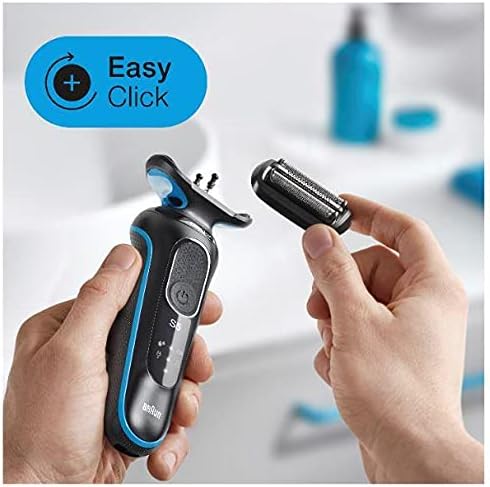
Image Description: A hand demonstrating the EasyClick system, showing the shaver head being detached from the main body of the shaver. An overlay indicates "+ Easy Click".
4. Operating Instructions
4.1 Shaving
- Dry Shaving: For best results, shave before washing your face. Hold the shaver at a right angle (90°) to your skin and shave against the direction of hair growth. Stretch your skin with your free hand to ensure a smooth surface.
- Wet Shaving: The shaver can be used with shaving foam or gel for a more refreshing experience. Apply foam/gel to your face and then shave as you would with dry shaving.
- Apply light pressure and move the shaver in straight, overlapping strokes.
4.2 Using the Precision Trimmer
If you have attached the Precision Trimmer accessory:
- Use the trimmer to shape sideburns, mustaches, or to pre-trim longer hairs before shaving.
- Hold the trimmer flat against the skin and move it slowly in the desired direction.
5. Cleaning and Maintenance
Regular cleaning ensures optimal shaving performance and hygiene.
5.1 EasyClean System
- After each shave, ensure the shaver is switched off and disconnected from the power supply.
- Hold the shaver head under warm running water. The EasyClean system allows water to flow through the cutting elements without removing the shaver head.
- You can also use a small amount of liquid soap to enhance cleaning.
- Rinse thoroughly until all residue is gone.
- Shake off excess water and let the shaver air dry with the shaver head open (if applicable) or detached.
5.2 Deep Cleaning
- Periodically, for a more thorough clean, remove the shaver head (as described in Section 3.2).
- Rinse both the shaver head and the shaver body under warm running water.
- Use the provided cleaning brush to remove any stubborn hair particles from the cutting elements. Do not use the brush on the foil itself, as this can damage it.
- Allow all parts to dry completely before reassembling.

Image Description: A close-up view of the Braun Series 5 shaver head, showing the intricate foil and cutter block design, which is essential for effective cleaning.

Image Description: The Braun Series 5 M1000s shaver displayed alongside its charging cable and a small cleaning brush, illustrating the typical contents of the product package and tools for maintenance.
6. Troubleshooting
| Problem | Possible Cause | Solution |
|---|---|---|
| Shaver does not turn on. | Battery is depleted. | Charge the shaver for at least 5 minutes for a quick shave, or fully charge for 1 hour. |
| Reduced shaving performance. | Shaver head is dirty or worn. | Clean the shaver head thoroughly using the EasyClean system or by detaching it. Consider replacing the shaver head if performance does not improve. |
| Shaver stops during use. | Battery is low. | Recharge the shaver. |
7. Technical Specifications
| Model Name | Series 5 M1000s |
| Brand | Braun |
| Power Source | Battery Powered (Li-Ion) |
| Battery Type | Lithium Ion (1 A battery included) |
| Average Battery Life | 50 minutes |
| Charging Time | Approx. 1 hour for full charge, 5 minutes for a quick shave |
| Waterproof | Yes (100% waterproof for Wet & Dry use) |
| Cordless | Yes |
| Product Dimensions (L x W x H) | 14 x 25 x 7 cm |
| Product Weight | 0.34 Kilogram |
| Voltage | 240V |
8. Warranty and Support
For detailed warranty information, product registration, and customer support, please refer to the official Braun website or the warranty card included with your product. Warranty terms and conditions may vary by region.
You can visit the official Braun store for more information: Braun Store.