
1. Introduction
This manual provides essential instructions for the safe and effective use of your West Biking USB Rechargeable Running Chest Light. Designed for enhanced visibility and illumination during various outdoor activities, this device features a 500-lumen light, a 90-degree adjustable beam, and reflective straps. Please read this manual thoroughly before first use and retain it for future reference.
2. Product Overview and Components
The West Biking Running Chest Light is engineered for comfort and performance, ensuring you remain visible and can see your path clearly in low-light conditions. It consists of a front light unit, a rear battery pack with a safety warning light, and adjustable reflective straps.

Figure 2.1: Overview of the West Biking Running Chest Light system.

Figure 2.2: Key components of the running chest light, including the front light, rear battery pack, and adjustable straps.
Key Components:
- Front Light Unit: Features a powerful LED with 500 lumens output.
- Rear Battery Pack: Houses the rechargeable battery and a red safety warning light.
- Adjustable Straps: Elastic and reflective bands for a secure and visible fit.
- On/Off Switch: Located on the front light unit for easy control.
- USB Charging Port: Micro-USB port on the rear unit for convenient recharging.
3. Setup and Wearing Instructions
Proper adjustment of the chest light is crucial for comfort and optimal light positioning.

Figure 3.1: The lightweight design and adjustable features ensure a comfortable fit.
- Positioning: Place the chest light over your shoulders and around your torso, similar to wearing a vest. The front light should be centered on your chest, and the rear battery pack on your back.
- Adjusting Straps: Use the adjustable buckles on the elastic straps to achieve a snug yet comfortable fit. Ensure the straps are not too tight to restrict movement or breathing, but secure enough to prevent bouncing during activity. The straps are 2cm (0.79") wide to prevent slipping.
- Reflective Elements: Confirm that the reflective elements on the straps are visible from all angles for maximum safety.
4. Operation
The chest light offers multiple lighting modes and an adjustable beam angle for various conditions.

Figure 4.1: The light unit can be tilted 90 degrees (45° up to 45° down) to adjust the beam angle.
- Power On/Off: Press the power button on the front light unit to turn the light on.
- Light Modes: Press the power button repeatedly to cycle through the available light modes:
- Strong Mode: Provides maximum illumination (500 lumens) for approximately 4 hours.
- Low Mode: Provides reduced illumination for extended battery life (approximately 10 hours).
- Beam Angle Adjustment: The front light unit can be manually tilted up to 90 degrees (45 degrees up to 45 degrees down). Adjust the angle to illuminate the ground directly in front of you, minimizing glare and ensuring clear visibility of your path.
- Rear Safety Light: The red warning light on the rear battery pack operates automatically when the front light is on, providing visibility from behind.
5. Charging
The West Biking Running Chest Light is equipped with a rechargeable lithium-ion battery.
- Battery Capacity: 2200mAh.
- Charging Port: Micro-USB.
- Charging Time: Approximately 5 hours for a full charge.
- Charging Process: Connect the provided micro-USB cable to the charging port on the rear battery pack and to a standard USB power source (e.g., computer, wall adapter). An indicator light will typically show charging status (e.g., red for charging, green for fully charged).
- Battery Life: Up to 10 hours on Low Mode, 4 hours on Strong Mode.
6. Maintenance
Proper care ensures the longevity and performance of your running chest light.
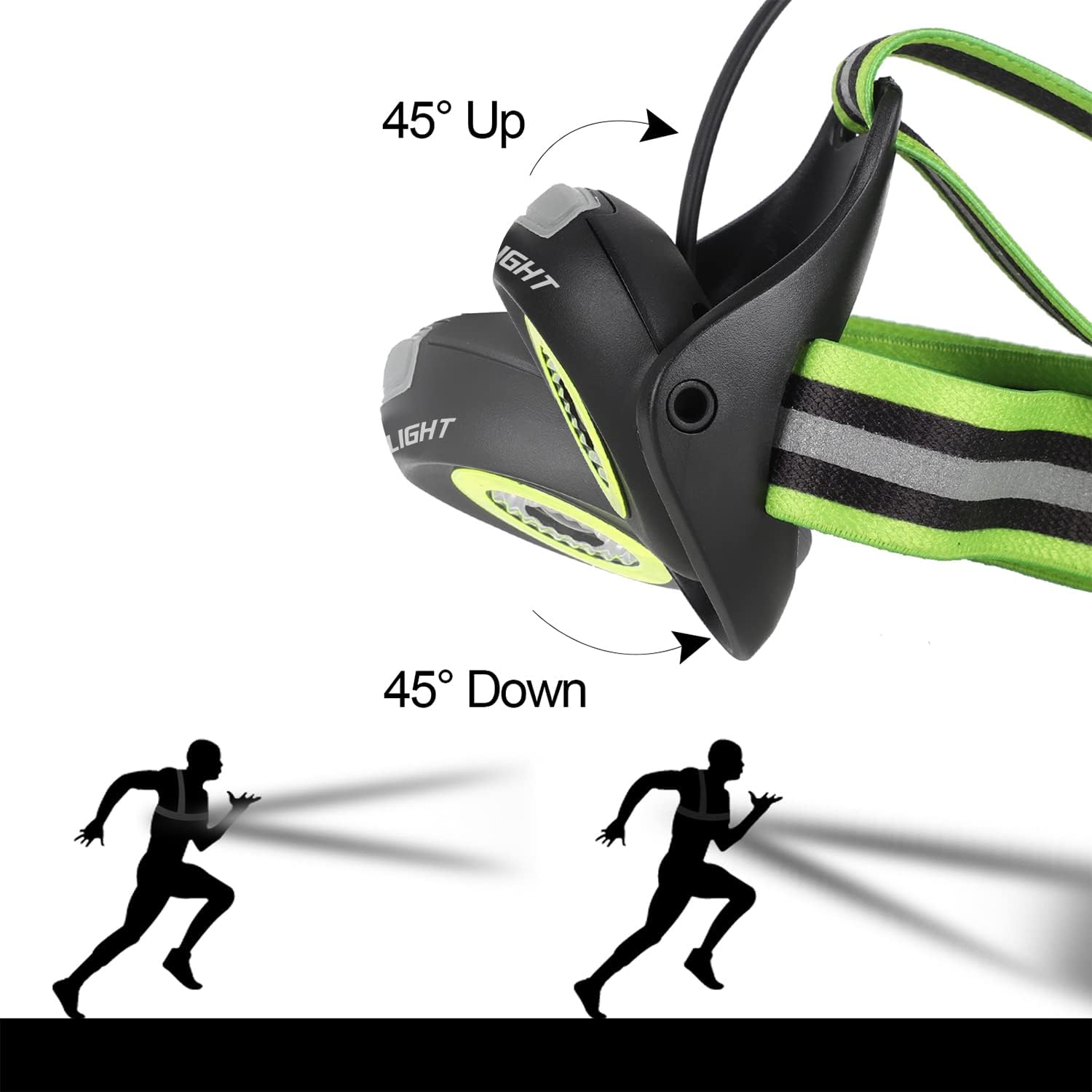
Figure 6.1: The light is IPX-5 waterproof, offering protection against splashing water.
- Cleaning: Wipe the device with a soft, damp cloth. Do not use abrasive cleaners or solvents.
- Water Resistance: The light is IPX-5 waterproof, meaning it is protected against splashing or spraying water from any direction. It is suitable for use in rain but should not be submerged in water.
- Storage: Store the light in a cool, dry place when not in use. Avoid extreme temperatures.
- Battery Care: To maintain battery health, charge the device fully before long periods of storage and recharge every 3-6 months if not in regular use.
7. Troubleshooting
If you encounter issues with your West Biking Running Chest Light, refer to the following common solutions:
- Light does not turn on:
- Ensure the battery is charged. Connect the light to a USB power source and allow it to charge for at least 30 minutes.
- Check the USB charging cable for damage and ensure it is securely connected.
- Press the power button firmly.
- Light does not charge:
- Verify the USB cable and power adapter are functional. Try a different cable or adapter.
- Ensure the charging port is clean and free of debris.
- If the light has been completely drained, it may take a few minutes for the charging indicator to appear.
- Light output is dim:
- The battery may be low. Recharge the device.
- Ensure the light is not in Low Mode if you expect maximum brightness.
- Straps feel uncomfortable or slip:
- Adjust the buckles to achieve a tighter fit.
- Ensure the light is positioned correctly on your chest and back.
If problems persist after attempting these steps, please contact customer support.
8. Specifications
| Feature | Specification |
|---|---|
| Brand | West Biking |
| Model Number | 6A-YP0701289-DE-Green |
| Light Output | 500 Lumens |
| Beam Angle Adjustment | 90° (45° up to 45° down) |
| Battery Type | Lithium-ion |
| Battery Capacity | 2200mAh |
| Charging Time | Approx. 5 hours |
| Run Time (Strong Mode) | Approx. 4 hours |
| Run Time (Low Mode) | Approx. 10 hours |
| Water Resistance | IPX-5 |
| Weight | 160 Grams |
| Material | Aluminum |
| Included Components | 1 x Running Light, 1 x USB Cable |
9. Safety Information
- Do not look directly into the light beam to avoid eye injury.
- Keep out of reach of children.
- Do not disassemble or modify the device. This may void the warranty and pose a safety risk.
- Use only the provided USB cable or a certified equivalent for charging.
- Dispose of the battery and device according to local regulations. Do not dispose of in household waste.
10. Warranty and Support
For warranty information or technical support, please refer to the product packaging or contact the retailer where the product was purchased. Keep your proof of purchase for any warranty claims.