
1. Introduction
Thank you for choosing the DEWENWILS 6-Outlet Power Strip with Individual Switches and Surge Protection. This device is designed to provide convenient power distribution and protection for your electronic equipment. Please read this manual thoroughly before use to ensure safe and optimal operation.

Image 1.1: Overview of the DEWENWILS 6-Outlet Power Strip.
2. Safety Instructions
To prevent injury or damage to your devices, always follow these safety precautions:
- Indoor Use Only: This power strip is designed for indoor use in dry locations. Do not use it outdoors or in wet environments.
- Electrical Rating: Do not exceed the maximum load of 3680W or 16A. Overloading can cause overheating and fire.
- Proper Grounding: Ensure the power strip is plugged into a properly grounded outlet.
- Avoid Daisy-Chaining: Do not plug one power strip into another.
- Child Safety: The power strip features child safety shutters on each outlet. Keep out of reach of children.
- Damage Inspection: Do not use if the power strip, cord, or plug is damaged. Contact customer support for assistance.
- Disassembly: Do not attempt to disassemble or modify the power strip. There are no user-serviceable parts inside.

Image 2.1: Visual representation of safety features including surge and lightning protection.
3. Product Features
The DEWENWILS Power Strip offers several key features for enhanced functionality and safety:
- 6 AC Outlets with Individual Switches: Each of the six outlets can be controlled independently, allowing you to power on or off specific devices without affecting others.
- Bipolar Switches: Both individual and main switches are bipolar, ensuring a safer disconnection of both live and neutral wires simultaneously.
- Surge and Overload Protection: Protects connected devices from power surges, voltage spikes, and overcurrents.
- LED Indicators: Each individual switch and the main power switch feature an LED indicator to show the power status.
- Wide Spacing and 90° Angled Outlets: Designed with ample space between outlets and 90-degree angled sockets to accommodate larger plugs and power adapters without blocking adjacent outlets.
- Wall-Mountable Design: Two mounting holes allow for secure installation on a wall or desk, saving space.
- 2-Meter Power Cord: Provides flexibility in placement to reach distant power sources.

Image 3.1: Illustration of the 6-in-1 power strip highlighting its capacity and power specifications.

Image 3.2: Detailed view of the 2-meter cable and the 90-degree angled plug design for convenience.
4. Setup and Installation
- Unpack: Carefully remove the power strip from its packaging. Inspect for any signs of damage.
- Placement: Choose a dry, indoor location away from heat sources and moisture.
- Wall Mounting (Optional): If desired, use the two mounting holes on the back of the power strip to secure it to a wall or desk. Ensure appropriate screws and anchors are used for the mounting surface.
- Connect to Power: Plug the power strip's main plug into a standard 230V AC grounded wall outlet.

Image 4.1: Example of the power strip mounted under a desk to save space.
5. Operating Instructions
- Main Power: Ensure the main power switch (if present, usually larger or distinct) is in the 'ON' position. The main LED indicator will illuminate.
- Connecting Devices: Plug your electronic devices into the AC outlets on the power strip.
- Individual Outlet Control: Use the red individual switches located next to each outlet to turn power to that specific outlet 'ON' or 'OFF'. The corresponding LED indicator will light up when the outlet is active.
- Energy Saving: Turn off individual outlets when devices are not in use to reduce standby power consumption.
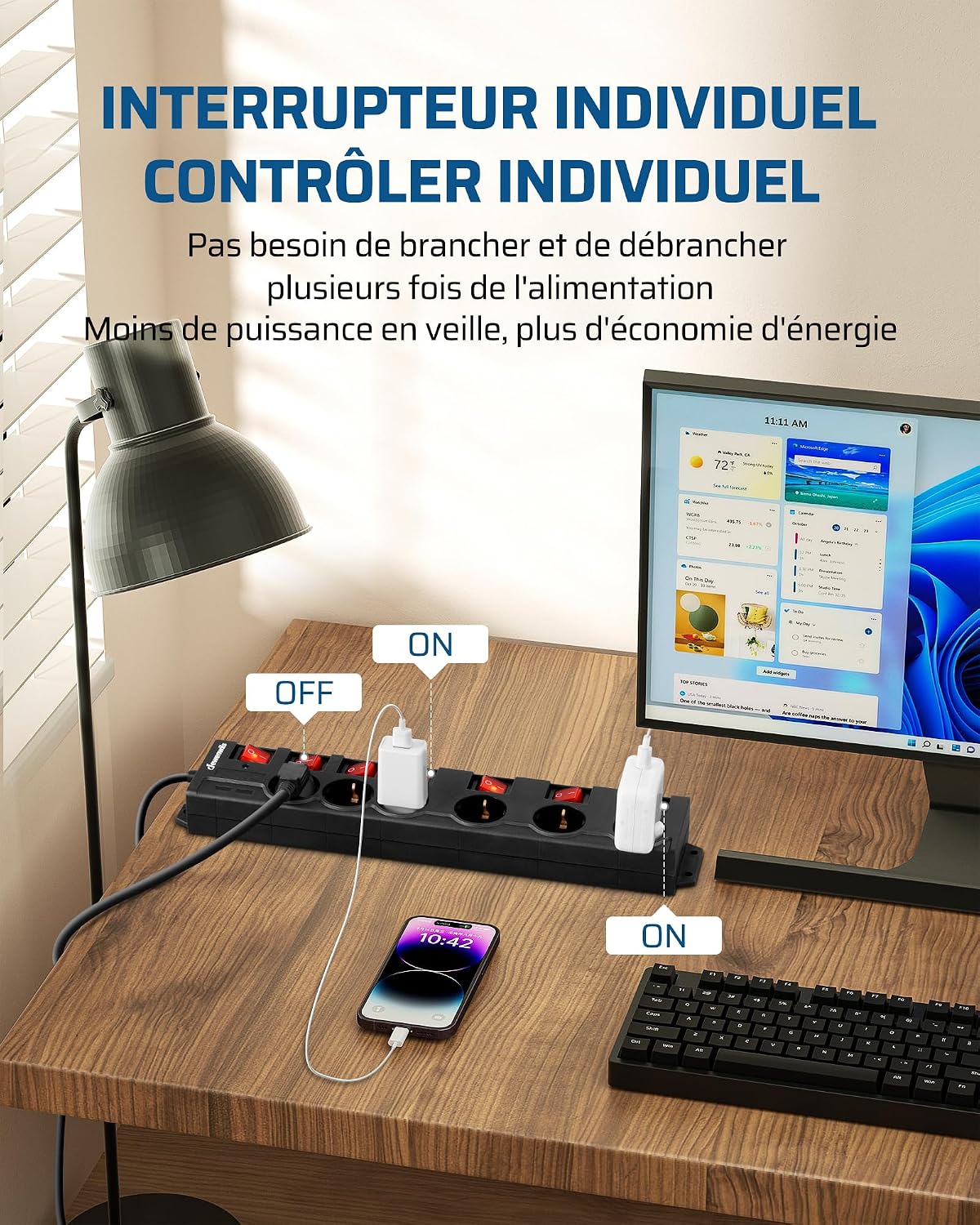
Image 5.1: Demonstrating the use of individual switches to control power to connected devices.

Image 5.2: Diagram illustrating the safer operation of a bipolar switch.
6. Maintenance
- Cleaning: Disconnect the power strip from the wall outlet before cleaning. Use a dry, soft cloth to wipe the surface. Do not use liquid cleaners or sprays.
- Inspection: Periodically inspect the power strip, cord, and plug for any signs of wear or damage. If damage is found, discontinue use immediately.
- Storage: When not in use for extended periods, store the power strip in a cool, dry place.
7. Troubleshooting
- No Power to an Outlet:
- Check if the individual switch for that outlet is in the 'ON' position.
- Ensure the main power switch of the power strip is 'ON'.
- Verify that the wall outlet is functioning by plugging in another device.
- Power Strip Not Functioning (All Outlets):
- Check if the main power switch is 'ON'.
- The overload protection may have tripped. Disconnect all devices, unplug the power strip, wait a few minutes, then plug it back in and try again. If it trips repeatedly, reduce the total load.
- Ensure the wall outlet has power.
8. Specifications
| Brand | DEWENWILS |
| Model | B08FX5MKRL |
| Color | Black |
| Number of AC Outlets | 6 |
| Voltage | 230 Volts |
| Max Current | 16 Amperes |
| Max Power | 3680 Watts |
| Cable Length | 2 Meters |
| Special Features | Individual On/Off Switches, Surge Protection, Overload Protection, Child Safety Shutters, Wall Mountable |
| Material | Plastic |
| Product Dimensions | 40L x 8W Centimeters |
9. Warranty and Support
DEWENWILS products are manufactured to high-quality standards. For warranty information, technical support, or any questions regarding your product, please refer to the contact information provided with your purchase or visit the official DEWENWILS website.