
Introduction
This manual provides essential instructions for the safe and effective operation of your Steamfast SF-680 Digital Steam Press and the A600-027 Steam Press Stand. The SF-680 Digital Steam Press is designed to provide professional-quality pressing results for various fabrics. The A600-027 Steam Press Stand offers a convenient, free-standing setup for your steam press, allowing for comfortable seated use and easy storage.
Important Safety Information
Please read all instructions carefully before using the appliance. Failure to follow these instructions may result in electric shock, fire, or serious personal injury.
- Always ensure the appliance is unplugged from the electrical outlet before filling with water, cleaning, or when not in use.
- Do not use the electrical cord as a handle or allow it to come into contact with hot surfaces.
- Keep the steam press and stand away from children and pets.
- Use only distilled or demineralized water in the steam press to prevent mineral buildup.
- Do not operate the steam press if it has a damaged cord or plug, or if it has been dropped or damaged.
- This appliance is built to meet U.S. voltage requirements. Improper use or shipping the product outside the U.S. will void all warranties.
Product Overview
SF-680 Digital Steam Press
The SF-680 Digital Steam Press features a large 25 x 10.5 inch non-stick pressing surface, digital controls for multiple fabric settings, and a powerful steam burst function. It includes a press lock feature for secure carrying and storage.
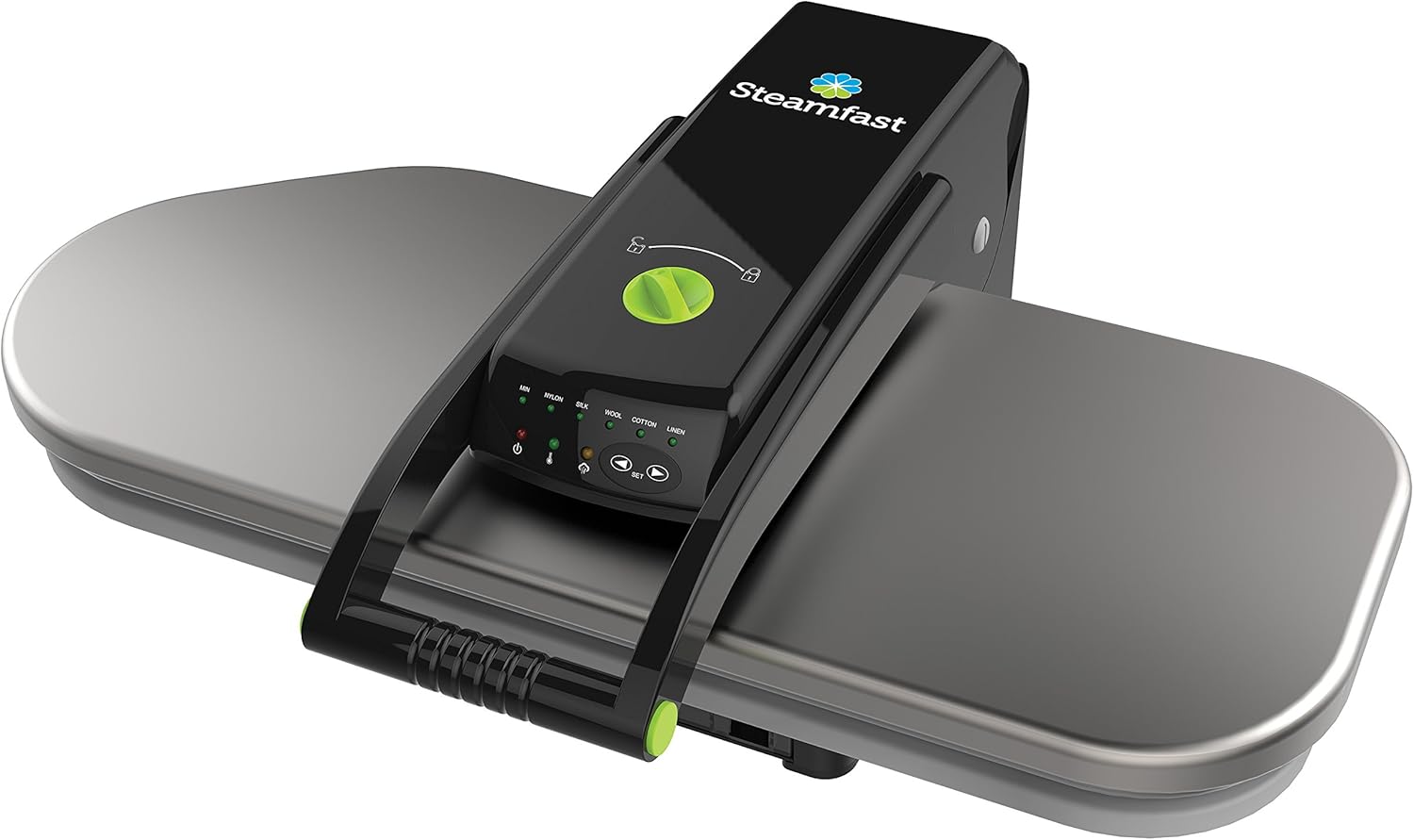
Image: The Steamfast SF-680 Digital Steam Press, showing its large pressing surface and control panel.
A600-027 Steam Press Stand
The A600-027 Steam Press Stand is designed to elevate your steam press for comfortable seated operation. It features a collapsible tripod base for easy storage and a convenient storage basket for accessories.

Image: The Steamfast A600-027 Steam Press Stand, featuring its adjustable height, tripod base, and accessory basket.
Included Accessories
The SF-680 Digital Steam Press comes with the following accessories:
- Spray Bottle: For pre-moistening fabrics.
- Pressing Cushion: For pressing intricate areas like collars, cuffs, and pleats.
- Measuring Cup: For accurately filling the water tank.

Image: The included accessories: a spray bottle, a pressing cushion, and a measuring cup.
Setup Instructions
Assembling the A600-027 Steam Press Stand
- Unfold the tripod base of the stand until it locks securely into place.
- Adjust the height of the stand to your preferred seated position.
- Attach the steam press platform to the top of the stand, ensuring it is stable.
- Secure the storage basket to the designated area on the stand.
Preparing the SF-680 Digital Steam Press
- Place the steam press securely on a stable, heat-resistant surface or on the assembled A600-027 stand.
- Ensure the press is in the unlocked position.
- Open the water tank cap and fill the 10-ounce tank with distilled or demineralized water using the provided measuring cup. Do not overfill.
- Close the water tank cap securely.
- Plug the power cord into a standard electrical outlet.
Operating Instructions
Powering On and Heating
- Once plugged in, the press will begin to heat up. This typically takes about 3 minutes.
- The indicator light will change to show it is ready for use.
Selecting Fabric Settings
Use the digital controls to select the appropriate fabric setting for your garment. Available settings include Nylon, Silk, Wool, Cotton, and Linen. Always check the garment's care label for recommended heat settings.
Pressing Garments
- Lay the garment flat on the pressing surface, ensuring it is smooth and free of wrinkles.
- Lower the pressing plate handle until it gently rests on the fabric.
- For steam, press the steam burst button. Hold for a few seconds, then release.
- Lift the handle to open the press and reposition the garment as needed.
- Repeat the process until the garment is wrinkle-free.

Image: Top-down view of the steam press in operation, showing a garment being pressed.

Image: Side view of the steam press during operation, with steam visible, demonstrating the steam burst function.
Automatic Shut-off
The SF-680 steam press is equipped with an automatic shut-off feature that activates when the unit is left idle for a period of time, enhancing safety.
Care and Maintenance
- Cleaning the Pressing Surface: Allow the press to cool completely. Wipe the non-stick pressing surface with a soft, damp cloth. Do not use abrasive cleaners or scouring pads.
- Draining the Water Tank: Regularly drain any remaining water from the tank after each use to prevent mineral buildup.
- Storage: Ensure the press is cool and dry before storing. Use the press lock feature for secure storage. The A600-027 stand can be collapsed for compact storage when not in use.
Troubleshooting
| Problem | Possible Cause | Solution |
|---|---|---|
| No steam produced | Water tank is empty; unit not heated; steam button not pressed. | Fill water tank; allow unit to heat completely; press steam burst button. |
| Press not heating | Not plugged in; power outlet issue; unit malfunction. | Check power connection; test outlet with another appliance; contact customer support if issue persists. |
| Water leaking | Overfilled water tank; cap not secured. | Do not overfill; ensure water tank cap is tightly closed. |
Specifications
- Model: Steamfast SF-680 Digital Steam Press
- Pressing Surface: 25 x 10.5 inches
- Water Tank Capacity: 10 ounces
- Heat-up Time: Approximately 3 minutes
- Features: Digital fabric settings (Nylon, Silk, Wool, Cotton, Linen), Steam Burst function, Automatic Shut-off, Press Lock feature.
- Stand Model: Steamfast A600-027 Steam Press Stand
- Stand Height: Elevates press 26 inches for comfortable seated use.
- Stand Features: Collapsible tripod base, storage basket, slip-resistant feet.
Official Product Video Guide
Video: An official guide demonstrating the features and operation of the Steamfast Digital Steam Press with Multiple Fabric Settings. This video provides a visual walkthrough of the product's capabilities and usage.
Warranty and Support
For detailed warranty information and customer support, please refer to the official documentation included with your product or visit the Steamfast website. Keep your purchase receipt for warranty claims.
Online Resources: For additional support, FAQs, and product registration, please visit the official Steamfast website.


