
1. Introduction
The ECOXGEAR EcoExtreme 2 is a rugged, waterproof, and dustproof Bluetooth speaker designed to protect your smartphone while providing high-quality audio. It features a watertight dry box for secure storage of your phone and other small essentials, making it ideal for outdoor activities and environments where protection from water, sand, and snow is crucial. The speaker allows full control of your music and phone calls via external buttons, ensuring your device remains safe inside.
Product Overview Video
This video provides a brief overview of the EcoExtreme 2's features and uses, demonstrating its waterproof capabilities and dry storage function.
2. What's in the Box
Upon unpacking your ECOXGEAR EcoExtreme 2, please ensure all the following items are present:
- 1x EcoExtreme 2 Dry Box Bluetooth Speaker
- 1x USB-C Cable (for charging)
- 1x User Guide (this document)
- 1x Carabiner (for attachment)

3. Product Features
- Waterproof and Dustproof: Meets IP67 international standards, providing protection against rain, sand, and snow. The device floats, preventing loss in water.
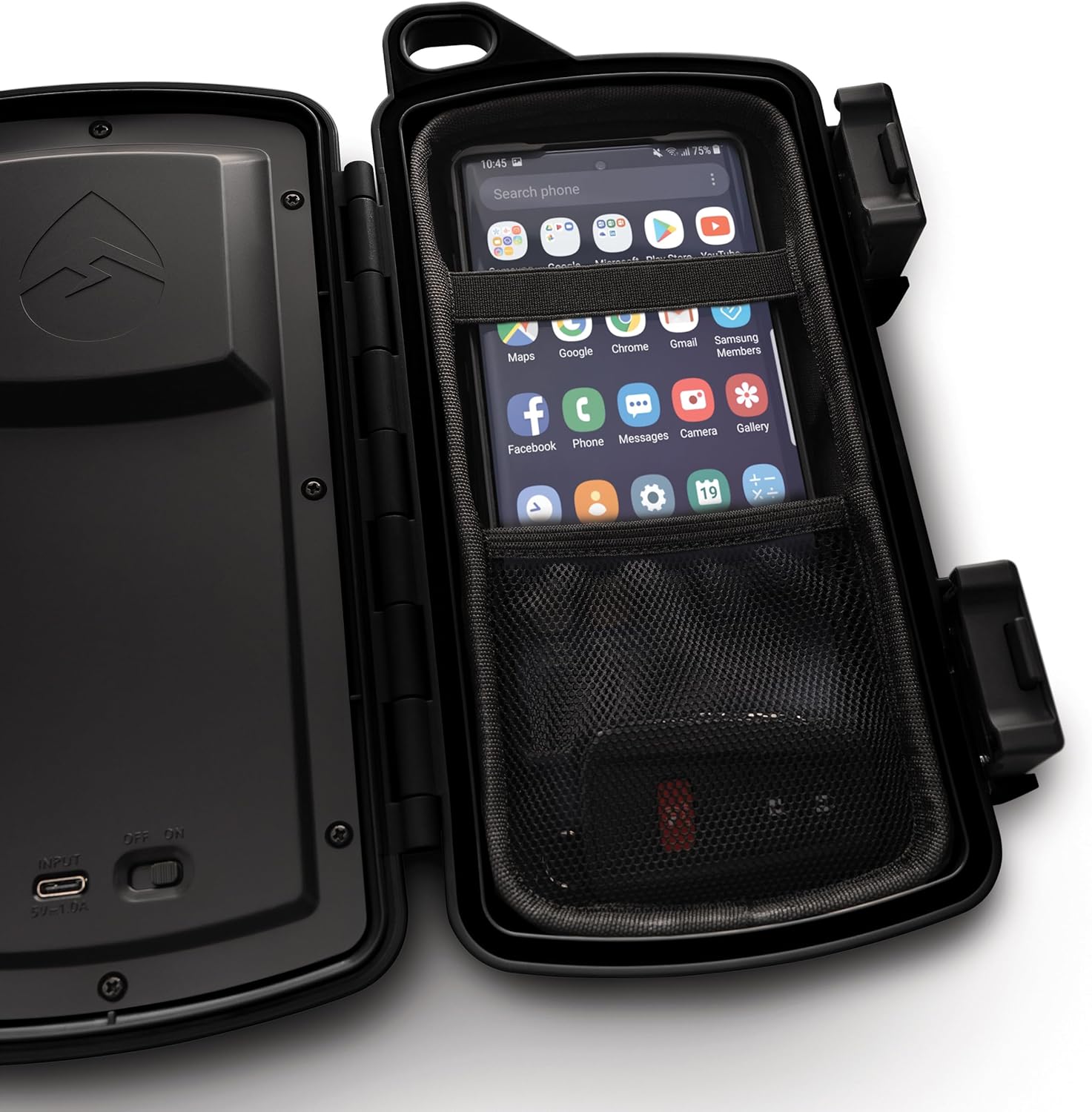
- Integrated Dry Box: Features a spacious, watertight compartment for secure storage of your smartphone, keys, and other small valuables.
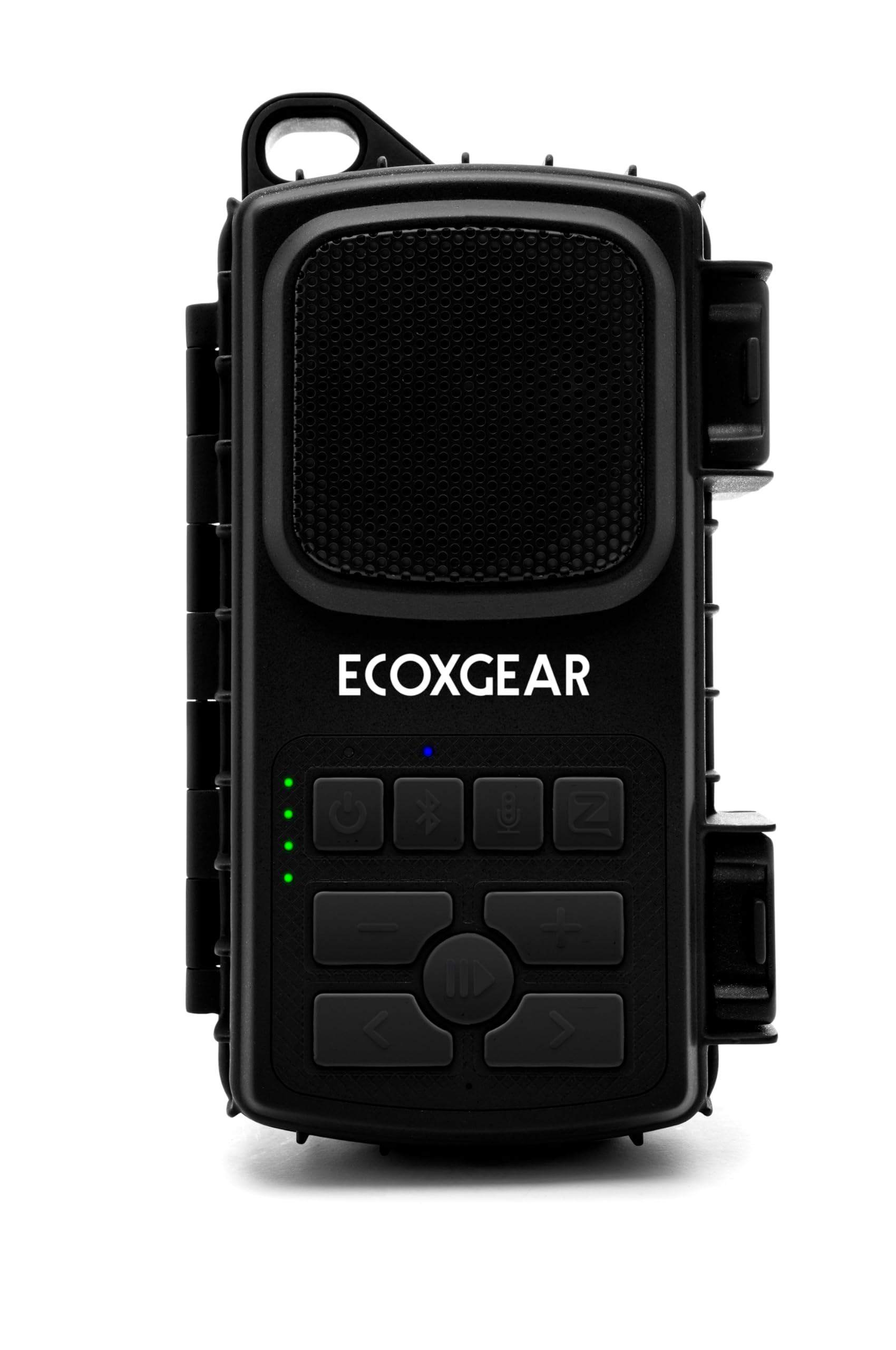
- External Controls: Music and phone buttons on the exterior allow full control of your device without needing to open the dry box.
- Extended Battery Life: Offers up to 15 hours of playtime at average listening levels, or 5 hours at maximum volume. The battery fully recharges in approximately 3 hours. The speaker can operate while recharging.
- EcoCast Built-In: Wirelessly connect up to 100 EcoCast enabled speakers for a synchronized audio experience. Note: EcoCast is not compatible with previous generation EcoConnect technology.
- Push-to-Talk Functionality: Compatible with the Zello App on your smartphone for walkie-talkie communication.
- Bluetooth 5.0: Enables wireless audio streaming from your device, whether it's inside the dry box or up to 100 feet away.
- Durable Construction: Made from plastic, designed for rugged outdoor use.
- Portable Design: Lightweight at 1.38 pounds and includes a carabiner for easy transport.
4. Setup Guide
4.1 Charging the EcoExtreme 2
- Open the dry box by unlatching the side clips.
- Locate the USB-C charging port inside the dry box.
- Connect the provided USB-C cable to the speaker's charging port and the other end to a USB power source (e.g., wall adapter, computer USB port).
- The charging indicator light will illuminate. A full charge typically takes approximately 3 hours.
- Once fully charged, disconnect the cable and ensure the dry box is securely closed to maintain its waterproof seal.
Note: The speaker can be used while it is charging.
4.2 Bluetooth Pairing
- Ensure the EcoExtreme 2 is powered on. If not, press and hold the Power button (⏻) on the front panel until the power indicator lights up.
- Press the Bluetooth button (🖨) on the speaker. The Bluetooth indicator light will flash, indicating it is in pairing mode.
- On your smartphone or Bluetooth-enabled device, go to the Bluetooth settings.
- Select "EcoExtreme 2" from the list of available devices.
- Once paired, the Bluetooth indicator light on the speaker will stop flashing and remain solid. You are now connected and ready to stream audio.
4.3 Using the Dry Box
The EcoExtreme 2 features a watertight compartment to protect your smartphone and other small items.
- Unlatch the two side clips to open the dry box.
- Carefully place your smartphone and any other small items (e.g., keys, cards) into the padded interior. Utilize the mesh pocket and elastic strap for organization.
- Ensure no items are obstructing the rubber gasket seal around the edges of the dry box.
- Close the lid firmly and secure both side clips until they click into place. This ensures a watertight seal.
5. Operating Instructions
5.1 Basic Controls
The EcoExtreme 2 features intuitive external buttons for controlling your audio and calls:
- Power Button (⏻): Press and hold to power ON/OFF.
- Bluetooth Button (🖨): Press to enter Bluetooth pairing mode.
- Play/Pause Button (►►): Press to play or pause audio.
- Volume Up/Down Buttons (+ / -): Press to adjust volume.
- Track Skip Buttons (◀◀ / ►►): Press to skip to the previous or next track.
- Answer/End Call Button (📞): Press to answer an incoming call or end an ongoing call.
- Microphone Button (🎤): Activates the built-in microphone for calls or voice commands.
- EcoCast Button (↻): Used to connect multiple EcoExtreme 2 speakers.
- Light Mode Button (🔆): Controls the LED light modes (if applicable).
5.2 EcoCast Functionality
The EcoExtreme 2 supports EcoCast, allowing you to wirelessly connect up to 100 compatible ECOXGEAR speakers for a larger sound system.
- Primary Speaker: Ensure your first EcoExtreme 2 speaker is paired with your Bluetooth device.
- Secondary Speakers: Power on any additional EcoExtreme 2 speakers you wish to connect.
- On the primary speaker, press the EcoCast button (↻). The EcoCast indicator light will flash.
- On each secondary speaker, press the EcoCast button (↻). They will automatically search for and connect to the primary speaker.
- Once connected, the EcoCast indicator light on all speakers will become solid. Audio will now play through all linked speakers.
Important: EcoCast is not compatible with older EcoConnect technology. Ensure all speakers are EcoCast enabled.
5.3 Push-to-Talk (Zello App)
The EcoExtreme 2 can be used with the Zello App on your smartphone for push-to-talk communication, effectively turning your speaker into a walkie-talkie.
- Download and install the Zello App on your smartphone.
- Ensure your smartphone is securely placed inside the EcoExtreme 2 dry box and the speaker is connected via Bluetooth.
- Follow the Zello App's instructions to set up your account and channels.
- Use the dedicated Push-to-Talk button on the EcoExtreme 2 (often integrated with the microphone button or a specific Zello button, refer to the speaker's button icons for exact identification) to communicate through the app.
6. Maintenance
- Cleaning: After use, especially in saltwater or sandy environments, rinse the EcoExtreme 2 with fresh water. Use a soft, damp cloth to wipe down the exterior. Do not use abrasive cleaners or solvents.
- Gasket Care: Periodically inspect the rubber gasket inside the dry box lid for any debris, cracks, or damage. A clean, intact gasket is essential for maintaining the waterproof seal. Clean with a soft cloth and ensure it is free of sand or dirt before closing.
- Storage: Store the speaker in a cool, dry place away from direct sunlight when not in use. For long-term storage, ensure the battery is partially charged (around 50%) to prolong its lifespan.
- Charging Port: Keep the USB-C charging port clean and dry.
7. Troubleshooting
7.1 No Power
- Ensure the battery is charged. Connect the speaker to a power source using the USB-C cable.
- Press and hold the Power button for a few seconds to ensure it's not just a short press.
7.2 Bluetooth Pairing Issues
- Make sure the EcoExtreme 2 is in pairing mode (Bluetooth indicator flashing).
- Ensure your device's Bluetooth is enabled and within range (up to 100 feet).
- Forget "EcoExtreme 2" from your device's Bluetooth list and try pairing again.
- Turn both the speaker and your device off and on again.
7.3 Poor Sound Quality or No Audio
- Check the volume levels on both the speaker and your connected device.
- Ensure the speaker is not submerged in water if sound quality is muffled (though it is waterproof, sound transmission is affected underwater).
- Verify that the speaker is properly paired and connected to your device.
- If using EcoCast, ensure all speakers are correctly linked.
7.4 Water Leakage in Dry Box
- Immediately remove your device and dry it.
- Inspect the rubber gasket around the dry box lid for any dirt, sand, hair, or damage. Clean the gasket thoroughly.
- Ensure the lid is closed firmly and both side clips are fully latched.
- Avoid overfilling the dry box, which can prevent a proper seal.
8. Specifications
| Model Name | EcoExtreme 2 |
| Model Number | GDI-EX3W201 |
| Brand | ECOXGEAR |
| Material | Plastic |
| Color | Black |
| Product Dimensions | 2.6"D x 5.5"W x 10.1"H |
| Item Weight | 1.38 pounds (22 Ounces) |
| Speaker Type | Outdoor |
| Connectivity Technology | Wireless (Bluetooth 5.0) |
| Bluetooth Range | Up to 100 Feet |
| Power Source | Battery Powered (1 Lithium Ion battery included) |
| Battery Capacity | 2600 Milliamp Hours |
| Charging Time | Approximately 3 Hours |
| Playtime | Up to 15 hours (average volume), 5 hours (max volume) |
| Speaker Maximum Output Power | 15 Watts |
| Audio Output Mode | Mono |
| Water Resistance Level | IP67 (Waterproof and Dustproof) |
| Control Method | Touch buttons |
| Special Features | Built-in Microphone, Lightweight, Portable, Stereo Pairing (EcoCast), Waterproof, Dry Box |
| Compatible Devices | Smartphones, Tablets |
| UPC | 819127010850 |
9. Warranty & Support
9.1 Manufacturer's Warranty
The ECOXGEAR EcoExtreme 2 Dry Box Bluetooth Speaker comes with a 1-Year Manufacturer Warranty. This warranty covers defects in materials and workmanship under normal use. Please retain your proof of purchase for warranty claims. The warranty does not cover damage caused by misuse, accidents, unauthorized modifications, or normal wear and tear.
9.2 Customer Support
For technical assistance, warranty inquiries, or further information regarding your ECOXGEAR EcoExtreme 2, please contact ECOXGEAR customer support directly. Refer to the official ECOXGEAR website or the packaging for the most current contact details.
You can also visit the official ECOXGEAR store for additional product information and support resources: ECOXGEAR Store


