1. Introduction
Product Overview
This manual provides essential information for the proper installation, operation, and maintenance of the DAVITU Electrical Connector. This high-quality connector is designed for reliable electrical connections in various applications. It is identified by model numbers such as EHF-117-01-L-D-SM-P-TR, ASP-103612-01, and TFC-120-02-L-D-A, and is part of the Davitu Electrical Equipments Supplies series.
Please read this manual thoroughly before using the product to ensure safe and efficient operation.
2. Setup
Installation and Connection
Follow these steps for proper installation and connection of the electrical connector:
- Inspection: Before installation, carefully inspect the connector for any signs of physical damage, bent pins, or debris. Ensure all contact points are clean and free from contaminants.
- Preparation: Ensure the mating component (e.g., PCB, cable) is clean and prepared according to its specifications. Verify pin assignments and polarization to prevent incorrect insertion.
- Alignment: Carefully align the connector with its mating component. Ensure that all pins or contacts are correctly aligned with their corresponding receptacles. Do not force the connection if resistance is met.
- Insertion: Apply gentle, even pressure to fully seat the connector. Listen for a click or feel a positive engagement, indicating a secure connection. Avoid twisting or uneven pressure during insertion.
- Verification: After insertion, visually inspect the connection to confirm it is fully seated and there are no visible gaps or misalignments. Gently tug on the connector to ensure it is securely locked in place.

Figure 2.1: Detailed view of the electrical connector showing its pin configuration.
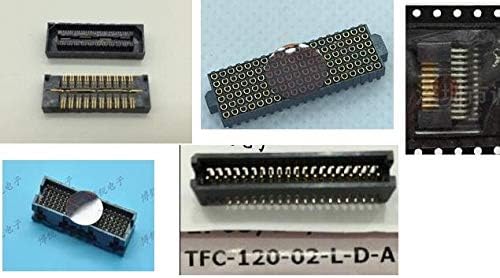
Figure 2.2: Multiple perspectives of the electrical connector, illustrating its form factor and contact points.
3. Operating
Usage Guidelines
Once installed, the connector is designed for reliable electrical signal and power transmission. Observe the following guidelines during operation:
- Secure Connection: Ensure the connector remains securely seated during operation to prevent intermittent connections or signal loss. Avoid applying excessive force or strain to the connected components.
- Environmental Considerations: Operate the connector within its specified environmental conditions (temperature, humidity). Avoid exposure to corrosive substances, excessive moisture, or extreme temperatures unless the product is specifically rated for such conditions.
- Current and Voltage Limits: Adhere to the maximum current and voltage ratings specified for the connector. Exceeding these limits can lead to overheating, damage, or system failure.
- Disconnection: When disconnecting, apply firm, even pressure to pull the connector straight out. Avoid wiggling or pulling at an angle, which can bend pins or damage the housing.
4. Maintenance
Care and Maintenance
Proper maintenance extends the lifespan and ensures the continued performance of your DAVITU electrical connector:
- Cleaning: If necessary, clean the connector contacts using a lint-free cloth and a small amount of isopropyl alcohol. Ensure the connector is completely dry before re-connecting. Avoid abrasive cleaners or solvents.
- Storage: Store unused connectors in a clean, dry, and dust-free environment, preferably in their original packaging or anti-static bags, to protect the contacts from oxidation and physical damage.
- Regular Inspection: Periodically inspect connectors in active use for signs of wear, corrosion, or damage to the housing or pins. Replace any damaged connectors immediately to prevent system malfunctions.
5. Troubleshooting
Troubleshooting Common Issues
If you encounter issues with your electrical connector, refer to the table below for common problems and their potential solutions:
| Problem | Possible Cause | Solution |
|---|---|---|
| Intermittent Connection | Loose connection, dirty contacts, bent pins. | Ensure connector is fully seated. Clean contacts with isopropyl alcohol. Inspect for and carefully straighten bent pins if possible, or replace the connector. |
| Connector Not Seating Fully | Misalignment, debris in receptacle, bent pins. | Re-align carefully. Check for and remove any debris. Inspect pins for damage. |
| No Signal/Power | Damaged connector, incorrect wiring, open circuit. | Verify continuity of the connection. Check wiring diagrams. Replace connector if damaged. |
| Overheating | Exceeding current/voltage ratings, poor contact. | Verify load is within specifications. Ensure secure connection. Consult a qualified technician if issue persists. |
6. Specifications
Technical Specifications
The following are key technical specifications for the DAVITU Electrical Connector:
| Specification | Detail |
|---|---|
| Brand | DAVITU |
| Model Numbers | EHF-117-01-L-D-SM-P-TR, ASP-103612-01, TFC-120-02-L-D-A |
| Material | Other (as specified by manufacturer) |
| Color | ASP-103612-01 (referring to a specific variant/color code) |
| Manufacturer | DAVITU |
| ASIN | B08FST765T |
7. Warranty and Support
Specific warranty details for this DAVITU electrical connector are not provided within the available product information. For warranty claims, technical support, or further inquiries, please contact the seller or manufacturer directly through their official channels.
When contacting support, please have your product model numbers (EHF-117-01-L-D-SM-P-TR, ASP-103612-01, TFC-120-02-L-D-A) and ASIN (B08FST765T) readily available.


