
Introduction
The Studebaker SB2002TE is a portable AM/FM analog radio designed for clear audio reception and versatile connectivity. It features a 3-inch speaker, a swivel telescopic antenna for enhanced signal, an Aux-in jack for connecting external audio devices, and a 3.5mm headphone jack for private listening. This radio offers flexible power options, operating on both AC and DC power, and includes a built-in carry handle for easy portability.
Important Safety Instructions
Please read and understand all safety and operating instructions before using this product. Keep these instructions for future reference.
- Water and Moisture: Do not use this product near water (e.g., bathtubs, sinks, swimming pools) or expose it to dripping or splashing liquids.
- Heat: Do not place the product near heat sources such as radiators, heat registers, stoves, or other appliances that produce heat.
- Ventilation: Ensure proper ventilation. Do not block any ventilation openings.
- Power Sources: Operate this product only from the type of power source indicated on the marking label.
- Cleaning: Unplug this product from the wall outlet before cleaning. Use a soft, dry cloth only. Do not use liquid cleaners or aerosol cleaners.
- Servicing: Do not attempt to service this product yourself, as opening or removing covers may expose you to dangerous voltage or other hazards. Refer all servicing to qualified service personnel.
- Batteries: Follow all instructions for battery installation and disposal. Do not mix old and new batteries, or different types of batteries. Remove batteries if the unit is not used for extended periods.
Package Contents
Carefully unpack your radio and ensure all items are present:
- Studebaker SB2002TE Portable AM/FM Radio
- Built-in AC Power Cord
Note: 4 'C' size batteries are required for DC operation and are not included.
Controls and Features
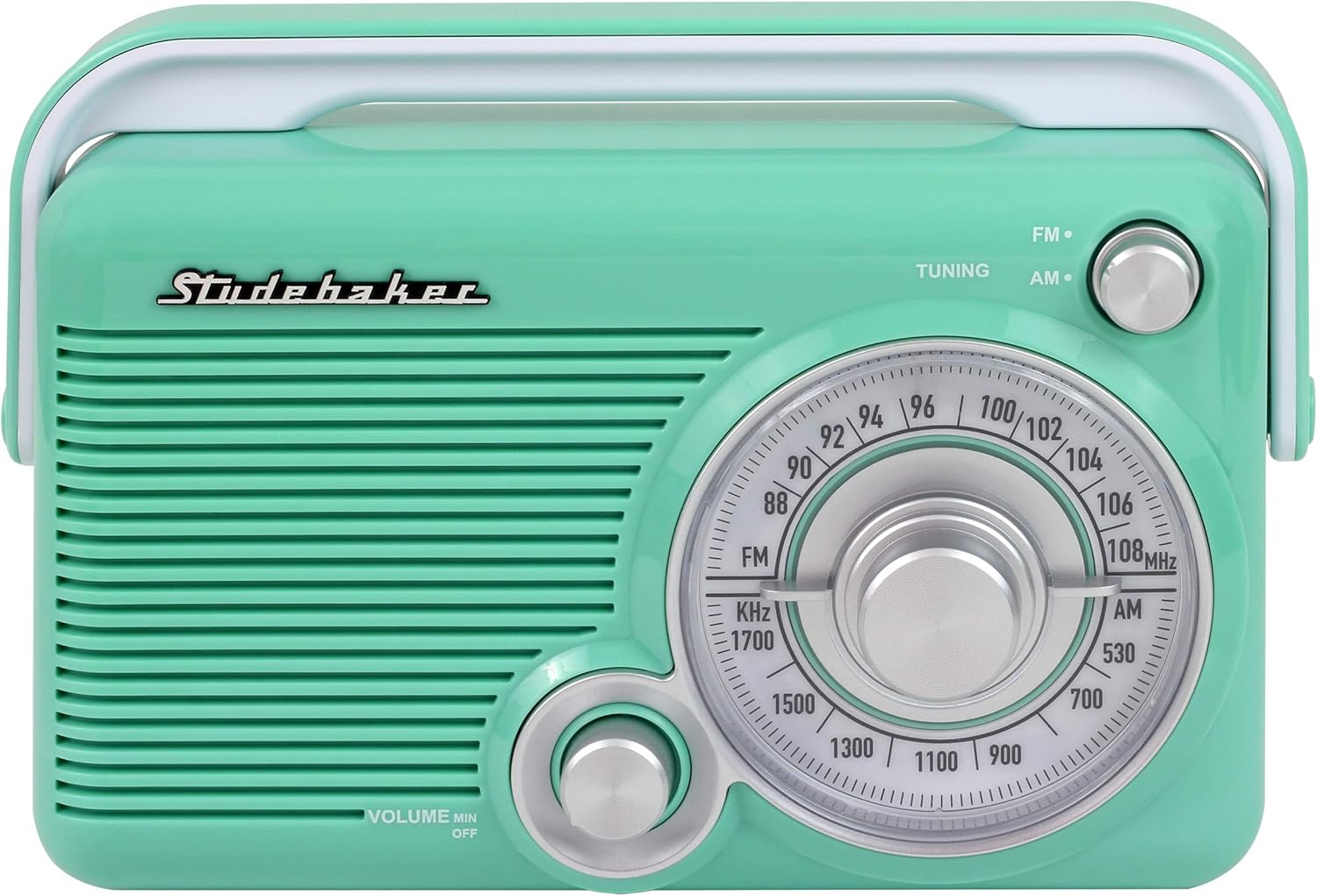
Front view of the radio, highlighting the main controls.

Side view of the radio, showing the Aux-in and Headphone jacks.
- VOLUME MIN/OFF Knob: Rotate clockwise to turn the radio ON and increase volume. Rotate counter-clockwise to decrease volume and turn OFF.
- TUNING Knob: Rotate to select your desired AM or FM radio station.
- AM/FM Selector Switch: Slide to choose between AM (Amplitude Modulation) or FM (Frequency Modulation) radio bands.
- Frequency Dial: Displays the current radio frequency for AM and FM bands.
- Telescopic Antenna: Extend and adjust for optimal FM reception.
- AUX IN Jack: Connect an external audio device using a 3.5mm audio cable.
- HEADPHONE Jack: Connect 3.5mm headphones for private listening.
- Carry Handle: For easy transportation of the radio.
- Built-in AC Power Cord: Located in the battery compartment for AC power connection.
- Battery Compartment: Holds 4 'C' size batteries for DC power.
Setup
Powering the Unit
Your Studebaker SB2002TE radio can be powered by either AC (household current) or DC (batteries).
AC Power Operation
- Locate the built-in AC power cord, typically stored within the battery compartment.
- Extend the AC power cord and plug it into a standard 120V AC ~ 60Hz wall outlet.
- The radio is now ready for use with AC power.
DC (Battery) Power Operation
- Ensure the unit is turned OFF and unplugged from any AC power source.
- Locate the battery compartment on the back or bottom of the radio.
- Open the battery compartment cover.
- Insert 4 'C' size (UM-2) batteries (not included) into the compartment. Ensure the positive (+) and negative (-) terminals of the batteries match the diagrams inside the compartment.
- Close the battery compartment cover securely.
- The radio is now ready for use with battery power.
Antenna Adjustment
- For FM Reception: Fully extend the telescopic antenna and rotate it for the best possible signal reception.
- For AM Reception: The radio has a built-in AM antenna. For optimal AM reception, rotate the entire radio unit until the clearest signal is achieved.
Operating Instructions
Turning On/Off and Volume Control
- Rotate the VOLUME MIN/OFF knob clockwise. You will hear a click as the unit turns ON.
- Continue rotating the knob clockwise to increase the listening volume.
- To turn the radio OFF, rotate the VOLUME MIN/OFF knob counter-clockwise until it clicks into the OFF position.
Listening to the Radio
- Turn the radio ON using the VOLUME MIN/OFF knob.
- Slide the AM/FM Selector Switch to your desired band (AM or FM).
- Rotate the TUNING knob to scan through the frequencies. Stop when you find your desired station.
- Adjust the VOLUME knob to your preferred listening level.
- For FM, adjust the telescopic antenna for optimal reception. For AM, rotate the entire radio unit.
Using the AUX IN Jack
The AUX IN jack allows you to connect an external audio device (e.g., smartphone, MP3 player) to play audio through the radio's speaker.
- Connect one end of a 3.5mm audio cable (not included) to the headphone jack or line-out jack of your external audio device.
- Connect the other end of the 3.5mm audio cable to the AUX IN jack on the side of the radio.
- Turn the radio ON. The unit will automatically switch to AUX IN mode.
- Start playback on your external audio device.
- Adjust the volume using both the radio's VOLUME knob and the volume control on your external device.
Using the HEADPHONE Jack
For private listening, you can connect headphones to the radio.
- Connect a pair of 3.5mm headphones (not included) to the HEADPHONE jack on the side of the radio.
- The radio's built-in speaker will automatically be muted.
- Adjust the volume using the VOLUME knob on the radio.
Maintenance
Cleaning the Unit
- Always unplug the radio from the AC outlet before cleaning.
- Use a soft, dry cloth to wipe the exterior surfaces of the radio.
- Do not use abrasive cleaners, waxes, or solvents, as these can damage the finish.
Battery Care
- Remove batteries if the unit will not be used for an extended period (e.g., one month or more) to prevent battery leakage and corrosion.
- Dispose of used batteries responsibly according to local regulations.
Troubleshooting
If you experience issues with your radio, please consult the following table before contacting customer support.
| Problem | Possible Cause | Solution |
|---|---|---|
| No power | AC cord not plugged in; Batteries dead or incorrectly inserted; Volume knob in OFF position. | Ensure AC cord is securely plugged into a live outlet. If using batteries, replace with fresh ones and check polarity. Rotate VOLUME knob clockwise past the click. |
| Poor radio reception | Antenna not extended/adjusted; Radio positioned in a poor reception area; Interference from other electronics. | For FM, fully extend and adjust the telescopic antenna. For AM, rotate the entire radio unit. Move the radio to a different location away from other electronic devices. |
| No sound from speaker (but power is on) | Volume too low; Headphones connected; Aux-in cable connected. | Increase the VOLUME. Disconnect headphones if not desired. Disconnect Aux-in cable if not desired. |
| Sound distorted or unclear | Poor reception; Volume too high; Weak batteries. | Adjust antenna/radio position for better reception. Lower the volume. Replace batteries if using DC power. |
| Aux-in not working | Aux-in cable not fully inserted; External device volume too low; Incorrect cable. | Ensure 3.5mm audio cable is fully inserted into both the radio and the external device. Increase volume on the external device. Use a standard 3.5mm audio cable. |
Specifications

The Studebaker SB2002TE radio, showcasing its portable design.
- Brand:
- Studebaker
- Model Number:
- SB2002TE
- Color:
- Teal/White
- Tuner Technology:
- AM, FM
- Radio Bands Supported:
- AM/FM
- Connectivity Technology:
- Auxiliary
- Hardware Interface:
- 3.5mm Audio
- Compatible Devices:
- Headphone, Smartphone
- Product Dimensions (L x W x H):
- 2.99" x 8.27" x 5.89"
- Item Weight:
- 1.5 Pounds
- Material:
- Plastic
- Power Source:
- AC (built-in cord) or 4 'C' batteries (not included)
- UPC:
- 077283010064
- Manufacturer:
- Spectra Merchandising International, Inc.
Warranty Information
This Studebaker product is covered by a limited manufacturer's warranty. The warranty period and terms may vary. Please refer to the warranty card included in your original product packaging for specific details regarding coverage, duration, and how to make a claim. Keep your purchase receipt as proof of purchase.
Customer Support
For technical assistance, troubleshooting not covered in this manual, or warranty inquiries, please contact Studebaker customer support. Contact information, including phone numbers and email addresses, can typically be found on the official Studebaker website or in the documentation provided with your product.


