
Hart 40-Volt Cordless Turbo Fan Blower
HART 40-Volt Cordless Turbo Fan Blower Instruction Manual
Model: 40-Volt Cordless Turbo Fan Blower
Introduction
This manual provides essential instructions for the safe operation, assembly, maintenance, and troubleshooting of your HART 40-Volt Cordless Turbo Fan Blower. Please read this manual thoroughly before using the product to ensure proper function and safety.
Safety Information
Always follow basic safety precautions to reduce the risk of fire, electric shock, and personal injury. Keep the work area clean and well-lit. Do not operate power tools in explosive atmospheres, such as in the presence of flammable liquids, gases, or dust. Keep children and bystanders away while operating a power tool.
- Wear appropriate personal protective equipment, including eye protection, hearing protection, and gloves.
- Ensure the battery is fully charged before use.
- Remove the battery pack from the tool before making any adjustments, changing accessories, or storing power tools.
- Do not expose battery packs or tools to fire or excessive temperature.
- Use only with specified battery packs and chargers.
Package Contents
Verify that all items are present upon unpacking:
- HART 40-Volt Cordless Turbo Fan Blower
- 40V Lithium-Ion Battery
- Battery Charger
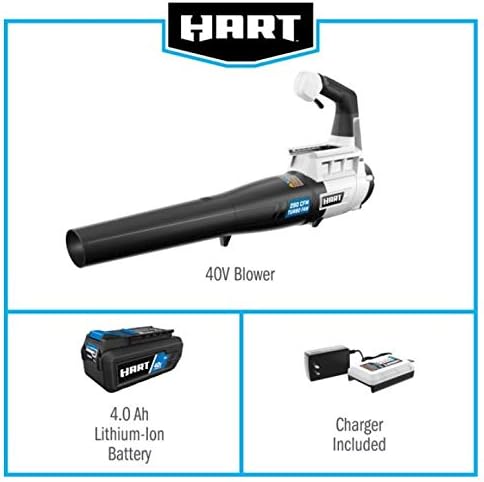
Image: The HART 40V Blower, 4.0 Ah Lithium-Ion Battery, and Charger are included in the package.
Setup
1. Charging the Battery
- Connect the charger to a standard power outlet.
- Slide the 40V Lithium-Ion Battery into the charger until it clicks into place.
- Allow the battery to charge fully. Refer to the charger's indicator lights for charging status.
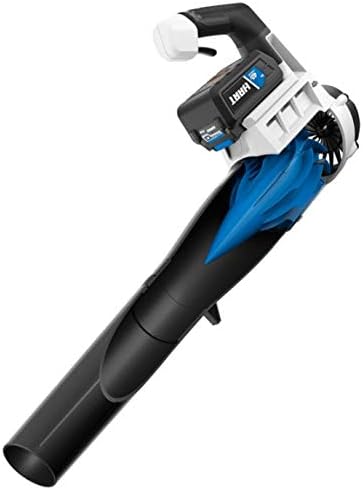
Image: The HART 40V Battery Charger connected to a power source.
2. Installing the Battery
- Ensure the blower is turned off.
- Align the fully charged 40V Lithium-Ion Battery with the battery port on the blower.
- Slide the battery into the port until it locks securely.

Image: The HART 40V Cordless Turbo Fan Blower with the battery pack securely installed.
Operating Instructions
Powering On/Off
- To turn on the blower, press and hold the power trigger.
- To turn off the blower, release the power trigger.
Using the Blower
- Direct the blower nozzle towards the debris you wish to clear.
- Maintain a comfortable distance from the ground to maximize airflow effectiveness.
- For optimal performance, sweep the blower from side to side.

Image: The HART 40V Cordless Turbo Fan Blower demonstrating its airflow capability.
Maintenance
Cleaning
- Always remove the battery pack before cleaning.
- Wipe the exterior of the blower with a clean, damp cloth. Do not use harsh chemicals.
- Ensure air vents are clear of debris to prevent overheating.
Storage
- Store the blower and battery in a cool, dry place, away from direct sunlight and moisture.
- Keep out of reach of children.
Troubleshooting
| Problem | Possible Cause | Solution |
|---|---|---|
| Blower does not start. | Battery not charged or improperly installed. | Ensure battery is fully charged and correctly seated. |
| Reduced airflow. | Air vents blocked or battery low. | Clear any obstructions from vents. Recharge or replace battery. |
| Battery not charging. | Charger not plugged in or faulty battery/charger. | Check power connection. Contact customer support if issue persists. |
Specifications
- Brand: Hart
- Model: 40-Volt Cordless Turbo Fan Blower
- Voltage: 40 Volts
- Air Flow Capacity: 280 Cubic Feet Per Minute (CFM)
- Speed: 120 Miles per Hour (MPH)
- Power Source: Battery Powered (Cordless)
- Included Components: Battery, Charger
- Item Weight: Approximately 15.8 ounces (0.45 Kilograms)
Warranty and Support
For warranty information or technical support, please refer to the warranty card included with your product or visit the official Hart website. Keep your purchase receipt as proof of purchase.
Ask a question about this manual
Ask about setup, troubleshooting, compatibility, parts, safety, or missing instructions. Manuals+ will review the question and use this page’s manual context to help answer it.