
Claymore Ultra 3.0
CLAYMORE Ultra 3.0 (X-Large) Portable Area Light User Manual
Model: Ultra 3.0 (CLC-2800BK)
Introduction
This manual provides essential instructions for the safe and efficient use of your CLAYMORE Ultra 3.0 (X-Large) portable area light. Please read this manual thoroughly before operating the device and retain it for future reference.
The CLAYMORE Ultra 3.0 (X-Large) is a versatile, USB-C rechargeable outdoor portable area light designed for various activities including camping, fishing, backpacking, and construction. It features adjustable brightness, multiple color modes, and can also function as a power bank.

Image: Front view of the CLAYMORE Ultra 3.0 (X-Large) portable area light, showcasing its rectangular design with LED panel and integrated handles.

Image: An overview of the CLAYMORE Ultra 3.0, emphasizing its maximum brightness of 3,200 lumens, up to 150 hours of usage, 23,200mAh battery capacity, and 680g weight.
Package Contents
Verify that all items are present in the package:
- CLAYMORE Ultra 3.0 (X-Large) Portable Area Light (Model CLC-2800BK)
- USB Type-C Charging Cable
- Lantern Hook
- Pouch
- User Manual (this document)

Image: Visual representation of the CLAYMORE Ultra 3.0 package contents, including the light unit, charging cable, lantern hook, and storage pouch.
Safety Information
Please observe the following safety precautions to prevent injury or damage to the product:
- Do not disassemble, repair, or modify the device.
- Keep away from direct sunlight and high temperatures.
- Do not use near flammable materials.
- Avoid direct eye exposure to the LED light.
- Store in a dry place when not in use.
- Keep out of reach of children.
Setup
Charging the Device
Before first use, fully charge the CLAYMORE Ultra 3.0. Use the provided USB Type-C cable to connect the device to a compatible USB power adapter (not included).
- The charging indicator lights will show the charging status.
- A full charge typically takes approximately 8 hours for the X-Large model.
Operating Instructions
Control Panel Overview
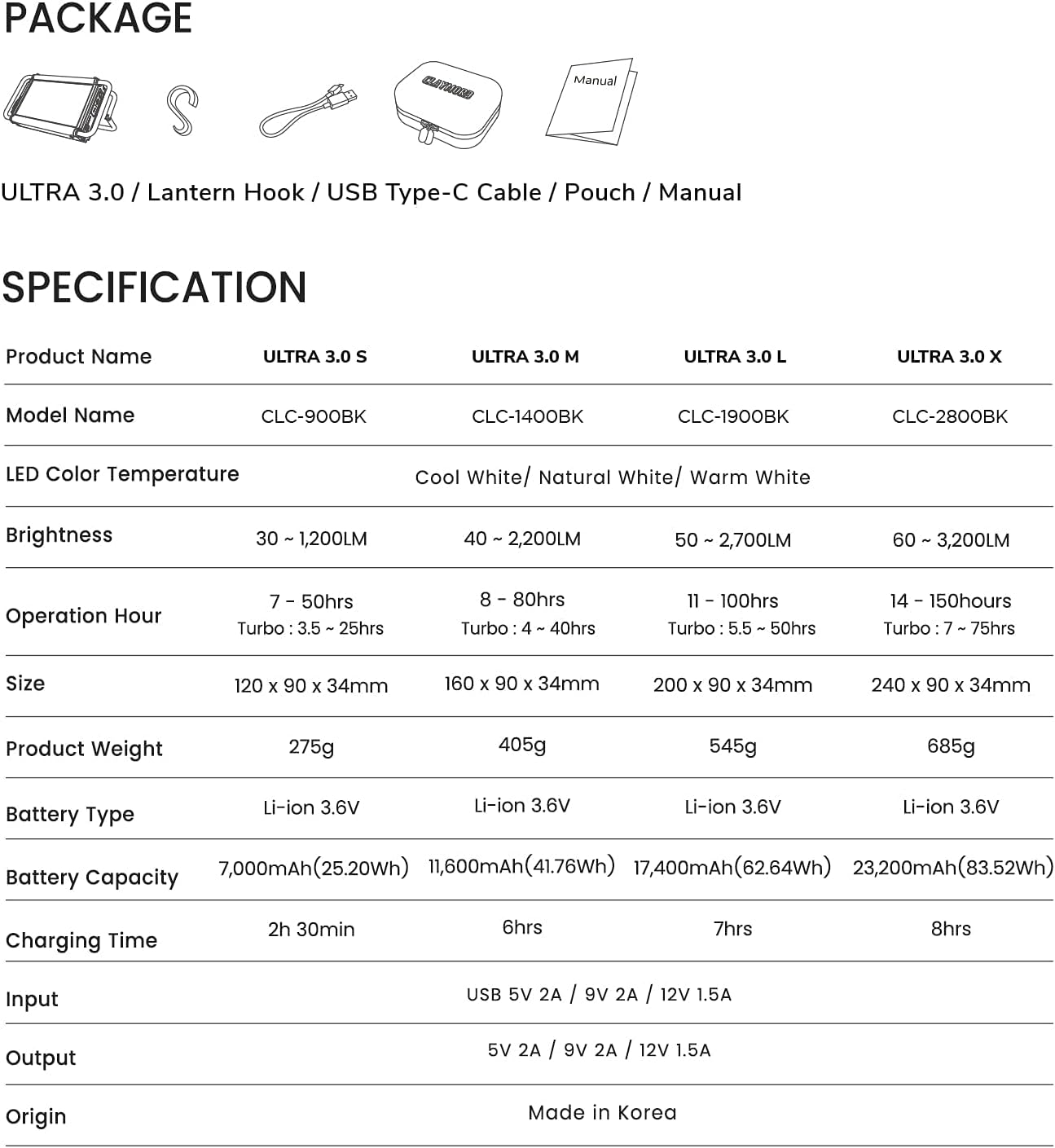
Image: A detailed view of the control panel on the CLAYMORE Ultra 3.0, showing the power button, brightness adjustment buttons (+/-), and mode button.
- ⏻ Power Button: Press and hold for 2 seconds to turn the light on or off.
- + / - Brightness Buttons: Short press to adjust brightness levels (5 modes).
- ↻ Mode Button: Short press to change color temperature. Press and hold for 2 seconds for SOS function.
Adjusting Brightness
With the light on, short press the brightness adjustment buttons (+ / -) to cycle through the 5 available brightness levels. The brightness ranges from 60 to 3,200 lumens.
Changing Color Temperature
Short press the mode button (↻) to switch between the three color temperature modes:
- Cool White (6500K)
- Natural White (4200K)
- Warm White (3000K)

Image: Three CLAYMORE Ultra 3.0 units demonstrating the distinct light outputs for Cool (6500K), Natural (4200K), and Warm (3000K) color temperatures.
Turbo Mode
The Ultra 3.0 features an upgraded turbo mode for maximum brightness. Activate this mode by pressing a specific button (refer to device for exact button, usually a quick double-press of power or mode button). This mode provides enhanced lighting performance, particularly in Natural White mode.
SOS Flash Function
For emergency situations, press and hold the mode button (↻) for 2 seconds while the power is on. The LED will flash an SOS signal.
Power Bank Function
The CLAYMORE Ultra 3.0 can function as a power bank to charge other electronic devices. Connect your device to the Ultra 3.0's USB-C port using a compatible cable. It provides a 5V – 2A output.

Image: The CLAYMORE Ultra 3.0 acting as a power bank, charging a smartphone via its USB-C port.
Mounting and Positioning
The Ultra 3.0 offers flexible mounting options:
- Use the integrated handle wires to hang the light.
- Attach S-hooks (included) for hanging on ropes or branches.
- Place the light on any flat surface using the adjustable back handle, which can be set up to 90 degrees for optimal lighting angles.

Image: A collage of six images illustrating different ways to position the CLAYMORE Ultra 3.0, including standing on its adjustable handle and hanging from a hook.
Maintenance
- Clean the device with a soft, dry cloth. Do not use abrasive cleaners or solvents.
- Ensure the charging port is free of dust and debris.
- Store the device in its pouch in a cool, dry place when not in use for extended periods.
- Avoid exposing the device to extreme temperatures or humidity.
Troubleshooting
| Problem | Possible Cause | Solution |
|---|---|---|
| Light does not turn on. | Battery is depleted. | Charge the device using the provided USB-C cable. |
| Light output is dim. | Low battery or brightness setting is low. | Charge the device or increase brightness using the '+' button. |
| Device not charging. | Faulty cable or power adapter. | Try a different USB-C cable or power adapter. Ensure connections are secure. |
| Cannot charge external devices. | Light battery is too low or external device is incompatible. | Ensure the Ultra 3.0 has sufficient charge. Verify compatibility of the external device. |
Specifications
| Feature | Detail |
|---|---|
| Model Name | CLC-2800BK |
| LED Color Temperature | Cool White (6500K), Natural White (4200K), Warm White (3000K) |
| Brightness | 60 - 3,200 Lumens |
| Operation Hour (Max) | 150 hours (low brightness) |
| Operation Hour (Turbo) | 7 - 75 hours |
| Size | 240 x 90 x 34 mm (7.87 x 3.54 x 1.34 inches) |
| Product Weight | 685g (1.5 pounds) |
| Battery Type | Li-ion 3.6V |
| Battery Capacity | 23,200mAh (83.52Wh) |
| Charging Time | 8 hours |
| Input | USB 5V 2A / 9V 2A / 12V 1.5A |
| Output | 5V 2A / 9V 2A / 12V 1.5A |
| Origin | Made in Korea |
| Water Resistance Level | Not Water Resistant |
Note: Specifications are subject to change without prior notice.
Warranty and Support
For warranty information and customer support, please refer to the official Claymore website or contact your local distributor. Keep your proof of purchase for warranty claims.
Manufacturer: Claymore
Website: Visit the Claymore Store on Amazon
Related documentsUltra 3.0

Ask a question about this manual
Ask about setup, troubleshooting, compatibility, parts, safety, or missing instructions. Manuals+ will review the question and use this page’s manual context to help answer it.