
1. Introduction
This manual provides essential information for the safe and effective use of your DEWALT DS300 TOUGHSYSTEM 2.0 Medium Toolbox. Designed for durability and protection, this toolbox offers secure storage for your tools in various work environments. Please read these instructions carefully before using the product.

Image 1: The DEWALT DS300 TOUGHSYSTEM 2.0 Medium Toolbox, showcasing its robust design and integrated handle.
2. Product Features
The DEWALT DS300 TOUGHSYSTEM 2.0 Medium Toolbox incorporates several features designed for enhanced tool protection and user convenience:
- IP65 Rated Seal: A high-performance seal within the lid ensures the toolbox is dust-tight and resistant to water jets, protecting contents from severe weather and jobsite debris.
- Auto-Latching Side Latches: New, intuitive side latches allow for quick and easy connection and disconnection of multiple TOUGHSYSTEM 2.0 modules with a single hand.
- Metal Wire Front Latches: Durable metal wire front latches provide secure closure and can be operated with one hand.
- Removable Internal Tray: A removable tray is included for organizing smaller items and accessories, allowing for easy access to tools stored below.
- Tracker-Ready Design: Features an internal fixing point for installing a DEWALT Tracker (sold separately), enabling tracking of the toolbox.
- Metal-Reinforced Padlock Eye: Provides increased security for your tools when a padlock is used (padlock not included).
- Backward Compatibility: Fully compatible with original TOUGHSYSTEM 1.0 modules, allowing for integration with existing storage systems.
- Increased Internal Volume: Offers 30% more internal storage space compared to previous models.

Image 2: Detailed diagram highlighting key features of the TOUGHSYSTEM 2.0 design, including the IP65 seal, auto-stacking latches, and tracker readiness.
3. Setup and Assembly
3.1 Initial Inspection
Upon receiving your toolbox, inspect it for any signs of damage. Ensure all latches operate smoothly and the lid seal is intact.
3.2 Opening and Closing the Toolbox
- To open, disengage the two front metal wire latches by pulling them outwards and upwards.
- Lift the lid.
- To close, align the lid with the base and press down firmly until the front latches engage securely. Ensure the IP65 seal is properly seated around the perimeter of the lid.

Image 3: A hand demonstrating the operation of the metal wire front latch for opening and closing the toolbox.
3.3 Stacking Multiple Modules
The TOUGHSYSTEM 2.0 is designed for modular stacking. To connect modules:
- Place the upper toolbox onto the lower toolbox, aligning the feet of the upper box with the grooves on the lid of the lower box.
- Engage the auto-latching side latches by pushing them inwards until they click into place. These latches secure the modules together.
- To separate, pull the auto-latching side latches outwards to release the connection, then lift the upper module.

Image 4: A worker demonstrating the stacking capability of DEWALT TOUGHSYSTEM 2.0 modules on a jobsite.
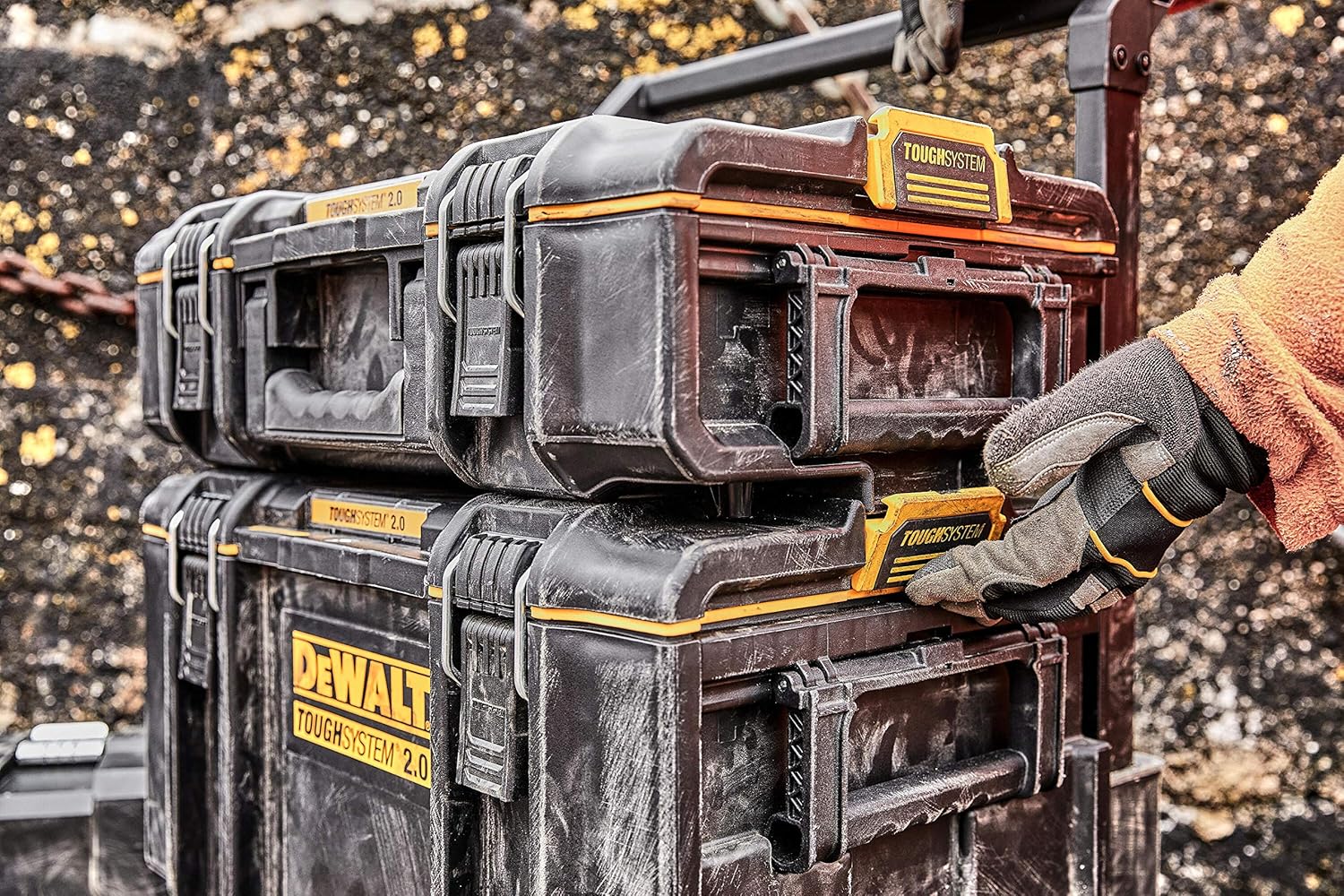
Image 5: A close-up view of the auto-latching side mechanism, showing how modules connect securely.
4. Operation
4.1 Carrying the Toolbox
Use the integrated top handle to carry the toolbox. For heavier loads, ensure a firm grip and lift with your legs, not your back. When stacked, use the handles of the bottom module or a compatible TOUGHSYSTEM trolley for transport.

Image 6: A worker carrying a DEWALT TOUGHSYSTEM 2.0 toolbox by its integrated top handle.
4.2 Utilizing the Removable Tray
The internal removable tray is ideal for storing smaller tools, fasteners, or accessories. It can be easily lifted out to access the main compartment below.

Image 7: The DEWALT TOUGHSYSTEM 2.0 toolbox open, showing the spacious interior and the removable tray (not visible in this specific image, but implied by the open box).
4.3 Securing Contents
For added security, a padlock can be inserted through the metal-reinforced padlock eye located on the front of the toolbox.
5. Maintenance
5.1 Cleaning
Clean the toolbox regularly with a damp cloth and mild soap. Avoid using harsh chemicals or abrasive cleaners, as these can damage the material and seals. Ensure the IP65 seal is free from dirt and debris to maintain its protective properties.
5.2 Inspection
Periodically inspect the latches, hinges, and the IP65 seal for wear or damage. Replace any damaged components to ensure the continued integrity and functionality of the toolbox. Ensure the auto-latching side mechanisms are clean and move freely.
6. Troubleshooting
- Difficulty closing latches: Check for any obstructions preventing the lid from seating properly. Ensure the IP65 seal is not twisted or displaced.
- Water or dust ingress: Verify that the IP65 seal is clean, intact, and properly seated around the entire perimeter of the lid. Ensure front and side latches are fully engaged.
- Modules not stacking securely: Check that the auto-latching side mechanisms are free of debris and fully engaged. Ensure the modules are correctly aligned before attempting to latch.
7. Specifications
| Feature | Specification |
|---|---|
| Model Number | DWST83294-1 (DS300) |
| Material | High-impact resin or polymer |
| Product Dimensions (L x W x H) | 21.85" x 14.61" x 12.13" (55.4 cm x 37.1 cm x 30.8 cm) |
| Item Weight | 6.6 pounds (3 kg) |
| Weight Capacity | 50 Kilograms (110 lbs) |
| Internal Volume | 39 Liters |
| Water Resistance Level | IP65 (Dust-tight, waterjet resistant) |
| Number of Compartments | 1 (plus removable tray) |
| Compatibility | DEWALT TOUGHSYSTEM 2.0 and TOUGHSYSTEM 1.0 |

Image 8: A table comparing different DEWALT TOUGHSYSTEM 2.0 models, including the DS300, highlighting key specifications like waterseal, latches, weight capacity, and internal volume.
8. Warranty and Support
DEWALT products are manufactured to high quality standards. This product includes a 1-year EU Spare Part Availability Duration. For detailed warranty information, product registration, or technical support, please visit the official DEWALT website or contact DEWALT customer service directly. Keep your purchase receipt as proof of purchase.
DEWALT Customer Service: Refer to your regional DEWALT website for contact information.


