
1. Introduction
This manual provides essential information for the safe and effective use of your Sony MHC-V43D High Power Party Speaker. Please read these instructions thoroughly before operating the unit and retain them for future reference.

Figure 1: Front view of the Sony MHC-V43D Party Speaker.
Key Features:
- Jet Bass Booster: Enhances bass for powerful sound.
- Party Light & Speaker Light: Illuminates your space with dynamic lighting effects.
- Karaoke & Guitar Input: Connect microphones and guitars for interactive entertainment.
- Gesture Control: Manage music playback and effects with simple hand movements.
- NFC and Bluetooth Connectivity: Seamless wireless audio streaming.
- Music Center App Compatibility: Control speaker functions from your smartphone.
- Fiestable App Integration: Access DJ Control, Illumination, Karaoke, and Motion Control features.
- Built-in CD/DVD Player: Enjoy your favorite discs.
- USB and HDMI Connectivity: Versatile media playback options.
2. Setup
2.1 What's in the Box
- AC Cord (1U)
- FM Antenna (1U)
- Batteries (2U)
- Remote Control (1U)
- Setup Guide (1U)
2.2 Initial Placement
Place the speaker on a stable, flat surface. Ensure adequate ventilation around the unit to prevent overheating. Avoid placing it near heat sources or in direct sunlight.
2.3 Power Connection
- Connect the supplied AC power cord to the AC IN port on the rear of the speaker.
- Plug the other end of the AC power cord into a wall outlet (240 Volts).
2.4 FM Antenna Connection
Connect the supplied FM antenna to the FM ANTENNA terminal on the rear of the speaker for improved radio reception.
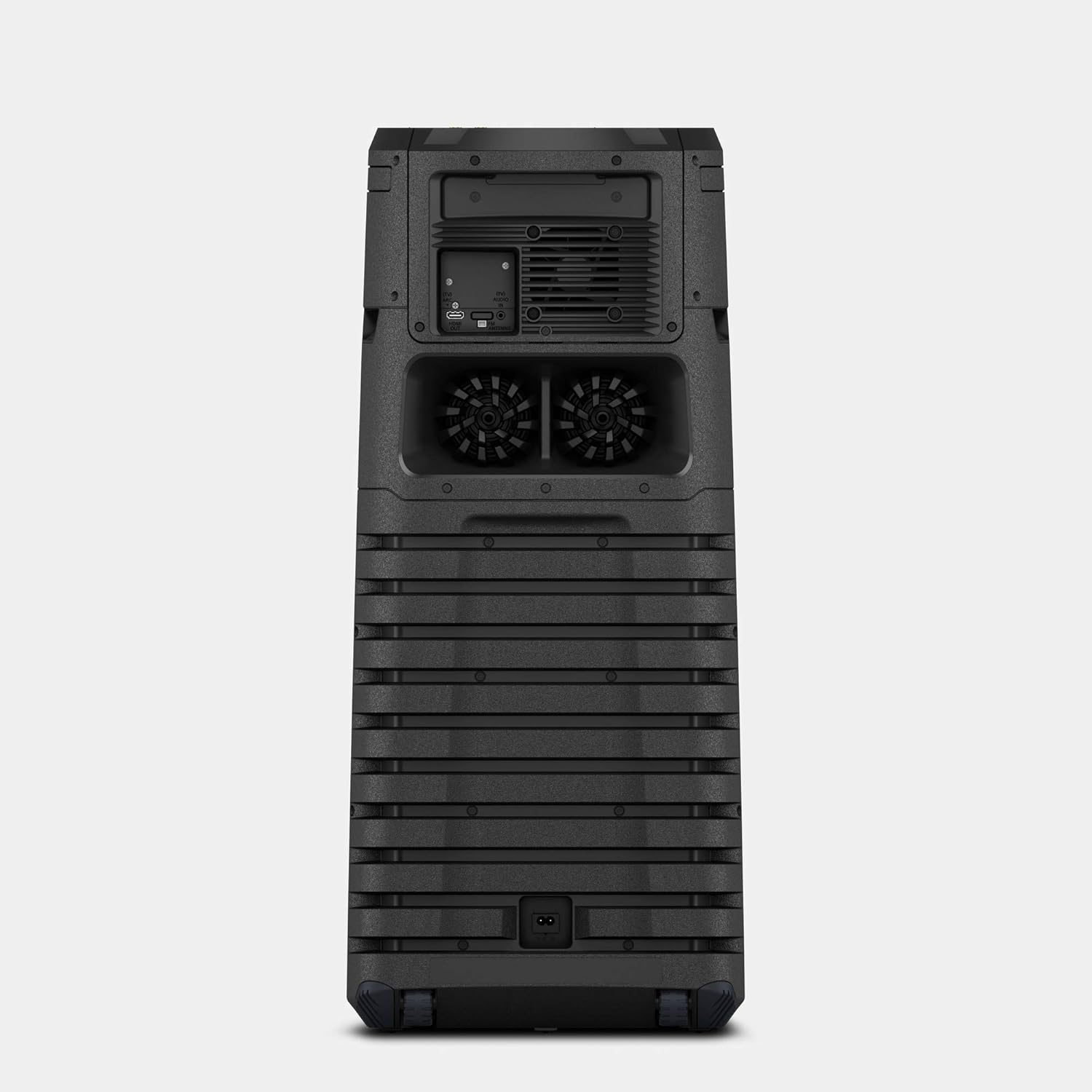
Figure 2: Rear panel connections including AC IN and FM Antenna port.
3. Operating Instructions
3.1 Basic Controls
The main controls are located on the top panel of the speaker. These include power, volume, playback controls, and function selection buttons.

Figure 3: Top panel controls for power, volume, and function selection.
3.2 Bluetooth and NFC Connectivity
To connect wirelessly:
- Bluetooth Pairing: Press the Bluetooth button on the speaker or remote control. On your device, search for "MHC-V43D" and select to pair.
- NFC (Near Field Communication): Touch your NFC-enabled smartphone to the N-Mark on the speaker for instant pairing.
3.3 Karaoke and Guitar Input
The speaker features two microphone/guitar inputs for karaoke and live performances.
- Connect your microphone or guitar to the MIC/GUITAR jacks on the top panel.
- Adjust the MIC/GUITAR LEVEL and VOCAL FADER controls as needed.
3.4 Gesture Control
Control various functions by waving your hand over the gesture control panel on the top of the speaker.
- Volume Up/Down: Twist your hand right/left.
- Skip Track: Shake your hand left/right.
- Pause/Play: Move your hand up/down.

Figure 4: Demonstrating gesture control for music playback.
3.5 Music Center and Fiestable App
Enhance your experience by downloading the Sony Music Center and Fiestable apps on your smartphone.
- Music Center: Manage music playback, sound settings, and speaker grouping.
- Fiestable: Access party features like DJ Control, Illumination, Karaoke, and Motion Control.
3.6 Media Playback (CD/DVD, USB, HDMI)
- CD/DVD: Insert a disc into the disc tray. Select the 'Disc' function.
- USB: Connect a USB device to the USB port. Select the 'USB' function.
- HDMI: Connect to a TV or other device using an HDMI cable. Select the 'HDMI' function.
4. Maintenance
4.1 Cleaning
- Wipe the exterior of the speaker with a soft, dry cloth.
- Do not use abrasive pads, scouring powder, or solvents such as alcohol or benzene.
4.2 Storage
When not in use for extended periods, store the speaker in a cool, dry place away from direct sunlight and extreme temperatures.
5. Troubleshooting
5.1 No Power
- Ensure the AC power cord is securely connected to both the speaker and the wall outlet.
- Check if the wall outlet is functioning correctly by plugging in another device.
5.2 No Sound
- Verify the volume level on both the speaker and the connected device.
- Ensure the correct input source (Bluetooth, USB, CD/DVD, HDMI) is selected.
- Check all cable connections for wired inputs.
5.3 Bluetooth Pairing Issues
- Make sure the speaker is in Bluetooth pairing mode.
- Ensure your device's Bluetooth is enabled and within range (approx. 10 meters).
- Delete the speaker from your device's Bluetooth list and attempt to re-pair.
6. Specifications
| Feature | Detail |
|---|---|
| Model Name | MHC-V43D |
| Mounting Type | Floor Standing |
| Material | Plastic |
| Speaker Type | Bookshelf/Outdoor |
| Special Feature | NFC Enabled |
| Recommended Uses | For Smartphones or Tablets |
| Compatible Devices | Smartphone, Tablet |
| Subwoofer Diameter | 12 Inches |
| Surround Sound Channel Configuration | 2.1 |
| Color | Black |
| Product Dimensions | 32.9D x 35W x 79.5H Centimeters |
| Item Weight | 14 kg 500 g |
| Is Waterproof | TRUE |
| Maximum Range (Bluetooth) | 10 metres / 30 Feet |
| Control Method | Touch |
| Wireless Communication Technology | Bluetooth |
| Power Source | Corded Electric |
| Wattage | 400 Watts |
| Frequency Response | 20000 Hz |
7. Warranty and Support
7.1 Warranty Information
This product comes with a Limited Warranty. Please refer to the warranty card included in your package for specific terms and conditions.
7.2 Customer Support
For any queries, technical assistance, or service requests, please contact Sony India Private Limited customer care:
- Customer Care Number: 080 6500 6500
- Email: sonyindia.care@ap.sony.com
Importer Address: Sony India Private Limited, A-18, Mohan Co-operative Industrial Estate, Mathura Road, NEW DELHI 110044, INDIA.


