
Introduction
This manual provides essential information for the installation, operation, and maintenance of your new Durpower replacement stylus. Please read this manual thoroughly before use to ensure proper function and longevity of the product.
Product Overview
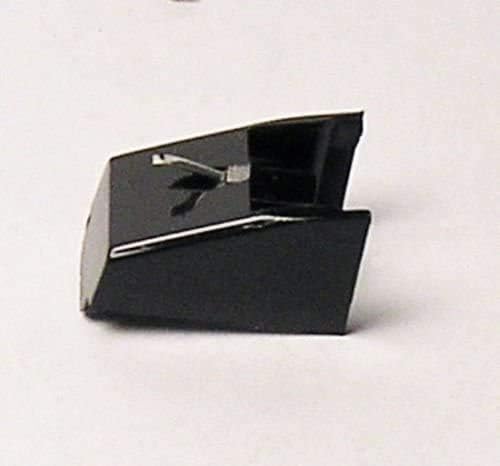
Figure 1: Durpower replacement stylus. This image shows the compact black body of the stylus with its delicate silver diamond tip protruding, designed for precise audio playback from vinyl records.
The Durpower replacement stylus is a precision-engineered component designed to restore or upgrade the audio performance of compatible phonograph record players. It features a diamond tip for accurate tracking and sound reproduction.
Setup and Installation
Proper installation is crucial for optimal performance and to prevent damage to your turntable or the stylus.
- Power Off: Ensure your record player is completely powered off and unplugged from the electrical outlet before beginning installation.
- Remove Old Stylus: Gently grasp the old stylus cartridge and pull it forward and down, or as per your turntable's specific instructions, to detach it from the tonearm. Avoid touching the cantilever or needle.
- Inspect New Stylus: Carefully remove the new Durpower stylus from its packaging. Inspect it for any visible damage.
- Install New Stylus: Align the new stylus with the cartridge slot on the tonearm. Gently push it upwards and backwards until it clicks securely into place. Do not force it.
- Verify Installation: Once installed, visually confirm that the stylus is seated correctly and is parallel to the record surface when the tonearm is lowered.
For specific turntable models (e.g., FISHER MT-725, MT-716, MT-855, MT-862), refer to your turntable's original user manual for detailed cartridge replacement instructions.
Operating Instructions
Once the stylus is installed, you can resume normal operation of your record player.
- Record Placement: Carefully place your vinyl record onto the turntable platter.
- Tonearm Handling: Use the tonearm lift lever to raise the tonearm. Gently position the tonearm over the desired starting groove of the record.
- Lowering the Stylus: Slowly lower the tonearm using the lift lever. The stylus will gently descend onto the record surface, and playback will begin.
- Ending Playback: At the end of a side, or when you wish to stop playback, use the tonearm lift lever to raise the tonearm from the record. Return the tonearm to its rest.
Avoid dropping the tonearm onto the record, as this can damage both the stylus and the record.
Maintenance
Regular maintenance will extend the life of your stylus and ensure optimal sound quality.
- Stylus Cleaning: Use a soft, anti-static brush designed for stylus cleaning. Always brush from the back of the stylus towards the front (the direction the record spins) to avoid bending the cantilever. Clean after every few plays.
- Record Cleaning: Keep your records clean. Dust and debris on records can transfer to the stylus, degrading sound quality and accelerating wear.
- Stylus Inspection: Periodically inspect the stylus tip for accumulated dust or damage using a magnifying glass. A worn or damaged stylus can harm your records.
- Replacement: A stylus typically lasts between 500 to 1000 hours of playback, depending on care and record condition. Replace the stylus when you notice a degradation in sound quality, increased distortion, or visible wear on the tip.
Troubleshooting
| Problem | Possible Cause | Solution |
|---|---|---|
| No sound or very low sound | Stylus not properly seated; amplifier/receiver issues; incorrect input selection. | Ensure stylus is fully clicked into place. Check all audio connections. Verify correct input on your audio system. |
| Distorted sound or skipping | Dirty stylus; dirty record; worn stylus; incorrect tracking force. | Clean stylus and record. Inspect stylus for wear and replace if necessary. Consult turntable manual for tracking force adjustment. |
| Stylus not tracking grooves | Incorrect anti-skate setting; tonearm balance issue. | Adjust anti-skate and re-balance tonearm according to your turntable's manual. |
Specifications
- Product Type: Replacement Phonograph Turntable Needle / Stylus
- Stylus Tip: Diamond
- Compatibility: Designed for various turntable models including FISHER MT-725, FISHER MT-716, FISHER MT-855, FISHER MT-862, and others.
- Material: High-quality components for durable and accurate playback.
Warranty Information
This Durpower replacement stylus is typically covered by a limited manufacturer's warranty against defects in materials and workmanship. Please retain your proof of purchase. For specific warranty terms and conditions, refer to the documentation included with your purchase or contact the seller directly. Wear and tear from normal use, improper installation, or misuse are generally not covered.
Support and Contact
If you have questions or require further assistance, please contact your retailer or the manufacturer. For general inquiries regarding Durpower products, you may visit the MagLite Store on Amazon (Note: Brand information provided by product data). Please have your product model information ready when contacting support.