
1. Introduction
Thank you for purchasing the Muse M-885 DBT Micro System. This comprehensive user manual provides detailed instructions for the setup, operation, and maintenance of your new audio system. The M-885 DBT is a versatile micro system featuring a Bluetooth speaker, LCD screen, DAB+ and FM PLL radio, CD player, alarm clock, sleep function, and various audio controls including treble, bass, and volume. It also includes 2 USB ports, an auxiliary input, AUX-IN cable, 2 RCA jacks, a remote control, antenna, and an AC adapter. Please read this manual thoroughly before using the device to ensure proper and safe operation.
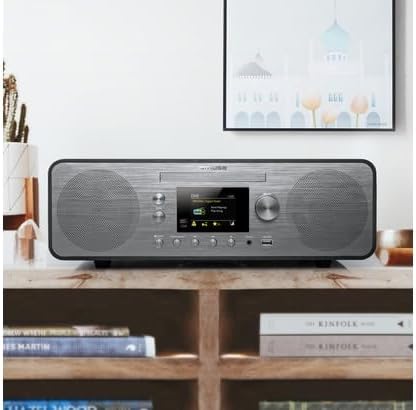
Figure 1.1: The Muse M-885 DBT Micro System placed on a wooden shelf in a home environment.
2. Safety Information
To ensure safe operation and prevent damage, please observe the following safety precautions:
- Do not expose the unit to rain or moisture to prevent fire or electric shock.
- Do not block any ventilation openings. Install in accordance with the manufacturer's instructions.
- Do not install near any heat sources such as radiators, heat registers, stoves, or other apparatus (including amplifiers) that produce heat.
- Protect the power cord from being walked on or pinched, particularly at plugs, convenience receptacles, and the point where they exit from the apparatus.
- Only use attachments/accessories specified by the manufacturer.
- Unplug this apparatus during lightning storms or when unused for long periods of time.
- Refer all servicing to qualified service personnel. Servicing is required when the apparatus has been damaged in any way, such as power-supply cord or plug is damaged, liquid has been spilled or objects have fallen into the apparatus, the apparatus has been exposed to rain or moisture, does not operate normally, or has been dropped.
3. Package Contents
Verify that all items listed below are present in the package:
- Muse M-885 DBT Micro System Unit
- Remote Control
- AC Power Adapter
- FM/DAB+ Antenna Cable (75-Ohm)
- AUX-IN Cable (3.5 mm)
- User Manual (this document)

Figure 3.1: Main unit with CD tray open and included accessories: remote control, power adapter, and antenna cable.
4. Product Overview
The Muse M-885 DBT Micro System is designed for a rich audio experience with multiple connectivity options.

Figure 4.1: Front panel of the Muse M-885 DBT, highlighting the central display, control knobs, buttons, and stereo speakers.
Key Features:
- DAB+/FM PLL Radio: Enjoy high-quality digital and analog radio broadcasts with 20 FM and 20 DAB preset stations.
- CD Player: Play your entire CD collection effortlessly.
- Bluetooth Connectivity: Stream audio wirelessly from your mobile devices (smartphones, tablets, laptops).
- USB Playback: Two USB ports for playing MP3 files from USB drives.
- Auxiliary Input: Connect external audio devices via the 3.5mm AUX-IN jack.
- LCD Display: Clear 2.8-inch LCD/TFT display for easy navigation and information.
- Alarm Clock & Sleep Function: Integrated alarm and sleep timer for convenience.
- Audio Controls: Adjustable Bass & Treble, Loudness Control, and Preset EQ options.
- Output Power: 80 Watts for powerful stereo sound.
- Real Wood Casing: Features an elegant real wood housing.

Figure 4.2: Visual representation of key features such as Bluetooth streaming, real wood casing, strong bass with passive membrane, and PLL radio with 20 FM + 20 DAB presets.

Figure 4.3: Dimensional drawing of the Muse M-885 DBT, showing length (420mm), height (139mm), and depth (212mm).
5. Setup
5.1 Unpacking and Placement
- Carefully remove the unit and all accessories from the packaging.
- Place the micro system on a stable, flat surface, away from direct sunlight, heat sources, and moisture. Ensure adequate ventilation around the unit.
5.2 Connecting the Antenna
For optimal DAB+ and FM radio reception, connect the supplied antenna cable to the "ANTENNA" jack on the rear of the unit. Extend the antenna fully and position it for the best signal.
5.3 Power Connection
- Connect the AC power adapter to the "DC IN" jack on the rear of the micro system.
- Plug the other end of the power adapter into a standard wall outlet (AC 100-240V, 50/60Hz).
- The unit will enter standby mode.
5.4 Remote Control Battery Installation
The remote control requires 2 x AA batteries (not included).
- Open the battery compartment cover on the back of the remote control.
- Insert the 2 AA batteries, ensuring correct polarity (+ and -).
- Close the battery compartment cover.
6. Operating Instructions
6.1 Power On/Off
Press the POWER button on the front panel or remote control to turn the unit on or off (standby mode).
6.2 Source Selection
Press the SOURCE button repeatedly on the front panel or remote control to cycle through available modes: DAB+, FM, CD, USB, Bluetooth, AUX.
6.3 Volume Control
Rotate the VOLUME knob on the front panel or use the VOL+ / VOL- buttons on the remote control to adjust the volume level.
6.4 DAB+ Radio Operation
- Select DAB+ mode using the SOURCE button.
- The unit will automatically scan for available DAB+ stations upon first use.
- Use the PRESET/SCAN buttons or the SELECT knob to navigate through the station list.
- Press SELECT to confirm your station choice.
- To save a preset: Press and hold the PRESET button, use the SELECT knob to choose a preset number, then press SELECT again to save.
6.5 FM Radio Operation
- Select FM mode using the SOURCE button.
- Press and hold the PRESET/SCAN button to auto-scan and save available FM stations.
- Use the PRESET/SCAN buttons or the SELECT knob to navigate through saved presets or manually tune.
- To save a preset: Press and hold the PRESET button, use the SELECT knob to choose a preset number, then press SELECT again to save.
6.6 CD Playback
- Select CD mode using the SOURCE button.
- Gently insert a CD into the CD slot with the label side facing up. The CD will load automatically.
- Use the PLAY/PAUSE, STOP, SKIP FORWARD/BACKWARD buttons to control playback.
6.7 USB Playback
- Insert a USB flash drive into one of the USB ports on the front panel.
- Select USB mode using the SOURCE button.
- The unit will automatically detect and begin playing compatible MP3 files.
- Use the playback control buttons (PLAY/PAUSE, STOP, SKIP FORWARD/BACKWARD) to manage your music.
6.8 Bluetooth Pairing and Playback
- Select Bluetooth mode using the SOURCE button. The display will show "PAIRING" or "BLUETOOTH".
- Enable Bluetooth on your mobile device (smartphone, tablet, etc.) and search for available devices.
- Select "M-885 DBT" from the list of devices. Once paired, the unit will confirm the connection.
- Start playing music on your connected device. Audio will stream wirelessly to the micro system.
6.9 AUX-IN Connection
- Connect one end of the supplied 3.5mm AUX-IN cable to the AUX IN jack on the front panel of the micro system.
- Connect the other end of the cable to the headphone jack or audio output of your external audio device.
- Select AUX mode using the SOURCE button.
- Play audio from your external device.
6.10 Alarm Clock and Sleep Function
Refer to the detailed instructions in the full manual for setting the alarm time, alarm source (radio/CD/USB), and activating the sleep timer. These functions are typically accessed via the ALARM and SLEEP buttons on the remote control or through the system menu.
6.11 Audio Settings (EQ, Bass, Treble, Loudness)
Access the audio settings through the MENU button on the front panel or remote control. You can adjust:
- Preset EQ: Select from various equalizer presets (e.g., Flat, Rock, Pop, Jazz, Classic).
- Bass/Treble: Manually adjust bass and treble levels to your preference.
- Loudness Control: Enhance bass and treble at low volume levels.
7. Maintenance
7.1 Cleaning the Unit
- Always unplug the unit from the power outlet before cleaning.
- Use a soft, dry cloth to wipe the exterior surfaces.
- Do not use abrasive cleaners, waxes, or solvents as they may damage the finish.
7.2 CD Lens Care
To ensure optimal CD playback, avoid touching the CD lens. If the lens becomes dirty, use a specialized CD lens cleaner disc.
7.3 Storage
If the unit will not be used for an extended period, unplug it from the power outlet and store it in a cool, dry place.
8. Troubleshooting
Before contacting customer support, please refer to the following table for common issues and their solutions.
| Problem | Possible Cause | Solution |
|---|---|---|
| No power | Power cord not securely connected. | Ensure the power cord is firmly plugged into the unit and the wall outlet. |
| No sound | Volume is too low or muted. Incorrect source selected. | Increase volume. Press the SOURCE button to select the correct input. |
| Poor radio reception | Antenna not properly connected or positioned. Interference from other devices. | Adjust the antenna position. Move the unit away from other electronic devices. |
| CD not playing | CD inserted incorrectly or dirty/scratched. | Re-insert CD with label side up. Clean the CD. Try another CD. |
| Bluetooth pairing fails | Bluetooth not enabled on device. Unit not in pairing mode. Device too far. | Ensure Bluetooth is on and unit is in pairing mode. Move device closer (within 10m). |
| USB playback issues | USB drive not formatted correctly or unsupported file type. | Ensure USB drive is FAT32 formatted and contains MP3 files. Try another USB drive. |
9. Specifications
| Feature | Description |
|---|---|
| Model Number | M-885 DBT |
| Brand | MUSE |
| Color | Dark Gray |
| Connectivity | Bluetooth, Auxiliary (3.5mm), USB |
| Compatible Devices | Laptop, Smartphone, Tablet |
| Power Source | Wired Electric (AC Power Adapter) |
| Output Power | 80 Watts |
| Speaker Type | Stereo |
| Dimensions (L x W x H) | 42 x 21.2 x 13.9 cm (16.5 x 8.3 x 5.5 inches) |
| Item Weight | 3.5 Kilograms (7.7 pounds) |
| Remote Control Batteries | 2 x AA (Alkaline, not included) |
| Country of Origin | China |
10. Warranty and Support
For warranty information and technical support, please refer to the warranty card included with your product or visit the official MUSE website. Keep your purchase receipt as proof of purchase for any warranty claims.
Manufacturer: MUSE
Availability of spare parts: Information unavailable.
Software updates guaranteed until: Information unavailable.
Note: Product specifications and design are subject to change without prior notice for improvement.


