
1. Introduction
This manual provides essential information for the installation, operation, and maintenance of your Cooler Master V650 Gold White Edition V2 650W Full Modular Power Supply. Please read this manual thoroughly before installation and use to ensure proper functionality and safety.

Image 1.1: The Cooler Master V650 Gold White Edition V2 650W Power Supply shown alongside its retail packaging.
2. Safety Information
- Always disconnect the power cord from the wall outlet before installing, servicing, or cleaning the power supply.
- Do not open the power supply unit. High voltages are present inside, and opening the unit will void the warranty.
- Ensure the power supply is installed in a well-ventilated area.
- Use only the modular cables provided with this power supply. Using incompatible cables can cause damage to the PSU and connected components.
- This product is designed for use in personal computer systems. Do not use it for other applications.
3. Product Overview
The Cooler Master V650 Gold White Edition V2 is a full modular power supply designed for high efficiency and stable power delivery. It features a white casing and white modular cables for aesthetic integration into various PC builds.
3.1 Key Features
- 80 PLUS Gold Certified: Guarantees a typical efficiency of 90% under normal operating conditions.
- Performance Driven Topology: Half-bridge LLC resonant converter and DC-DC technology for reliable and stable voltage outputs.
- Semi-Fanless Mode with Hybrid Switch: The 135mm FDB fan operates semi-fanless up to 40% load and can be manually controlled.
- Full-Modular Cabling: Reduces clutter, increases airflow, and improves thermal performance.
- 16 AWG PCI-e Cables: Thicker cables allow for higher currents, improving efficiency and safety.
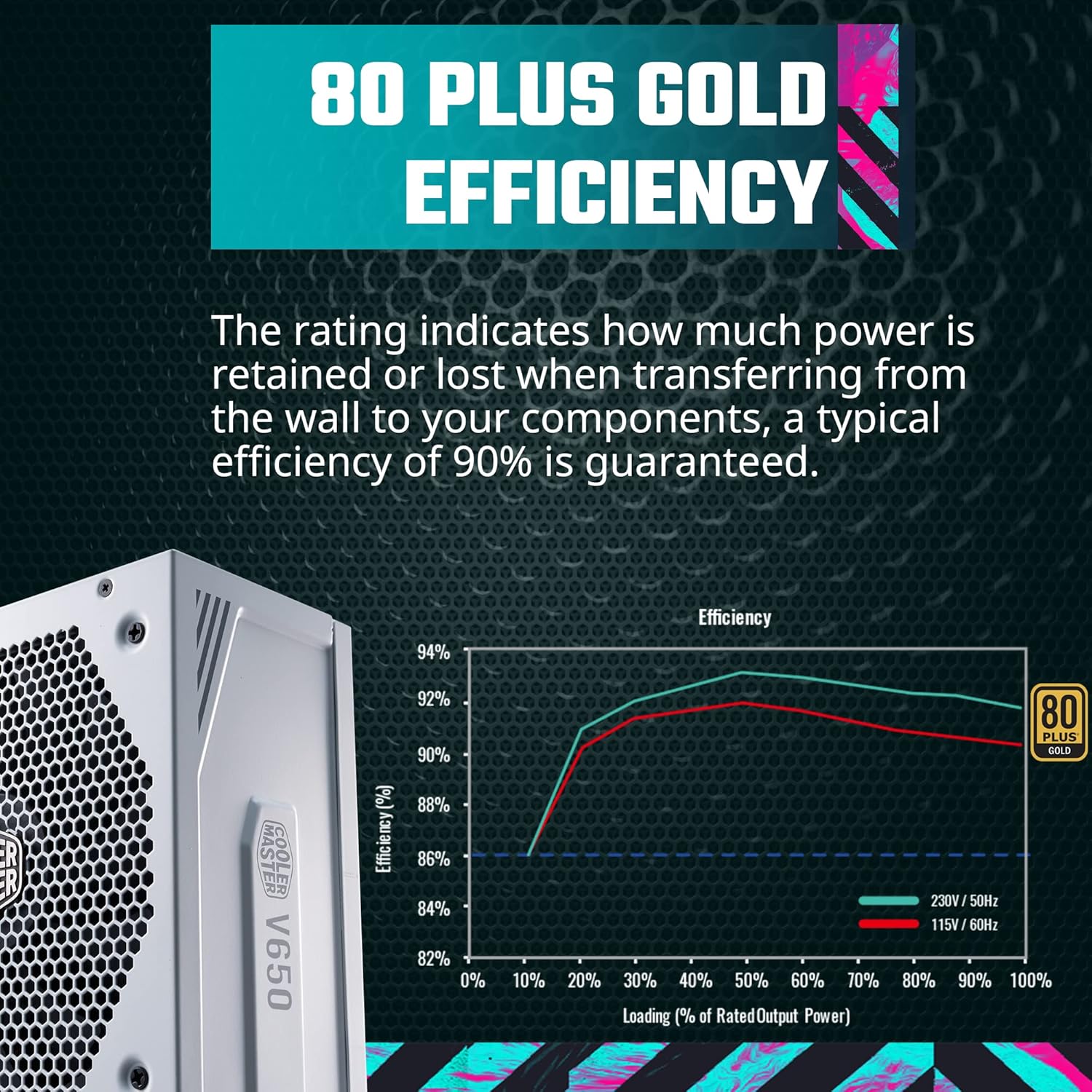
Image 3.1: A visual representation of the 80 PLUS Gold efficiency rating, showing a typical efficiency of 90%.
3.2 Modular Connectors and Rear Panel
The V650 Gold V2 features a fully modular design, allowing you to connect only the necessary cables for your system. The rear panel includes the AC power input, a power switch, and a hybrid switch for fan control.

Image 3.2: The side of the power supply unit displaying the various modular ports for connecting cables.

Image 3.3: The rear panel of the PSU, featuring the AC power input, the main power switch, and the 'Hybrid' fan control switch.
4. Installation
4.1 Mounting the Power Supply
- Ensure your computer case is compatible with ATX form factor power supplies.
- Position the power supply in the designated PSU bay of your computer case, typically at the bottom or top rear.
- Secure the power supply to the case using the provided screws. Ensure the fan is facing the correct direction for optimal airflow (usually facing downwards if there's a bottom vent, or upwards if not).
4.2 Connecting Modular Cables
The V650 Gold V2 is fully modular, meaning you only connect the cables your system requires. This helps in reducing cable clutter and improving airflow within your PC case.
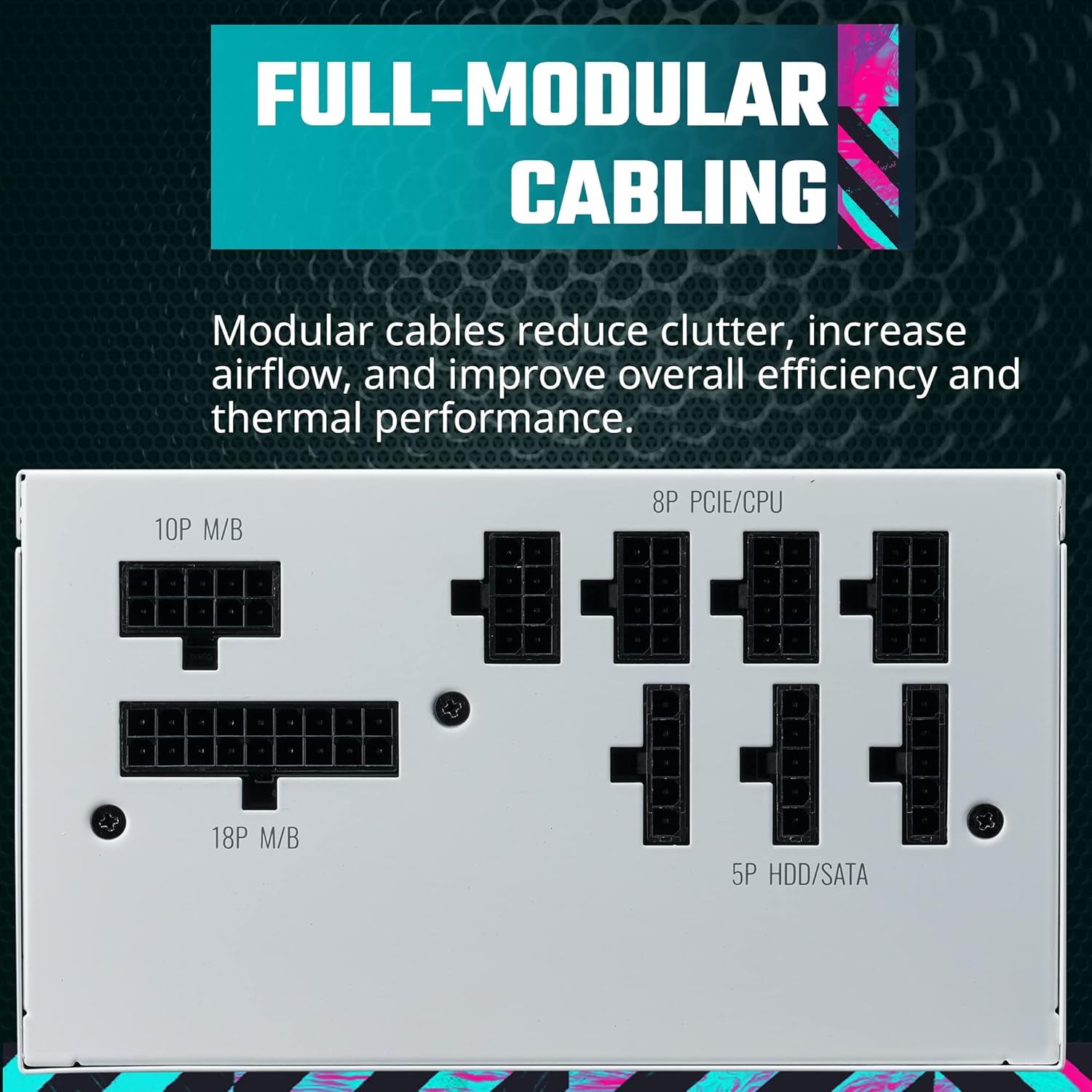
Image 4.1: A visual representation highlighting the full modular cabling design, allowing for custom cable management.
- Identify the necessary cables for your motherboard, CPU, graphics card(s), and storage devices.
- Connect the required cables to the corresponding ports on the power supply. Ensure a firm connection.
- Route the cables neatly through your case's cable management channels.
- Connect the other end of each cable to the respective components (e.g., 24-pin ATX to motherboard, 8-pin EPS to CPU, PCIe cables to graphics cards, SATA power to SSDs/HDDs).
- Ensure all connections are secure before powering on your system.

Image 4.2: An illustration showing the various modular cables, including 16 AWG PCIe cables, and their respective lengths.
5. Operation
5.1 Powering On
After all components are securely connected and the power supply is mounted, connect the AC power cord to the PSU and then to a wall outlet. Flip the main power switch on the rear of the PSU to the 'ON' position. You can then power on your computer system.
5.2 Semi-Fanless Mode and Hybrid Switch
The V650 Gold V2 features a 135mm Fluid Dynamic Bearing (FDB) fan that operates in a semi-fanless mode. This means the fan will remain off under low loads (typically up to 40% of the PSU's maximum wattage) for silent operation. When the load exceeds 40%, the fan will automatically activate to provide necessary cooling.

Image 5.1: A close-up of the 'Hybrid' switch on the power supply, which controls the semi-fanless operation.
A 'Hybrid' switch on the rear panel allows you to manually toggle this semi-fanless mode. When the switch is in the 'ON' position, the fan will operate continuously regardless of load. When in the 'OFF' position, the semi-fanless mode is active, and the fan will only spin up under higher loads.

Image 5.2: An internal view highlighting the Fluid Dynamic Bearing (FDB) fan, designed for quiet and efficient cooling.
6. Maintenance
To ensure the longevity and optimal performance of your power supply, follow these maintenance guidelines:
- Keep Vents Clear: Ensure that the intake and exhaust vents of the power supply are not obstructed by dust or other objects. Good airflow is crucial for cooling.
- Dust Removal: Periodically clean the exterior of the power supply and fan grill using compressed air. Do not attempt to clean the internal components.
- Environmental Conditions: Operate the power supply within recommended temperature and humidity ranges. Avoid extreme conditions.
7. Troubleshooting
If you encounter issues with your power supply, consider the following troubleshooting steps:
- No Power:
- Check if the AC power cord is securely connected to both the power supply and the wall outlet.
- Ensure the main power switch on the PSU is in the 'ON' position.
- Verify that the wall outlet is functional by plugging in another device.
- Check all modular cable connections to the motherboard, CPU, and other components.
- System Instability/Crashes:
- Ensure your system's power requirements do not exceed the 650W capacity of the PSU.
- Check for loose cable connections.
- Monitor system temperatures to rule out overheating of other components.
- Fan Noise:
- If the fan is constantly running and you prefer silent operation under low loads, ensure the 'Hybrid' switch on the rear of the PSU is in the 'OFF' position (semi-fanless mode enabled).
- Excessive noise might indicate dust buildup; refer to the maintenance section for cleaning.
If problems persist after attempting these steps, contact Cooler Master customer support for further assistance.
8. Specifications
Detailed technical specifications for the Cooler Master V650 Gold White Edition V2 Power Supply:

Image 8.1: The product label displaying electrical input/output specifications and certifications.
| Feature | Specification |
|---|---|
| Brand | Cooler Master |
| Series | V650 |
| Model Number | MPY-650V-AGBAG-US |
| Item Weight | 4.32 pounds |
| Product Dimensions (LxWxH) | 6.3 x 5.91 x 3.39 inches |
| Color | White Edition |
| Compatible Devices | Personal Computer |
| Connector Type | PCI Express |
| Output Wattage | 650W |
| Form Factor | ATX |
| Cooling Method | Air (135mm FDB Fan) |
| Efficiency Certification | 80 PLUS Gold |
| Modular | Full Modular |
9. Warranty and Support
The Cooler Master V650 Gold White Edition V2 Power Supply comes with a 10-year warranty from the date of purchase. This warranty covers defects in materials and workmanship under normal use.
For technical support, warranty claims, or additional product information, please visit the official Cooler Master website or contact their customer service department.
Cooler Master Official Website: www.coolermaster.com