
1. Introduction
The Autel MaxiTPMS TS508WF is a comprehensive Tire Pressure Monitoring System (TPMS) tool designed for activating, relearning, and programming TPMS sensors, as well as performing TPMS diagnostics. This manual provides detailed instructions for the proper use and maintenance of your TS508WF device.

Image 1.1: Autel MaxiTPMS TS508WF device and its primary functions.
2. Product Overview
The TS508WF is an advanced TPMS tool offering a range of functionalities for efficient TPMS service. It features a user-friendly interface with Quick Mode and Advanced Mode options to streamline operations.
2.1 Key Features
- TPMS Health Check: Perform a one-step health check of the TPMS system.
- Code Management: Read and clear TPMS diagnostic trouble codes (DTCs) with on-screen descriptions.
- Warning Light Reset: Reset the TPMS warning light after service.
- Sensor Activation: Wirelessly activate both Original Equipment (OE) and aftermarket TPMS sensors.
- Sensor Relearn: Relearn TPMS sensors using Stationary, Automatic, or OBD relearn procedures.
- MX-Sensor Programming: Program Autel MX-Sensors (433MHz & 315MHz) using Auto Create or Copy by OBD methods. Note: Only Autel MX-Sensors are programmable.
- Data Review & Printing: Review recorded data and print diagnostic reports.
- Software Updates: Lifetime free software updates via WiFi and USB.

Image 2.1: Overview of the Autel MaxiTPMS TS508WF's main functionalities.
2.2 Package Contents
Verify that all items are present in your package:
- MaxiTPMS TS508WF Main Unit
- Main Cable (OBDII connection)
- Power Adapter (Plug)
- Mini USB Cable
- Wrench
- Magnet
- Carrying Case
- User Manual (Printed)
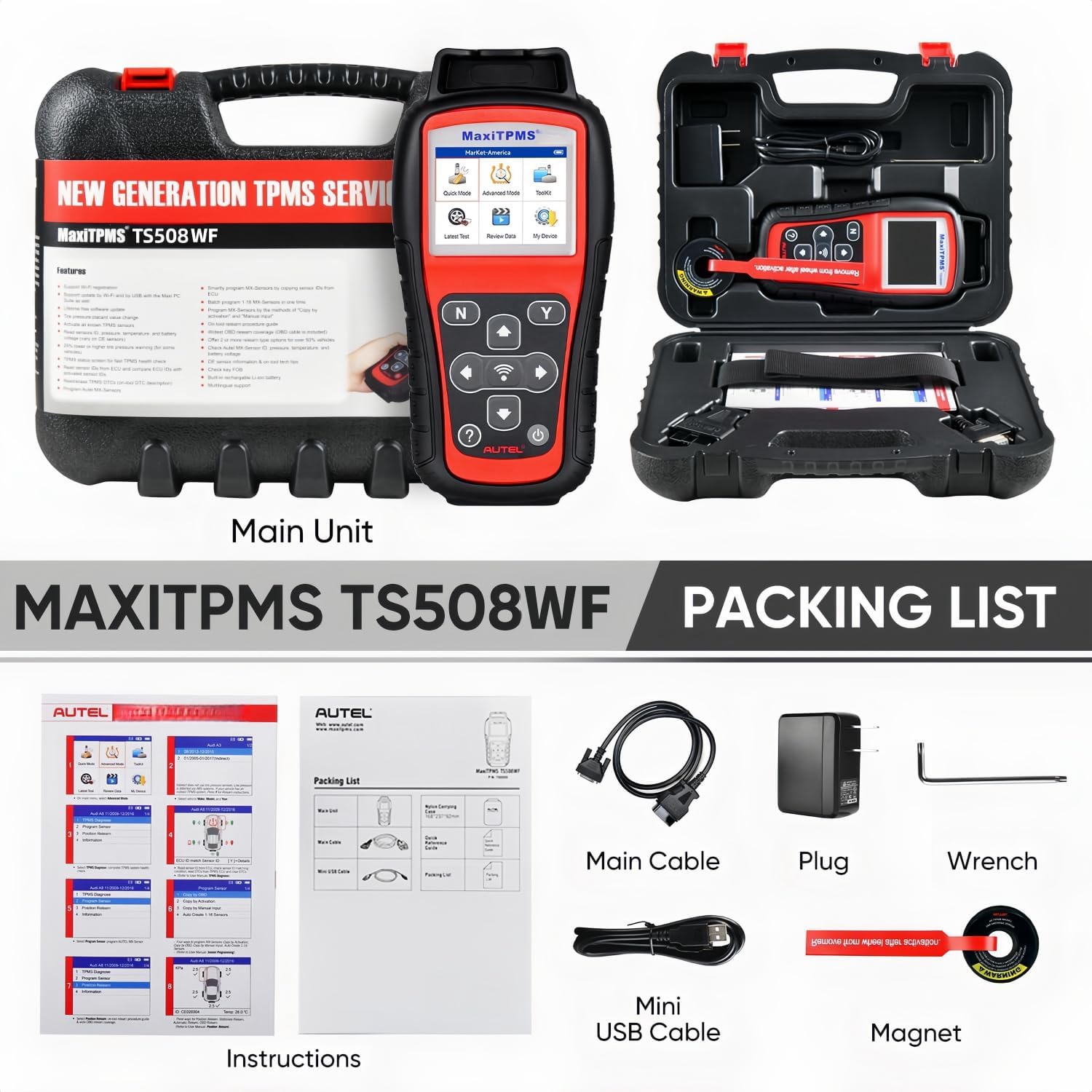
Image 2.2: Contents included in the MaxiTPMS TS508WF package.
3. Setup
3.1 Initial Power-On
- Ensure the device is charged using the provided power adapter.
- Press the power button to turn on the device.
- Follow the on-screen prompts for initial setup, including language selection.
3.2 Software Updates
The TS508WF supports software updates via WiFi or USB. Regular updates ensure compatibility with the newest car models and features.
- WiFi Update: Connect the device to a stable WiFi network. Navigate to the 'Update' menu on the device and follow the instructions to download and install available updates.
- USB Update: Connect the device to a computer using the Mini USB cable. Visit the official Autel website to download the latest update software and follow the provided instructions for installation.
It is recommended to perform software updates regularly to maintain optimal performance and access the latest vehicle coverage.
4. Operating Instructions
4.1 Quick Mode vs. Advanced Mode
The TS508WF offers two operational modes to suit different service needs:
- Quick Mode: Designed for rapid TPMS health checks and basic sensor functions. This mode is ideal for quick service tasks.
- Advanced Mode: Provides comprehensive TPMS diagnostics, including detailed sensor data, DTC analysis, and advanced programming options. This mode is suitable for in-depth TPMS repairs.
Select the appropriate mode from the home screen based on the required task.

Image 4.1: Comparison of Quick Mode and Advanced Mode functionalities.
4.2 Activating and Relearning TPMS Sensors
To ensure proper TPMS function and turn off the warning light after sensor replacement or tire rotation, sensors must be activated and relearned.
- Select the appropriate vehicle make, model, and year.
- Choose the 'Activate' function to trigger the sensors and retrieve data such as Sensor ID, tire pressure, temperature, battery status, and position.
- Proceed to the 'Relearn' function. The TS508WF supports three methods:
- Stationary Relearn: Requires the vehicle to be in a specific mode (e.g., 'TPMS Learn Mode') and sensors to be triggered in a specific order.
- Automatic Relearn: For some vehicles, the relearn process completes automatically after driving for a short period.
- Relearn by OBD: Connect the TS508WF to the vehicle's OBDII port to transfer new sensor IDs directly to the vehicle's Engine Control Unit (ECU).

Image 4.2: The three methods for TPMS sensor relearning.
4.3 Programming Autel MX-Sensors
The TS508WF can program Autel MX-Sensors to replace faulty or low-battery sensors. This tool supports both 433MHz and 315MHz MX-Sensors.
- Select the 'Program MX-Sensor' option.
- Choose one of the following programming methods:
- Auto Create 1-16 Sensors: The tool generates new sensor IDs for up to 16 MX-Sensors.
- Copy by OBD: Reads existing sensor IDs from the vehicle's ECU via the OBDII port and programs them into new MX-Sensors.
Note: The TS508WF can only program Autel MX-Sensors. Other brands of sensors, including original equipment sensors, cannot be programmed by this device.
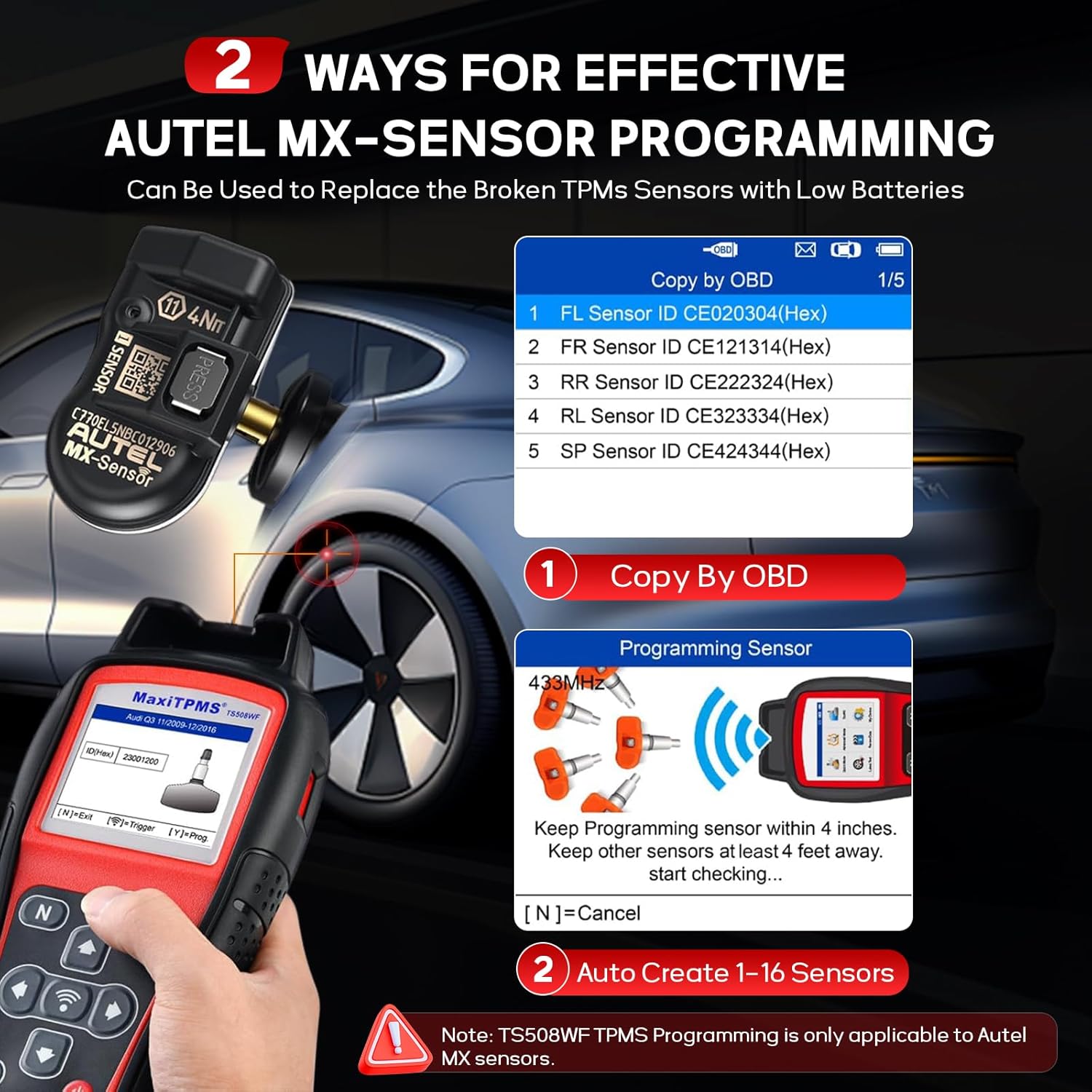
Image 4.3: Methods for programming Autel MX-Sensors.
4.4 TPMS Diagnosis
The TS508WF provides comprehensive diagnostic capabilities for the TPMS system.
- Read TPMS DTCs: Identify and display diagnostic trouble codes related to the TPMS.
- Clear TPMS DTCs: Erase stored trouble codes after repairs are completed. The device will automatically re-check for DTCs.
- On-Screen DTC Description: Provides explanations for detected trouble codes to assist in diagnosis.
Important: Always activate all TPMS sensors before performing TPMS diagnostics to ensure accurate readings.

Image 4.4: The TS508WF's ability to activate and read data from a wide range of TPMS sensors.
5. Maintenance
5.1 Software Updates
As mentioned in Section 3.2, regular software updates are crucial for maintaining the device's functionality and compatibility. Autel provides lifetime free software updates for the TS508WF.
5.2 Data Management
The device allows for data review and printing of diagnostic reports. This feature is useful for record-keeping and further analysis of TPMS issues.
5.3 Device Care
- Keep the device clean and free from dust and debris.
- The protective rubber boot helps guard against grease and water, but avoid submerging the device in liquids.
- Store the device in its carrying case when not in use to prevent damage.
- Ensure the battery is charged regularly to prolong its lifespan. The device features an auto power-off function for battery life conservation.
6. Troubleshooting
This section addresses common issues you might encounter with the Autel MaxiTPMS TS508WF.
6.1 Device Not Powering On
- Check the battery level. Connect the device to the power adapter and allow it to charge for at least 30 minutes before attempting to power it on again.
- Ensure the power adapter and cable are securely connected and functioning correctly.
6.2 Unable to Activate/Relearn Sensors
- Verify that the correct vehicle make, model, and year are selected in the device.
- Ensure the sensor is within the activation range (typically within 4 inches of the tool).
- Check if the sensor battery is depleted.
- For relearn procedures, ensure the vehicle is in the correct mode (e.g., 'TPMS Learn Mode' for Stationary Relearn) or that the OBDII connection is secure for OBD Relearn.
6.3 Programming MX-Sensors Fails
- Confirm that you are attempting to program an Autel MX-Sensor. The TS508WF cannot program other brands of sensors.
- Ensure the MX-Sensor is placed correctly near the device during programming.
6.4 Software Update Issues
- For WiFi updates, ensure a strong and stable internet connection.
- For USB updates, ensure the correct update software is downloaded from the official Autel website and installed properly on your computer.
If you encounter persistent issues not covered here, please contact Autel customer support for assistance.
7. Specifications
| Feature | Specification |
|---|---|
| Brand | Autel |
| Model Number | TS508NJ |
| Power Source | Battery Powered |
| Operating System | Android 4.0 |
| Language | English |
| Item Weight | 13.8 ounces |
| Product Dimensions | 4.13 x 8.46 x 1.46 inches |
| UPC | 791319285614 |
8. Warranty and Support
The Autel MaxiTPMS TS508WF comes with lifetime free software updates, ensuring your device remains current with the latest vehicle data and features.
For technical support, warranty inquiries, or service, please contact Autel customer service through their official website or the contact information provided with your product packaging. Please have your model number (TS508WF) and UPC (791319285614) available when contacting support.
9. Important Safety Information
Read all instructions carefully before using this device. Failure to do so may result in damage to the device, vehicle, or personal injury.
- Always operate the device in a well-ventilated area.
- Do not operate the device near open flames or combustible materials.
- Keep the device away from water, oil, and other liquids.
- Use only the power adapter and cables provided by Autel.
- Do not attempt to disassemble or modify the device. Internal repairs should only be performed by authorized service personnel.
- Wear appropriate personal protective equipment, such as safety glasses, when working on vehicles.
- Ensure the vehicle is safely supported and the ignition is off before connecting or disconnecting the OBDII cable.


