1. Introduction
This manual provides comprehensive instructions for the safe and effective use of your FaceLake HTD8813C No-Touch Forehead Thermometer. Please read this manual thoroughly before using the device and retain it for future reference.
The FaceLake HTD8813C is a non-contact infrared thermometer designed for measuring body temperature from the forehead and surface temperatures of objects. It features a high-sensitivity sensor and microchip for quick and accurate readings.

Figure 1: Front view of the FaceLake HTD8813C No-Touch Forehead Thermometer.
2. Safety Information
- Do not immerse the thermometer in water or other liquids.
- Keep the device away from direct sunlight and extreme temperatures.
- Do not drop or subject the thermometer to strong impact.
- Ensure the sensor is clean before each use for accurate readings.
- This device is intended for household use. Consult a medical professional for health concerns.
- Keep out of reach of children.
3. Product Overview
Familiarize yourself with the components of your FaceLake HTD8813C thermometer:
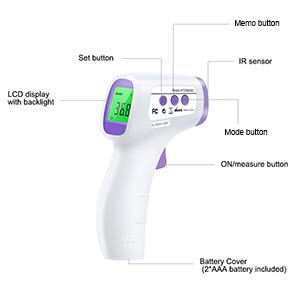
Figure 2: Labeled components of the FaceLake HTD8813C Thermometer.
- IR Sensor: Detects infrared heat for temperature measurement.
- LCD Display: Shows temperature readings, mode, and other indicators.
- ON/Measure Button: Powers on the device and initiates temperature measurement.
- Mode Button: Switches between Body and Surface temperature modes.
- Memo Button: Accesses stored temperature readings.
- Set Button: Used for adjusting settings (e.g., °C/°F, sound).
- Battery Cover: Protects the battery compartment.
4. Setup
4.1. Battery Installation
- Locate the battery cover at the bottom of the handle.
- Slide the battery cover open.
- Insert two AAA batteries, ensuring correct polarity (+/-).
- Close the battery cover securely.
Note: 2 AAA batteries are included with the product.
4.2. Initial Power On
Press the ON/Measure button to power on the thermometer. The LCD display will light up, indicating the device is ready for use.
5. Operating Instructions
5.1. Taking a Body Temperature (Forehead)
- Ensure the thermometer is in "Body" mode. If not, press the "Mode" button to switch.
- Hold the thermometer approximately 1-2 inches (2-5 cm) from the center of the forehead.
- Press and release the ON/Measure button.
- The temperature reading will appear on the LCD display within 1 second.

Figure 3: Measuring forehead temperature.
Note: The LCD display may change color to indicate temperature status (e.g., green for normal, yellow for slight fever, red for high fever).
5.2. Taking a Surface Temperature
- Press the "Mode" button to switch to "Surface" mode.
- Point the thermometer at the desired surface.
- Press and release the ON/Measure button.
- The surface temperature reading will appear on the LCD display.
5.3. Switching Temperature Units (°C/°F)
With the device powered on, press the "Set" button to toggle between Celsius (°C) and Fahrenheit (°F) units. The selected unit will be displayed on the screen.
5.4. Memory Recall
The thermometer can store up to 50 previous temperature readings. To access these readings:
- Press the "Memo" button.
- Each subsequent press of the "Memo" button will cycle through the stored readings, from most recent to oldest.

Figure 4: Memory recall function displaying previous readings.
5.5. Sound On/Off
To turn the sound (beeps) on or off, press and hold the "Set" button for a few seconds until the sound icon appears or disappears on the display.
6. Maintenance
6.1. Cleaning
Wipe the thermometer clean with a soft, dry cloth. For disinfection, use an alcohol swab. Do not use abrasive cleaners or immerse the device in water.
6.2. Storage
Store the thermometer in a cool, dry place, away from direct sunlight and extreme temperatures. Remove batteries if the device will not be used for an extended period.
7. Troubleshooting
- No Display: Check battery installation and ensure batteries are not depleted. Replace if necessary.
- Inaccurate Readings: Ensure the sensor is clean and free from obstructions. Verify the thermometer is held at the correct distance from the forehead. Allow the device to acclimate to room temperature for 30 minutes if moved from a different environment.
- "Lo" or "Hi" on Display: Indicates the measured temperature is outside the normal operating range for body or surface mode.
8. Specifications
| Feature | Detail |
|---|---|
| Brand | FaceLake |
| Model Name | HTD8813C |
| Special Feature | Non-Contact |
| Color | White |
| Age Range (Description) | Adult (also suitable for kids) |
| Included Components | 2 AAA batteries |
| Outer Material | Plastic |
| Specification Met | FDA |
| Display Type | LCD |
| Connectivity Technology | Infrared |
| Product Care Instructions | Wipe Clean |
| Power Source | Battery Powered |
| Number of Batteries | 2 AAA batteries required (included) |
| Upper Temperature Range | 212 Degrees Fahrenheit (100°C) |
| Response Time | 1 second |
| Reusability | Reusable |
| Lower Temperature Range | 32 Degrees Fahrenheit (0°C) |
| Indoor Outdoor Usage | Indoor |
| GTIN | 703457515867 |
9. Warranty and Support
For warranty information or technical support, please refer to the contact details provided with your product packaging or visit the official FaceLake website. Keep your purchase receipt as proof of purchase.


