
1. Introduction
The Beurer IPL 5800 Pure Skin Pro is an advanced device designed for permanent hair removal using Intense Pulsed Light (IPL) technology. This manual provides essential information for the safe and effective use of your device, helping you achieve long-lasting smooth skin.
Key Features:
- Compact design for easy handling and treatment of various body areas.
- 3.1 cm² light surface for efficient and fast treatment sessions.
- Three intensity levels to suit different skin sensitivities.
- Integrated 2-in-1 skin type and skin contact sensor for enhanced safety.
- Automatic flash mode for continuous application.
- Up to 600,000 light pulses for extensive use.
- UV filter to protect the skin during treatment.
- Compatibility with the Beurer MyIPL app for personalized treatment plans.

Image 1.1: The Beurer IPL 5800 Pure Skin Pro device.
2. Important Safety Information
Read all safety warnings and instructions carefully before using the device. Failure to follow these instructions may result in injury or damage to the device.
- Skin and Hair Type Compatibility: The device is not suitable for dark skin tones and particularly light/white hair. IPL technology targets melanin in the hair follicle; therefore, it is most effective on darker hair colors and lighter skin tones.
- UV Filter: The device includes an integrated UV filter to protect your skin from harmful UV radiation during treatment.
- Skin Contact Sensor: Ensure the device is in full contact with the skin for safe and effective operation. The 2-in-1 sensor prevents accidental flashes.
- Eye Protection: Avoid direct eye exposure to the light pulse. Do not look directly into the light window during operation.
- Medical Conditions: Consult a physician before use if you have any underlying medical conditions, are pregnant, or are taking photosensitizing medications.
- Children: Keep the device out of reach of children.

Image 2.1: IPL Skin and Hair Color Compatibility Chart. This chart indicates which skin tones and hair colors are suitable for IPL treatment. Generally, IPL is effective on natural brown to black hair and light to medium skin tones. It is not effective on white, grey, red, or very light blonde hair, nor is it safe for very dark skin tones.
3. Getting Started: Setup
3.1 Preparation Before Use
- Clean Skin: Ensure your skin is clean, dry, and free from any lotions, creams, deodorants, or makeup.
- Shave Area: Shave the area to be treated 12-24 hours before your IPL session. Do not wax, pluck, or use depilatory creams, as the hair root needs to be present for IPL to be effective.
- Skin Test: Perform a skin test on a small area of skin 24 hours before your first full treatment to check for any adverse reactions.
3.2 Device Connection
- Connect the power adapter to the device and then plug it into a suitable electrical outlet.
- The device will enter standby mode, indicated by a specific light pattern.
3.3 MyIPL App Installation
For personalized treatment plans and reminders, download the free Beurer MyIPL app on your smartphone.
- Search for "Beurer MyIPL" in your device's app store.
- Install the app and follow the on-screen instructions to set up your profile and treatment schedule.

Image 3.1: Using the Beurer MyIPL app to manage treatment areas and schedules.
4. Operating Instructions
4.1 Understanding IPL Technology
IPL (Intense Pulsed Light) technology works by emitting broad-spectrum light that is absorbed by the melanin (pigment) in the hair follicle. This light energy is converted into heat, which damages the hair follicle and inhibits future hair growth. Over several treatments, this leads to a significant reduction in hair.
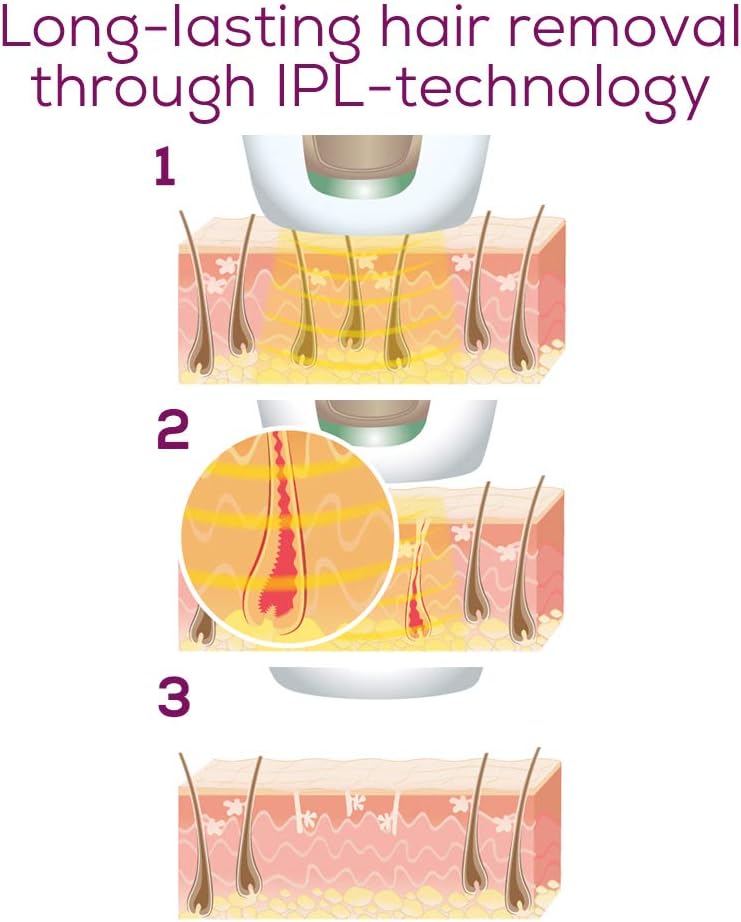
Image 4.1: Illustration of IPL hair removal process.
4.2 Treatment Areas
The Beurer IPL 5800 Pure Skin Pro is suitable for full body use, including:
- Legs
- Arms
- Armpits
- Bikini area
- Chest and abdomen
- Back
- Face (for women only, below the cheekbones)
4.3 Using the Device
- Power On: Press and hold the power button until the device turns on.
- Select Intensity Level: Choose one of the three intensity levels based on your skin tone and comfort. Start with the lowest level and increase if comfortable.
- Apply to Skin: Place the light window firmly against the skin in the desired treatment area. The skin contact sensor will detect proper placement.
- Flash: Press the flash button. For larger areas, use the "auto-flash" mode by holding the flash button down and gliding the device over the skin. The device will emit continuous flashes.
- Move to Next Area: After each flash or glide, move the device to an adjacent area, ensuring slight overlap to cover the entire treatment zone.
- Power Off: After completing your session, press and hold the power button to turn off the device.

Image 4.2: The 3.1 cm² light surface ensures fast and efficient treatment.

Image 4.3: Demonstrating safe application with the skin contact sensor.
4.4 Treatment Schedule
Consistent use is crucial for optimal results. You can expect up to 50% hair reduction after 3-4 treatments. Follow the recommended schedule provided by the MyIPL app or as advised in the full user manual for your specific needs.

Image 4.4: Expected results of long-lasting hair reduction.
5. Care and Maintenance
5.1 Cleaning the Device
- Always ensure the device is turned off and unplugged before cleaning.
- Wipe the light window and the device surface with a soft, dry, or slightly damp cloth. Do not use abrasive cleaners or solvents.
- Ensure no moisture enters the device openings.
5.2 Storage
- Store the device in a cool, dry place, away from direct sunlight and extreme temperatures.
- Keep the device in its original packaging or a protective case to prevent damage.
6. Troubleshooting
If you encounter issues with your Beurer IPL 5800 Pure Skin Pro, refer to the following common solutions:
- Device Not Turning On: Ensure the power adapter is securely connected to both the device and the electrical outlet. Check if the outlet is functional.
- No Flash Emitted: Verify that the light window is in full contact with your skin. The skin contact sensor must be activated for a flash to occur. Ensure the device is not in standby mode.
- Skin Irritation: If you experience redness or discomfort, reduce the intensity level. Ensure your skin is clean and dry before treatment. If irritation persists, discontinue use and consult a healthcare professional.
- App Connectivity Issues: Ensure your smartphone's Bluetooth is enabled and the device is within range. Restart both the app and the device if necessary.
- Uneven Results: Ensure you are covering all areas with slight overlap and maintaining a consistent treatment schedule.
For further assistance, please contact customer support.
7. Technical Specifications
| Specification | Detail |
|---|---|
| Brand | Beurer |
| Model Number | IPL58P (57500) |
| Item Dimensions (L x W x H) | 21.9 x 3.1 x 0.1 cm |
| Item Weight | 0.33 Kilograms |
| Light Surface Area | 3.1 cm² |
| Light Pulses | Up to 600,000 |
| Intensity Levels | 3 |
| Power Source | Battery Powered (2 AA batteries required, included) |
| Voltage | 230 Volts |
| Operating Time | Approximately 20 minutes for full body treatment |
| Water Resistance Level | Not Water Resistant |
8. Warranty and Customer Support
8.1 Warranty Information
Egyserv Company grants a 1-year service warranty on all Beurer products, with the exception of Blood Pressure Monitors which have a 3-year warranty. To activate your warranty, please visit egyservshop.com, enter the required data, and upload your invoice on the activation page.
8.2 Customer Support
For any inquiries, technical support, or warranty claims, please contact Beurer customer service through Egyserv Company at the following locations:
- Alexandria Branch: 40 Tout ankh amoun St, Smouha, second floor. Mobile Number: 01000777452
- Cairo Branch: 26 Mohamed Mekled St, Nasr City, 8th district, first floor. Mobile Number: 01000777453