
Frigidaire EMW1220AMZ
FRIGIDAIRE 1.2 cu ft Microwave, Digital Air Fryer, Convection Oven, Combo-Fry User Manual
Model: EMW1220AMZ
Introduction
This manual provides comprehensive instructions for the safe and efficient operation of your new Frigidaire 1.2 cu ft Microwave, Digital Air Fryer, Convection Oven, Combo-Fry appliance. This versatile appliance combines the functions of a microwave, air fryer, and convection oven, offering multiple cooking methods in one compact unit. Please read this manual thoroughly before use and retain it for future reference.
Important Safety Instructions
When using electrical appliances, basic safety precautions should be followed, including the following:
- Read all instructions before using the appliance.
- Ensure the voltage in your home corresponds to the voltage stated on the appliance's rating label.
- To reduce the risk of fire, electric shock, or injury, do not immerse the cord, plugs, or the appliance in water or other liquid.
- Close supervision is necessary when any appliance is used by or near children.
- Do not operate any appliance with a damaged cord or plug, or after the appliance malfunctions or has been damaged in any manner.
- Only use accessories recommended by the manufacturer.
- Do not use outdoors.
- Do not let the cord hang over the edge of a table or counter, or touch hot surfaces.
- Always place the appliance on a stable, level surface.
- Do not block any ventilation openings.
- Do not heat liquids or other foods in sealed containers as they are liable to explode.
- Regularly inspect the appliance for any signs of damage.
Product Overview
Familiarize yourself with the components of your Frigidaire multi-functional appliance.

Figure 1: Front view of the Frigidaire 1.2 cu ft Microwave, Digital Air Fryer, Convection Oven, Combo-Fry appliance. It features a stainless steel finish, a large viewing window, and a digital control panel on the right side.
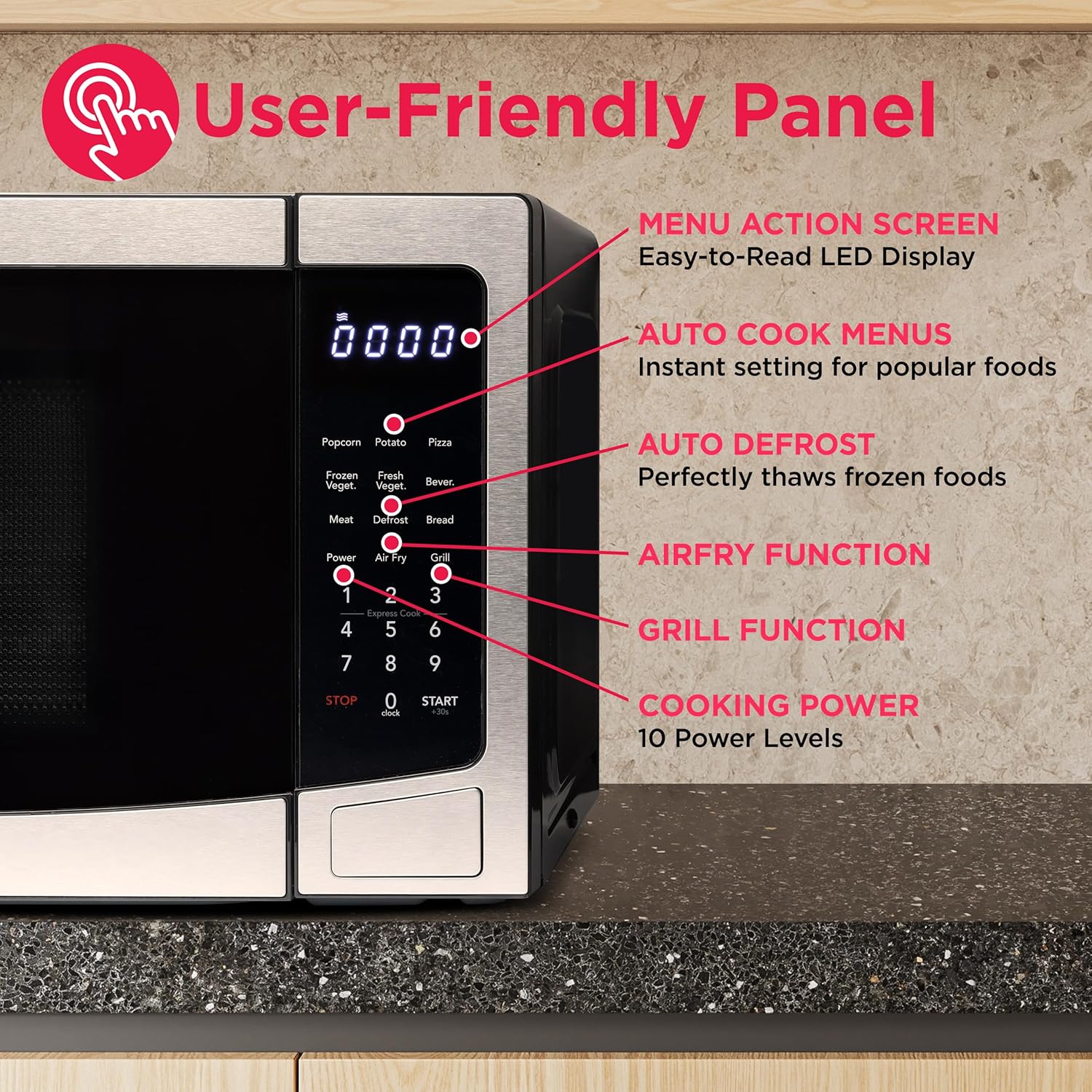
Figure 2: A detailed view of the user-friendly control panel. Key features include a menu action screen, auto cook menus, auto defrost, air fry function, grill function, and cooking power levels (10 levels).

Figure 3: The interior of the appliance demonstrating its multi-functional capabilities. The top image shows the microwave setup with a glass turntable. The bottom left shows the air fryer setup with a basket and stand, and the bottom right shows the convection oven setup with a rack.
Components:
- Main Unit: The primary appliance housing the microwave, air fryer, and convection oven components.
- Glass Turntable: Used for microwave and convection cooking to ensure even heating.
- Turntable Ring: Supports the glass turntable.
- Bake Plate: A specialized plate for baking functions.
- Air Frying Kit: Includes a basket and rack designed for air frying.
- Control Panel: Digital display and touch buttons for operation.
Setup
- Unpacking: Carefully remove the appliance and all packing materials. Check for any damage. Do not operate if damaged.
- Placement: Place the appliance on a stable, level surface that is strong enough to hold its weight. Ensure there is adequate ventilation space: at least 2 inches (5 cm) on both sides, 8 inches (20 cm) at the top, and 2 inches (5 cm) at the rear. Do not block any air vents.
- Power Connection: Plug the power cord into a grounded electrical outlet. Ensure the outlet meets the electrical requirements of the appliance (110 Volts).
- Initial Setup:
- Setting the Clock: Press the "Clock" button. Use the number pad to enter the current time. Press "Clock" again to confirm.
- Turntable Assembly: Place the turntable ring in the center of the oven cavity. Place the glass turntable securely on top of the ring.

Figure 4: Dimensional diagram of the appliance, indicating a height of 11.8 inches, a width of 21.3 inches, and a depth of 16.1 inches. These measurements are crucial for proper placement and ventilation.
Operating Instructions
Microwave Function
The microwave function offers quick and efficient heating and cooking.
- Time Cook:
- Place food in a microwave-safe container on the glass turntable.
- Enter desired cooking time using the number pad.
- Press "Power Level" repeatedly to select desired power (1-10 levels). Default is 100% power.
- Press "Start" to begin cooking.
- One-Touch Cook Menus: The appliance features 5 pre-set one-touch cook menus for common foods.
- Potato: For baking potatoes.
- Popcorn: For popping popcorn.
- Beverage: For heating drinks.
- Reheat: For reheating pre-cooked food.
- Frozen Dinner: For cooking frozen meals.
To use, simply press the corresponding menu button. The appliance will automatically set the time and power level. Press "Start" to begin.
- +30 Seconds: Press "Start/+30 Sec" to quickly start cooking at full power for 30 seconds, or to add 30 seconds to an ongoing cooking cycle.

Figure 5: Illustration of the "Quick Start Cooking" feature, allowing users to cook and heat meals with a single touch.

Figure 6: A visual representation of the 8 automatic menus available, including popcorn, potato wedges, pizza, mixed vegetables, frozen vegetables, hot beverage, chicken wings, and bread. These options provide one-touch cooking for various food types.
Air Fryer Function
The air fryer function uses hot air circulation to cook food with a crispy texture, often with less oil than traditional frying methods.
- Use the provided Air Frying Kit (basket and rack) for optimal results.
- Place food in the air frying basket, ensuring not to overcrowd it for even cooking.
- Place the basket on the rack, then place the assembly on the glass turntable inside the oven.
- Press the "Air Fry" button.
- Select the desired air fry preset or manually set time and temperature.
- Press "Start" to begin.
- For best results, shake or flip food halfway through cooking.
Convection Oven Function
The convection oven function uses a fan to circulate hot air, providing more even and faster cooking, similar to a conventional oven.
- Place food on the bake plate or a suitable oven-safe dish on the glass turntable.
- Press the "Convection" button.
- Select the desired temperature using the number pad or temperature presets.
- Enter the desired cooking time.
- Press "Start" to begin.
- Preheating may be required for some recipes.
Combo-Fry Function
This function combines microwave power with convection or air fry for faster cooking with browning/crisping.
- Place food in a suitable dish (microwave and oven safe).
- Press the "Combi. Micro+Conv." or "Combi. Micro+Air Fry" button.
- Select the desired combination setting (e.g., Combi 1, Combi 2, Combi 3).
- Enter the desired cooking time.
- Press "Start" to begin.
Defrost Function
The appliance offers defrosting by time or by weight.
- Defrost by Weight:
- Press "Defrost/Time/Weight" once.
- Enter the weight of the food using the number pad.
- Press "Start".
- Defrost by Time:
- Press "Defrost/Time/Weight" twice.
- Enter the desired defrosting time.
- Press "Start".
Maintenance and Cleaning
Regular cleaning and maintenance will ensure the longevity and optimal performance of your appliance.
- Before Cleaning: Always unplug the appliance from the power outlet and allow it to cool completely.
- Interior Cleaning:
- Wipe the interior cavity with a damp cloth and mild detergent after each use.
- For stubborn stains, place a bowl of water with lemon slices inside and microwave for 2-3 minutes to loosen residue, then wipe clean.
- The glass turntable and turntable ring can be removed and washed in warm, soapy water or in the dishwasher.
- Exterior Cleaning:
- Wipe the exterior surfaces with a soft, damp cloth. For stainless steel, use a specialized stainless steel cleaner.
- Do not use abrasive cleaners or scouring pads, as they can scratch the surface.
- Accessories: Wash the bake plate and air frying kit in warm, soapy water after each use. Ensure they are completely dry before storing or reusing.
Troubleshooting
If you encounter issues with your appliance, refer to the following common problems and solutions:
| Problem | Possible Cause | Solution |
|---|---|---|
| Appliance does not start. | Not plugged in; door not closed properly; fuse blown or circuit breaker tripped. | Ensure plug is firmly in outlet; close door securely; check household fuse/circuit breaker. |
| Food is not cooking evenly. | Food not stirred/rotated; incorrect power level/temperature; turntable not rotating. | Stir or rotate food during cooking; adjust settings; ensure turntable is correctly placed and not obstructed. |
| Excessive steam or condensation inside. | Normal during cooking, especially with high-moisture foods. | Wipe interior with a dry cloth after use. Ensure proper ventilation around the unit. |
| Loud fan noise during operation. | Normal operation for cooling components, especially after convection/air fry. | This is normal. The fan will continue to run for a short period after cooking to cool the unit. |
| Air fryer results are not crispy. | Food overcrowded; insufficient cooking time/temperature; not using air fry kit. | Cook in smaller batches; increase time/temperature; ensure air fry kit is used and food is spread out. |
If the problem persists after trying these solutions, please contact customer support.
Specifications
| Feature | Detail |
|---|---|
| Brand | Frigidaire |
| Model Number | EMW1220AMZ |
| Capacity | 1.2 Cubic Feet |
| Microwave Power | 900 Watts |
| Oven Power | 1000 Watts |
| Convection Power | 1500 Watts |
| Voltage | 110 Volts |
| Material | Stainless Steel |
| Product Dimensions (L x W x H) | 50.09 x 53.98 x 30.23 cm (19.72 x 21.25 x 11.9 inches) |
| Item Weight | 19.05 kg (42 lbs) |
| Special Features | Programmable, Multi-function (Microwave, Air Fryer, Convection Oven, Combo-Fry) |
| Included Components | Microwave, Bake Plate, Air Frying Kit |
Warranty and Support
For warranty information, please refer to the warranty card included with your purchase or visit the official Frigidaire website. For technical support, troubleshooting assistance beyond this manual, or to order replacement parts, please contact Frigidaire Customer Service.
Manufacturer: CURTIS INTERNATIONAL LTD
Place of Business: Mississauga, ON L5S 2A4, CA
Please have your model number (EMW1220AMZ) and purchase date ready when contacting support.
Related documentsEMW1220AMZ

Ask a question about this manual
Ask about setup, troubleshooting, compatibility, parts, safety, or missing instructions. Manuals+ will review the question and use this page’s manual context to help answer it.