
iLiving ILG8SF12V-ST
iLIVING 12" Wall Mounted Shutter Exhaust Fan User Manual
Model: ILG8SF12V-ST | Brand: iLiving
1. Introduction
This manual provides instructions for the safe and efficient operation of your iLIVING 12-inch Wall Mounted Shutter Exhaust Fan. This fan is designed to remove excess heat, moisture, and odors from various commercial and residential locations such as garages, greenhouses, workshops, and barns. It features aluminum blades, OSHA compliant wire guards, and automatic shutters. The fan includes a Thermospeed Controller for temperature and speed regulation.
2. Product Features
- Powerful Air Ventilation: Provides 960 CFM airflow, suitable for areas up to 1400 square feet. Operates at 115V, 0.6A, with a 1/20 Horse Power motor and 1650 RPM.
- Speed and Thermal Control: Equipped with the Thermospeed Controller (Model ILG8SFST) for variable speed adjustment and temperature regulation (32°F - 130°F). Allows for automatic ON/OFF cycling based on desired temperature.
- Durable Construction: Features an industrial-grade galvanized steel frame, aluminum shutters, and fan blades. The motor is a reliable direct-drive, permanently lubricated, and thermally protected unit.
- Safety and Compliance: UL/cUL certified and includes OSHA compliant wire guards for enhanced safety. Noise level is below 65dB.
- Efficient Air Movement: 12-inch steel blades with a deep pitch angle ensure maximum air movement.
- Automatic Shutters: Shutters open and close automatically in tandem with fan operation, providing protection against elements and pests.

Image: iLIVING 12-inch Wall Mounted Shutter Exhaust Fan with Thermospeed Controller.
3. Package Contents
Verify that all components are present before beginning installation:
- 1 x Exhaust Fan
- 1 x Thermospeed Controller
- 1 x Owner's Manual
4. Safety Information
WARNING: Read and understand all instructions before using this product. Failure to follow all instructions listed below may result in electric shock, fire, and/or serious personal injury.
- Always disconnect power before servicing or cleaning the fan.
- Ensure proper grounding to reduce the risk of electric shock.
- Do not operate any fan with a damaged cord or plug. Discard fan or return to an authorized service facility for examination and/or repair.
- Do not run cord under carpeting. Do not cover cord with throw rugs, runners, or similar coverings. Arrange cord away from traffic area and where it will not be tripped over.
- Use this fan only as described in this manual. Any other use not recommended by the manufacturer may cause fire, electric shock, or injury to persons.
- This fan is for indoor use. Do not use outdoors.
- Keep fingers and other objects away from the fan blades and moving parts.
5. Setup and Installation
The iLIVING 12" Wall Mounted Shutter Exhaust Fan comes fully assembled. Installation primarily involves mounting the unit and connecting the electrical hardwiring.
5.1 Mounting the Fan
- Prepare the Opening: Create an opening in the wall suitable for the fan's dimensions (approximately 15"W x 15"H). Ensure the opening is clear of obstructions and electrical wiring.
- Position the Fan: Carefully place the fan into the prepared opening. The fan is designed for wall-mount installation.
- Secure the Fan: Use appropriate fasteners (screws, bolts) to secure the fan frame to the wall structure. Ensure it is firmly mounted to prevent vibration and movement during operation.

Image: General guideline for wall mounting the exhaust fan.
5.2 Electrical Connection
The fan requires electrical hardwiring. It is recommended that a qualified electrician perform the electrical installation to ensure compliance with local codes and safety standards.
- Connect the fan's power cord to the Thermospeed Controller.
- Plug the Thermospeed Controller into a standard 115V electrical outlet.

Image: The iLIVING 12-inch Wall Mounted Shutter Exhaust Fan with its power cord and Thermospeed Controller.
6. Operating Instructions
The iLIVING exhaust fan is controlled by the included Thermospeed Controller, which allows for both manual and automatic operation based on temperature.
6.1 Thermospeed Controller Overview
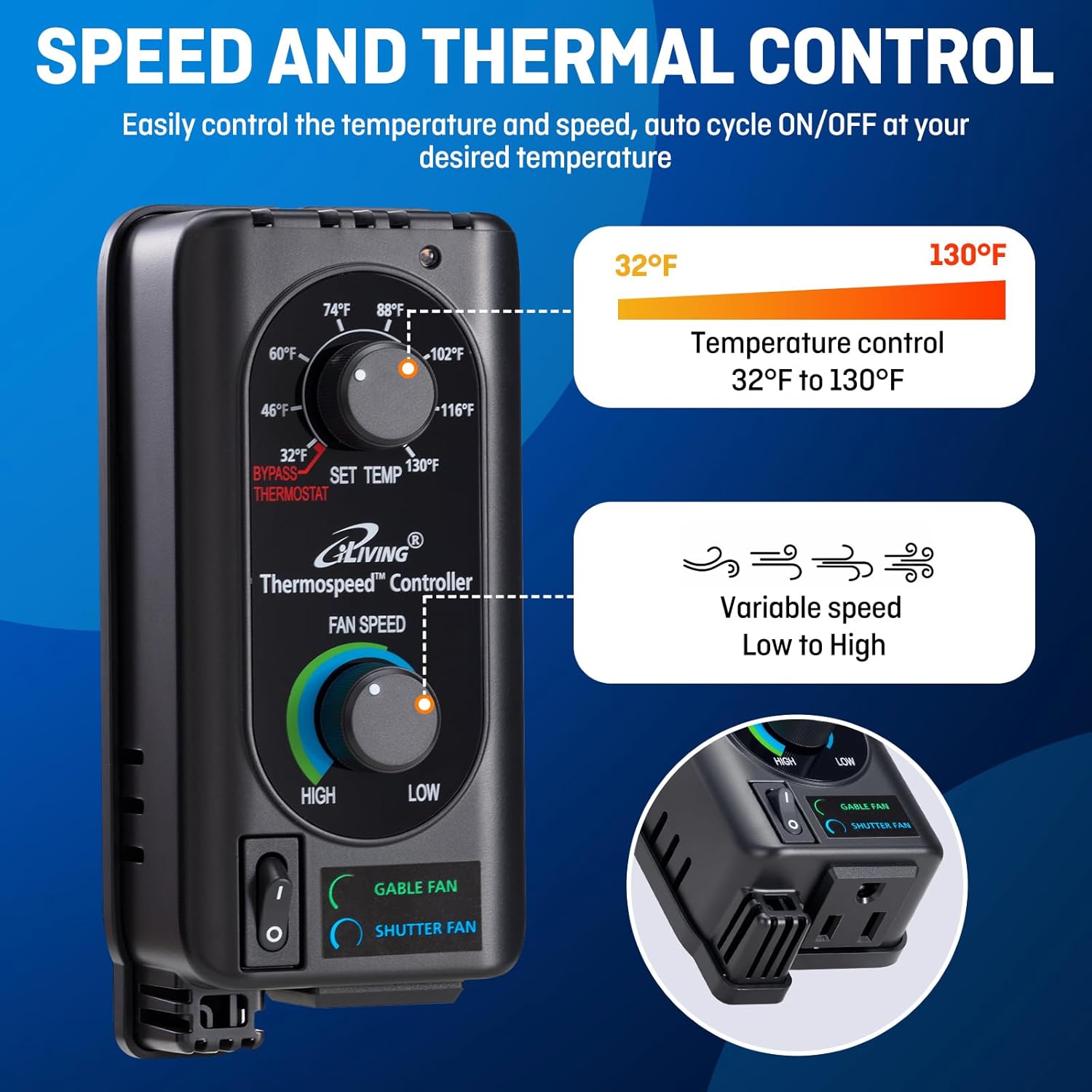
Image: The Thermospeed Controller with dials for temperature and fan speed.
6.2 Setting the Temperature
- Locate the 'SET TEMP' dial on the Thermospeed Controller.
- Rotate the dial to your desired temperature setting, ranging from 32°F to 130°F.
- When the ambient room temperature exceeds the set temperature, the fan will automatically turn on to cool the area.
- Once the room temperature drops below the set temperature, the fan will automatically turn off.
6.3 Adjusting Fan Speed
- Locate the 'FAN SPEED' dial on the Thermospeed Controller.
- Rotate the dial to adjust the fan speed from 'LOW' to 'HIGH' as needed for optimal ventilation.
Video: Demonstration of the Thermospeed Temperature and Speed Controller features.
6.4 Application Examples
The fan is suitable for various environments requiring ventilation:

Image: Examples of wide application for the iLIVING exhaust fan in various settings.
7. Maintenance
Regular maintenance ensures optimal performance and longevity of your exhaust fan.
- Cleaning: Disconnect power before cleaning. Use a dry cloth for general cleaning. For deeper cleaning, follow manufacturer guidelines for dry cleaning the fan components. Avoid using harsh chemicals or abrasive materials.
- Motor: The motor is permanently lubricated and requires no additional lubrication.
- Shutters: Periodically check the automatic shutters for smooth operation and clear any debris that may obstruct their movement.
- Wire Guards: Ensure wire guards are intact and free from damage to maintain safety compliance.

Image: Fully enclosed shutters help protect the motor and keep out debris.
8. Troubleshooting
If you encounter issues with your iLIVING exhaust fan, refer to the following common problems and solutions:
| Problem | Possible Cause | Solution |
|---|---|---|
| Fan does not turn on | No power; Thermostat setting too high; Fan speed set to 'OFF' or 'LOW' | Check power connection and outlet; Adjust thermostat to a lower temperature than ambient; Increase fan speed. |
| Fan runs continuously | Thermostat setting too low; Room temperature consistently high | Adjust thermostat to a higher temperature; Ensure proper sizing for the area. |
| Excessive noise or vibration | Loose mounting; Debris in fan blades; Damaged motor/blades | Check and tighten mounting hardware; Disconnect power and clear debris; Contact customer support if damage is suspected. |
| Shutters not opening/closing | Obstruction; Mechanism issue | Disconnect power and clear any obstructions; Contact customer support if mechanism is faulty. |
9. Specifications
| Attribute | Detail |
|---|---|
| Brand | iLiving |
| Model Name | ILG8SF12V-ST |
| Electric Fan Design | Exhaust Fan |
| Power Source | Corded Electric |
| Voltage | 115 Volts |
| Wattage | 65 watts |
| Air Flow Capacity | 960 Cubic Feet Per Minute (CFM) |
| Coverage Area | Up to 1400 square feet |
| Blade Length | 12 Inches |
| Speed | 1650 RPM |
| Noise Level | Less than 65 Decibels |
| Product Dimensions | 5.75"D x 15"W x 15"H |
| Item Weight | 10.15 Pounds |
| Installation Type | Wall Mount |
| Special Features | Corrosion Resistant, Speed Control, Temperature Control, Weather Resistant |
| Motor Type | Permanently Lubricated |
| Certification | UL, cUL |
10. Warranty
This iLIVING product comes with a 1-Year Limited Component Warranty. For specific terms and conditions, please refer to the warranty documentation included with your product or contact customer support.
11. Customer Support
For any questions, concerns, or assistance with your iLIVING 12" Wall Mounted Shutter Exhaust Fan, please contact our local customer support team. Refer to the product packaging or the official iLIVING website for contact details.

Image: iLIVING customer support information.
Related documentsILG8SF12V-ST


Ask a question about this manual
Ask about setup, troubleshooting, compatibility, parts, safety, or missing instructions. Manuals+ will review the question and use this page’s manual context to help answer it.