
1. Product Overview
The Dpofirs UHF Modulator is an AV to RF converter designed to integrate audio/video sources into a television system using an RF signal. This device allows you to connect a set-top box or other AV sources to older televisions or distribute the signal across a local CATV system. It supports both PAL and NTSC video formats and includes an IR extender function for remote control of the source device.
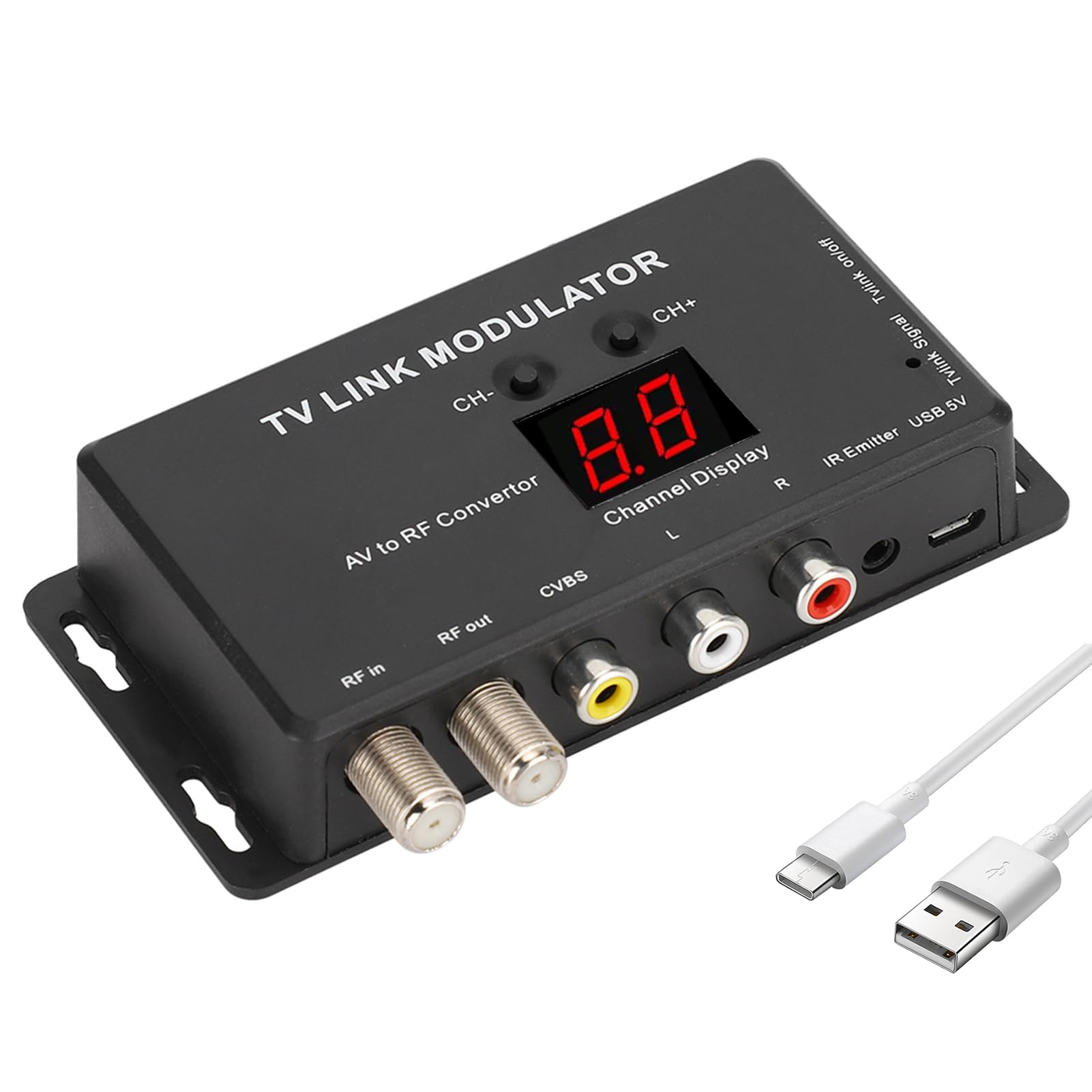
Image 1.1: Front view of the Dpofirs UHF Modulator, showing RF in/out, CVBS, L/R audio, IR Emitter, and USB 5V ports, along with channel display and CH-/CH+ buttons.
Key Features:
- UHF Modulator: Converts AV signals to UHF RF, suitable for local CATV systems.
- PAL/NTSC Support: Compatible with both PAL and NTSC video standards.
- AV to RF Conversion: Connects various A/V sources like set-top boxes to RF inputs.
- IR Extender: Allows remote control of the source device from a different location.
- Adjustable Output: Features adjustable audio/video output levels and selectable output channels.
- USB Powered: Conveniently powered via a 5V USB connection.
2. Package Contents
Please verify that all items are present in the package:
- Dpofirs UHF Modulator Unit
- IR Emitter Cable
- USB Power Cable

Image 2.1: The UHF Modulator unit shown with its accompanying IR Emitter cable and USB power cable.
3. Setup Instructions
- Connect AV Source: Connect your AV source (e.g., set-top box, DVD player) to the modulator's CVBS (yellow) and L/R Audio (white/red) input ports using standard RCA cables.
- Connect to TV: Connect the "RF out" port of the modulator to the "RF in" (antenna/cable) port of your television using a coaxial cable. If you have an existing antenna or cable signal, connect it to the "RF in" port of the modulator, then connect the "RF out" to your TV.
- Connect IR Emitter (Optional): If using the IR extender function, plug the IR Emitter cable into the "IR Emitter" port on the modulator. Position the IR emitter head near the IR receiver window of your AV source device (e.g., set-top box) to allow remote control signals to pass through.
- Power On: Connect the USB power cable to the "USB 5V" port on the modulator and plug the other end into a 5V USB power adapter (not included) or a compatible USB port on your TV or other device. The channel display should light up.
- Tune TV: Turn on your television and perform an automatic channel scan or manually tune to the output channel selected on the modulator. Use the CH- and CH+ buttons on the modulator to select the desired output channel. Ensure your TV is set to the correct input source (Antenna/Cable).

Image 3.1: Angled view highlighting the various input and output ports for connecting the modulator to AV sources and a television.
Video 3.1: An official product video demonstrating the setup and basic operation of the Dpofirs UHF Modulator, including connecting cables and tuning a television.
4. Operating Instructions
- Channel Selection: Use the "CH-" and "CH+" buttons on the modulator to cycle through available output channels. The selected channel will be displayed on the digital display. Ensure your television is tuned to this same channel.
- PAL/NTSC Selection: The modulator supports both PAL and NTSC. The system automatically detects the input signal format. If manual adjustment is needed, refer to the device's specific settings (not explicitly detailed in provided data, but implied by "PAL optional").
- IR Extender Usage: Once the IR Emitter is correctly positioned and connected, your existing remote control for the AV source device will function through the modulator, allowing you to control the source from a different room or location where the TV is located.
- TV Link Signal: The "TVlink Signal" and "TVlink on/off" feature (if present and active) is typically used in conjunction with specific TV link systems to provide power or control signals over the coaxial cable. Consult your TV link system's documentation for compatibility and usage.
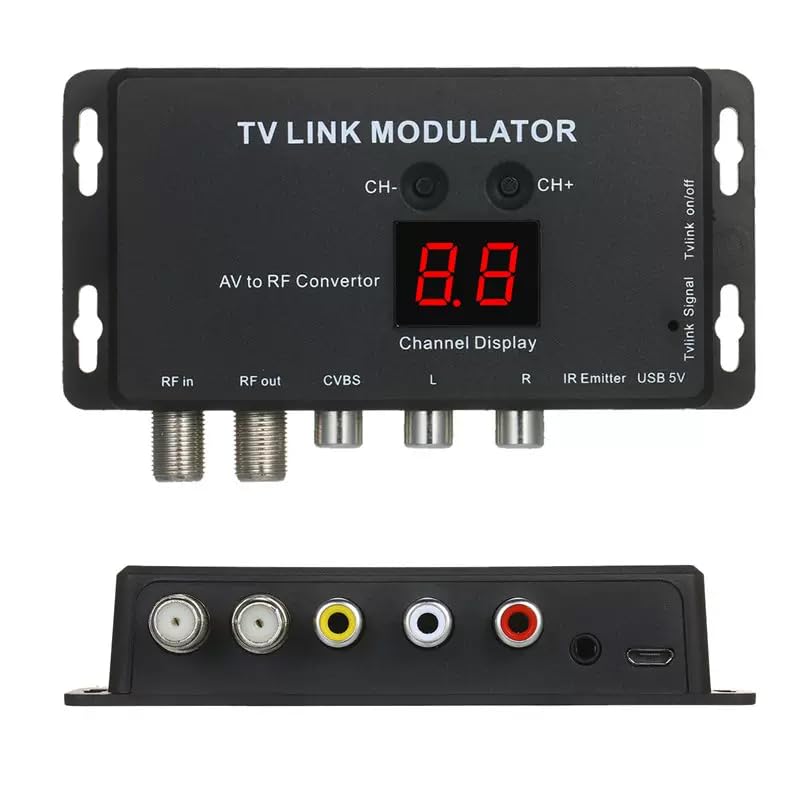
Image 4.1: Top view of the modulator, highlighting the CH- and CH+ buttons for channel selection and the digital channel display.
5. Maintenance
To ensure the longevity and optimal performance of your Dpofirs UHF Modulator, follow these maintenance guidelines:
- Cleaning: Use a soft, dry cloth to clean the exterior of the unit. Avoid using liquid cleaners or abrasive materials.
- Environment: Keep the modulator in a dry environment, away from direct sunlight, high temperatures, and excessive humidity.
- Ventilation: Ensure proper ventilation around the unit to prevent overheating. Do not block any ventilation openings.
- Cable Connections: Periodically check all cable connections to ensure they are secure and free from damage.
6. Troubleshooting
If you encounter issues with your Dpofirs UHF Modulator, please refer to the following troubleshooting steps:
| Problem | Possible Cause | Solution |
|---|---|---|
| No picture or sound on TV. |
|
|
| Poor picture quality (grainy, distorted). |
|
|
| No audio or distorted audio. |
|
|
| IR extender not working. |
|
|
7. Specifications
| Feature | Description |
|---|---|
| Brand | Dpofirs |
| Model Number | Dpofirsrxy319e4wk |
| Interface Type | USB (for power) |
| Number of Channels | 2 (implied by product title, though specific channel range not provided) |
| Video Input | CVBS (RCA Yellow) |
| Audio Input | L/R RCA (White/Red) |
| RF Output | Coaxial F-type connector |
| Power Supply | USB 5V |
| Video System | PAL/NTSC (selectable/auto-detect) |
8. Warranty and Support
Dpofirs is committed to providing quality products and customer satisfaction. This product comes with a complete after-sales service. If you have any questions about the product, require technical assistance, or are not satisfied with your purchase, please contact Dpofirs customer support. Details for contacting support are typically found on the product packaging or the retailer's website.
Please retain your proof of purchase for warranty claims.