
Beatfoxx SDH-340
Beatfoxx SDH-340 Silent Disco V2 Wireless Stereo Headset User Manual
Model: SDH-340 | Brand: Beatfoxx
Introduction
Thank you for choosing the Beatfoxx SDH-340 Silent Disco V2 Wireless Stereo Headset. This manual provides detailed instructions for the proper use, setup, maintenance, and troubleshooting of your new headset. Please read this manual thoroughly before operating the device to ensure optimal performance and longevity.
Safety Information
- Do not expose the headset to extreme temperatures, humidity, or direct sunlight.
- Avoid dropping or subjecting the headset to strong impacts.
- Do not disassemble or attempt to repair the headset yourself. This will void the warranty.
- Keep the headset away from water and other liquids. The headset is not waterproof.
- Prolonged listening at high volume levels can cause permanent hearing damage. Adjust the volume to a safe level.
- Dispose of the battery and electronic components responsibly according to local regulations.
What's in the Box
- Beatfoxx SDH-340 Silent Disco V2 Wireless Stereo Headset
- 3.5 mm Audio Cable
- USB Charging Cable
- User Manual (this document)
Product Overview
Familiarize yourself with the various components and controls of your Beatfoxx SDH-340 headset.

Figure 1: Beatfoxx SDH-340 Silent Disco V2 Headset (Front View)
This image shows the overall design of the Beatfoxx SDH-340 headset, highlighting its sleek black finish and the illuminated Beatfoxx logo on the earcups.
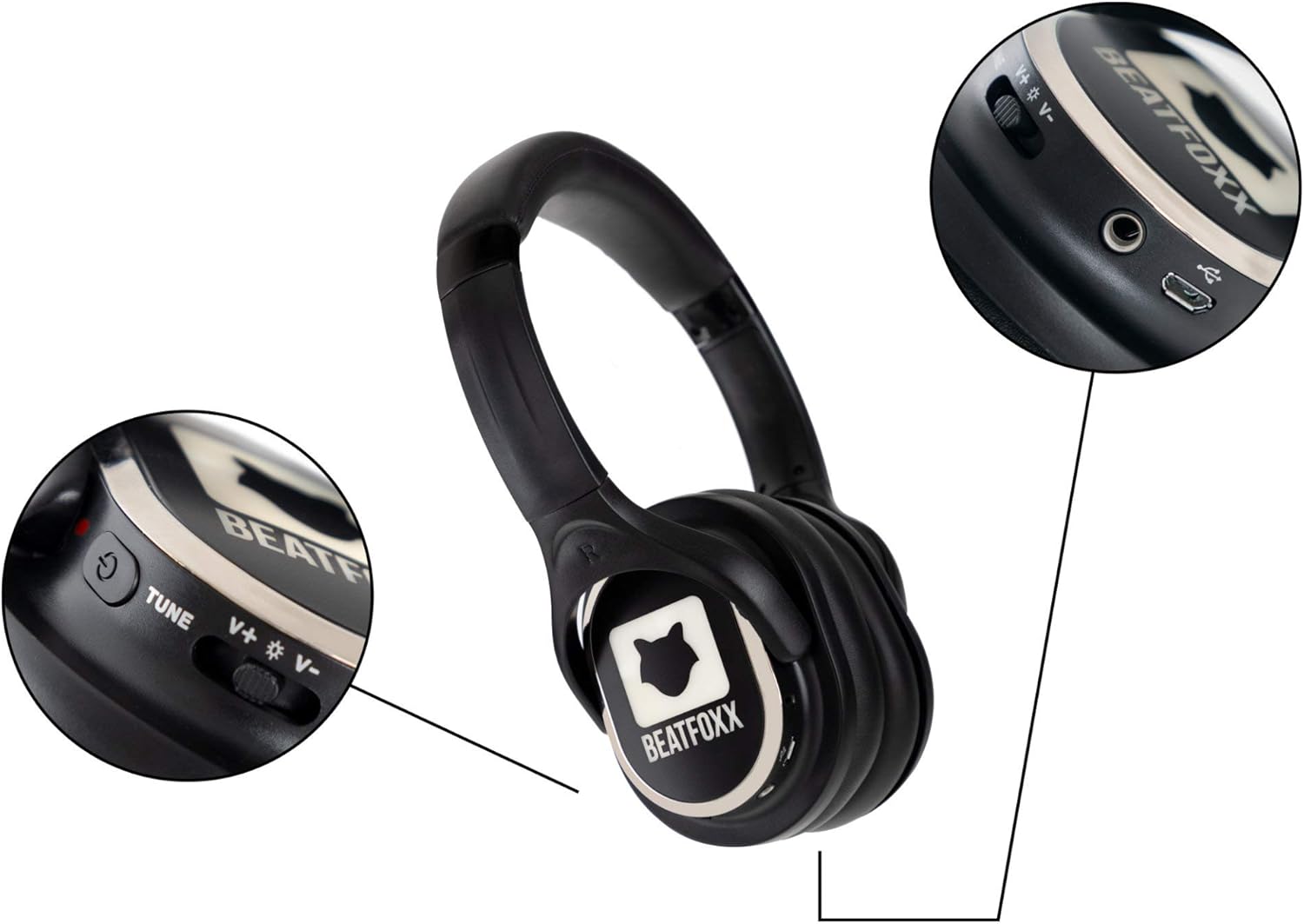
Figure 2: Headset Controls and Ports
This image provides a close-up view of the headset's controls, including the volume rocker, channel tune button, power switch, 3.5mm audio jack, and micro USB charging port.

Figure 3: Adjustable Headband Mechanism
This image illustrates the adjustable headband, allowing users to customize the fit for maximum comfort. The arrows indicate the direction of adjustment.
Key Components:
- Power Switch: Turns the headset on or off.
- Volume Control: Adjusts the audio output level.
- Channel Switch (Tune): Selects between the 3 available reception channels (Blue, Red, Green).
- LED Illumination: Indicates the active channel and can be toggled on/off.
- 3.5mm Audio Jack: For wired connection to audio sources.
- Micro USB Charging Port: For recharging the internal battery.
- Adjustable Headband: Ensures a comfortable and secure fit.
- Soft Ear Pads: Provide comfort during extended use.
Setup
1. Initial Charging
Before first use, fully charge the headset. The integrated lithium-polymer battery (600 mAh) requires approximately 4 hours for a full charge.
- Connect the supplied USB charging cable to the micro USB port on the headset.
- Connect the other end of the USB cable to a USB power source (e.g., computer USB port, USB wall adapter, power bank).
- The LED indicator will show charging status (red for charging, green for fully charged).

Figure 4: Headset Charging Connections
This image demonstrates how to connect the USB charging cable to the headset and various power sources such as a computer, power bank, or wall adapter.
2. Wired Connection (Optional)
The headset can also be used with a wired connection using the 3.5mm audio cable.
- Insert one end of the 3.5mm audio cable into the 3.5mm jack on the headset.
- Insert the other end into the audio output port of your device (e.g., smartphone, tablet, laptop).

Figure 5: Wired Headset Usage
This image shows a user connecting the headset to a smartphone using the 3.5mm audio cable, illustrating the wired usage option.
Operating Instructions
1. Power On/Off
- To power on the headset, slide the power switch to the "ON" position. The LED illumination will light up.
- To power off the headset, slide the power switch to the "OFF" position. The LED illumination will turn off.
2. Channel Selection
The headset supports 3 distinct reception channels, indicated by different LED colors.
- Press the "Tune" button to cycle through the available channels: Blue, Red, and Green.
- Select the channel that matches the audio source you wish to listen to.
3. Volume Adjustment
- Use the volume rocker switch to increase or decrease the audio volume.
- Push the rocker up to increase volume (+).
- Push the rocker down to decrease volume (-).
4. LED Illumination Control
The LED illumination on the earcups can be turned off if desired.
- Locate the LED switch (often integrated with the power or channel switch, refer to Figure 2).
- Toggle the switch to turn the LED illumination on or off.

Figure 6: Silent Disco Event with Headsets
This image depicts individuals at a silent disco event, each wearing a Beatfoxx headset and enjoying their chosen audio channel, indicated by the glowing earcups.
Maintenance
Cleaning
- Wipe the headset with a soft, dry cloth.
- Do not use abrasive cleaners, alcohol, or solvents, as these may damage the surface.
- For ear pads, gently wipe with a slightly damp cloth and allow to air dry completely before use.
Storage
- Store the headset in a cool, dry place away from direct sunlight and extreme temperatures.
- If storing for an extended period, charge the battery every 3-6 months to maintain battery health.
Troubleshooting
| Problem | Possible Cause | Solution |
|---|---|---|
| No sound from headset. | Headset is off; Battery is low; Incorrect channel selected; Volume too low; Transmitter issue. | Ensure headset is ON; Charge the battery; Select the correct channel (Blue, Red, or Green); Increase volume; Check the silent disco transmitter for proper operation. |
| LED illumination not working. | LED feature is turned off; Battery is low. | Toggle the LED switch to ON; Charge the battery. |
| Short battery life. | Not fully charged; High volume usage; Old battery. | Ensure full charge (4 hours); Reduce volume; Battery degradation is normal over time. |
| Distorted audio. | Weak signal; Interference; Volume too high. | Move closer to the transmitter; Avoid sources of strong electromagnetic interference; Reduce volume. |
Specifications
| Feature | Specification |
|---|---|
| Model | SDH-340 |
| Connectivity Technology | RF UHF Wireless |
| Reception Channels | 3 (Blue, Red, Green LED indication) |
| Speaker Diameter | 38 mm Mylar membrane |
| Frequency Response | 20 - 15,000 Hz |
| Signal-to-Noise Ratio (SNR) | >80dB |
| Total Harmonic Distortion (THD) | <1% |
| Battery Type | Integrated Lithium-Polymer (600 mAh) |
| Battery Life | 8 - 10 hours (depending on usage and volume) |
| Charging Time | Approx. 4 hours |
| Weight | 225 grams |
| Material | Faux Leather (ear pads) |
| Included Components | 3.5 mm Audio Cable, USB Charging Cable |
Warranty and Support
Beatfoxx products are designed for reliability and performance. For warranty information and technical support, please refer to the official Beatfoxx website or contact your retailer. Keep your proof of purchase for warranty claims.
For further assistance, please visit the Beatfoxx Brand Store on Amazon.
Related documentsSDH-340


Ask a question about this manual
Ask about setup, troubleshooting, compatibility, parts, safety, or missing instructions. Manuals+ will review the question and use this page’s manual context to help answer it.