1. Safety Information
Please read all safety instructions before assembling and using the FANTASYLAB Gaming Chair Model 8280. Failure to follow these instructions may result in injury or damage to the product.
- Maximum Weight Capacity: The chair is designed to support a maximum weight of 300 pounds (approximately 136 kg). Do not exceed this limit.
- Footrest Stability: When using the retractable footrest, ensure the chair is stable and balanced. Avoid sudden movements that could compromise stability.
- Adjustments: Exercise caution when adjusting the backrest and armrests to prevent pinching or unexpected movement.
- Assembly: Ensure all components are securely fastened according to the assembly instructions before use.
- Children and Pets: Keep children and pets away from the chair during assembly and adjustment to prevent accidents.
2. Product Overview and Features
The FANTASYLAB Gaming Chair Model 8280 is designed for comfort and ergonomic support during extended periods of use. Key features include:
- Ergonomic Design: Features a high back, padded headrest, and lumbar support to promote good posture.
- Massage Lumbar Cushion: Includes a USB-powered electric massage lumbar cushion for added comfort and relaxation.
- Retractable Footrest: A pull-out footrest provides support for your legs and feet, ideal for reclining.
- Adjustable Recline: The backrest can be reclined from 90° to 135°, allowing for various positions for working, gaming, reading, or napping.
- Adjustable Armrests: Armrests can be adjusted to suit individual preferences and desk height.
- Height Adjustment: Seat height is adjustable to accommodate different user heights and desk setups.
- 360° Swivel: Smooth-rolling castors and a swivel base allow for easy movement and multi-tasking.
- Durable Construction: Made with high-density foam, skin-friendly PU leather, and a high-quality steel frame for longevity.

Image 2.1: The FANTASYLAB Gaming Chair Model 8280, showcasing its design and retractable footrest.

Image 2.2: Illustration of the ergonomic design providing support for the neck, shoulders, back, and lumbar region.
3. Assembly Instructions
The FANTASYLAB Gaming Chair Model 8280 is designed for straightforward assembly. All necessary hardware and tools are included with your purchase.
- Unpack Components: Carefully remove all parts from the packaging and lay them out on a clean, flat surface. Verify that all components listed in the included parts list are present.
- Follow Included Manual: Refer to the detailed step-by-step assembly manual provided in the product box. This manual contains specific diagrams and instructions for each stage of assembly.
- Secure All Fasteners: Ensure all screws, bolts, and other fasteners are tightened securely. Do not overtighten.
- Test Stability: Once assembled, gently test the chair's stability and functionality before full use.
Typical assembly time is approximately 15 minutes. If you encounter any difficulties, please refer to the troubleshooting section or contact customer support.
4. Operating Instructions
Familiarize yourself with the various adjustable features of your FANTASYLAB Gaming Chair Model 8280 to optimize your comfort.
4.1. Seat Height Adjustment
- To raise the seat, lift the lever located under the right side of the seat while taking your weight off the chair.
- To lower the seat, lift the same lever while seated on the chair.
- Release the lever to lock the seat at the desired height.

Image 4.1: The lever for adjusting seat height.
4.2. Backrest Recline
- Pull the recline lever located on the right side of the chair, below the seat.
- Lean back or forward to achieve the desired angle (between 90° and 135°).
- Release the lever to lock the backrest in position.
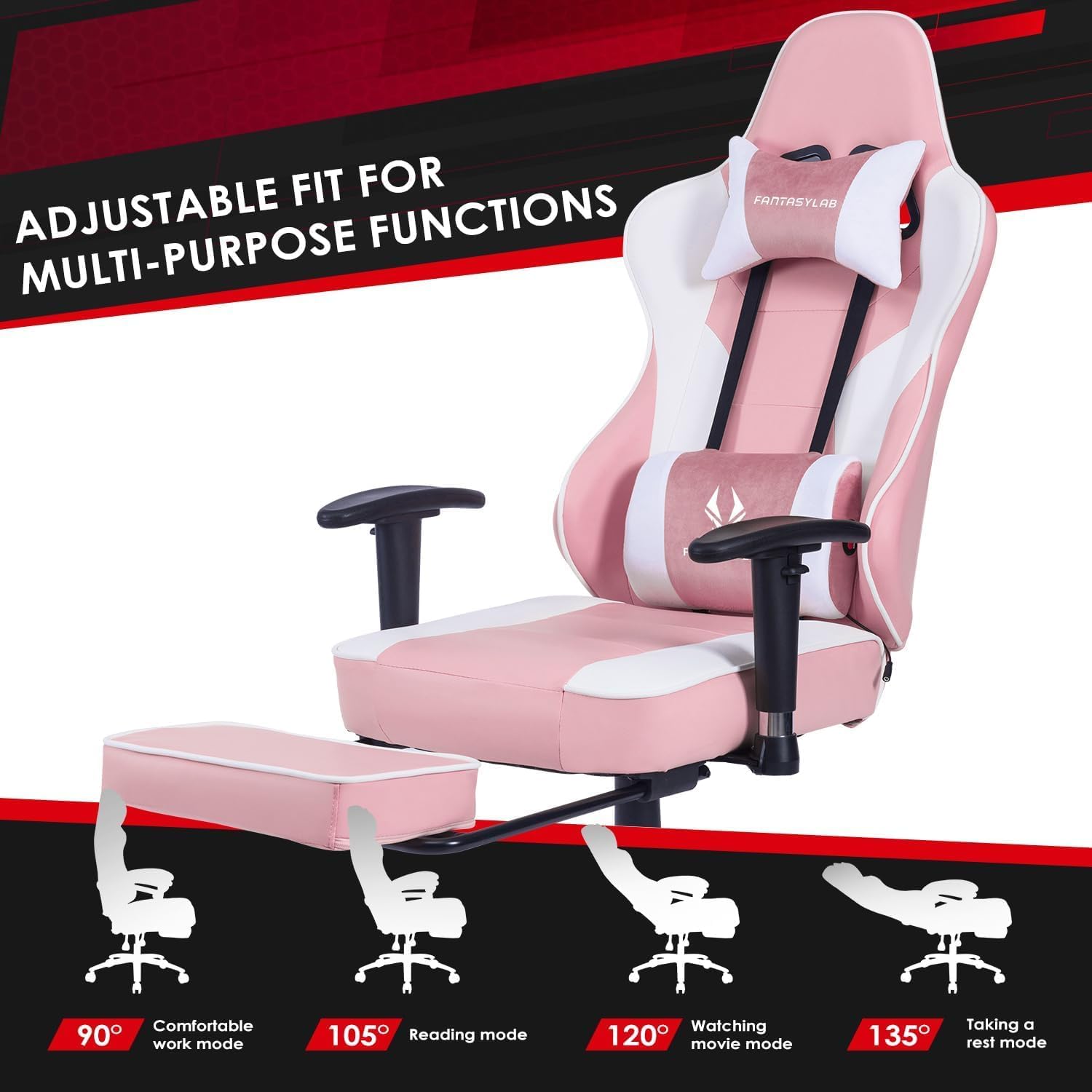
Image 4.2: Visual representation of the chair's recline capabilities for different activities.
4.3. Adjustable Armrests
- The armrests can be adjusted vertically. Locate the button or lever on the side of each armrest.
- Press the button/lift the lever and move the armrest up or down to your preferred height.
- Release the button/lever to lock the armrest in place.

Image 4.3: The chair's adjustable armrests and other key features.
4.4. Retractable Footrest
- To extend the footrest, pull it outwards from beneath the seat.
- To retract, push it back inwards until it is fully stored under the seat.
- Ensure the footrest is fully extended and stable before placing your feet on it.

Image 4.4: Close-up of the retractable footrest mechanism.
4.5. Massage Lumbar Cushion
- The lumbar cushion contains a USB-powered massage unit.
- Connect the USB cable from the cushion to a compatible USB power source (e.g., computer, power bank, USB wall adapter).
- The massage function will activate upon connection. Disconnect to turn off.

Image 4.5: The USB-powered massage lumbar cushion.
5. Maintenance
Proper maintenance will extend the life and appearance of your FANTASYLAB Gaming Chair Model 8280.
- Cleaning: Wipe clean with a damp cloth. For tougher stains on the PU leather, use a mild soap solution and wipe dry immediately. Avoid harsh chemicals or abrasive cleaners.
- Inspection: Periodically check all bolts and screws to ensure they remain tight. Retighten if necessary.
- Avoid Direct Sunlight: Prolonged exposure to direct sunlight can cause the PU leather to fade or crack.
- Caster Care: Keep the chair's casters free of hair and debris to ensure smooth rolling.
6. Troubleshooting
If you encounter any issues with your FANTASYLAB Gaming Chair Model 8280, please refer to the following common solutions or contact customer support.
- Chair Wobbles: Ensure all assembly bolts are securely tightened. Check that the chair is on a flat, even surface.
- Difficulty Adjusting Height: Verify that the gas lift lever is fully engaged. If the chair does not raise, ensure you are not seated on it when lifting the lever. If it does not lower, ensure you are seated when lifting the lever.
- Footrest Not Extending/Retracting Smoothly: Check for any obstructions under the seat or along the footrest mechanism. Ensure the mechanism is clean.
- Massage Function Not Working: Confirm the USB cable is securely connected to both the lumbar cushion and a working USB power source.
7. Specifications
Detailed specifications for the FANTASYLAB Gaming Chair Model 8280:
| Feature | Specification |
|---|---|
| Model Number | 8280 |
| Brand | Fantasylab |
| Material | PU Leather, High-Density Foam, Alloy Steel Frame |
| Product Dimensions (L x W x H) | 26.8” x 26.8” x 48.8” - 52.0” (68 x 68 x 124 - 132 cm) |
| Seating Area Dimension (W x D) | 18.1” x 18.9” (46 x 48 cm) |
| Backrest Dimension (W x H) | 20.9” x 32.2” (53 x 82 cm) |
| Item Weight | 20.82 kg (45.9 lbs) |
| Maximum Weight Capacity | 300 lbs (136 kg) |
| Recline Angle | 90° to 135° |
| Special Features | Adjustable Height, Ergonomic Design, Retractable Footrest, Massage Lumbar Cushion, Adjustable Armrests, 360° Swivel |
| Care Instructions | Wipe Clean |

Image 7.1: Detailed dimensions of the FANTASYLAB Gaming Chair Model 8280.
8. Warranty and Support
FANTASYLAB stands behind the quality of its products.
- Warranty: This product comes with a 12-month parts warranty from the date of purchase. This warranty covers manufacturing defects in materials and workmanship. It does not cover damage caused by misuse, accidents, or normal wear and tear.
- Customer Support: For any questions, concerns, or warranty claims, please contact FANTASYLAB customer service. Refer to your purchase documentation for contact details or visit the official FANTASYLAB website.