
1. Introduction
The PROGENY 300W Portable Power Station is a versatile and reliable power source designed for various applications, including camping, home emergencies, travel, and outdoor activities. With its 299Wh/80818mAh capacity, it can efficiently power a wide range of electronic devices.
This manual provides detailed instructions on how to set up, operate, maintain, and troubleshoot your power station to ensure optimal performance and longevity.
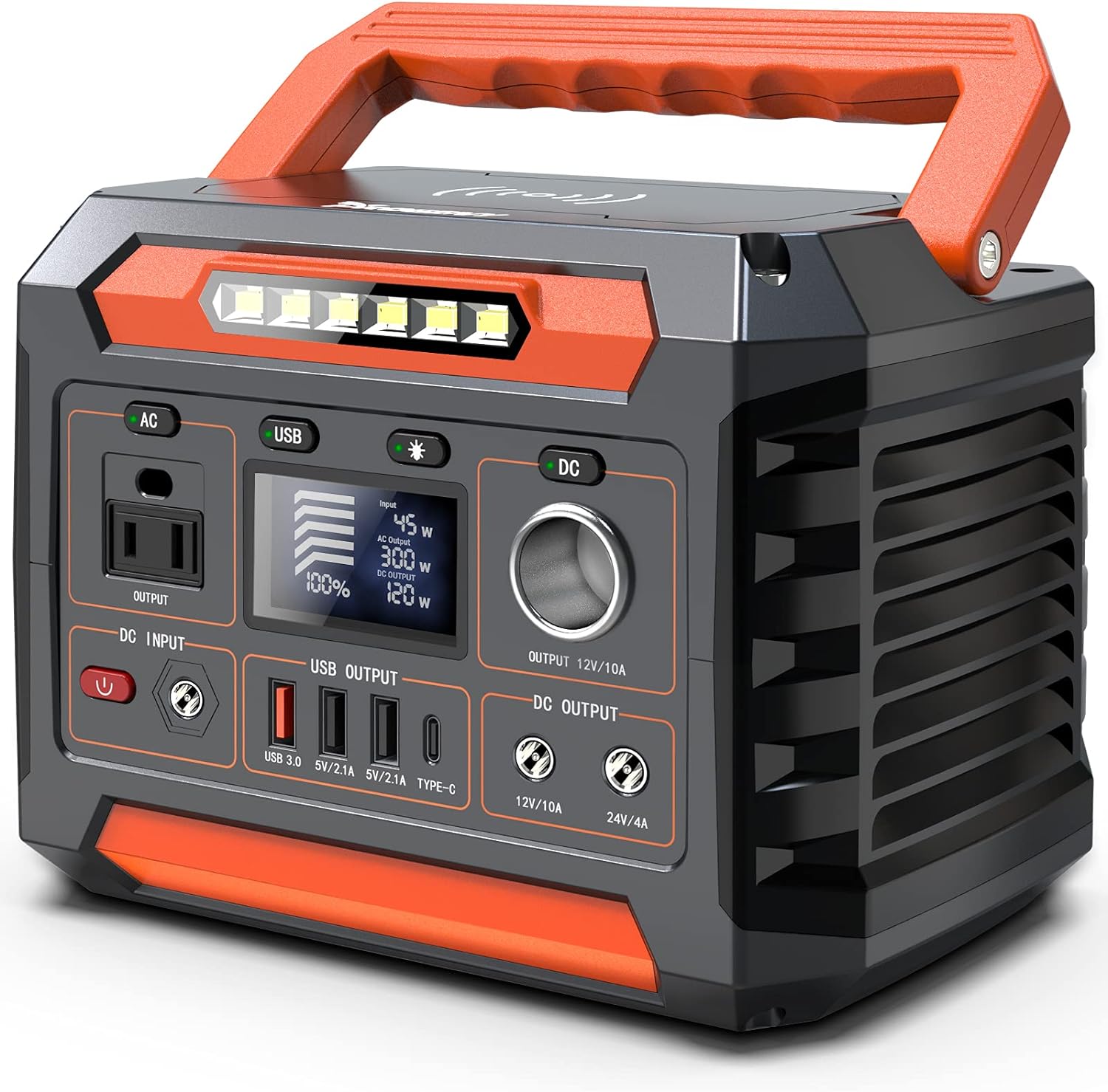
Figure 1: PROGENY 300W Portable Power Station (Model P66)
2. What's in the Box
Upon unboxing your PROGENY 300W Portable Power Station, please ensure all the following components are present:
- PROGENY 300W Portable Power Station (P66)
- Power Cord (for AC wall charging)
- Carrying Case/Handle (integrated)
3. Product Features
- High Capacity: 299Wh/80818mAh battery, capable of charging smartphones multiple times, laptops, and running small appliances like mini-fridges or CPAP machines.
- Multiple Output Ports: Includes 110V AC outlet (300W rated, 600W peak pure sine wave), 12V/10A car port, QC 3.0 USB, 5V/2.1A USB, and Type-C outputs for diverse charging needs.
- Regulated 12V DC Output: Ensures stable power delivery, preventing devices like electric coolers or CPAP machines from shutting down when the battery is low.
- Efficient Charging: Built-in MPPT technology allows for faster solar recharging (with compatible solar panels, sold separately). Can also be charged via AC wall outlet or car port.
- Wireless Fast Charging: Conveniently charge compatible smartphones by placing them on the designated wireless charging pad on top of the unit.
- Integrated LED Light: A powerful LED light provides illumination for emergencies or low-light conditions.
- Advanced Safety Features: Equipped with a Battery Management System (BMS) for short protection, overcurrent protection, overvoltage protection, overload protection, and overheating protection. Pure Sine Wave output ensures stable and safe power for sensitive electronics.
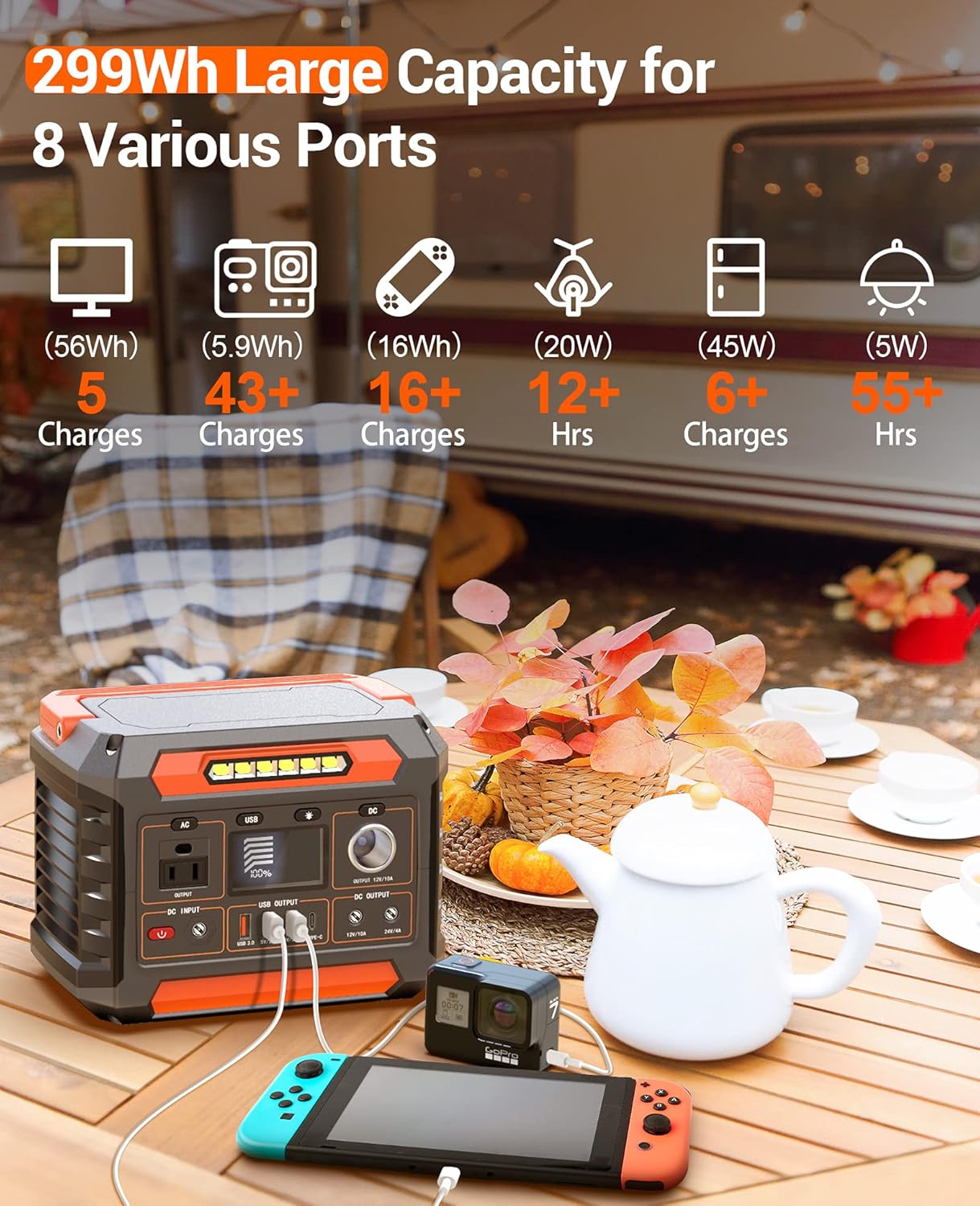
Figure 2: Large Capacity and Multiple Ports

Figure 3: Stable 12V Regulated Power Output

Figure 4: Wireless Fast Charging Function
4. Setup
Initial Charge
Before first use, fully charge your PROGENY 300W Portable Power Station. This ensures the battery is conditioned and ready for optimal performance.
- Connect the provided power cord to the DC INPUT port on the front of the unit.
- Plug the other end of the power cord into a standard AC wall outlet.
- The LCD display will show the charging progress. The unit is fully charged when the battery indicator reaches 100%.
Charging from an AC wall outlet typically takes 6-7 hours.
5. Operating Instructions
Powering On/Off
To power on the unit, press and hold the red power button located next to the DC INPUT port. The LCD display will illuminate, showing the battery percentage.
To power off the unit, press and hold the red power button again until the display turns off.
Using AC Output
- Ensure the power station is turned on.
- Press the 'AC' button located above the AC outlet. A green indicator light will illuminate next to the button, confirming the AC output is active.
- Plug your device's power cord into the 110V AC outlet.
- The LCD display will show the real-time power consumption (in watts) of the connected device.
- To turn off the AC output, press the 'AC' button again.
Using USB Output
- Ensure the power station is turned on.
- Press the 'USB' button located above the USB output ports. A green indicator light will illuminate.
- Connect your USB-powered device to any of the available USB-A (QC 3.0 or 5V/2.1A) or Type-C ports.
- To turn off the USB output, press the 'USB' button again.
Using DC Output
- Ensure the power station is turned on.
- Press the 'DC' button located above the 12V/10A car port. A green indicator light will illuminate.
- Connect your 12V DC device to the car port or the 12V/10A/24V/4A DC output ports.
- To turn off the DC output, press the 'DC' button again.
Wireless Charging
- Ensure the power station is turned on.
- Place your Qi-compatible smartphone on the wireless charging pad located on the top of the unit.
- The wireless charging icon on the LCD display will activate, indicating charging is in progress.
LED Light Operation
- Ensure the power station is turned on.
- Press the 'Light' button (sun icon) to turn on the LED light.
- Press the button again to cycle through different brightness modes or turn off the light.

Figure 5: LCD Display Showing Power Levels
6. Charging Methods
Your PROGENY 300W Portable Power Station can be recharged using multiple methods:
- AC Wall Outlet: Connect the provided power cord to the DC INPUT port and a standard wall outlet. Full charge in 6-7 hours.
- Car Port: Recharge from your vehicle's 12V car port using a compatible car charger (not included). Full charge in 7-8 hours.
- Solar Panel: Utilize a compatible solar panel (e.g., PROGENY 120W solar panel, sold separately) connected to the DC INPUT port. The built-in MPPT technology optimizes solar charging efficiency. Full charge in 6-7 hours under optimal sunlight.

Figure 6: Multiple Charging Options
7. Safety and Maintenance
Safety Precautions
- Do not short-circuit the unit. Keep away from metal objects (coins, hair-pins, keys, etc.).
- Do not heat the unit or dispose of it in fire, water, or other liquids.
- Keep away from high humidity and dusty places.
- Do not disassemble or reassemble the unit.
- Do not drop or place heavy objects on the unit.
- Children should be supervised to ensure they do not play with the appliance.
- Do not cover the device with towels, clothing, or other items during operation, as this may cause overheating.
- The unit may become hot when charging. This is normal. Use caution when handling.
- Use the unit properly to avoid electronic shock.

Figure 7: Pure Sine Wave for Device Safety
Maintenance Tips
- Store the unit in a cool, dry place away from direct sunlight.
- Recharge the unit every 3-6 months if not in frequent use to maintain battery health.
- Clean the exterior with a soft, dry cloth. Avoid using harsh chemicals or abrasives.
8. Troubleshooting
- Unit Not Turning On: Ensure the battery is charged. If completely drained, it may take a few minutes of charging before the display illuminates.
- Output Not Working: Verify that the specific output (AC, USB, DC) is activated by pressing its corresponding button and checking for the green indicator light. Check if the device you are trying to power exceeds the power station's output limits.
- Overheating: If the unit becomes excessively hot, it may automatically shut down due to overheating protection. Allow it to cool down in a well-ventilated area before resuming use. Ensure vents are not blocked.
- Slow Charging: Check the charging cable and adapter. For solar charging, ensure the panel is in direct sunlight and properly angled.
9. Specifications
| Feature | Specification |
|---|---|
| Brand | PROGENY |
| Model Number | P66 |
| Wattage | 300 watts |
| Power Source | Battery-Powered |
| Item Weight | 7 Pounds |
| Voltage | 110 Volts |
| Output Wattage | 300 Watts |
| Product Dimensions | 8.2 x 6.2 x 5.8 inches |
| Batteries | 30 Lithium Ion batteries required (included) |
| Special Feature | Portable, Overload Protection |
10. Warranty and Support
For detailed warranty information and further support, please refer to the official user manual PDF available for download or contact PROGENY customer service.
A digital version of the user manual can be found at: User Manual (PDF)