
1. Introduction
This manual provides essential information for the safe and efficient operation of your Nature's Generator Elite Gold System. This system is a comprehensive off-grid power solution, combining a powerful 3600W pure sine wave generator with two 100W monocrystalline solar panels. It is designed to provide reliable electricity for various applications, including emergency backup, outdoor activities, and remote power needs.
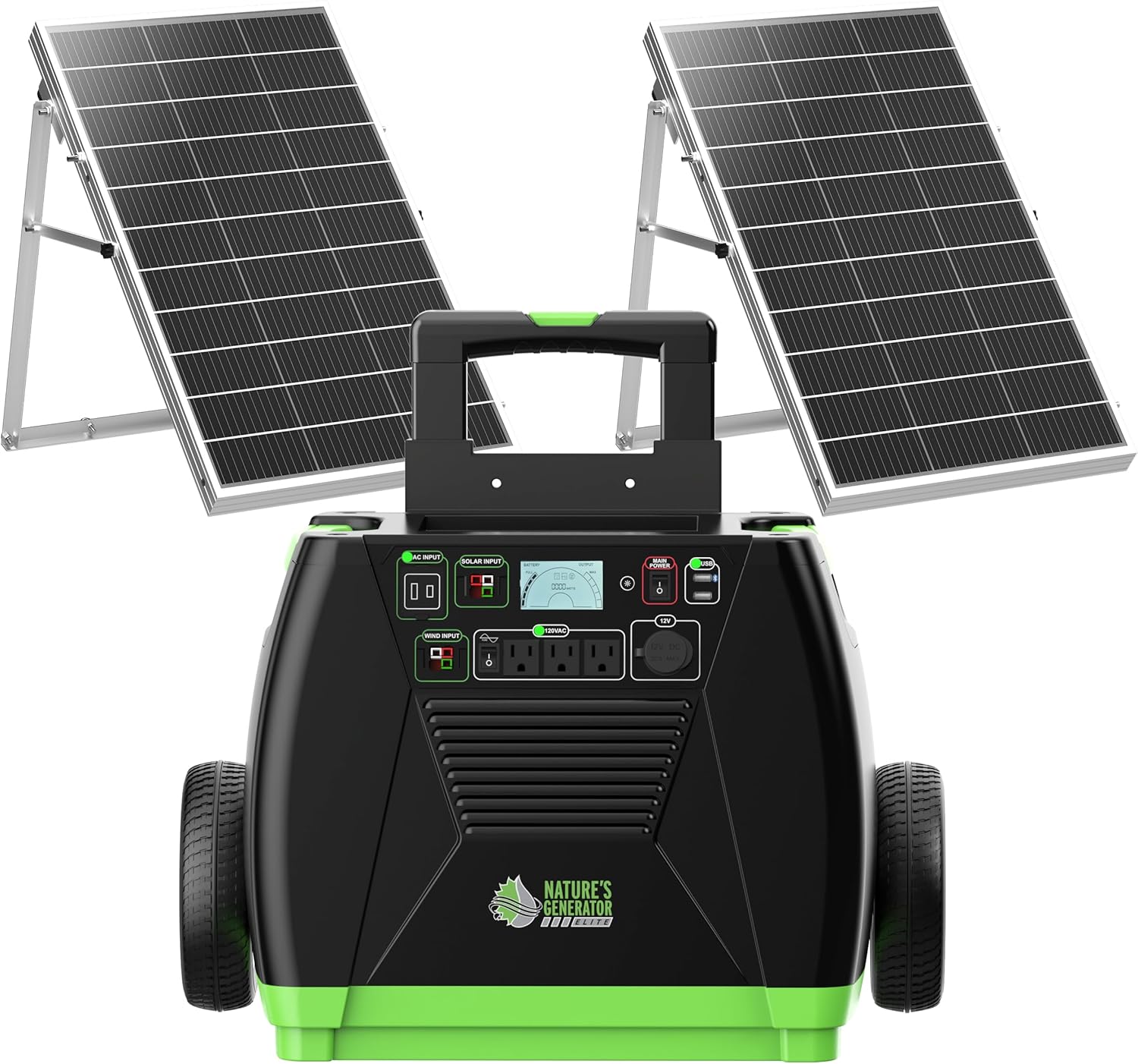
Figure 1: The Nature's Generator Elite Gold System, featuring the main generator unit and two 100W solar panels, designed for off-grid power generation.
2. Safety Information
Please read all safety instructions carefully before operating the Nature's Generator Elite Gold System. Failure to follow these instructions may result in electric shock, fire, or serious injury.
- General Safety: Ensure the generator is placed on a stable, level surface. Keep children and pets away from the unit during operation.
- Ventilation: Operate the generator in a well-ventilated area to prevent overheating.
- Moisture: Do not expose the generator or solar panels to rain, snow, or excessive moisture.
- Electrical Connections: Ensure all connections are secure and properly insulated. Do not attempt to modify the wiring or internal components.
- Proposition 65 Warning: This product may contain chemicals known to the State of California to cause cancer and birth defects or other reproductive harm. Wash hands after handling.
Storage Guidelines
To maintain battery health and system longevity:
- Recharge your Nature's Generator Elite at least once every four months.
- Store the unit in a ventilated, cool, and dry location, away from direct sunlight and extreme temperatures.
- If possible, connect your Nature's Generator Elite to a solar panel during storage to help maintain optimal battery voltage.
3. Package Contents
Verify that all items listed below are included in your package. If any components are missing or damaged, please contact customer support.
- 1 x Nature's Generator Elite Power Unit (with integrated cart, 12V DC port, 2 USB ports, 3 AC outlets, and 120V 30amp pure sine wave AC outlet)
- 2 x Nature's Generator 100W Monocrystalline Solar Panel
- Assembly tools and detailed installation instructions for solar panel stands and other accessories.
- User Manual

Figure 2: Contents of the Nature's Generator Elite Gold System package, including the generator, solar panels, and assembly tools.
4. Setup
4.1. Solar Panel Assembly
The 100W solar panels require minor assembly of their stands. Refer to the separate detailed installation instructions provided in the package for step-by-step guidance. Ensure all bolts are securely tightened.

Figure 3: An assembled 100W monocrystalline solar panel with its adjustable stand, ready for deployment.
4.2. Connecting Solar Panels
Once assembled, position the solar panels in a location with maximum sunlight exposure. Connect the 50-foot UL approved 12 AWG pure copper cables from the solar panels to the "SOLAR INPUT" ports on the Nature's Generator Elite. The solar panels feature three adjustable angles to optimize sunlight capture.

Figure 4: High-efficiency monocrystalline silicon solar panel, capable of up to 23% efficiency in converting sunlight to electricity.
4.3. Initial Charging
Before first use, it is recommended to fully charge the Nature's Generator Elite. This can be done via solar panels, a wind turbine (sold separately), or AC power.
5. Operating Instructions
5.1. Control Panel Overview
The Nature's Generator Elite features an intuitive control panel with an LCD display to monitor system status.

Figure 5: Detailed diagram of the Nature's Generator Elite control panel, highlighting the LCD display, input/output ports, and various indicators.
- LCD Display: Shows battery level, output wattage, and various status icons.
- AC Input: Port for charging via standard wall outlet.
- Solar Input: Ports for connecting solar panels.
- Wind Input: Port for connecting a wind turbine (optional accessory).
- AC Outlets Switch: Activates the three 120V AC outlets.
- Main Power Switch: Turns the entire unit on or off.
- USB Ports: Two USB ports for charging small electronic devices.
- 12V DC Port: For connecting 12V DC appliances.
- 120V 30amp AC Outlet: High-power AC output.
5.2. Recharging the Generator
The Nature's Generator Elite can be recharged using three primary methods:
- Solar Panels: Connect the included 100W solar panels to the "SOLAR INPUT" ports. Recharging time varies based on sunlight intensity, typically 15 to 20 hours for a full charge with one 100W panel.
- Wind Turbine: Connect an optional Nature's Generator wind turbine to the "WIND INPUT" port. Recharging speed depends on wind strength.
- AC Power: Connect the generator to a standard wall outlet using the appropriate cable via the "AC INPUT" port.
5.3. Using Output Ports
- AC Outlets: Flip the "AC Outlets Switch" to ON. Plug your 120V AC devices into the three standard outlets or the 30amp outlet. The system provides 3600W running wattage and 7200W starting wattage.
- USB Ports: Plug USB-powered devices directly into the two USB ports.
- 12V DC Port: Connect compatible 12V DC devices.
6. Maintenance
Regular maintenance ensures the longevity and optimal performance of your Nature's Generator Elite Gold System.
- Battery Recharge: Recharge the generator's battery at least once every four months to prevent deep discharge and extend battery life.
- Cleaning: Keep the generator and solar panels clean from dust and debris. Use a soft, dry cloth for cleaning. Do not use harsh chemicals or abrasive materials.
- Inspection: Periodically inspect all cables and connections for signs of wear or damage. Replace any damaged components immediately.
- Storage: Store the unit in a cool, dry, and well-ventilated area. Avoid extreme temperatures.
7. Troubleshooting
If you encounter issues with your Nature's Generator Elite Gold System, refer to the following common troubleshooting tips:
- No Power Output:
- Ensure the "Main Power Switch" is ON.
- Verify the "AC Outlets Switch" is ON for AC power.
- Check the battery level on the LCD display. If low, recharge the unit.
- Look for "FUSE AC!" or "Battery Fail Icon" on the LCD display, indicating a potential internal issue or fuse trip.
- Slow Charging:
- For solar charging, ensure panels are in direct sunlight and free from obstructions. Adjust panel angle for optimal exposure.
- Verify solar panel connections are secure.
- Charging speed is dependent on environmental conditions (sunlight intensity, wind speed).
- Overload Protection: If the unit shuts down unexpectedly, it may be due to an overload. Disconnect some devices and restart the generator.
- Temperature Warning: If a "Temperature Warning" icon appears, allow the unit to cool down in a well-ventilated area.
For persistent issues not resolved by these steps, please contact Nature's Generator customer support.
8. Specifications
| Feature | Specification |
|---|---|
| Brand | Nature's Generator |
| Model Number | HKNGAUEL |
| Wattage (Running) | 3600 Watts |
| Wattage (Starting) | 7200 Watts |
| Fuel Type | Electric |
| Power Source | Battery Powered (Solar/Wind Rechargeable) |
| Item Weight (Generator) | 297 pounds (135 Kilograms) |
| Voltage | 240 Volts (AC) |
| Output Wattage | 3600 Watts |
| Special Feature | USB Port |
| Included Components | Batteries, 2x 100W Solar Panels |
| Product Dimensions (Generator) | 28"L x 18"W x 19"H |
| Solar Panel Material | Monocrystalline Silicon |
| Total Power Outlets | 3 (AC) + 2 (USB) + 1 (DC) |
| Current Rating | 30 Amps |
| UPC | 855634006443 |
| Manufacturer | HUNTKEY USA INC |
| Date First Available | August 4, 2020 |

Figure 6: Physical dimensions and weight of the Nature's Generator Elite power unit.
9. Warranty and Support
For warranty information, product registration, or technical assistance, please contact Nature's Generator customer support directly.
You can typically find contact details on the manufacturer's official website or through the retailer where the product was purchased. Please have your model number (HKNGAUEL) and purchase date available when contacting support.
Note: It is recommended to keep your purchase receipt as proof of purchase for warranty claims.


