
PowerPac PPFS212B 2-in-1 Dual-Usage Stand Fan Instruction Manual
Model: PPFS212B
1. Important Safety Information
Please read all instructions carefully before using this appliance and retain them for future reference. Failure to follow these instructions may result in electric shock, fire, or serious injury.
- Ensure the voltage indicated on the rating label matches your mains supply voltage.
- Do not immerse the fan, plug, or cord in water or other liquids.
- Unplug the fan from the power outlet before cleaning, assembling, or disassembling parts.
- Keep fingers, pencils, or any other objects out of the fan grille when it is running.
- Do not operate the fan with a damaged cord or plug. Contact qualified service personnel for repair.
- This appliance is equipped with thermal fuse protection against overheating. If the fan stops working unexpectedly, unplug it and allow it to cool before attempting to restart.
- This appliance is not intended for use by persons (including children) with reduced physical, sensory, or mental capabilities, or lack of experience and knowledge, unless they have been given supervision or instruction concerning use of the appliance by a person responsible for their safety.
2. Product Overview
The PowerPac PPFS212B is a versatile 2-in-1 dual-usage stand fan designed for efficient cooling in indoor environments. It features 7 blades for maximum airflow, 3-speed settings, and an oscillation function for wider air distribution. The fan is equipped with thermal fuse protection for enhanced safety.
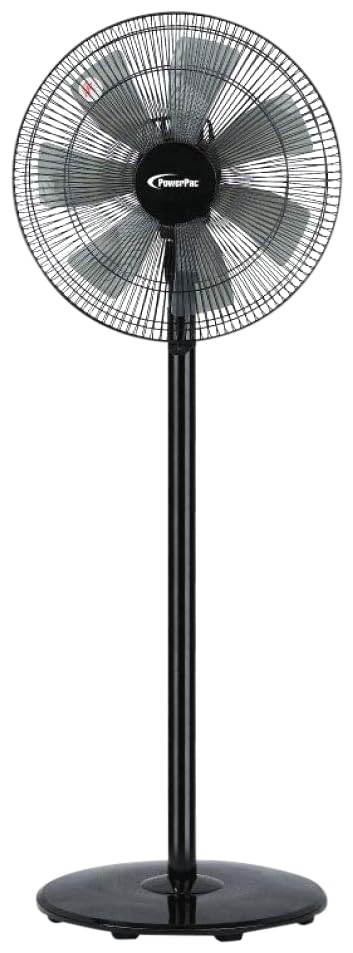
Image: PowerPac PPFS212B 2-in-1 Dual-Usage Stand Fan, showcasing its black finish and stand configuration.
3. Package Contents
Please check the package contents upon opening to ensure all parts are present and undamaged:
- 1 x PowerPac PPFS212B Stand Fan (includes fan head, stand pole, and base)
4. Assembly Instructions
Follow these steps to assemble your PowerPac PPFS212B fan:
- Carefully unpack all components from the packaging.
- Attach the stand pole to the fan base. Ensure it is securely fastened according to the markings or locking mechanism.
- Mount the fan head assembly onto the top of the stand pole. Align the connection points and secure it firmly.
- Ensure all screws and fasteners are tightened to prevent wobbling during operation.
- Place the assembled fan on a stable, flat surface.
Image: Illustrative diagram of the PowerPac PPFS212B fan assembly, showing the base, stand, and fan head components.
5. Operating Instructions
To operate your PowerPac PPFS212B fan:
- Plug the power cord into a suitable electrical outlet.
- Power On/Off: Press the 'ON/OFF' button (or corresponding button) on the control panel to turn the fan on or off.
- Speed Adjustment: Press the 'SPEED' button repeatedly to cycle through the 3 available speed settings (Low, Medium, High).
- Oscillation Function: Press the 'OSC' button (or corresponding button) to activate or deactivate the oscillation feature, which allows the fan head to sweep from side to side.
- When finished, press the 'ON/OFF' button to turn off the fan and unplug it from the power outlet.
6. Maintenance and Cleaning
Regular cleaning and maintenance will help ensure optimal performance and longevity of your fan:
- Always unplug the fan from the power supply before cleaning.
- Use a soft, damp cloth to wipe the exterior surfaces of the fan. Do not use abrasive cleaners, solvents, or harsh chemicals.
- To clean the fan blades, carefully remove the front grille (if detachable) according to the product design. Wipe the blades with a soft cloth. Ensure all parts are dry before reassembling.
- Do not allow water to drip into the motor housing.
- Store the fan in a cool, dry place when not in use for extended periods.
7. Troubleshooting
If you encounter issues with your fan, refer to the following table for common problems and solutions:
| Problem | Possible Cause | Solution |
|---|---|---|
| Fan does not turn on. | No power supply. Thermal fuse activated. | Check if the plug is securely inserted into the outlet. Ensure the power outlet is functional. Unplug and allow the fan to cool down for 30 minutes before restarting. |
| Weak or no airflow. | Fan speed set too low. Fan blades are dirty. | Increase the fan speed setting. Unplug the fan and clean the blades as per maintenance instructions. |
| Fan does not oscillate. | Oscillation function is off. | Press the 'OSC' button to activate oscillation. |
| Unusual noise during operation. | Loose parts. Obstruction. | Unplug the fan and check for any loose components or obstructions around the blades or motor. Tighten any loose parts. |
If the problem persists after attempting these solutions, please contact customer support.
8. Specifications
| Feature | Specification |
|---|---|
| Brand | PowerPac |
| Model Number | PPFS212B |
| Type | 2-in-1 Dual-Usage Stand Fan |
| Number of Blades | 7 |
| Number of Speeds | 3 |
| Power Source | Corded Electric |
| Wattage | 50 watts |
| Control Method | Push Button |
| Special Features | Oscillating, Thermal Fuse Protection |
| Material | Plastic |
| Indoor/Outdoor Usage | Indoor |
| Color | Black |
9. Warranty and Support
This PowerPac PPFS212B fan comes with a 2-year warranty from the date of purchase. This warranty covers manufacturing defects under normal use conditions.
For warranty claims, technical support, or any inquiries regarding your product, please contact PowerPac customer service. Keep your proof of purchase for warranty validation.


