1. Product Overview
The PUPPY KITTY 4L Automatic Pet Feeder is designed to provide convenient and reliable feeding for your pets. Featuring a 1080p HD camera, two-way audio, and app control, you can manage your pet's feeding schedule and interact with them remotely. This feeder is suitable for both cats and small to medium-sized dogs.
Key Features:
- Smart App Control: Remote feeding and interaction via mobile app (iOS & Android), supports 2.4G Wi-Fi only.
- 1080p HD Camera: Real-time video monitoring, recording, night vision, and 110° wide-angle view.
- Two-Way Audio: Built-in microphone and speaker for communication with your pet.
- Large Capacity: 4-liter food container, suitable for dry food with a diameter of 2-10 mm.
- Customizable Feeding: Up to 12 feeding schedules, 1-10 portions per meal (approx. 8-10g per portion), manual feeding option.
- Dual Power Supply: Operates via USB cable (included) or 3 x D-cell batteries (not included) for backup power.
- Easy to Clean: Detachable food bucket and bowl for simple maintenance.
- Food-Grade Material: Made from safe ABS plastic, CE, FCC, and RoHS certified.
2. Safety Information
- Use the feeder only in a stable 2.4G Wi-Fi environment. 5G Wi-Fi is not supported.
- This device is suitable for small and medium-sized pets weighing under 20 kg.
- Keep the food container dry and sealed to prevent food spoilage. Regularly check for food residue.
- Do not immerse the main unit in water or other liquids.
- Ensure the power cable is securely connected and not damaged.
- Keep out of reach of children and pets to prevent accidental operation or damage.
3. Package Contents
Please check that all items are present and in good condition:
- 1 x PUPPY KITTY Automatic Pet Feeder
- 1 x USB Cable
- 1 x Power Adapter (EU plug)
- 1 x User Manual
4. Setup Guide
4.1 Unpacking
Carefully remove all components from the packaging. Retain the packaging for future storage or transport.
4.2 Power Supply
The feeder supports dual power modes:
- Primary Power: Connect the USB cable to the feeder and plug the power adapter into a standard wall outlet.
- Backup Power: For uninterrupted operation during power outages, insert 3 x D-cell batteries (not included) into the battery compartment at the bottom of the feeder. The feeder will automatically switch to battery power if the main power is lost.

Image: Illustration of the dual power supply options, including the battery compartment and external AC adapter connection.
4.3 Food Loading
- Open the lid of the food container.
- Place a desiccant packet (if included or purchased separately) in the designated slot under the lid to keep food fresh.
- Pour dry pet food into the 4-liter container. Ensure the food kibble size is between 2-10 mm to prevent clogging.
- Close the lid securely to maintain freshness.
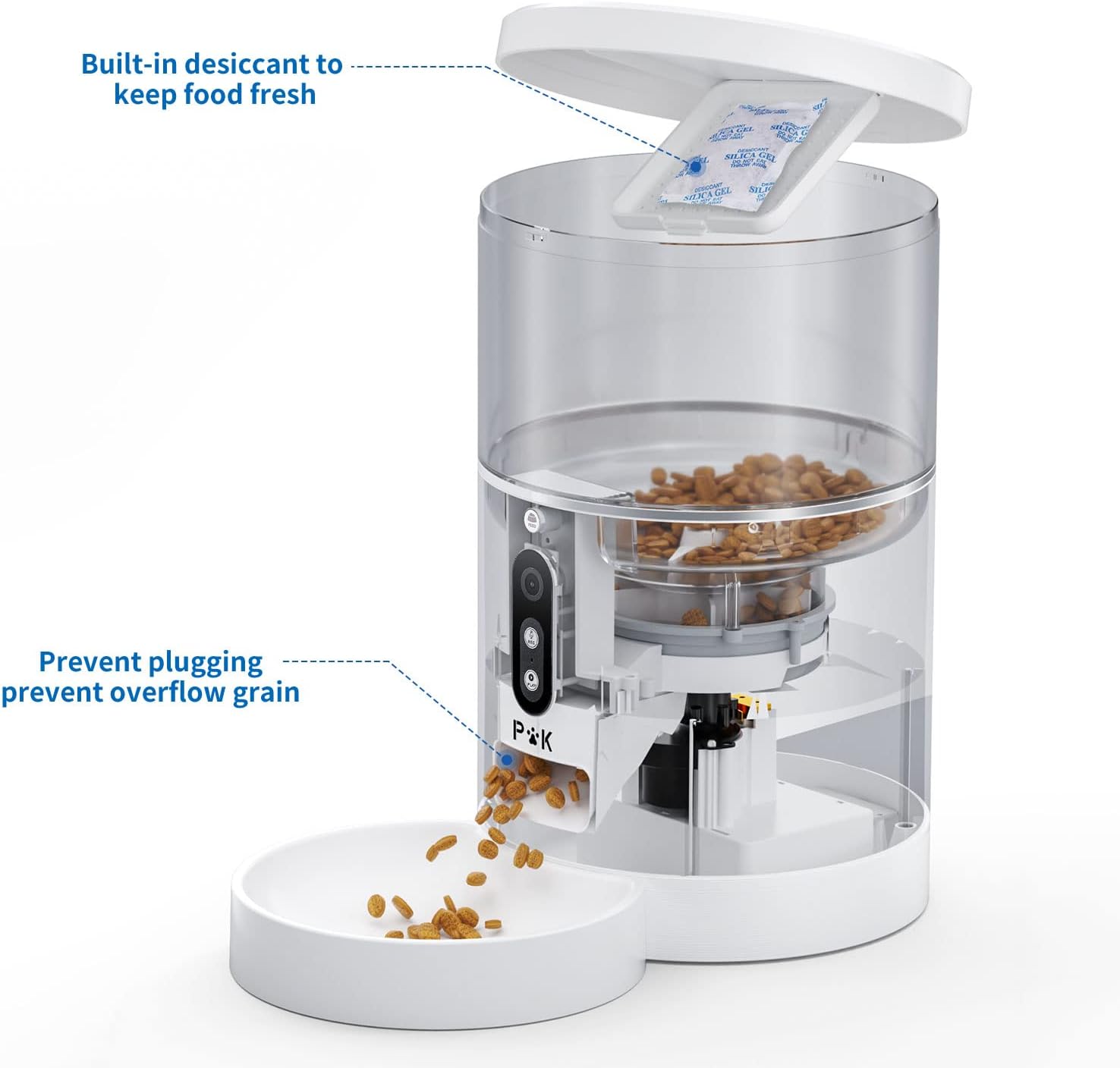
Image: View of the feeder's internal structure, highlighting the desiccant compartment and the mechanism designed to prevent food clogging and overflow.
4.4 App Installation & Wi-Fi Connection
- Download the companion app from the Apple App Store (for iOS) or Google Play Store (for Android). Search for "PUPPY KITTY" or refer to the QR code in the separate quick start guide.
- Register an account and log in.
- Follow the in-app instructions to add your device. Ensure your mobile device is connected to a 2.4G Wi-Fi network. The feeder does not support 5G Wi-Fi.
- Once connected, you will see the feeder listed in your app, and you can access its features.
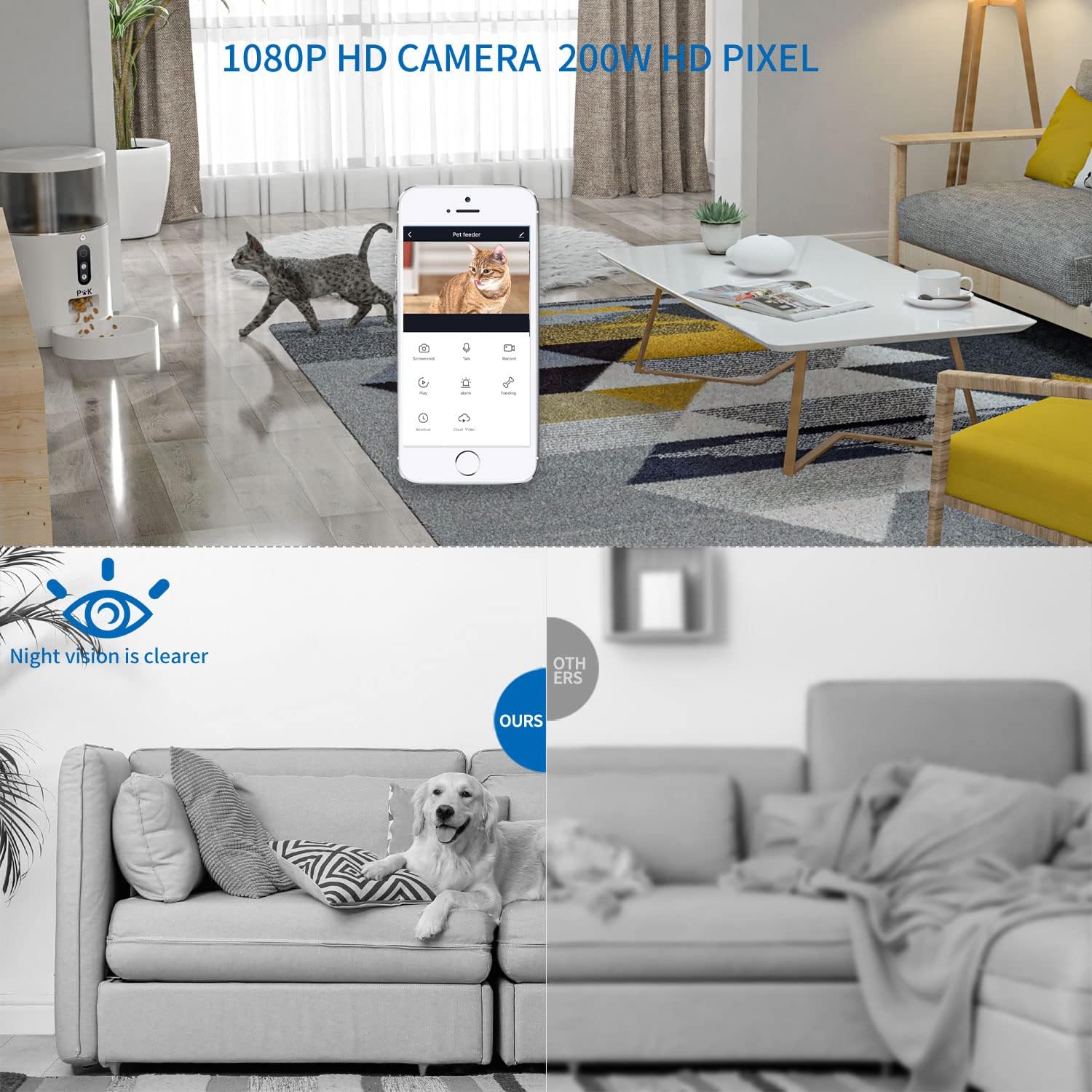
Image: Screenshot of the mobile app interface displaying the 1080p HD camera feed and a comparison demonstrating the night vision capability.

Image: Close-up of the feeder's control panel, showing the manual feed, record, and play buttons, along with an indicator for 2.4GHz Wi-Fi support.
5. Operating Instructions
5.1 Manual Feeding
- Via App: Open the app and tap the "Feed" button to dispense a single portion of food immediately.
- Via Feeder Button: Press the physical "FEED" button on the feeder to dispense one portion of food.
5.2 Scheduled Feeding
Use the app to set up automated feeding schedules:
- In the app, navigate to the feeding schedule settings.
- Add a new schedule, specifying the time, days of the week, and the number of portions (1-10) for each meal.
- You can set up to 12 different feeding schedules.
5.3 Voice Recording & Playback
- Record: Press and hold the "REC" button on the feeder to record a short voice message (e.g., your pet's name or a meal call). This message will play before each scheduled feeding.
- Play: Press the "PLAY" button on the feeder to play the last recorded voice message.
5.4 Camera & Two-Way Audio
- Live View: Access the live 1080p HD video feed through the app to monitor your pet.
- Night Vision: The camera automatically switches to night vision in low-light conditions, providing clear visibility.
- Two-Way Communication: Use the microphone and speaker functions in the app to talk to your pet or listen to their sounds.
- Record & Share: Capture photos and videos from the live feed and share them directly from the app.
6. Maintenance
6.1 Cleaning
Regular cleaning ensures hygiene and proper function:
- Disconnect the power supply before cleaning.
- Remove the food container and feeding bowl. These parts are detachable and can be washed with mild soap and water. Rinse thoroughly.
- Wipe the main unit with a damp cloth. Do not immerse the main unit in water.
- Ensure all parts are completely dry before reassembling and refilling with food.
6.2 Food Storage
- Always keep the food container lid securely closed to maintain food freshness and prevent moisture.
- Replace the desiccant packet regularly (e.g., monthly) to ensure optimal freshness.
- Check the food level periodically and refill as needed.
7. Troubleshooting
| Problem | Possible Cause | Solution |
|---|---|---|
| Feeder not connecting to Wi-Fi | Incorrect Wi-Fi band (5G not supported); weak signal; incorrect password. | Ensure you are connected to a 2.4G Wi-Fi network. Move the feeder closer to the router. Double-check Wi-Fi password. |
| Food not dispensing | Food container empty; food clogged; dispensing mechanism blocked. | Refill food. Check for blockages in the dispenser. Ensure kibble size is appropriate (2-10mm). |
| Camera feed is unclear or black | Poor lighting; camera lens dirty; network issue. | Ensure adequate lighting or check night vision mode. Clean the camera lens. Check Wi-Fi connection stability. |
| Voice recording not playing | No recording saved; volume too low. | Re-record your message. Check app settings for volume control. |
| Feeder not working during power outage | Backup batteries not installed or depleted. | Install 3 x D-cell batteries or replace old ones. |
8. Specifications
| Brand | PUPPY KITTY |
| Model | 4L Automatic Pet Feeder (ASIN: B08F5F486W) |
| Capacity | 4 Liters |
| Material | Food-grade ABS Plastic, PET |
| Target Species | Dog, Cat |
| Camera Resolution | 1080p HD |
| Wi-Fi Support | 2.4 GHz only (5 GHz not supported) |
| Power Supply | USB cable with AC adapter (included); 3 x D-cell batteries (not included) for backup. |
| Product Dimensions | Approx. 34 x 20.7 x 20.7 cm (13.4 x 8.1 x 8.1 inches) |
| Product Weight | Approx. 1.9 kg (4.2 lbs) |
| Certifications | CE, FCC, RoHS |
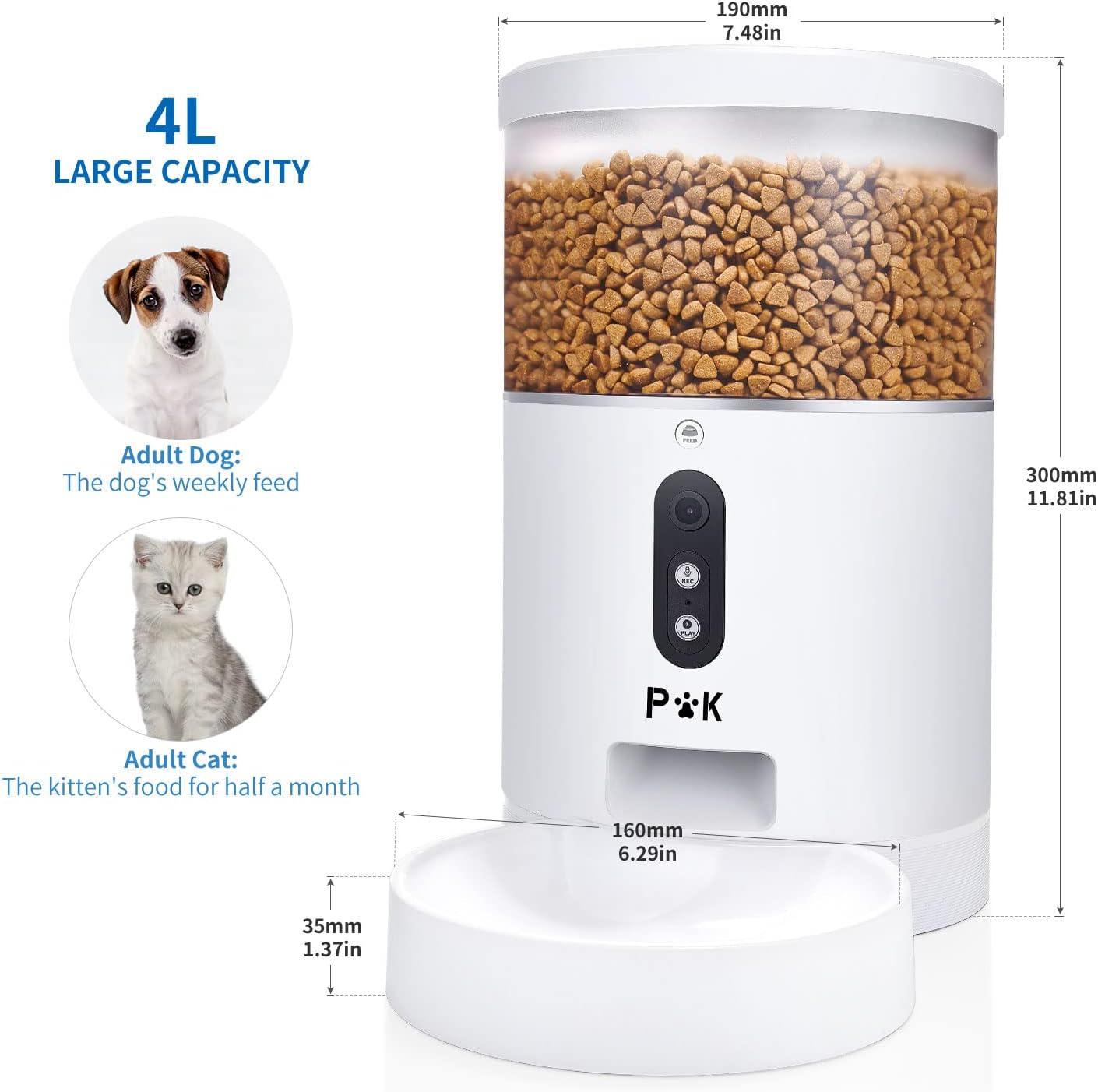
Image: Diagram showing the 4-liter capacity and physical dimensions of the PUPPY KITTY Automatic Pet Feeder.
9. Warranty and Support
9.1 Warranty Information
This PUPPY KITTY Automatic Pet Feeder comes with a 3-year warranty from the date of purchase. This warranty covers manufacturing defects and malfunctions under normal use. Please retain your proof of purchase for warranty claims.
9.2 Customer Support
If you encounter any issues or have questions regarding your PUPPY KITTY Automatic Pet Feeder, please do not hesitate to contact our customer support team. You can typically find contact information (email or support portal) on the product packaging or the brand's official website.


