Introduction
This manual provides essential instructions for the safe and effective use of your Nekteck Leg Compression Massager, Model FE-7204B. This device is designed to provide air compression massage to your feet and calves, aiding in circulation and relaxation. Please read this manual thoroughly before initial use and retain it for future reference.
Safety Information
WARNING: To reduce the risk of electric shock, burns, fire, or injury:
- Avoid use near water or in wet conditions.
- Do not use for more than 20 minutes at a time. The device features a built-in 20-minute auto-off function for safety.
- Consult a physician before use if you have any pre-existing medical conditions, especially those related to circulation, blood clots, or skin conditions.
- Do not use if you have open wounds, swelling, or inflammation in the massage area.
- Keep out of reach of children.
- Always unplug the device from the power outlet immediately after use and before cleaning.
- Do not operate under a blanket or pillow. Excessive heating can occur and cause fire, electric shock, or injury to persons.
- Never operate this appliance if it has a damaged cord or plug, if it is not working properly, if it has been dropped or damaged, or dropped into water.
Package Contents
Please check the package for the following items:
- Leg Massager Wraps (Pair)
- Hand-held Controller
- Power Adapter
- User Manual (this document)

Image: Contents of the Nekteck Leg Compression Massager package, showing the leg wraps, controller, power adapter, and user manual.
Product Overview
The Nekteck Leg Compression Massager utilizes air compression technology to provide a soothing massage. It consists of two leg wraps, a hand-held controller, and a power adapter.

Image: The Nekteck Leg Compression Massager, featuring the two leg wraps and the attached controller.
Key Components
- Leg Wraps: Designed to fit around your calves and feet, containing multiple airbags.
- Hand-held Controller: Used to power on/off the device, select massage modes, and adjust intensity levels.
- Power Adapter: Connects the device to an electrical outlet.

Image: Detailed view of the massager's components, including airbags, controller, connectors, fabric, and adjustable wraps.
How Air Compression Works
The leg massager uses air compression to inflate and deflate airbags strategically placed around your calves and feet. This action helps to stimulate the contraction and relaxation of muscles and blood vessels, promoting improved circulation and a relaxing sensation.

Image: Visual representation of the 2x2 airbag system, showing how different areas of the leg (calf, ankle, instep, heel, toes) are targeted during inflation and deflation cycles.
Setup Guide
Follow these steps to set up your Nekteck Leg Compression Massager for first use:
- Put on the Leg Wraps: Identify the 'L' and 'R' labels inside the wraps and place them on your left and right legs, respectively. Ensure your feet are comfortably positioned within the foot sections.
- Adjust for Proper Fit: Secure the wraps using the adjustable Velcro straps. Leave approximately 3-4 fingers of space between your leg and the wrap to prevent excessive tightness during inflation. This ensures optimal comfort and massage effectiveness.
- Connect the Controller: Insert the hose connector from the leg wraps firmly into the designated port on the hand-held controller.
- Connect the Power Adapter: Plug the power adapter into the controller, then plug the adapter into a standard electrical outlet.
- Power On and Customize: Press the 'ON/OFF' button on the controller to power on the device. Select your desired massage mode and intensity level using the corresponding buttons.

Image: Step-by-step visual instructions for setting up the massager, from wearing the wraps to selecting settings.
Operating Instructions
Your Nekteck Leg Compression Massager offers various settings to customize your massage experience.
Controller Functions

Image: The hand-held controller with clearly labeled buttons for power, modes, and intensity adjustments.
- ON/OFF Button: Press to power the device on or off.
- M1 (Sequence Mode): Activates a sequential inflation and deflation pattern, typically starting from the feet and moving upwards.
- M2 (Whole Mode): Inflates and deflates all airbags simultaneously for a comprehensive compression.
- Intensity Buttons (Min, Mid, Max): Adjusts the air pressure strength. Start with 'Min' and gradually increase as desired.
Massage Modes

Image: Illustration of the two massage modes: M1 (Sequence Mode) showing progressive inflation, and M2 (Whole Mode) showing simultaneous inflation.
Intensity Levels
Choose from three pressure intensity levels: Minimum (Min), Medium (Mid), and Maximum (Max). It is recommended to begin with the lowest intensity and gradually increase as you become accustomed to the sensation.

Image: Visual guide to the three pressure intensity levels: Min, Mid, and Max.
Automatic Shut-off
For user safety and to prevent overuse, the massager is equipped with a 20-minute automatic shut-off feature. The device will power down automatically after one session. If you wish to continue, simply restart the device.

Image: A user enjoying the massager, highlighting the 20-minute auto-off feature for safety and convenience.
Adjusting the Wraps for a Better Fit
The leg wraps are designed with adjustable Velcro straps to accommodate various leg sizes. To ensure a comfortable and effective massage, measure your calf circumference before purchase. The maximum calf circumference for this model is approximately 22.83 inches (23 inches).
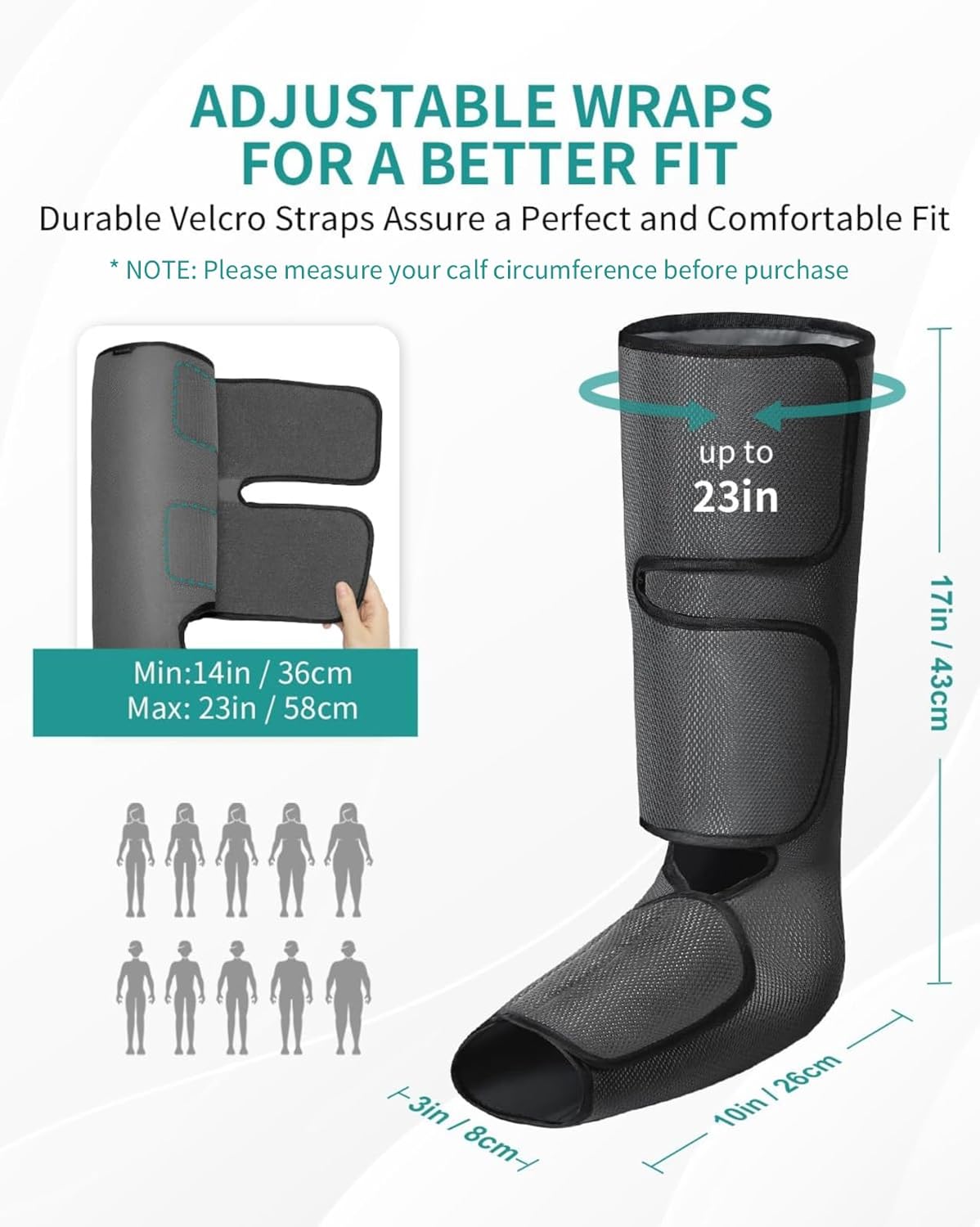
Image: Illustration demonstrating the adjustable nature of the wraps and the recommended maximum calf circumference for a proper fit.
Maintenance
Cleaning
- Always unplug the device before cleaning.
- Wipe the surface of the leg wraps and controller with a soft, damp cloth.
- Do not use abrasive cleaners, solvents, or harsh chemicals.
- Do not immerse the device or any of its components in water.
- Ensure the device is completely dry before storing or next use.
Storage
- Store the massager in a cool, dry place, away from direct sunlight and extreme temperatures.
- Avoid sharp objects that could puncture the airbags or damage the fabric.
- Do not wrap the power cord tightly around the controller, as this may damage the cord.
Troubleshooting
If you encounter any issues with your Nekteck Leg Compression Massager, please refer to the following common solutions:
| Problem | Possible Cause | Solution |
|---|---|---|
| Device does not turn on. | Power adapter not properly connected or no power from outlet. | Ensure the power adapter is securely plugged into both the controller and a working electrical outlet. Try a different outlet. |
| Weak or no compression. | Hose connector loose, wraps not secured, or intensity set too low. | Check that the hose connector is firmly attached to the controller. Ensure wraps are securely fastened. Increase the intensity level. |
| Device suddenly stops during use. | 20-minute auto-off feature activated. | This is normal operation. Press the ON/OFF button to restart for another session if desired. |
| Discomfort during massage. | Wraps too tight or intensity too high. | Loosen the Velcro straps on the wraps. Decrease the intensity level. Ensure 3-4 fingers of space are left when securing the wraps. |
If the problem persists after attempting these solutions, please contact Nekteck customer support.
Specifications
| Feature | Detail |
|---|---|
| Model Number | FE-7204B |
| Product Dimensions | 10.24 x 3.15 x 16.93 inches |
| Item Weight | 3 Pounds |
| Power Source | Corded Electric |
| Material | Mesh Memory Cloth |
| Massage Modes | 2 (Sequence, Whole) |
| Intensity Levels | 3 (Min, Mid, Max) |
| Auto-off Timer | 20 minutes |
| Max Calf Circumference | 22.83 inches (approx. 23 inches) |
Warranty and Support
Your Nekteck Leg Compression Massager comes with a manufacturer's warranty. Please refer to the warranty card included in your product packaging for specific details regarding warranty coverage and how to register your product.
For technical support, troubleshooting assistance beyond this manual, or warranty claims, please contact Nekteck customer service through the contact information provided with your product or on the official Nekteck website.


