
Introduction
Thank you for choosing the MEGATEK T8 Bluetooth Portable Speaker. This manual provides essential information for the proper setup, operation, and maintenance of your new speakers. The MEGATEK T8 speakers feature True Wireless Stereo (TWS) technology for an immersive audio experience, vibrant LED lighting, and a durable, waterproof design, making them ideal for various environments.
Package Contents
Please check the package for the following items:
- 2 x MEGATEK T8 Bluetooth Portable Speakers
- 1 x USB Charging Cable (designed to charge both speakers simultaneously)
- 1 x User Manual
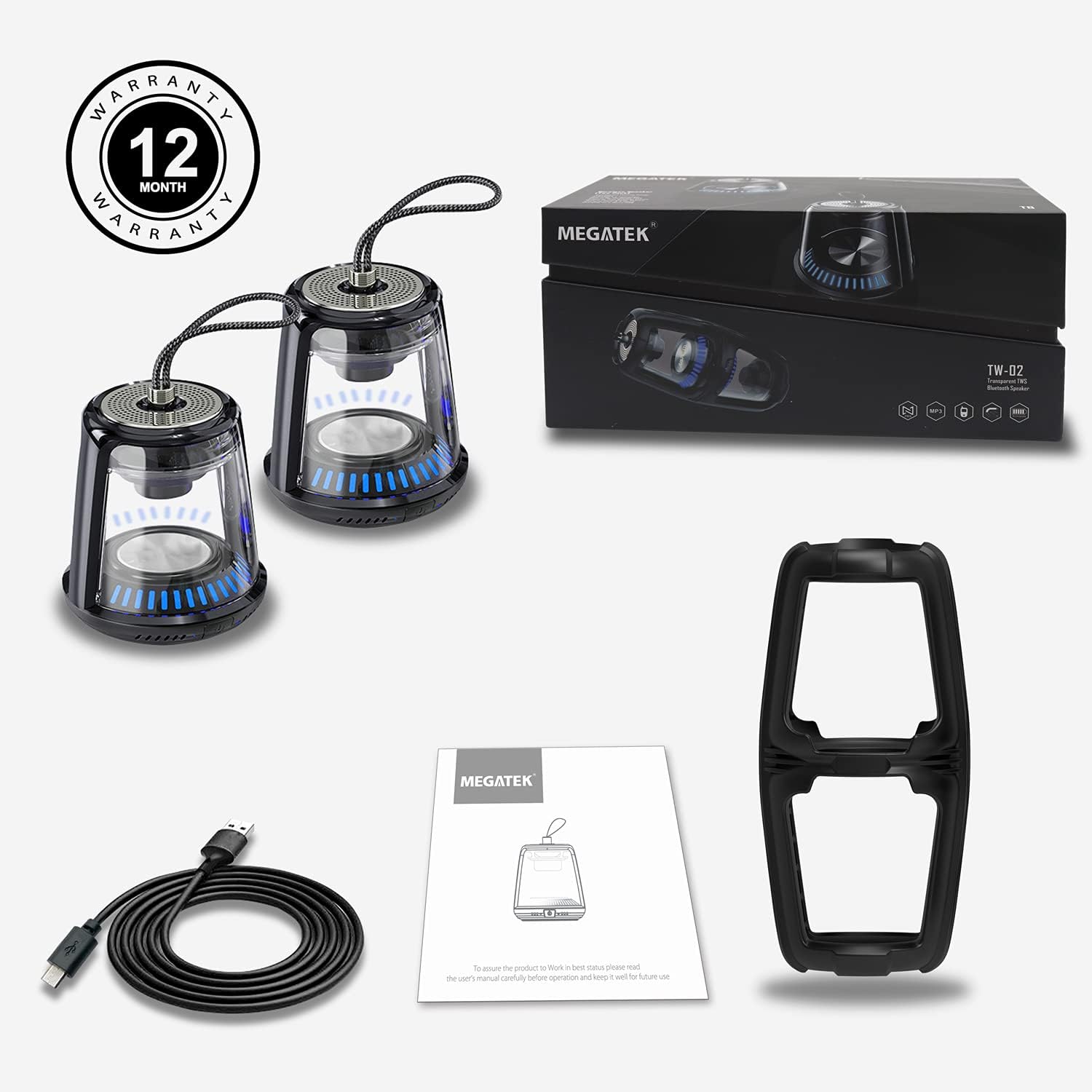
The package includes two MEGATEK T8 speakers, a USB charging cable for simultaneous charging, and this instruction manual.
Product Features
- Bluetooth Connectivity: Seamless wireless connection to your devices.
- True Wireless Stereo (TWS): Pair two speakers for a synchronized stereo sound experience.
- LED Light Modes: Dynamic LED lighting to enhance ambiance.
- Built-in Microphone: Supports hands-free calling.
- IPX5 Waterproof Rating: Protected against water splashes and light rain.
- Magnetic Base: Allows for convenient attachment to metal surfaces.
- Compact and Portable Design: Easy to carry and place anywhere.
- Rechargeable Battery: Provides portable power for on-the-go use.
Setup
1. Charging the Speakers
Before initial use, fully charge both speakers. Connect the provided USB charging cable to the charging port on each speaker and then to a USB power adapter (not included) or a computer's USB port. The LED indicator will show charging status and turn off when fully charged.
2. Powering On/Off
To power on the speaker, press and hold the power button for approximately 3 seconds until you hear an audible prompt and the LED lights illuminate. To power off, press and hold the power button again for 3 seconds until you hear a power-off prompt and the LED lights turn off.
3. Bluetooth Pairing (Single Speaker)
- Ensure the speaker is charged and powered on.
- Activate Bluetooth on your smartphone, tablet, or other Bluetooth-enabled device.
- Search for available devices and select "MEGATEK T8" from the list.
- Once connected, you will hear a confirmation sound from the speaker.

The speaker connects easily to your device via Bluetooth for wireless music streaming.
4. True Wireless Stereo (TWS) Pairing (Two Speakers)
To enjoy true stereo sound, you can pair two MEGATEK T8 speakers together:
- Ensure both speakers are fully charged and powered off.
- Power on both speakers simultaneously.
- On one of the speakers (this will become the primary speaker), quickly double-press the power button. The speakers will begin searching for each other.
- Once successfully paired, you will hear a confirmation sound, and the LED indicators on both speakers will synchronize.
- Now, connect your Bluetooth device to the primary speaker (the one you double-pressed the button on) as described in the "Bluetooth Pairing (Single Speaker)" section.

This image illustrates the True Wireless Stereo (TWS) functionality, allowing two speakers to connect for an enhanced stereo sound experience.
Operating
1. Playing Music
After successful Bluetooth pairing, you can play music from your connected device. Control playback (play/pause, next/previous track, volume) directly from your device.
2. Hands-Free Calling
When connected to a smartphone, the built-in microphone allows for hands-free calling. Press the power button once to answer an incoming call, and press it again to end the call. Press and hold the power button to reject an incoming call.
3. LED Light Modes
The speakers feature integrated LED lights. To cycle through different light modes or turn them off, short press the LED light button (if available, otherwise refer to the power button for multi-functionality). The lights can create a dynamic visual experience.

The speaker features multiple LED light modes to enhance your listening experience with visual effects.
4. Magnetic Mounting
The base of the speaker is magnetic, allowing it to be securely attached to compatible metal surfaces. This provides versatile placement options.

The magnetic base allows for convenient placement on metal surfaces, such as a refrigerator.
Maintenance
1. Cleaning
Wipe the speakers with a soft, dry cloth. Do not use abrasive cleaners, alcohol, or chemical solvents, as these may damage the surface or internal components.
2. Water Resistance (IPX5)
The MEGATEK T8 speakers are IPX5 waterproof, meaning they are protected against low-pressure water jets from any direction. They are suitable for use in environments where they might encounter splashes, such as by a pool or in a bathroom. Do not submerge the speakers in water. Ensure the charging port cover is securely closed to maintain water resistance.

With an IPX5 waterproof rating, the speakers are protected against splashes, making them suitable for poolside or bathroom use.
3. Storage
When not in use for extended periods, store the speakers in a cool, dry place away from direct sunlight and extreme temperatures. It is recommended to charge the speakers periodically to maintain battery health.
Troubleshooting
- Speaker will not turn on: Ensure the battery is charged. Connect the speaker to the charging cable and allow it to charge for at least 30 minutes before attempting to power on again.
- Cannot pair via Bluetooth:
- Ensure Bluetooth is enabled on your device.
- Make sure the speaker is in pairing mode (LED indicator blinking).
- Ensure your device is within the Bluetooth range (approximately 33 feet or 10 meters).
- Try unpairing and re-pairing the speaker from your device's Bluetooth settings.
- No sound or low volume:
- Check the volume level on both the speaker and your connected device.
- Ensure the speaker is properly connected via Bluetooth.
- TWS pairing fails:
- Ensure both speakers are powered off before initiating TWS pairing.
- Make sure both speakers are within close proximity to each other (within a few feet).
- Repeat the TWS pairing steps carefully.
Specifications
| Model Number | T8 |
| Unit Count | 2 Speakers |
| Color | Black |
| Product Dimensions | 4"D x 4.7"W x 8.7"H |
| Item Weight | 0.6 Pounds (per speaker) |
| Water Resistance Level | IPX5 Waterproof |
| Connectivity Technology | Bluetooth, USB |
| Audio Output Mode | Stereo, Surround |
| Mounting Type | Freestanding, Magnetic |
| Special Features | Stereo Pairing (TWS), Auto EQ, Auto Speaker Setup, LED Light |
| Manufacturer | Megatek Electronics |
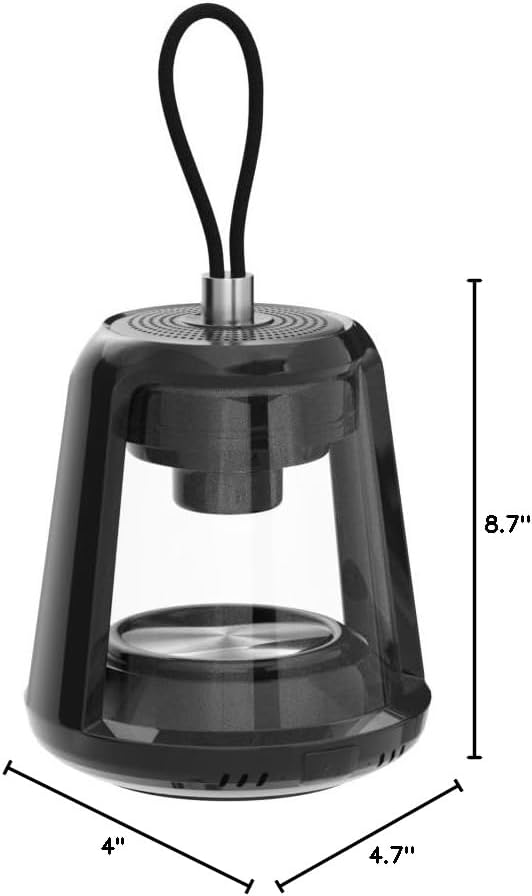
This image provides the physical dimensions of the MEGATEK T8 speaker: 4"D x 4.7"W x 8.7"H.
Warranty & Support
1. Warranty Information
The MEGATEK T8 Bluetooth Portable Speakers come with a 12-month warranty from the date of purchase. This warranty covers manufacturing defects and ensures the product is free from defects in material and workmanship under normal use.
2. Customer Support
For any questions, technical assistance, or warranty claims, please contact MEGATEK customer support through the retailer where you purchased the product or visit the official MEGATEK website for contact information. Please have your purchase receipt and product model number (T8) ready when contacting support.


