
ROCKPALS RP250W Portable Power Station & 100W Solar Panel
Contents
ROCKPALS 250W Portable Power Station and 100W Solar Panel User Manual
Model: RP250W Portable Power Station & 100W Solar Panel
Brand: ROCKPALS
1. Introduction
This user manual provides essential information for the safe and efficient operation of your ROCKPALS 250W Portable Power Station and 100W Solar Panel. Please read this manual thoroughly before using the product and retain it for future reference.
The ROCKPALS 250W Portable Power Station is a versatile power source designed for various applications, including home backup, outdoor adventures, and camping. It provides multiple output options to power your devices. The ROCKPALS 100W Portable Solar Panel is designed to efficiently convert sunlight into clean energy, allowing you to recharge your power station sustainably.
2. Safety Instructions
Always adhere to the following safety precautions to prevent injury or damage to the product:
- Do not disassemble, repair, or modify the unit.
- Keep the product away from fire, heat sources, and direct sunlight.
- Do not use or store the product in a bathroom or in areas exposed to water or rain.
- Do not use the product if it is damaged or has been dropped.
- Ensure proper ventilation during use to prevent overheating.
- Keep out of reach of children.
- The junction box of the solar panel is not waterproof; keep it dry.
- Do not connect devices that exceed the rated output power of the power station (250W continuous, 300W surge max).
3. Package Contents
Please check to ensure all items are present in your package:
- ROCKPALS 250W Portable Power Station
- ROCKPALS 100W Portable Solar Panel
- AC Wall Charger Cable
- Car Charger Cable
- User Manual
4. Product Overview
4.1 ROCKPALS 250W Portable Power Station
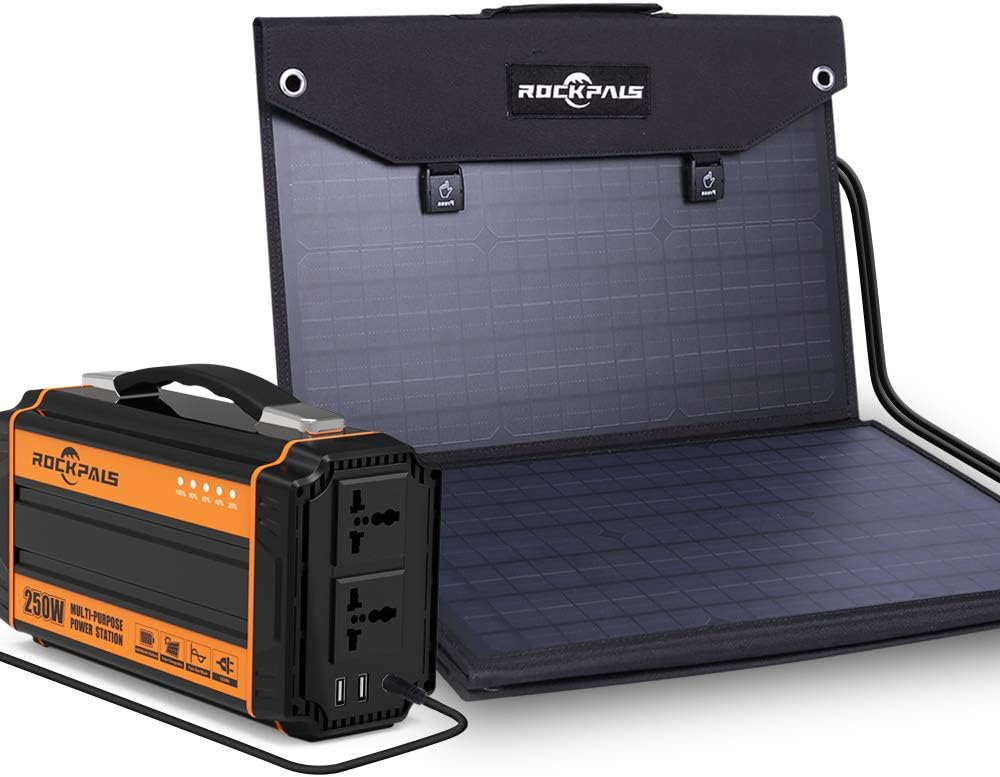
Figure 4.1: ROCKPALS 250W Portable Power Station and 100W Solar Panel (folded).
The power station features a compact design with a sturdy handle for portability. It includes various output ports for different devices.
- AC Outlets: Two 110V AC outlets (250W continuous, 300W surge max) for household appliances.
- USB Ports: Two USB 2.1A ports for charging smartphones, tablets, and other USB-powered devices.
- DC 12V Ports: Four 12V DC ports (60W total) for compatible DC appliances.
- Input Ports: Dedicated ports for AC wall charging, car charging, and solar panel input.
- Display: LED indicators for battery level.

Figure 4.2: Multiple output options of the ROCKPALS 250W Portable Power Station, including AC, USB, and DC ports.
4.2 ROCKPALS 100W Portable Solar Panel

Figure 4.3: ROCKPALS 100W Portable Solar Panel, showcasing its durable and water-resistant design.
The 100W solar panel is foldable for easy transport and storage. It features high-efficiency solar cells and a durable, water-resistant outer layer.
- High Conversion Efficiency: Converts up to 23.5% of solar power into energy.
- Durable Design: Made from Oxford cloth, water-resistant for outdoor use.
- Built-in Protections: Includes over power, short circuit, and surge protection.

Figure 4.4: Safety features of the ROCKPALS 100W Portable Solar Panel, including over power, short circuit, and surge protection.
5. Setup
5.1 Initial Charging of the Power Station
Before first use, it is recommended to fully charge the power station.
- Connect the AC wall charger cable to the input port of the power station.
- Plug the other end into a standard wall outlet.
- The battery indicator lights will illuminate, showing the charging progress. The unit is fully charged when all indicators are solid.
Approximate charging time via wall outlet: 8 hours.
5.2 Setting up the Solar Panel
- Unfold the ROCKPALS 100W Solar Panel and place it in direct sunlight.
- Adjust the angle of the solar panel to face the sun directly for optimal charging efficiency.
- Ensure the junction box remains dry and protected from moisture.
6. Operating Instructions
6.1 Recharging the Power Station
The power station can be recharged using three methods:

Figure 6.1: Illustration of the three recharging methods for the power station.
- Via Solar Panel (Sold Separately, or included in bundle):
- Connect the output cable of a compatible 60W or 100W solar panel (like the ROCKPALS 100W Solar Panel) to the DC input port of the power station.
- Place the solar panel in direct sunlight.
- Charging time: 4-6.5 hours (depending on sunlight intensity).
- Via Wall Outlet:
- Connect the AC wall charger cable to the input port of the power station and plug into a standard wall outlet.
- Charging time: Approximately 8 hours.
- Via Car 12V Socket:
- Connect the car charger cable to the input port of the power station and plug into your vehicle's 12V cigarette lighter socket.
- Charging time: 9-10 hours.
6.2 Using the Power Station to Power Devices
The ROCKPALS 250W Portable Power Station can power a variety of electronic devices. Ensure the total power consumption of your devices does not exceed 250W (continuous) to avoid overload.

Figure 6.2: Estimated recharges/runtimes for common devices.
- AC Output: Press the AC power button to activate the AC outlets. Plug in your devices (e.g., laptops, small fans, TVs).
- USB Output: Plug your USB devices directly into the USB ports. These are typically always on or activate automatically when a device is connected.
- DC 12V Output: Press the DC power button to activate the DC ports. Plug in your 12V compatible devices (e.g., mini car refrigerator).
Note: For CPAP machines, using a DC converter from your CPAP machine (if available) will generally provide longer operating hours compared to using the AC output.

Figure 6.3: The power station can power a wide range of devices, but note the 250W limit.
Important: Do not attempt to power devices exceeding 250W continuous output, such as electric kettles, toasters, power drills, or induction cooktops. This can damage the power station.

Figure 6.4: The power station provides a pure sine wave output, which is safer for sensitive electronics compared to modified sine wave inverters.
7. Maintenance
- Cleaning: Use a soft, dry cloth to clean the power station and solar panel. Do not use abrasive cleaners or solvents.
- Storage: Store the product in a cool, dry place, away from direct sunlight and extreme temperatures.
- Battery Care: For optimal battery life, fully charge the power station every 3-6 months, even if not in use.
- Solar Panel Care: Keep the solar panel surface clean from dust and debris to ensure maximum efficiency.
8. Troubleshooting
| Problem | Possible Cause | Solution |
|---|---|---|
| Power station not charging. | Charging cable not properly connected; charger faulty; power station battery protection activated. | Ensure all connections are secure. Try a different charging method (e.g., wall outlet, car charger). If using solar, ensure direct sunlight and correct panel angle. |
| No output from AC/DC/USB ports. | Output button not pressed; device power consumption too high; power station battery depleted. | Press the respective output button (AC/DC) to activate. Check if the device's power consumption is within the power station's limits. Recharge the power station. |
| Solar panel not charging power station efficiently. | Insufficient sunlight; panel not angled correctly; panel surface dirty; junction box wet. | Ensure direct, unobstructed sunlight. Adjust panel angle for optimal exposure. Clean the panel surface. Keep the junction box dry. |
| Power station shuts down unexpectedly. | Overload protection activated; overheating; low battery. | Reduce connected load. Allow the unit to cool down in a well-ventilated area. Recharge the power station. |
9. Specifications
| Feature | Detail |
|---|---|
| Brand | ROCKPALS |
| Model Number | RP250W (Power Station), 100W (Solar Panel) |
| Power Station Capacity | 240Wh (3.7V 64.8Ah / 12V 20Ah) Lithium Polymer |
| AC Output | 250W Continuous, 300W Surge Max (110V, 60Hz Pure Sine Wave) |
| USB Output | 2 x USB 2.1A ports |
| DC Output | 4 x 12V ports (60W total) |
| Recharge Methods | AC Wall Outlet, 12V Car Charger, Solar Panel (60W/100W compatible) |
| Charging Time (AC Wall) | Approx. 8 hours |
| Charging Time (Solar) | 4-6.5 hours (depending on sunlight) |
| Charging Time (Car) | 9-10 hours |
| Power Station Weight | 5.5 lbs |
| Solar Panel Efficiency | Up to 23.5% |
| Solar Panel Material | Durable Oxford cloth, Water-resistant (junction box not waterproof) |
10. Warranty and Support
ROCKPALS products are designed and manufactured to the highest quality standards. For warranty information, technical support, or customer service inquiries, please refer to the contact information provided on the official ROCKPALS website or your purchase documentation.
It is recommended to register your product online to receive updates and support.
Website: www.rockpals.com
Ask a question about this manual
Ask about setup, troubleshooting, compatibility, parts, safety, or missing instructions. Manuals+ will review the question and use this page’s manual context to help answer it.