Introduction
This manual provides detailed instructions for the setup, operation, and maintenance of your CHUNGHOP K-1038E Universal Air Conditioner Remote Control. This remote is designed for broad compatibility with over 1000 air conditioner brands. Please read this manual carefully before use to ensure proper functionality and to maximize the lifespan of your device.
Product Overview
The CHUNGHOP K-1038E is a versatile remote control for air conditioning units, featuring a simple design with a sliding cover for dust protection and a large LCD screen for easy readability. It includes essential functions such as clock, timer, fast cooling, and fast heating.
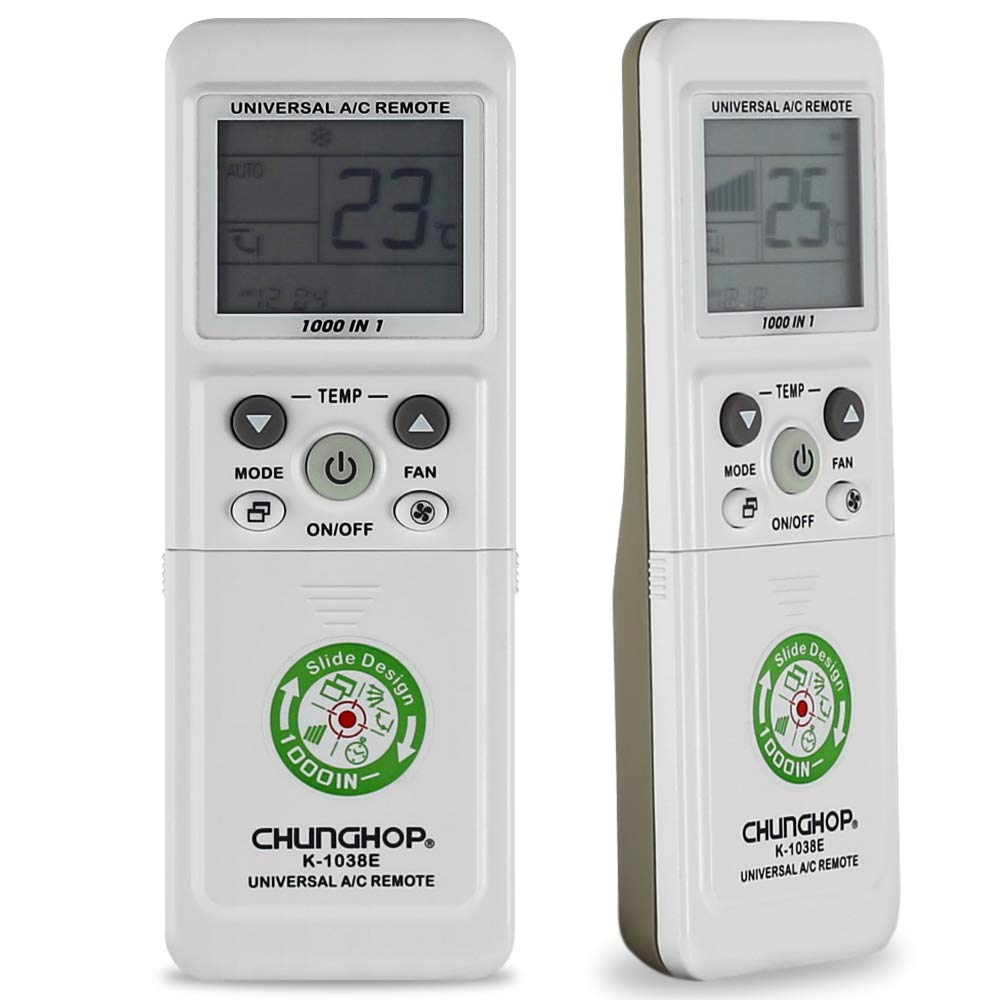
Image: Front view of the CHUNGHOP K-1038E Universal Air Conditioner Remote Control, showing the LCD display, power button, mode, fan, and temperature controls, along with a sliding cover revealing additional function buttons.
Key Features:
- Broad Compatibility: Compatible with a wide range of air conditioner brands (over 1000).
- Essential Functions: Includes clock, timer (if supported by AC unit), fast cooling, and fast heating.
- User-Friendly Design: Features a sliding cover for protection and a large LCD screen for clear display.
- Memory Function: Built-in memory retains settings during short-term battery replacement.
Setup
1. Battery Installation
The remote control requires two AAA batteries (not included). Ensure correct polarity when inserting the batteries.
- Slide open the battery compartment cover located on the back of the remote control.
- Insert two AAA batteries, matching the (+) and (-) terminals as indicated inside the compartment.
- Close the battery compartment cover securely.
2. Pairing with Your Air Conditioner
There are several methods to pair the remote control with your air conditioner. It is recommended to try the "Manual Code Input" method first if you know your AC brand's code, or "Automatic Search" for convenience.
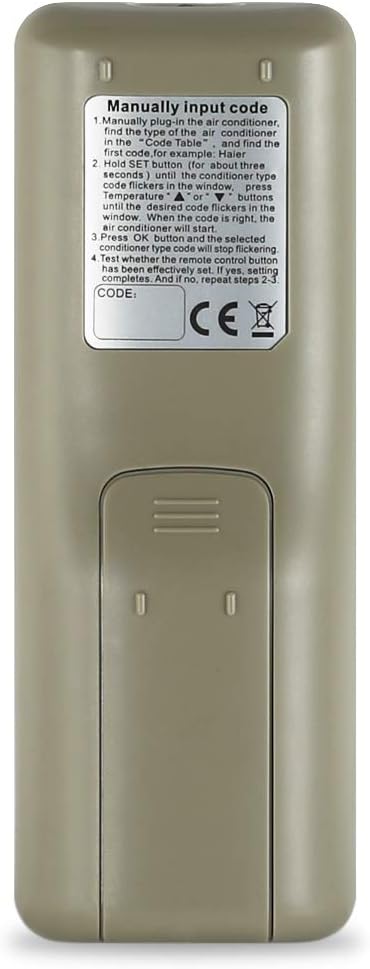
Image: Back view of the CHUNGHOP K-1038E Universal Air Conditioner Remote Control, showing the battery compartment and printed instructions for manual code input.
Method 1: Manual Code Input (Recommended if code is known)
Refer to the code list provided with your remote (or search online for CHUNGHOP K-1038E codes) to find the code for your air conditioner brand.
- Manually plug in the air conditioner.
- Find the type of the air conditioner in the code table. For example, Haier.
- Hold the SET button (for about three seconds) until the code type code flickers in the window. Press temperature UP or DOWN buttons until the desired code flickers in the window. When the code is right, the air conditioner will start.
- Press the OK button and the selected conditioner type code will stop flickering.
- Test whether the remote control button has been effectively set. If not, repeat steps 2-3.
Method 2: Automatic Search
- Ensure your air conditioner is powered on.
- Point the remote control towards the air conditioner.
- Press and hold the SET button for approximately 6 seconds until the code on the LCD screen starts flashing. The remote will begin searching for the correct code automatically.
- Release the SET button when your air conditioner responds (e.g., turns on, off, or changes mode).
- Press the OK button to confirm the code. Test all functions to ensure proper operation. If not, repeat the process.
Method 3: Brand Button (If available on your remote model)
Some versions of this remote may have dedicated brand buttons. If present, press and hold the button corresponding to your AC brand until the AC responds, then release.
Method 4: Manual Code Search (Alternative to Automatic Search)
- Ensure your air conditioner is powered on.
- Press the SET button once. The code on the LCD screen will flash.
- Press the TEMP UP or TEMP DOWN buttons repeatedly to cycle through the codes one by one.
- Stop pressing when your air conditioner responds.
- Press the OK button to confirm the code. Test all functions. If not working correctly, continue cycling through codes.
Operating Instructions
Once paired, the remote control provides access to various functions of your air conditioner.
Button Functions:
- ON/OFF: Powers the air conditioner on or off.
- MODE: Cycles through operating modes (e.g., Cool, Heat, Fan, Dry, Auto).
- TEMP UP/DOWN (▲/▼): Adjusts the temperature setting.
- FAN: Adjusts the fan speed (e.g., Auto, Low, Med, High).
- M.SWING: Controls the horizontal swing of the air deflector.
- A.SWING: Controls the vertical swing of the air deflector.
- CLOCK: Sets the current time on the remote's display.
- TIME ON: Sets a timer for the air conditioner to turn on automatically.
- TIME OFF: Sets a timer for the air conditioner to turn off automatically.
- F.Cool (Fast Cool): Activates the fast cooling function for rapid temperature reduction.
- F.Heat (Fast Heat): Activates the fast heating function for rapid temperature increase.
- SET: Used for entering setup/pairing mode and confirming settings.
- OK: Confirms selections or exits certain menus.
Note: Not all functions may be supported by every air conditioner model. The timer function, for example, requires your original air conditioner to have this capability.
Maintenance
- Cleaning: Wipe the remote control with a soft, dry cloth. Do not use liquid cleaners or abrasive materials.
- Battery Replacement: Replace batteries when the remote's display becomes dim or the remote becomes unresponsive. Always replace both batteries at the same time with new AAA batteries.
- Storage: If the remote will not be used for an extended period, remove the batteries to prevent leakage. Store in a cool, dry place.
- Sliding Cover: Keep the sliding cover closed when not in use to protect buttons from dust and accidental presses.
Troubleshooting
| Problem | Possible Cause | Solution |
|---|---|---|
| Remote does not power on or display is blank. | Dead or incorrectly inserted batteries. | Replace batteries with new AAA batteries, ensuring correct polarity. |
| Air conditioner does not respond to remote. | Incorrect pairing code; remote not pointed at AC; obstruction; AC receiver issue. | Re-pair the remote using one of the pairing methods. Ensure direct line of sight to AC. Check for obstructions. |
| Only some functions work. | Partial code match; AC unit does not support all functions. | Try another code for your AC brand. Confirm if your AC unit originally supported the function. |
| Remote display shows code flashing continuously. | Remote is in search mode or awaiting confirmation. | Press the OK button to confirm the code once the AC responds. |
Specifications
- Model Number: K-1038E
- Brand: CHUNGHOP
- Compatible Devices: Air Conditioner
- Connectivity Technology: Infrared
- Power Source: 2 x AAA Batteries (not included)
- Special Feature: Universal compatibility with over 1000 AC brands
- Package Dimensions: 3.15 x 2.36 x 0.79 inches (approximate)
- First Available: August 1, 2020
Warranty and Support
For warranty information or technical support, please refer to the retailer where the product was purchased or contact CHUNGHOP customer service directly. Please have your model number (K-1038E) and purchase details ready when contacting support.
Manufacturer: CHUNGHOP


