
Introduction
This manual provides comprehensive instructions for the installation, operation, and maintenance of the Fafeicy SYS-1D-R Electronic Timer Accumulating Time Counter. This device is designed for industrial applications to accurately record the total operating time of various equipment and machinery. Please read this manual thoroughly before installation and operation to ensure correct usage and optimal performance.
1. Setup and Installation
The SYS-1D-R timer is designed for panel mounting. Ensure the power supply is disconnected before proceeding with installation.
1.1 Mounting
- Cut a rectangular opening in the equipment panel according to the dimensions provided in the specifications section.
- Insert the timer into the opening from the front.
- Secure the timer using appropriate mounting clips or screws from the rear of the panel.
1.2 Wiring
Refer to the product label for correct connections and voltage requirements.

Figure 1: Rear view of the timer with spade terminals. This image illustrates the connection points for power input.
- Connect the power supply (100V-250VAC, 50/60Hz) to the designated terminals.
- Verify all connections are secure to prevent loose contacts.

Figure 2: Product label indicating voltage requirements (100-250VAC, 50/60Hz) and model type.
2. Operating Instructions
The Fafeicy SYS-1D-R is an accumulating timer, meaning it continuously records operating hours when power is supplied. There are no user-adjustable settings or reset functions on this model.
2.1 Power On
- Once correctly wired and mounted, apply power to the timer.
- The digital display will illuminate and begin accumulating time. The display shows hours and minutes (H.M).
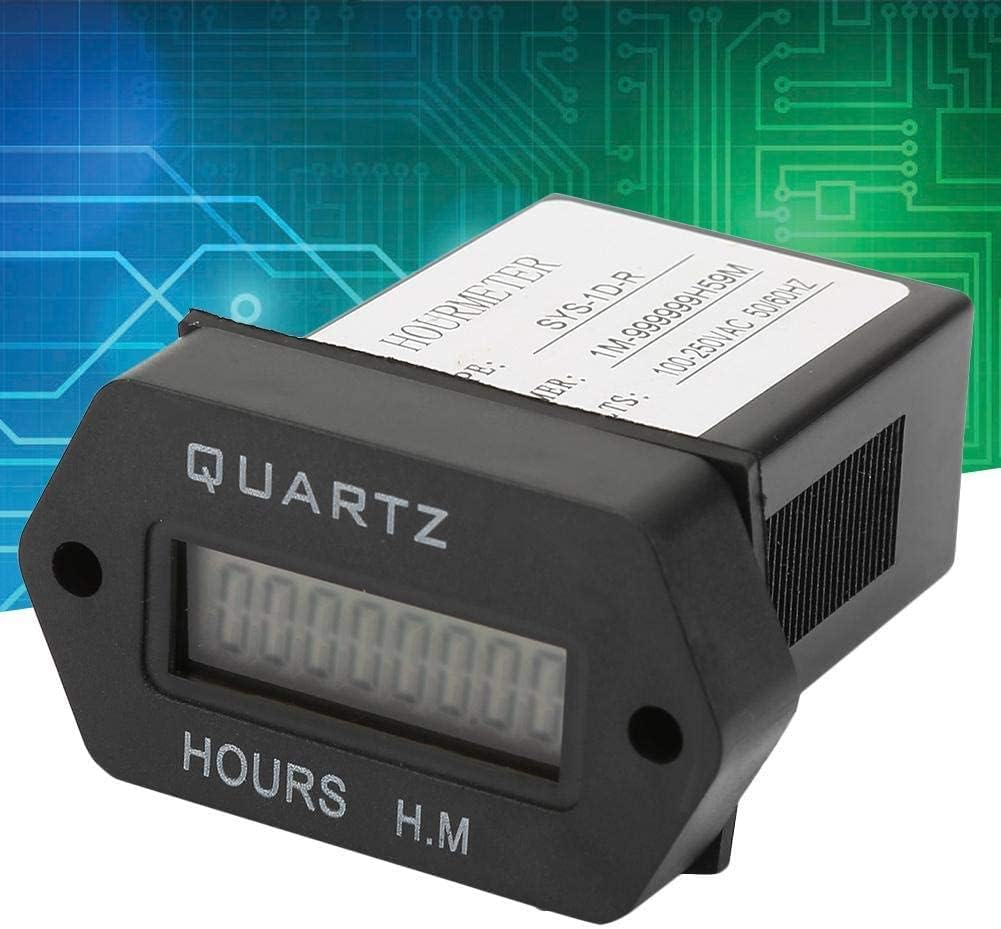
Figure 3: Front display of the timer showing accumulated hours and minutes.
2.2 Reading the Display
- The display shows the total accumulated operating time. The format is typically HHHHHH.M, where H represents hours and M represents tenths of an hour.
- The timer will continue to accumulate time as long as it receives power.
3. Maintenance
The Fafeicy SYS-1D-R timer is designed for long-term, maintenance-free operation. Follow these guidelines for optimal performance:
- Cleaning: Use a soft, dry cloth to clean the display and casing. Avoid abrasive cleaners or solvents.
- Environmental Conditions: Ensure the timer is operated within its specified temperature and humidity ranges to prevent damage.
- Inspection: Periodically check wiring connections for tightness and signs of wear or corrosion.
4. Troubleshooting
If you encounter issues with your Fafeicy SYS-1D-R timer, refer to the following common problems and solutions:
| Problem | Possible Cause | Solution |
|---|---|---|
| Display is blank / Timer not accumulating | No power supply or incorrect wiring. |
|
| Inaccurate time accumulation | Unstable power supply or internal fault. |
|
| Physical damage to casing or display | Impact or improper handling. |
|
5. Specifications
| Feature | Detail |
|---|---|
| Model | SYS-1D-R |
| Type | Electronic Timer Accumulating Time Counter (Hourmeter) |
| Voltage Range | 100V-250VAC |
| Frequency | 50/60Hz |
| Timing Range | 1M-999999H59M (1 minute to 999,999 hours and 59 minutes) |
| Display Type | Digital LCD |
| Product Dimensions | 2.76 x 2.17 x 1.18 inches (approx. 70 x 55 x 30 mm) |
| Item Weight | 1.76 ounces (approx. 50 grams) |
| Material | Metal, Plastic |
| Color | Black (Casing), White (Label) |
Note: Specifications are subject to change without prior notice.
6. Warranty and Support
For warranty information or technical support, please refer to the retailer or the official Fafeicy website. Keep your purchase receipt for warranty claims.
Manufacturer: Fafeicy
Product ASIN: B08F3714DZ