
Product Overview
The Benro VX25 Two Series Arca-Style Aluminum Ball Head is designed for photographers and video creators requiring a robust and versatile camera support. It features a dual panoramic mode, allowing for panning from both the base and the quick-release platform. The ball head incorporates simple controls, including a main lock knob with integrated ball friction adjustment and an independent pan lock. A safety lock mechanism is included for the quick release plate to prevent accidental disengagement of your camera gear.
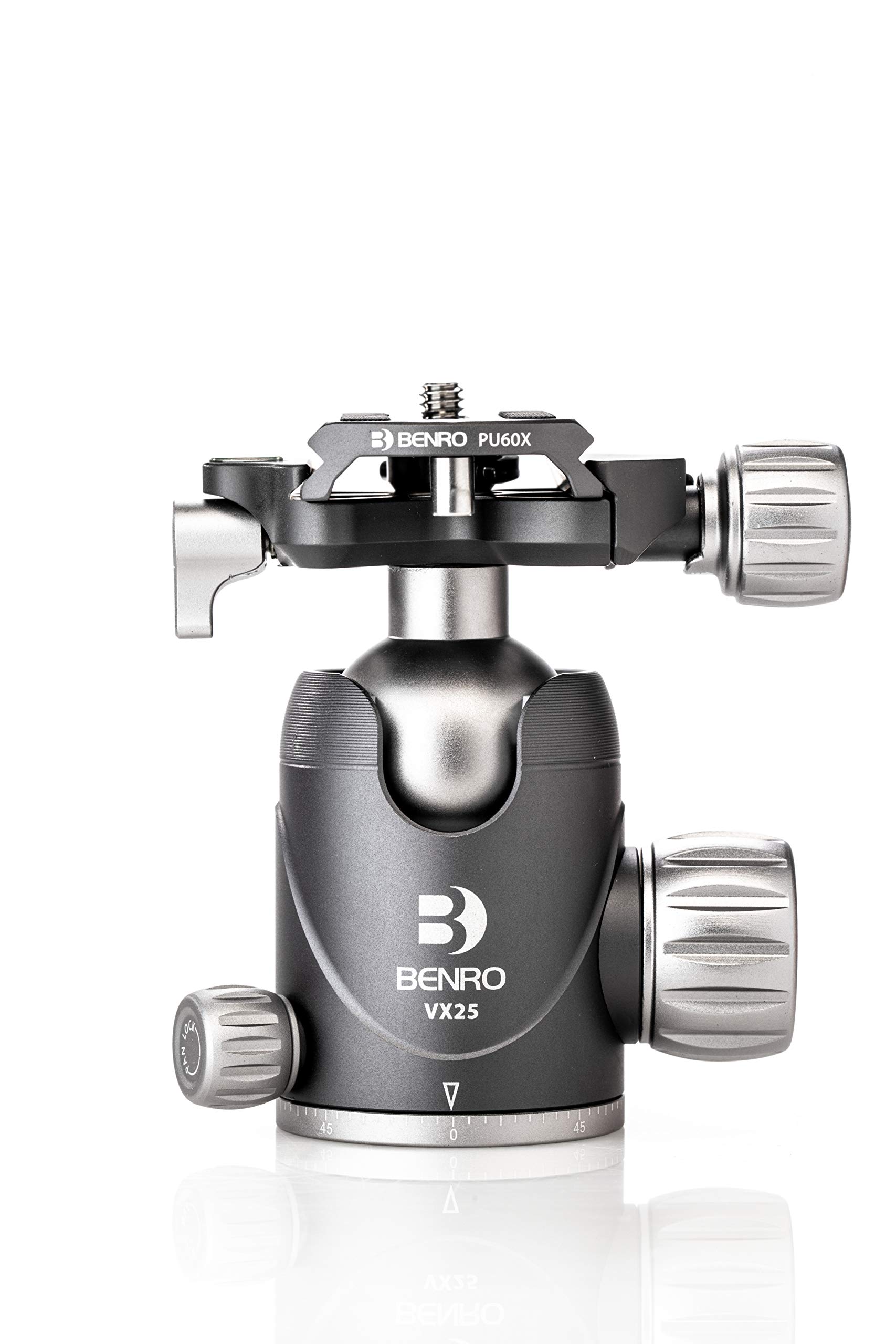
Image: Benro VX25 Ball Head with a camera attached, demonstrating its use.
Key Features
- High Load Capacity: Supports up to 55 lb (approximately 25 kg) of camera gear, suitable for heavier DSLR or mirrorless setups with large lenses or accessories.
- Dual Panoramic Mode: Enables panning from both the base and the quick-release plate for enhanced framing flexibility, ideal for panoramic shots and video production.
- Arca-Style Quick Release Plate with Safety Lock: Features an Arca-compatible plate and a safety locking mechanism to prevent accidental camera detachment.
- Precision Friction and Lock Controls: Integrated friction adjustment within the main lock knob and an independent pan lock provide smooth movement and secure positioning for various shooting needs.
- Lightweight High Strength Aluminum Design: Constructed from aluminum for an excellent strength-to-weight ratio, ensuring portability and robust support.
What's in the Box
- Benro VX25 Two Series Arca-Type Aluminum Ball Head
Setup Instructions
- Attach to Tripod: Locate the 1/4-inch connector thread at the base of the ball head. Screw the ball head onto your tripod's mounting plate until secure. Ensure it is tightened firmly to prevent wobbling.
- Attach Quick Release Plate to Camera: The Arca-Style quick release plate (Benro PU60X) is designed to attach to the bottom of your camera. Use a coin or an Allen key (if provided) to firmly screw the plate onto your camera's tripod mount.
- Mount Camera to Ball Head:
- Loosen the quick release clamp knob on the ball head.
- Align the quick release plate (attached to your camera) with the clamp on the ball head.
- Slide the plate into the clamp until it is fully seated.
- Tighten the quick release clamp knob securely. Ensure the safety lock mechanism engages to prevent accidental release.

Image: The Benro PU60X Arca-Style Quick Release Plate, which attaches to your camera.

Image: Close-up of the quick release clamp with its safety lock and adjustment knob.
Operating Instructions
- Adjusting Ball Head Position:
- Locate the main ball lock knob (the largest knob).
- Turn the knob counter-clockwise to loosen the ball, allowing for free movement and tilting of your camera.
- Adjust your camera to the desired angle.
- Turn the knob clockwise to tighten and secure the ball head in position.
- The main lock knob also integrates friction adjustment. A slight turn counter-clockwise will allow for controlled movement without fully loosening the ball.
- Using Dual Panoramic Panning:
- Base Panning: To pan the entire ball head from its base, locate the smaller pan lock knob at the bottom of the ball head. Turn it counter-clockwise to loosen, allowing the head to rotate horizontally. Tighten clockwise to lock.
- Quick Release Platform Panning: The quick release platform also allows for independent panning. This is controlled by a separate knob, typically located near the quick release clamp. Loosen this knob to rotate the platform horizontally, then tighten to secure.
- Bubble Level: The quick release platform may include a small bubble level to assist in achieving a perfectly level horizon.

Image: Close-up of the main ball lock knob on the Benro VX25 ball head.

Image: Close-up of the pan lock knob and the degree markings on the base of the Benro VX25 ball head.
Maintenance
- Cleaning: Wipe the ball head with a soft, dry cloth after each use to remove dust and debris. For stubborn dirt, use a slightly damp cloth and dry thoroughly. Avoid harsh chemicals or abrasive materials.
- Lubrication: The internal ball mechanism is factory-lubricated and generally does not require additional lubrication. If movement becomes stiff, consult professional service.
- Storage: Store the ball head in a clean, dry environment, away from extreme temperatures and humidity.
- Inspection: Periodically check all knobs and screws for tightness. Ensure the quick release plate and clamp mechanism operate smoothly and securely.
Troubleshooting
- Ball Head Slips or Does Not Hold Position:
- Ensure the main ball lock knob is fully tightened.
- Check if the camera setup exceeds the maximum load capacity (25 kg / 55 lb).
- Clean the ball and socket area if there is any visible debris.
- Quick Release Plate Does Not Secure Camera:
- Verify the quick release plate is correctly attached to the camera and fully seated in the clamp.
- Ensure the quick release clamp knob is tightened completely and the safety lock is engaged.
- Inspect the quick release plate and clamp for any damage or wear.
- Panning is Stiff or Uneven:
- Ensure the pan lock knob is sufficiently loosened.
- Clean the panning base to remove any dust or grit.
Specifications
| Model Number | VX25 |
| Brand | Benro |
| Material | Aluminum |
| Load Capacity | Up to 25 kg (55 lb) |
| Product Dimensions | 6 x 4.6 x 4.5 inches |
| Item Weight | 10.4 ounces |
| Mounting Thread | 1/4-inch (standard tripod mount) |
| Quick Release Plate Type | Arca-Style (Benro PU60X) |
Warranty and Support
The Benro VX25 Two Series Arca-Style Aluminum Ball Head comes with a standard limited warranty of 3 years from the date of purchase for the original owner. If you register the product online, the warranty is extended by 2 additional years, providing a total of 5 years of coverage in applicable regions.
For technical support, warranty claims, or service inquiries, please visit the official Benro website or contact their customer service department. Keep your proof of purchase for warranty validation.
Online Registration: www.benro.com/support/warranty-registration (Example link, actual link may vary)