
1. Introduction
The Retevis RT85 is a robust dual-band UHF/VHF walkie talkie designed for reliable communication. It features 200 channels, DTMF, and FM radio capabilities, making it suitable for various outdoor activities such as hunting, hiking, and camping. The device includes a 1400mAh rechargeable battery for extended use and offers clear sound quality with noise reduction. Its durable construction ensures resilience in challenging environments, and an emergency alarm function provides an added layer of safety.

Overview of Retevis RT85 features, including 200 channels, LCD display, VOX, durability, emergency alarm, and LED flashlight.
2. Package Contents
The Retevis RT85 package typically includes the following items:
- 2 x Retevis RT85 Walkie Talkie units
- 2 x 1400mAh Li-ion Batteries
- 2 x Antennas
- 2 x Belt Clips
- 2 x Hand Straps
- 2 x Charging Docks
- 1 x User Manual

The Retevis RT85 Walkie Talkie and its standard accessories.
3. Product Overview
Familiarize yourself with the main components of your Retevis RT85 walkie talkie:
- Front Panel: Features an LCD display for channel and frequency information, an alphanumeric keypad for direct input, and various function keys.
- Top: Includes the antenna connector, a power/volume knob, and a channel selector knob.
- Side: Equipped with the PTT (Push-to-Talk) button, a monitor button, and an accessory jack for external audio devices.
- Back: Houses the battery compartment and the attachment point for the belt clip.
Front view of the Retevis RT85 Walkie Talkie, highlighting the display and keypad.
4. Setup
4.1 Battery Installation
Install the 1400mAh Li-ion battery into the compartment on the back of the radio. Ensure it clicks securely into place.
4.2 Antenna Attachment
Screw the antenna clockwise onto the connector at the top of the radio until it is finger-tight. Do not overtighten.
The Retevis RT85 with its high-gain antenna, designed for extended communication range.
4.3 Charging
Place the walkie talkie into the charging dock. Connect the charging adapter to the dock and a power outlet. The charging indicator light will show the charging status. Charge fully before first use.

The Retevis RT85 Walkie Talkie in its charging dock, illustrating the 1400mAh battery capacity.
5. Operating Instructions
5.1 Power On/Off and Volume
Rotate the power/volume knob clockwise to turn the radio on. Rotate counter-clockwise until a click is heard to turn it off. Adjust the listening volume by rotating the same knob.
5.2 Channel Selection
Use the up/down arrow keys or the channel selector knob to navigate through the 200 available channels. Alternatively, enter channel numbers directly using the keypad.
5.3 Dual Band Operation
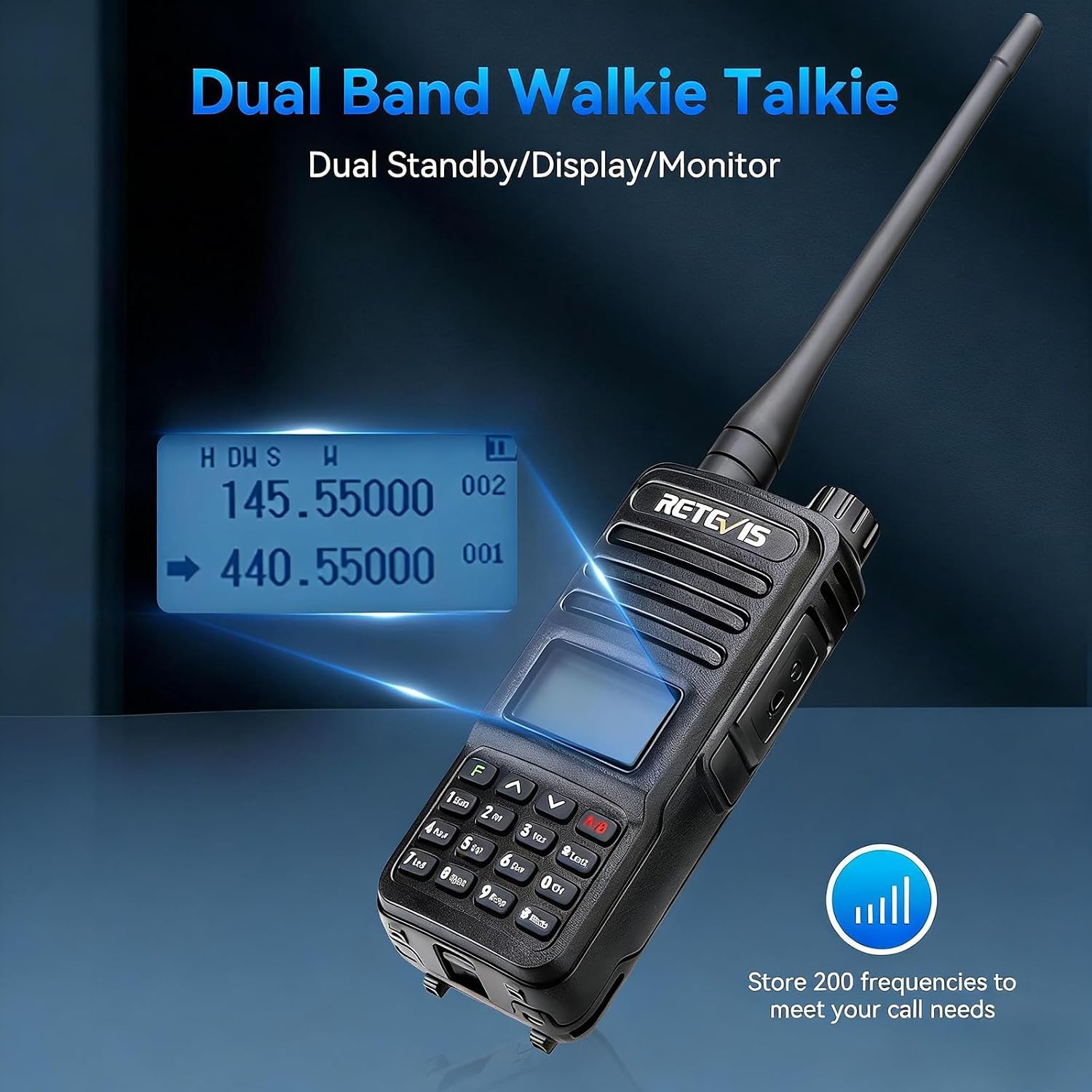
The RT85 supports dual-band display and monitoring. Use the A/B key to switch between the upper and lower frequency bands. The radio can monitor signals on both bands simultaneously.

The RT85 display showing dual-band frequencies and the keypad for manual input.
5.4 Transmitting (PTT)
Press and hold the PTT (Push-to-Talk) button on the side of the radio to transmit. Speak clearly into the microphone. Release the PTT button to receive.
5.5 FM Radio
To activate the FM radio function, press the 'Radio' key (often marked with a musical note or 'FM'). Use the arrow keys to scan for stations or enter frequencies directly. The radio can store up to 24 FM stations.

The Retevis RT85 with the FM radio function activated.
5.6 VOX Function
The Voice Operated Exchange (VOX) function allows hands-free transmission. When VOX is enabled, the radio will transmit automatically when it detects your voice. Adjust VOX sensitivity in the menu settings.

Illustration of the VOX function for hands-free communication.
5.7 Emergency Alarm
In an emergency, activate the alarm function by pressing the designated emergency key (refer to the specific key mapping in the full manual, often a long press on a specific button). This will emit an audible alarm locally and/or transmit an alarm signal to other radios.

The Retevis RT85 Walkie Talkie with an activated emergency alarm.
5.8 DTMF
The RT85 supports DTMF (Dual-Tone Multi-Frequency) signaling. This can be used for various functions such as remote control of repeaters or selective calling. Refer to advanced programming guides for DTMF setup.
5.9 Squelch Function
The squelch function automatically mutes the speaker when no signal is present, reducing background noise. Adjust the squelch level in the menu to optimize reception clarity.

The Retevis RT85 demonstrating clear sound quality with noise reduction.
5.10 LED Flashlight
The RT85 includes a built-in LED flashlight for illumination in low-light conditions. Activate it via the designated function key (consult the full manual for specific key assignment).

The Retevis RT85 with its LED flashlight activated.
6. Maintenance
6.1 Battery Care
To prolong battery life, avoid overcharging and fully discharging the battery. Store the battery in a cool, dry place when not in use. Replace the battery when its performance significantly degrades.
6.2 Cleaning
Clean the radio's exterior with a soft, damp cloth. Do not use harsh chemicals or solvents. Keep the charging contacts clean and dry.
6.3 Storage
When storing the radio for extended periods, remove the battery and store it separately. Keep the radio in a dry, dust-free environment.
7. Troubleshooting
- No Power: Ensure the battery is fully charged and correctly installed. Check if the power/volume knob is turned on.
- Cannot Transmit/Receive: Verify that the antenna is securely attached. Check the selected channel and frequency. Ensure the battery has sufficient charge. Confirm that the squelch level is not set too high.
- Poor Sound Quality: Adjust the volume. Check the squelch level. Ensure the antenna is properly connected. Move to an area with better signal reception.
- Short Communication Range: Ensure the antenna is correctly attached. Check for obstructions like buildings or dense foliage. The maximum range is up to 4 kilometers under optimal conditions. Low battery can also affect range.
8. Specifications
| Brand | Retevis |
| Model Number | EUA9195BX2 |
| Color | Black |
| Number of Channels | 200 |
| Frequency Range | UHF: 400 – 430 MHz (VHF range typically 136-174 MHz, consult full manual for specific model details) |
| Max Talk Range | 4 Kilometers (under optimal conditions) |
| Battery | 1400mAh Lithium-ion (included) |
| Battery Life | 8 Hours (typical use) |
| Voltage | 7.4 Volts |
| Water Resistance Level | Non-waterproof |
| Product Dimensions (D x W x H) | 3.6 x 5.3 x 11.6 cm |
| Item Weight | 540 Grams |
| Special Features | Emergency Alarm, Rechargeable, Long Range, Dual Band, FM Radio, DTMF, Squelch Function, LED Flashlight |
| Operating Temperature Range | -10°C to 50°C |
| Connectivity Protocol | FM |
| Tuner Technology | Dual Band |
| Compatible Devices | Ham radios, other devices with DTMF encoding and decoding |
9. Warranty and Support
Retevis provides a 2-year warranty for the radio body and a 1-year warranty for accessories. A 30-day return policy is also offered. For warranty claims or service requests, please contact Retevis customer support via Amazon. Support inquiries are typically answered within 12 hours. Service is available beyond the warranty period, with applicable costs borne by the buyer.


