
Introduction
Thank you for choosing the HETP HX160S3 20W PD QC 3.0 26800mAh Fast Charging Power Bank. This portable charger is designed to provide reliable and efficient power for your mobile devices on the go. Featuring 20W Power Delivery (PD) and Quick Charge (QC) 3.0 technology, it offers rapid charging for compatible devices and can charge up to three devices simultaneously. Its high capacity ensures multiple charges for smartphones and tablets, making it an ideal companion for travel and daily use.
Safety Information
Please read all safety instructions carefully before using this product. Failure to follow these instructions may result in fire, electric shock, product damage, or property damage.
- Do not expose the power bank to extreme temperatures (above 60°C/140°F or below 0°C/32°F).
- Avoid contact with water or other liquids.
- Do not disassemble, modify, or attempt to repair the device.
- Keep away from direct sunlight, heat sources, and flammable materials.
- Do not drop, puncture, or apply excessive force to the power bank.
- Use only certified charging cables and adapters.
- Keep out of reach of children.
This power bank incorporates an intelligent control circuit to prevent overcharging, overvoltage, overcurrent, and short circuits, ensuring safe operation. It is CE certified.

Image: Internal view highlighting the intelligent control IC for enhanced safety.
Package Contents
- HETP HX160S3 26800mAh Power Bank
- Micro USB Charging Cable
- User Manual (this document)
Product Overview
Familiarize yourself with the ports and indicators on your HETP power bank.

Image: Front and side view of the power bank, indicating port types and LED power indicator.
Ports:
- PD USB-C Input/Output: 5V/3A (Power Delivery for fast charging the power bank or devices).
- Micro USB Input: 5V/2.1A (Standard input for charging the power bank).
- QC3.0 Output: 5V/3A (Quick Charge 3.0 for fast charging compatible devices).
- USB Output: 5V/2.1A (Standard output for charging devices).
LED Indicator:
Press the power button once to check the remaining battery level. The LED indicators will light up as follows:
- 10%-25%: One LED lit (red)
- 26%-50%: Two LEDs lit (green)
- 51%-75%: Three LEDs lit (light blue)
- 76%-100%: Four LEDs lit (dark blue)
Setup: Initial Charging
Before first use, fully charge your HETP power bank.
- Connect the power bank to a wall charger using either the USB-C port (for faster charging) or the Micro USB port (using the provided cable).
- The LED indicators will flash to show charging status and remain solid when fully charged.
- A full charge using a PD Type-C charger (not included) takes approximately 3.5 hours. Using a standard 2A Micro USB charger takes approximately 9 hours.

Image: Illustration of recharging the power bank, highlighting the faster Type-C PD input.
Operating: Charging Your Devices
The HETP power bank can charge up to three devices simultaneously.
- Connect your device's charging cable to one of the power bank's output ports (QC3.0, PD USB-C, or USB 2.1A).
- Connect the other end of the cable to your device.
- The power bank will automatically begin charging. If not, press the power button once.
- The LED indicators will show the remaining battery level during charging.

Image: The power bank connected and charging an iPhone and other devices, demonstrating multi-device charging capability.
Universal Compatibility:
This power bank is compatible with a wide range of USB-powered devices, including iPhones, iPads, Samsung Galaxy phones, other smartphones, tablets, smartwatches, and Bluetooth devices.

Image: A visual representation of the power bank's universal compatibility with different electronic devices.
Maintenance
- Cleaning: Use a dry, soft cloth to clean the power bank. Do not use harsh chemicals or abrasive materials.
- Storage: Store the power bank in a cool, dry place away from direct sunlight and extreme temperatures. If storing for extended periods, charge it to about 50-75% every 3 months to maintain battery health.
- Battery Care: Avoid fully discharging the power bank regularly, as this can reduce its lifespan.
Troubleshooting
- Power bank not charging: Ensure the charging cable is securely connected to both the power bank's input port and the wall charger. Try a different cable or wall adapter.
- Device not charging from power bank: Ensure the power bank has sufficient charge. Press the power button to activate charging. Try a different output port or charging cable.
- Slow charging: Ensure your device and cable support fast charging (PD/QC 3.0) if you expect rapid charging speeds. Some devices may charge slower depending on their battery status or cable quality.
- Power bank automatically turns off: This may happen if the connected device is fully charged or if the current draw is too low. If it turns off unexpectedly, ensure it is sufficiently charged.
Specifications
| Model Number | HX160S3 |
| Capacity | 26800mAh |
| USB-C Input/Output (PD) | 5V/3A |
| Micro USB Input | 5V/2.1A |
| USB Output (QC3.0) | 5V/3A |
| USB Output | 5V/2.1A |
| Dimensions | 15.08 cm x 7.49 cm x 1.83 cm |
| Weight | 360 Grams |
| Compatible Devices | Smartphones, Tablets, Bluetooth devices |
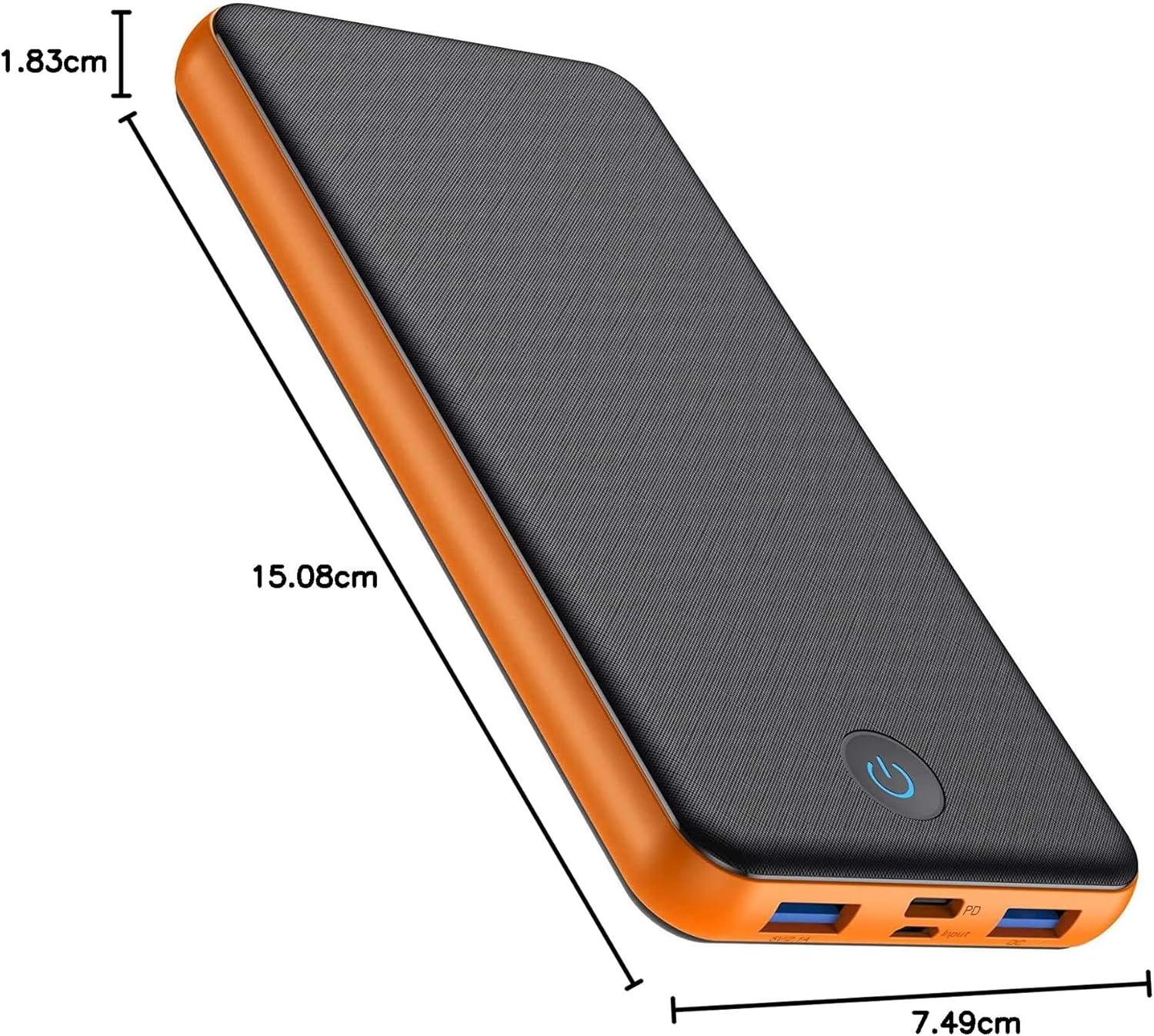
Image: The power bank displaying its physical dimensions.
Warranty and Support
Your HETP HX160S3 Power Bank comes with a 24-month warranty from the date of purchase. This warranty covers manufacturing defects and ensures product quality.
For any questions, technical support, or warranty claims, please contact our friendly customer service team. We are available 24 hours to assist you.
Please refer to your purchase documentation for specific contact details or visit the official HETP website.


