
focondot LZ-S2020
User Manual
Multi-Function Bedside Lamp with Bluetooth Speaker and Wireless Charger
Model: LZ-S2020 | Brand: focondot
Product Overview
The focondot Multi-Function Bedside Lamp is a versatile device designed to enhance your living space. It integrates a dimmable LED lamp, a built-in Bluetooth speaker, a fast wireless charging pad, and a digital clock, all within a modern and elegant design.

Figure 1: Overview of the focondot Multi-Function Bedside Lamp with a phone wirelessly charging.
This lamp offers convenience and functionality, making it an ideal addition to bedrooms, living rooms, or offices.
Package Contents
Please check the package for the following items:
- Multi-Function Bedside Lamp (Model: LZ-S2020)
- Power Adapter
- Remote Control (if included, as per specifications)
- User Manual
If any items are missing or damaged, please contact customer support.
Setup
- Unpacking: Carefully remove all components from the packaging.
- Placement: Place the lamp on a stable, flat surface, such as a nightstand or desk. Ensure there is adequate space around the lamp for proper ventilation and access to the wireless charging area.
- Power Connection: Connect the power adapter to the lamp's power input port, then plug the adapter into a standard electrical outlet. The lamp will power on automatically.
- Initial Clock Synchronization: After connecting the lamp to power, the digital clock on the interface will synchronize with your mobile device's time once you connect your mobile device to the lamp via Bluetooth. Ensure "device notification" is allowed on your phone for proper synchronization.

Figure 2: Product dimensions for optimal placement.
Operating Instructions
1. Light Control
The lamp features a dimmable LED light with adjustable color temperature.
- Brightness Adjustment: Swipe left or right on the Light Control Area (indicated on the lamp's top surface) to steplessly adjust the brightness of the lamp.
- Color Temperature Switch: Click the Light Control Area to switch between two color temperatures: 2200K Warm Light and 4500K White Light.

Figure 3: Adjusting light brightness and color temperature.
2. Wireless Charging Pad (QI Compatible)
The base of the lamp includes a wireless charging pad for compatible devices.
- Place your Qi-enabled smartphone or device directly on the wireless charging area on the lamp's base.
- The charging status indicator will illuminate to confirm charging has begun.
- This lamp supports 5W/7.5W/10W charging rates, compatible with various devices including iPhone X, 8, 8 Plus, Galaxy Note 8, S8, S8 Plus, S7, and Galaxy S7 Edge.

Figure 4: Using the wireless charging pad.
3. Bluetooth Speaker
Connect your devices to the built-in Bluetooth speaker for audio playback.
- Pairing: Turn on the lamp. Activate Bluetooth on your mobile device and search for available devices. Select "LZ-S2020" (or similar name) from the list to pair.
- Audio Playback: Once paired, you can play music, podcasts, or other audio from your device through the lamp's speaker.
- Volume Control: Use the volume up/down controls on the lamp's touch panel or your connected device to adjust the audio volume.

Figure 5: Enjoying music via the Bluetooth speaker.
4. Digital Clock
The lamp features a smart digital clock on its interface.
- The clock time will synchronize with your mobile device's time after a successful Bluetooth connection.
- Note: The clock time will reset each time you connect to Bluetooth. Ensure your mobile device's time is accurate for correct synchronization.

Figure 6: Digital clock display and synchronization.
5. Sleep Mode
The sleep mode feature helps create a comfortable sleeping environment.
- To activate Sleep Mode, click the dedicated Sleep Mode button on the touch control area.
- When activated, the speaker and light will automatically turn off after 30 minutes.

Figure 7: Activating Sleep Mode.
6. Touch Control Panel Overview
The lamp's functions are controlled via the intuitive touch panel on its top surface.

Figure 8: Detailed view of the touch control panel.
- Play/Pause
- Volume Down/Previous Song
- Digital Clock
- BT Indicator (Bluetooth)
- Light Control Area
- Volume Up/Next Song
- TWS Indicator (True Wireless Stereo)
- Sleep Mode
7. True Wireless Stereo (TWS) Function
For an enhanced audio experience, two focondot Multi-Function Bedside Lamps can be paired together to create a True Wireless Stereo (TWS) system.
- Ensure both lamps are powered on and within close proximity.
- Follow the specific pairing instructions for TWS mode, typically involving pressing and holding a designated button on both units until they connect. Refer to the detailed instructions provided with the product for precise steps.
- Once paired, audio will play in stereo across both lamps, providing a richer sound experience.
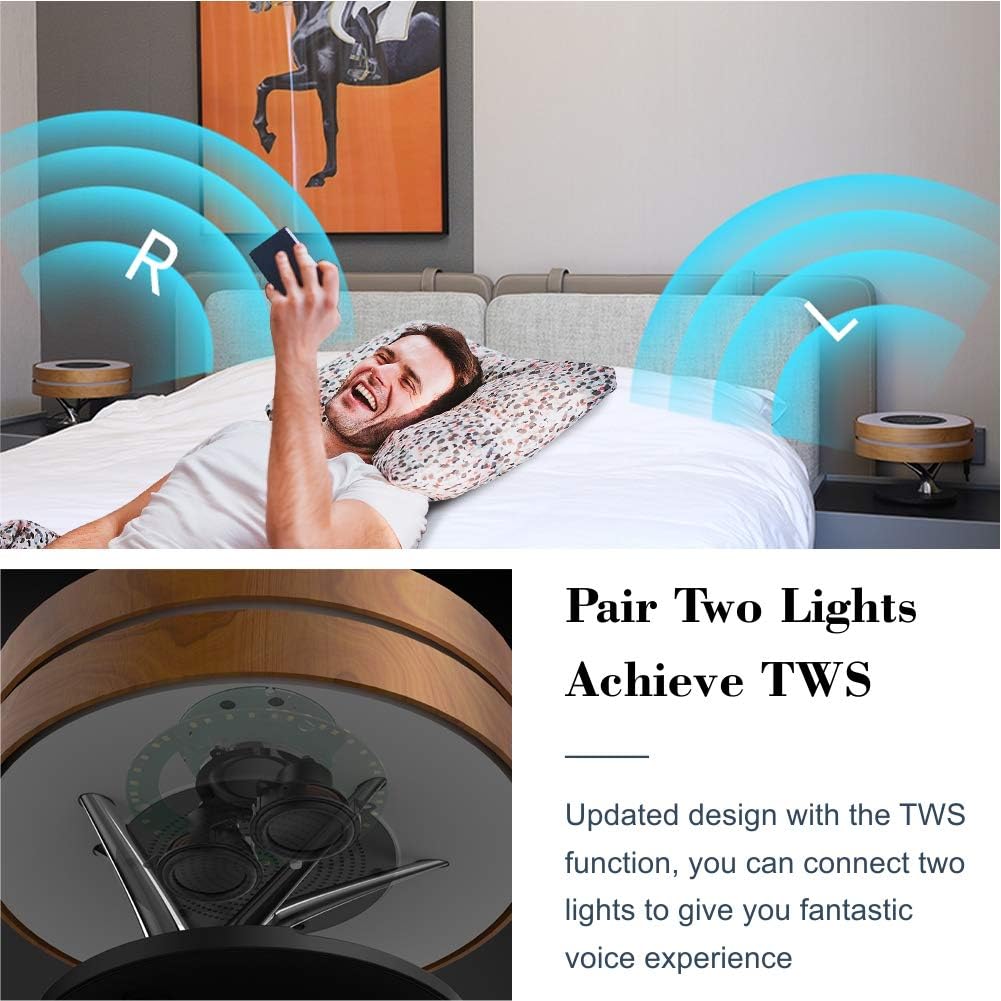
Figure 9: TWS function for stereo sound.
Maintenance
- Cleaning: Use a soft, dry cloth to clean the lamp's surfaces. Do not use abrasive cleaners or solvents, as they may damage the finish.
- Dust Removal: Regularly dust the speaker grille and light surfaces to maintain optimal performance and appearance.
- Storage: If storing the lamp for an extended period, disconnect it from power and store it in a cool, dry place away from direct sunlight and extreme temperatures.
- Water Resistance: The product is listed as waterproof, but it is recommended for indoor use only. Avoid submerging the device in water or exposing it to excessive moisture.
Troubleshooting
| Problem | Possible Cause | Solution |
|---|---|---|
| Lamp does not turn on. | No power connection or faulty adapter. | Ensure the power adapter is securely plugged into both the lamp and a working electrical outlet. Try a different outlet. |
| Bluetooth speaker not connecting or poor sound. | Device not in pairing mode, too far from lamp, or interference. |
|
| Wireless charging not working. | Device not Qi-compatible, misaligned, or foreign objects on pad. |
|
| Digital clock time is incorrect. | Clock resets on Bluetooth connection; mobile device time is inaccurate. | Ensure your mobile device's time is set correctly. The lamp's clock synchronizes with your phone upon Bluetooth connection. |
| Light is too dim. | Brightness setting is low. | Swipe right on the Light Control Area to increase brightness. |
Specifications
| Feature | Detail |
|---|---|
| Model Number | LZ-S2020 |
| Brand | focondot |
| Product Dimensions | 10.67"D x 10.67"W x 7.17"H (271mm x 271mm x 182mm) |
| Item Weight | 4.31 pounds |
| Material | Metal, Wood (Maple finish) |
| Light Source Type | LED |
| Color Temperature | 2200K Warm Light, 4500K White Light |
| Wattage | 10 watts |
| Control Method | Touch |
| Connectivity Technology | Bluetooth |
| Wireless Charging Output | 5W/7.5W/10W (Qi-compatible) |
| Power Source | Corded Electric |
| Indoor/Outdoor Usage | Indoor use only |
| Water Resistance Level | Waterproof (Note: Recommended for indoor use only, avoid submersion) |
| UPC | 680306607723 |
Warranty Information
This focondot product is covered by a limited warranty against defects in materials and workmanship. Please refer to the product packaging or contact focondot customer support for specific warranty terms and conditions. Keep your purchase receipt as proof of purchase.
Customer Support
For technical assistance, troubleshooting, or warranty claims, please contact focondot customer support through the following channels:
- Online Support: Visit the official focondot website for FAQs and support resources.
- Email Support: Refer to your product packaging or purchase documentation for the customer service email address.
- Amazon Store: You can also visit the focondot Store on Amazon for more information and contact options.
When contacting support, please have your product model number (LZ-S2020) and purchase date ready.
Ask a question about this manual
Ask about setup, troubleshooting, compatibility, parts, safety, or missing instructions. Manuals+ will review the question and use this page’s manual context to help answer it.