1. Introduction
This manual provides instructions for the ZdalaMit Replacement Remote Control, model 101018E0055. This remote is designed to be compatible with various JVC Roku Smart TV models, offering a direct replacement without the need for complex programming. Its ergonomic design ensures comfortable handling.
Compatible JVC Roku TV Models include:
- LT-49MAW598
- LT-55MAW595
- LT-32MAW388
- LT-65MAW595
- LT-32MAW205
- LT-43MAW595
- LT-70MAW795
- LT-50MAW595
2. Setup
The ZdalaMit Replacement Remote Control requires no programming or pairing. Simply install the batteries, and it will be ready for immediate use with your compatible JVC Roku Smart TV.
2.1 Battery Installation
- Locate the battery compartment cover on the back of the remote control.
- Slide the cover downwards or press the latch and lift to open the compartment.
- Insert two (2) new 1.5V AAA alkaline batteries, ensuring the positive (+) and negative (-) terminals match the diagrams inside the compartment.
- Replace the battery compartment cover by sliding it back into place until it clicks securely.

Image: Angled view of the ZdalaMit Replacement Remote Control, highlighting its buttons and ergonomic shape. The battery compartment is located on the back.
Note: Batteries are not included with the remote control. Always use new alkaline batteries for optimal performance.
3. Operation
This section describes the functions of the buttons on your ZdalaMit Replacement Remote Control.
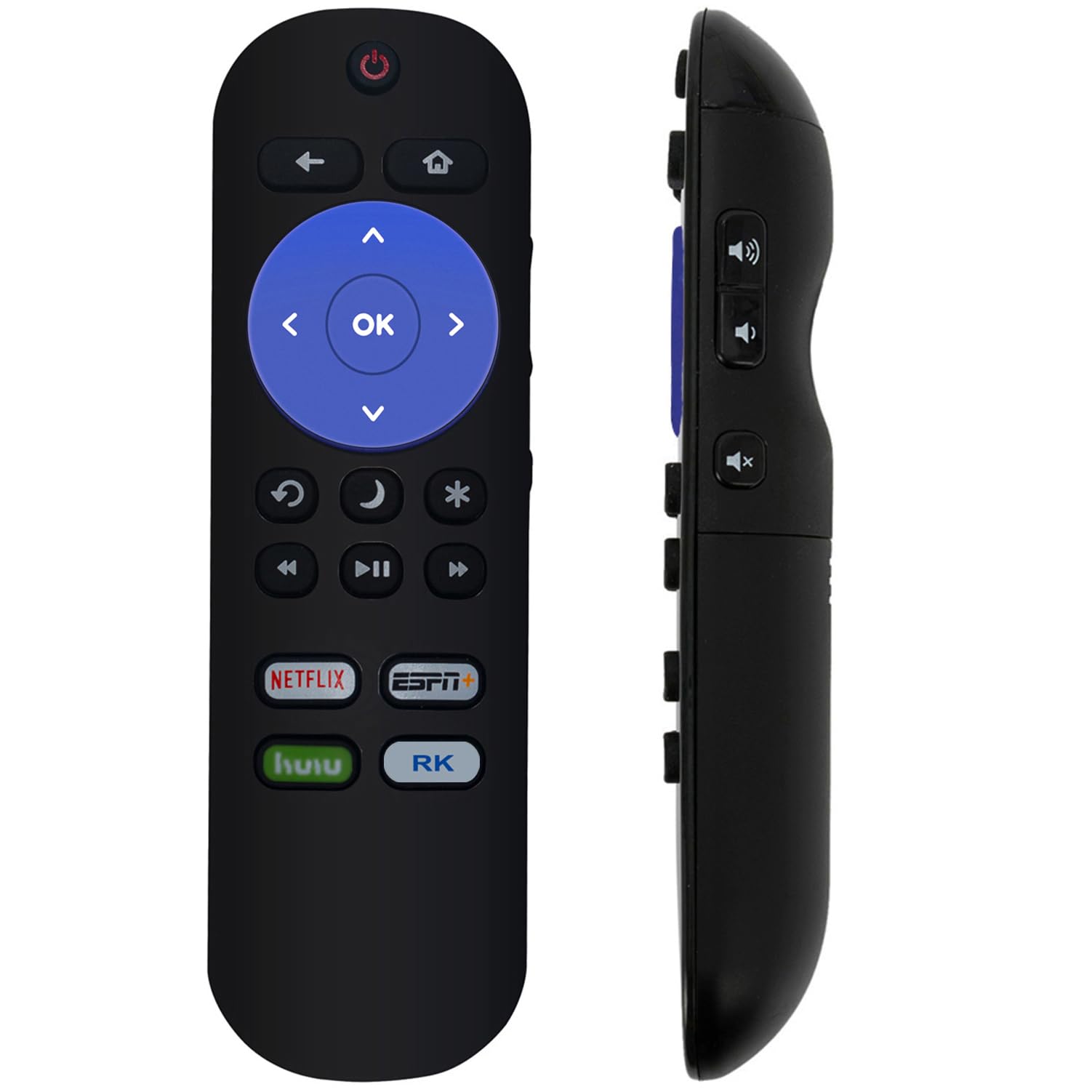
Image: Front view of the ZdalaMit Replacement Remote Control, displaying all functional buttons.
| Button | Function |
|---|---|
| Power (⏻) | Turns the TV on or off. |
| Back (↶) | Returns to the previous screen or menu. |
| Home (⌂) | Navigates to the Roku Home screen. |
| Directional Pad (Up, Down, Left, Right) | Navigates through menus and content. |
| OK | Confirms selections. |
| Rewind (⏮) | Rewinds video playback. |
| Play/Pause (⏯) | Plays or pauses video playback. |
| Fast Forward (⏭) | Fast forwards video playback. |
| Replay (↻) | Replays the last few seconds of content. |
| Sleep (🌙) | Activates the TV's sleep timer function. |
| Star (✱) | Accesses options or settings within certain apps. |
| Netflix | Direct access to the Netflix application. |
| ESPN+ | Direct access to the ESPN+ application. |
| Hulu | Direct access to the Hulu application. |
| RK (Roku Channel) | Direct access to The Roku Channel application. |
4. Maintenance
4.1 Battery Replacement
Replace batteries when the remote's response becomes sluggish or stops working. Refer to section 2.1 for battery installation instructions. Always replace both batteries simultaneously with new 1.5V AAA alkaline batteries.
4.2 Cleaning
To clean the remote control, gently wipe its surface with a soft, dry cloth. For stubborn dirt, slightly dampen the cloth with water. Avoid using harsh chemicals, abrasive cleaners, or excessive moisture, as these can damage the remote.
4.3 Storage
Store the remote control in a cool, dry place away from direct sunlight and extreme temperatures. If the remote will not be used for an extended period, it is recommended to remove the batteries to prevent leakage and potential damage.
5. Troubleshooting
| Problem | Possible Cause | Solution |
|---|---|---|
| Remote is not responding. | Dead or incorrectly installed batteries. | Replace batteries with new 1.5V AAA alkaline batteries, ensuring correct polarity. |
| Remote has limited range or intermittent response. | Weak batteries; Obstruction between remote and TV; Remote sensor on TV is blocked. | Replace batteries. Ensure a clear line of sight between the remote and the TV. Remove any objects blocking the TV's remote sensor. |
| Specific buttons are not working. | Dirt or debris under the button; Remote malfunction. | Clean the remote as described in section 4.2. If the issue persists, the remote may need replacement. |
| Remote does not control the TV. | Incompatible TV model; Remote malfunction. | Verify your JVC Roku TV model is listed in the compatible models section (Section 1). If compatible and troubleshooting steps above fail, contact support. |
6. Specifications
| Model Number | 101018E0055 |
| Brand | ZdalaMit |
| Compatible Devices | JVC Roku Smart Televisions (Specific models listed in Section 1) |
| Power Supply | 2 x 1.5V AAA Alkaline Batteries |
| Product Dimensions | 5 x 1.2 x 0.5 inches (approximately) |
| Item Weight | 1.41 ounces (approximately) |
| Color | Black |
| Special Feature | Ergonomic Design |
7. Support
If you encounter any issues not covered in this manual or require further assistance, please contact the seller or manufacturer for support. Refer to your purchase documentation for specific contact details.


