
1. Introduction
This manual provides essential information for the proper setup, operation, and maintenance of your Yamaha RX-A8A AVENTAGE 11.2-Channel AV Receiver. The RX-A8A is designed to deliver a premium home theater experience with advanced audio and video processing capabilities, including 8K and 4K/120 HDMI support, immersive audio formats like Dolby Atmos, DTS:X, and Auro-3D, and smart features such as Surround:AI, Wi-Fi, Bluetooth, and MusicCast.
Please read this manual thoroughly before using the receiver to ensure optimal performance and safe operation. Keep this manual for future reference.
2. What's in the Box
Verify that all items listed below are included in the package:
- Yamaha RX-A8A AV Receiver
- Remote control
- FM antenna
- AM antenna
- YPAO microphone with base
- Power cable
- Quick Start Guide (separate document)
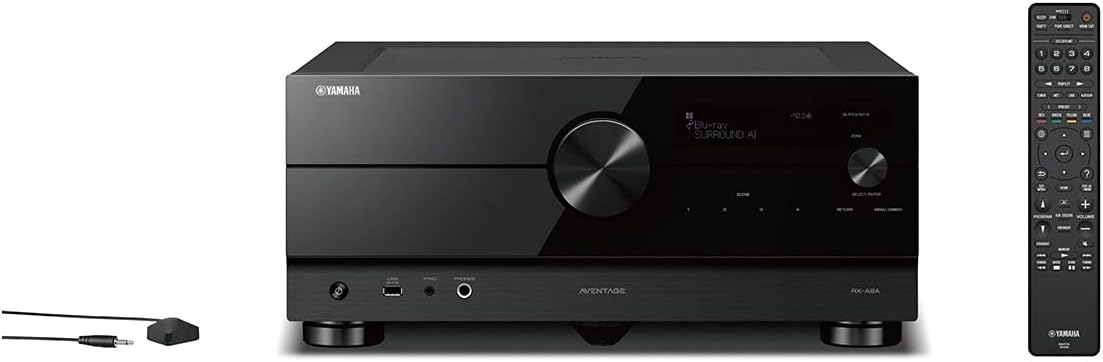
Image: The Yamaha RX-A8A AV Receiver shown with its remote control and YPAO microphone, which are included accessories.
3. Setup
3.1 Placement
Place the receiver on a stable, level surface with adequate ventilation. Ensure there is sufficient space around the unit for heat dissipation. Avoid placing it in direct sunlight or near heat sources. The receiver dimensions are approximately 18.75 x 17.13 x 7.5 inches, and it weighs 53.8 pounds.
3.2 Connections
Before making any connections, ensure the receiver and all connected devices are powered off and unplugged from the wall outlet.
- Speaker Connections: Connect your speakers to the appropriate terminals on the rear panel. The RX-A8A supports an 11.2-channel configuration. Ensure correct polarity (+ to + and - to -) for all speakers.
- HDMI Connections: Connect your video sources (e.g., Blu-ray player, gaming console, streaming device) to the HDMI inputs. Connect your TV or projector to the HDMI OUT (eARC) port. The receiver features 7 HDMI inputs and 3 HDMI outputs, all supporting 8K60 and 4K120 (40 Gbps).
- Audio Connections: For devices without HDMI, use optical, coaxial, or analog audio inputs. A dedicated phono input is available for turntables.
- Network Connection: For network features and firmware updates, connect an Ethernet cable to the NETWORK port or use the built-in Wi-Fi. Extend the Wi-Fi antennas for optimal wireless performance.
- Antenna Connections: Connect the supplied FM and AM antennas for radio reception.
- Power Connection: After all other connections are made, plug the power cable into the receiver and then into a wall outlet.

Image: Detailed view of the rear panel of the Yamaha RX-A8A, illustrating the various HDMI, audio, speaker, and network connection ports.
3.3 YPAO Calibration
The Yamaha Parametric Acoustic Optimizer (YPAO) system automatically analyzes room acoustics and adjusts audio parameters for optimal sound. This process is crucial for achieving the best sound quality.
- Connect the supplied YPAO microphone to the YPAO jack on the front panel.
- Place the microphone at your primary listening position, ideally on a tripod, at ear height.
- Follow the on-screen instructions displayed on your TV to initiate the YPAO calibration. The system will emit test tones from each speaker.
- For advanced calibration, use multiple measurement points as prompted by the system.

Image: The Yamaha RX-A8A AV Receiver with its Wi-Fi antennas extended, alongside the remote control and YPAO microphone, ready for setup.
4. Operating
4.1 Basic Controls
The receiver can be operated using the front panel controls, the included remote control, or the MusicCast app on a smart device.
- Power: Use the power button on the front panel or remote to turn the unit on/off.
- Input Selector: Use the input selector knob on the front panel or dedicated buttons on the remote to switch between connected sources (e.g., HDMI 1, CD, Phono).
- Volume: Adjust the master volume using the large knob on the front panel or the volume buttons on the remote.
4.2 Sound Modes and Features
- Surround:AI: This technology automatically optimizes the sound and effects in real-time based on the content being played. Activate it for an enhanced listening experience.
- Immersive Audio: The RX-A8A supports Dolby Atmos, DTS:X, and Auro-3D for multi-dimensional sound. Ensure your speaker setup is configured correctly for these formats.
- YPAO R.S.C.: Advanced room calibration with 3D, multipoint measurement, precision EQ, and low-frequency mode.
4.3 Network and Smart Features
The RX-A8A offers extensive network connectivity and smart home integration:
- MusicCast: Yamaha's multi-room audio system allows you to stream music throughout your home. Control it via the MusicCast app.
- Streaming Services: Access popular streaming services like Spotify, Apple Music (via AirPlay 2), Amazon Music HD, SiriusXM, TIDAL, Pandora, Deezer, and Qobuz.
- Wireless Connectivity: Built-in Wi-Fi and Bluetooth enable wireless audio streaming from compatible devices. AirPlay 2 is also supported.
- Voice Control: The receiver is compatible with Amazon Alexa, Google Assistant, and Siri (via AirPlay 2) for hands-free operation.
- Works with Sonos: Seamlessly integrate the RX-A8A into an existing Sonos system using a Sonos Port (sold separately).
5. Maintenance
5.1 Cleaning
To maintain the appearance and performance of your receiver, regularly clean it with a soft, dry cloth. Avoid using abrasive cleaners, solvents, or chemical sprays, as these can damage the finish or internal components. Ensure the unit is unplugged before cleaning.
5.2 Firmware Updates
Yamaha periodically releases firmware updates to improve performance, add features, or address issues. Connect the receiver to your network (wired or Wi-Fi) and check for updates via the on-screen menu. Follow the instructions carefully during the update process and do not power off the unit.
6. Troubleshooting
If you encounter issues with your RX-A8A receiver, refer to the following common troubleshooting steps:
- No Power: Ensure the power cable is securely connected to both the receiver and a working wall outlet. Check the power switch on the front panel.
- No Sound:
- Verify that the correct input source is selected.
- Check speaker connections for proper polarity and secure fit.
- Ensure the volume is not muted or set too low.
- Confirm that the audio output settings on your source device are correct.
- No Video/HDMI Issues:
- Ensure HDMI cables are securely connected to both the source and the receiver, and from the receiver to the TV/projector.
- Try a different HDMI cable or input port.
- If experiencing HDCP 2.2 errors or intermittent video, try restarting the receiver and connected devices. Ensure all devices support the required HDCP version.
- Disable HDMI CEC (Consumer Electronics Control) on the receiver and connected devices if experiencing unwanted automatic input switching.
- Network Connectivity Problems:
- For Wi-Fi, ensure the antennas are extended and the receiver is within range of your wireless router.
- For wired connection, check the Ethernet cable.
- Restart your router and the receiver.
- Remote Control Not Working:
- Check and replace the batteries (2 AAA batteries required).
- Ensure there are no obstructions between the remote and the receiver's IR sensor.
For persistent issues, consult the comprehensive troubleshooting section in the full owner's manual available on the Yamaha support website.
7. Specifications
| Feature | Description |
|---|---|
| Channels | 11.2-channel |
| Immersive Audio | Dolby Atmos, DTS:X, Auro-3D |
| HDMI Inputs/Outputs | 7 In / 3 Out (all support 8K60, 4K120, 40 Gbps, HDCP 2.3, eARC) |
| Video Support | Dolby Vision, HDR10+, HLG, BT.2020, ALLM, VRR |
| Room Calibration | YPAO R.S.C. with 3D, multipoint measurement, precision EQ, low frequency mode |
| AI Technology | Surround:AI for real-time sound optimization |
| Wireless Connectivity | Wi-Fi, Bluetooth, AirPlay 2 |
| Streaming Services | Spotify, Apple Music (via AirPlay 2), Amazon Music HD, SiriusXM, TIDAL, Pandora, Deezer, Qobuz |
| Multi-room Audio | MusicCast, Works with Sonos |
| Voice Control | Amazon Alexa, Google Assistant, Siri (via AirPlay 2) |
| Additional Inputs | Phono input, XLR inputs |
| Dimensions (W x H x D) | 17.13 x 7.5 x 18.75 inches (approx.) |
| Weight | 53.8 pounds |
8. Warranty and Support
8.1 Warranty Information
The Yamaha RX-A8A AV Receiver typically comes with a 5-year warranty. Please refer to the warranty card included with your product or visit the official Yamaha website for specific terms and conditions applicable to your region.

Image: A graphic displaying '5 YEARS *', indicating the typical warranty period for the product.
8.2 Customer Support
For further assistance, technical support, or service inquiries, please visit the official Yamaha website for your region. You can find detailed FAQs, downloadable manuals, and contact information for customer service representatives.


