1. Introduction
The Sanitas SBF 72 Bluetooth Diagnostic Scale is designed to provide comprehensive body analysis, helping you monitor your health and fitness progress. This scale measures body weight, body fat, body water, muscle percentage, bone mass, and calculates BMI, AMR/BMR (Active/Basal Metabolic Rate). It connects via Bluetooth to the free Sanitas HealthCoach app for long-term data tracking and graphical evaluation.
2. Safety Information
- This device is not intended for medical diagnosis or treatment. Consult a healthcare professional for medical concerns.
- Individuals with pacemakers or other medical implants should not use this scale, as the electrical current may interfere with their devices.
- Do not use the scale on wet or slippery surfaces to prevent falls.
- Keep the scale away from strong electromagnetic fields.
- Children should be supervised when using the scale.
- Replace batteries promptly when indicated to ensure accurate readings.
3. Package Contents
Please check that all items are present and undamaged upon unpacking:
- 1 x Sanitas SBF 72 Diagnostic Scale
- 1 x 3V Lithium Battery (CR2032)
- 1 x Quick Start Guide
- 1 x User Manual
The Sanitas HealthCoach app is available for free download from your device's app store.
4. Product Overview
The Sanitas SBF 72 features a sleek design with a glass surface and brushed stainless steel electrodes. It provides detailed body analysis values beyond just weight.

This image shows the Sanitas SBF 72 Bluetooth Diagnostic Scale, a sleek black square scale with two silver electrode strips and a digital display showing a weight reading.
Key Features:
- Comprehensive Body Analysis: Measures body weight, fat, water, muscle percentage, bone mass, and displays calorie requirements (AMR/BMR) and Body Mass Index (BMI).
- Bluetooth Connectivity: Seamless data transfer to the Sanitas HealthCoach app for long-term monitoring and graphical evaluation.
- User Memory: Stores data for up to 8 different users with automatic user recognition.
- Activity Levels: Adjustable for 5 activity levels to ensure accurate calorie expenditure calculations.
- Direct Start Function: Can be used without the app to measure weight directly. Body analysis values are calculated with standard parameters in this mode.
- LCD Display: Clear digital display with 30 mm digit size.
- High Weight Capacity: Supports up to 180 kg.
- Safety Glass Platform: Durable and easy to clean.
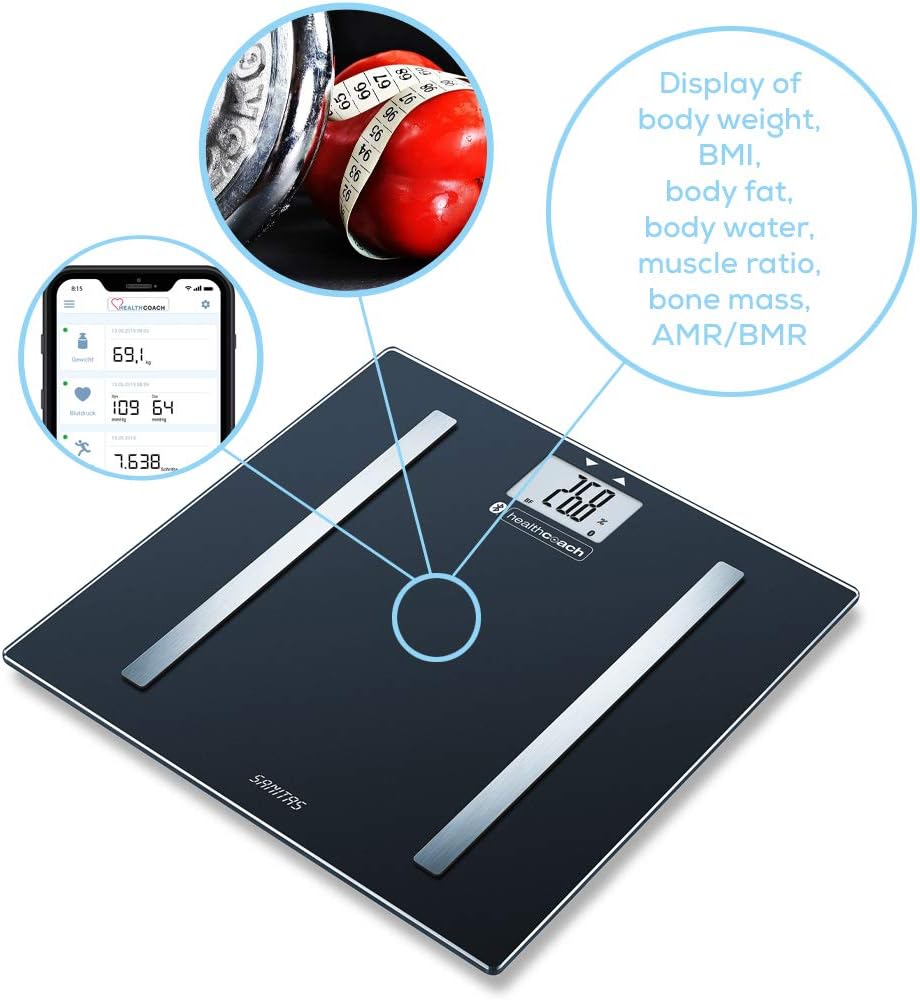
This diagram highlights the various body composition metrics measured by the Sanitas SBF 72 scale, such as body weight, BMI, body fat, body water, muscle ratio, bone mass, and calorie expenditure (AMR/BMR). It also shows the scale's connection to the HealthCoach app on a smartphone.
5. Setup
5.1 Battery Installation
- Open the battery compartment on the underside of the scale.
- Insert the included 3V CR2032 lithium battery, ensuring correct polarity (+/-).
- Close the battery compartment securely.
5.2 App Installation and Bluetooth Pairing
- Download the free Sanitas HealthCoach app from your smartphone's app store (Apple App Store for iOS or Google Play Store for Android).
- Ensure Bluetooth is enabled on your smartphone.
- Open the Sanitas HealthCoach app and follow the on-screen instructions to add a new device.
- Step onto the scale to activate it. The scale will automatically attempt to pair with the app via Bluetooth.
- Confirm the pairing within the app.
5.3 User Profile Setup
Within the Sanitas HealthCoach app, create your personal user profile. This includes:
- Gender
- Age
- Height
- Activity Level (choose from 5 options based on your physical activity)
The scale can store up to 8 user profiles and automatically recognize the user based on their weight and body composition data.

This image illustrates the Sanitas SBF 72 scale's capability to store data for up to 8 users with automatic recognition and its support for 5 different activity levels, allowing for personalized body data analysis.
6. Operating Instructions
6.1 Taking a Measurement
For accurate results, always weigh yourself at the same time of day, preferably in the morning, after using the restroom, and before breakfast or exercise. Ensure your feet are clean and dry.
- Place the scale on a firm, flat surface.
- Step onto the scale barefoot, ensuring your feet are positioned on the stainless steel electrodes. Stand still.
- The scale will first display your weight. Then, it will perform the body analysis.
- If connected to the app, the data will automatically transfer to your profile. If not connected, the scale will display the values sequentially.
6.2 Understanding Display Readings
The scale and app will display various metrics:
- Weight: Your current body weight.
- BMI (Body Mass Index): A measure of body fat based on height and weight.
- Body Fat: Percentage of body weight that is fat.
- Body Water: Percentage of body weight that is water.
- Muscle Percentage: Percentage of body weight that is muscle.
- Bone Mass: The weight of your bones.
- AMR/BMR (Active/Basal Metabolic Rate): Your estimated daily calorie requirement.
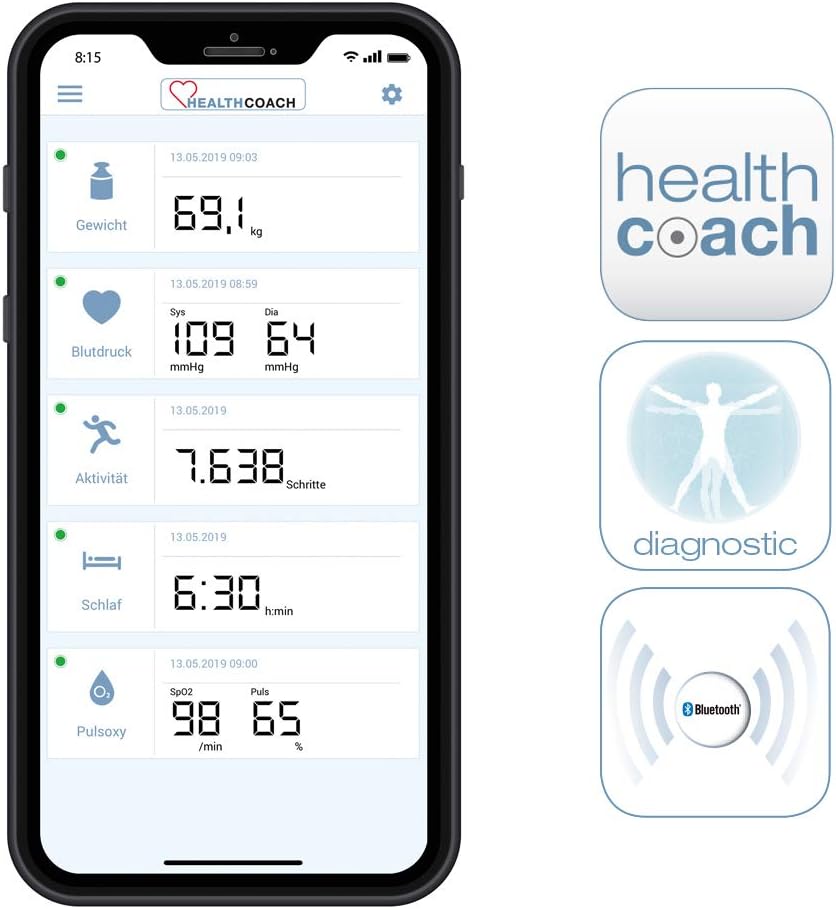
This image displays the Sanitas HealthCoach app interface, showing a comprehensive overview of health data including weight, blood pressure, daily activity steps, sleep duration, and blood oxygen saturation (SpO2) readings.
7. Maintenance and Care
- Clean the scale regularly with a damp cloth and mild detergent. Do not use abrasive cleaners or immerse the scale in water.
- Do not step on the edges of the scale or jump on it.
- Store the scale in a dry place, away from direct sunlight and extreme temperatures.
- If the scale is not used for an extended period, remove the battery to prevent leakage.
8. Troubleshooting
- No display/Scale does not turn on: Check battery installation and replace if necessary.
- Inaccurate readings: Ensure the scale is on a hard, flat surface. Weigh yourself at the same time each day. Ensure feet are clean and dry and positioned correctly on electrodes.
- Bluetooth connection issues: Ensure Bluetooth is enabled on your smartphone and the app is open. Try restarting both the scale (by removing and reinserting the battery) and your smartphone.
- Error messages (e.g., 'Err'): Refer to the full user manual for specific error code meanings, or try restarting the scale.
9. Specifications
| Feature | Specification |
|---|---|
| Model Number | 747.30 |
| Weight Limit | 180 kg |
| Accuracy | 100 g |
| Display Type | LCD |
| Digit Size | 30 mm |
| Material | Tempered Glass, Brushed Stainless Steel Electrodes |
| Product Dimensions | 35.1 x 34.1 x 4.6 cm |
| Item Weight | 1.5 kg |
| Batteries | 1 x CR2032 (included) |
| Connectivity | Bluetooth |
| User Memories | 8 |
| Activity Levels | 5 |
10. Compatibility
The Sanitas HealthCoach app is compatible with a range of iOS and Android devices. System requirements include Bluetooth® 4.0.
Compatible iOS Devices:
- iPad (3rd generation)
- iPad (4th generation)
- iPad mini
- iPhone 4s
- iPhone 5
- iPhone 5c
- iPhone 5s
- iPhone 6
- iPhone 6 Plus
- iPhone 6s
- iPhone 6s Plus
- iPhone 7
- iPhone 7 Plus
- iPod touch (5th generation)
System requirements: Bluetooth® 4.0, iOS from version 8.0 on.
Compatible Android Devices:
- LG Google Nexus 5
- LG L40
- Samsung Galaxy S3
- Samsung Galaxy S4
- Samsung Galaxy S4 mini
- Samsung Galaxy S5
- Samsung Galaxy S6
- Samsung Galaxy S7
Compatibility with other Android™ devices is possible, but not guaranteed. System requirements: Bluetooth® 4.0, Android from version 4.4 on.

This image provides a list of devices compatible with the Sanitas HealthCoach app, specifying various iPhone, iPad, and Samsung Galaxy models, along with the system requirements for Bluetooth 4.0 and iOS 8.0 or Android 4.4 and above.
11. Warranty and Support
For warranty information and technical support, please refer to the documentation included with your product or contact Sanitas customer service. Keep your proof of purchase for any warranty claims.


