
Introduction
The Gourmia GKS9190 Nutrition Scale is designed to provide accurate weight measurements for food items and calculate their nutritional values. Featuring a tempered glass platform and a digital touchscreen display, this scale offers precise measurements up to 5 kg (11 lbs) with a 1-gram (0.1 oz) division. It includes a database of 999 food codes to help track calories, sodium, protein, fat, carbohydrates, cholesterol, and fiber. This manual provides instructions for proper setup, operation, and maintenance of your nutrition scale.
Safety Information
- Always place the scale on a hard, flat, and stable surface to ensure accurate readings.
- Do not immerse the scale in water or any other liquid. Clean with a damp cloth.
- Avoid dropping the scale or subjecting it to strong impacts, as this may damage the tempered glass platform or internal components.
- Do not use abrasive cleaners or chemical agents on the scale.
- Keep the scale away from extreme temperatures and direct sunlight.
- This appliance is for household use only.
Package Contents
Please check the package contents to ensure all items are present:
- Gourmia GKS9190 Nutrition Scale
- User Manual
- Food Code List Booklet
- 4 x AAA Batteries
Product Overview
Familiarize yourself with the components of your Gourmia GKS9190 Nutrition Scale.
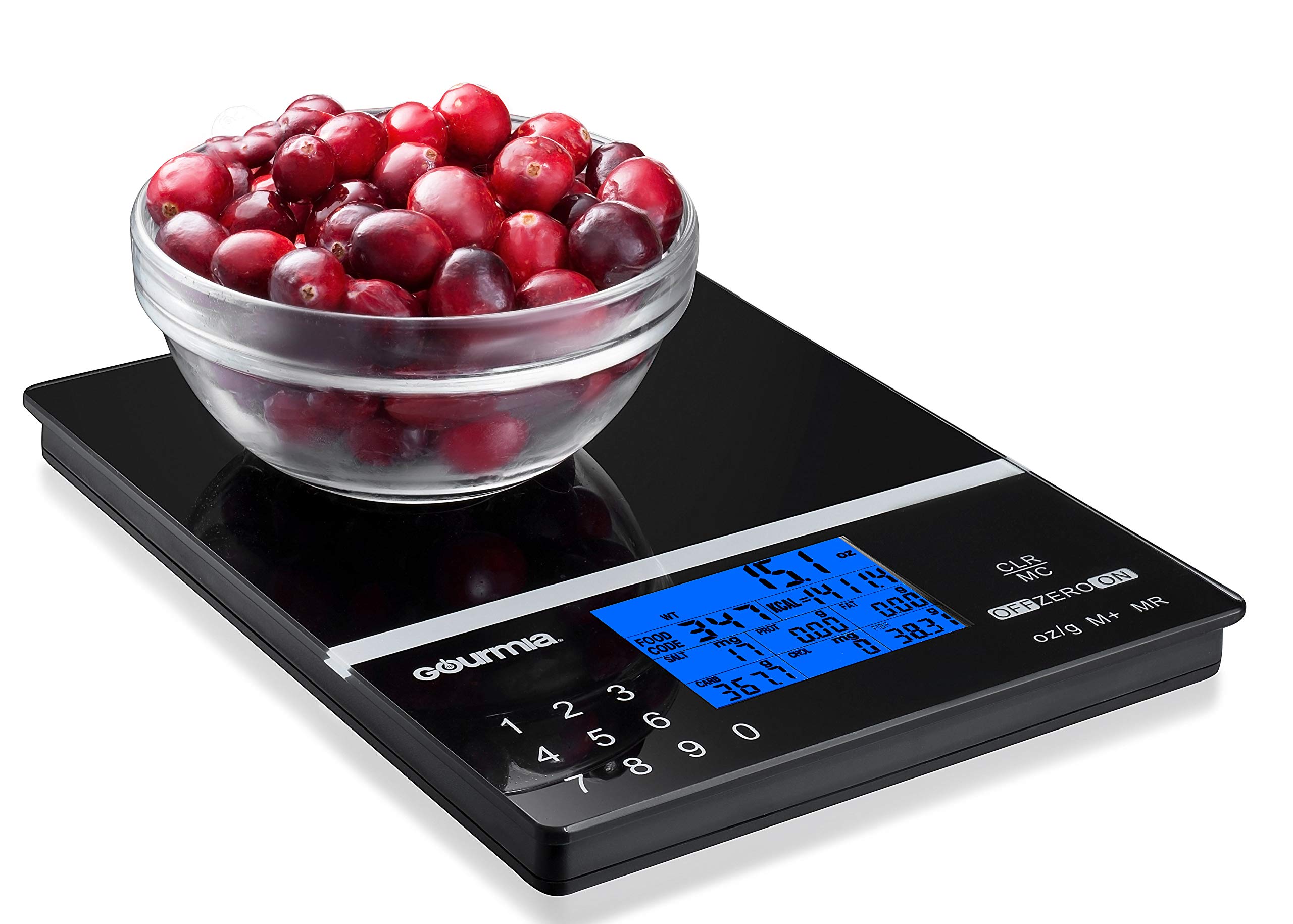
Figure 1: Gourmia GKS9190 Nutrition Scale. This image displays the scale from an elevated angle, highlighting its black tempered glass surface, the blue backlit digital display, and the touch-sensitive control buttons including the numerical keypad, CLR/MC, OFF/ZERO/ON, and oz/g M+ buttons.
- Weighing Platform: Tempered glass surface for placing items to be weighed.
- Digital Display: Blue backlit LCD showing weight, units, food code, and nutritional information.
- Numerical Keypad (0-9): Used for entering food codes.
- CLR/MC Button: Clears current nutritional data or memory.
- OFF/ZERO/ON Button: Powers the scale on/off and performs the Tare function.
- oz/g M+ Button: Changes weighing units (grams, ounces, pounds, milliliters, fluid ounces) and adds to memory.
Setup
1. Battery Installation
- Open the battery compartment cover located on the underside of the scale.
- Insert four (4) AAA batteries, ensuring correct polarity (+/-) as indicated inside the compartment.
- Close the battery compartment cover securely.
2. Initial Placement
Place the scale on a hard, flat, and stable surface. Uneven surfaces can affect weighing accuracy.
Operating Instructions
Basic Weighing
- Press the OFF/ZERO/ON button to turn on the scale. The display will show "0g" when ready.
- Place the item to be weighed directly onto the center of the tempered glass platform.
- Read the weight displayed on the screen.
- To turn off the scale, press and hold the OFF/ZERO/ON button for a few seconds, or it will auto shut-off after a period of inactivity.

Figure 2: The Gourmia GKS9190 Nutrition Scale in use, accurately weighing a bowl of fresh raspberries. The digital display shows the weight measurement.
Unit Conversion
The scale can measure in grams (g), ounces (oz), pounds (lb), milliliters (ml), and fluid ounces (fl oz).
- With the scale on and displaying "0g", press the oz/g M+ button repeatedly to cycle through the available units.
- The selected unit will be indicated on the display.
Tare Function
The Tare function allows you to weigh ingredients in a container by subtracting the container's weight.
- Place an empty container on the scale. The display will show its weight.
- Press the OFF/ZERO/ON button. The display will reset to "0g".
- Add ingredients to the container. The display will show only the weight of the ingredients.
- Repeat the Tare function for multiple ingredients in the same container.
Nutritional Calculation
To utilize the scale's nutritional analysis feature:
- Ensure the scale is on and displaying "0g".
- Using the numerical keypad, enter the 3-digit food code for the item you wish to analyze. Refer to the included Food Code List Booklet.
- Place the food item (or container with food, after taring) onto the scale.
- The display will show the weight and calculated nutritional values (calories, sodium, protein, fat, carbohydrates, cholesterol, fiber) for the entered food code.
- To clear the nutritional data and food code, press the CLR/MC button.

Figure 3: A detailed view of the Gourmia GKS9190 Nutrition Scale's digital display. The screen shows various nutritional metrics such as food code, weight, calories (KCAL), salt, protein, fat, carbohydrates, cholesterol, and fiber, along with the numerical keypad below.

Figure 4: The Gourmia GKS9190 Nutrition Scale displaying the weight and nutritional information for a bowl of cherry tomatoes. The numerical keypad is visible for entering food codes.
Food Code List
The Gourmia GKS9190 Nutrition Scale comes with a separate Food Code List Booklet. This booklet contains 999 preprogrammed food codes, each corresponding to specific nutritional data. To accurately calculate nutritional values, always refer to this booklet to find the correct 3-digit code for your food item before entering it into the scale.
Maintenance and Care
- Cleaning: Wipe the scale's surface with a soft, damp cloth. Do not use abrasive cleaners or immerse the scale in water.
- Storage: Store the scale in a cool, dry place when not in use.
- Battery Replacement: Replace batteries when the "Lo" indicator appears on the display. Remove batteries if the scale will not be used for an extended period.
Troubleshooting
| Problem | Possible Cause | Solution |
|---|---|---|
| Scale does not turn on. | Dead or incorrectly installed batteries. | Check battery polarity or replace with new AAA batteries. |
| "Lo" displayed. | Low battery power. | Replace all four AAA batteries. |
| "O-Ld" displayed. | Overload. Weight exceeds maximum capacity. | Remove item immediately. Do not exceed 5 kg (11 lbs). |
| Inaccurate readings. | Uneven surface, scale not tared, or external interference. | Place scale on a flat, stable surface. Ensure scale is tared to "0g" before weighing. Avoid strong vibrations or air currents. |
| Nutritional data not displayed. | Incorrect food code entered or no food code entered. | Verify the 3-digit food code from the booklet and re-enter. Ensure food is on the scale. |
Specifications
- Model: GKS9190 (8541976264)
- Brand: Gourmia
- Capacity: 5 kg (11 lbs)
- Accuracy: 1 g (0.1 oz)
- Units: g, oz, lb, ml, fl oz
- Material: Tempered Glass
- Power: 4 x AAA Batteries
- Special Features: Auto Shut Off, Backlit Display, Tare Function, Nutritional Calculator (999 food codes)
- Item Weight: Approximately 8.8 ounces
Warranty and Support
For warranty information or technical support, please contact Gourmia customer service. Refer to the contact details provided in your product packaging or visit the official Gourmia website for assistance.
Gourmia Official Website: www.gourmia.com