1. Introduction
This manual provides instructions for the ZdalaMit GA629PA replacement remote control. This remote is designed to function as a direct replacement for original Sharp Blu-Ray DVD Player remotes, specifically compatible with models BD-HP20U, BD-HP20, and BD-HP20X. No programming or pairing is required for its operation.
The remote control requires two AAA alkaline batteries for power. Please read this manual thoroughly to ensure proper setup and usage.
2. Package Contents
- 1 x ZdalaMit GA629PA Replacement Remote Control
Note: Batteries are not included and must be purchased separately.
3. Setup: Installing Batteries
To begin using your ZdalaMit GA629PA remote control, you must first install two AAA alkaline batteries.
- Locate the Battery Compartment: Turn the remote control over. The battery compartment cover is located on the back.
- Open the Cover: Press down on the latch and slide the battery compartment cover downwards or in the direction indicated by an arrow.
- Insert Batteries: Insert two 1.5V AAA alkaline batteries into the compartment. Ensure that the positive (+) and negative (-) terminals of the batteries align correctly with the markings inside the compartment. Incorrect insertion can prevent the remote from functioning.
- Close the Cover: Slide the battery compartment cover back into place until it clicks securely.
Once the batteries are installed, the remote control is ready for immediate use with your compatible Sharp Blu-Ray DVD Player. No additional programming is required.

Image: The ZdalaMit GA629PA remote control with its battery compartment open, illustrating the correct orientation for inserting two AAA batteries.
4. Operating the Remote Control
The GA629PA remote control provides full functionality for your Sharp Blu-Ray DVD Player. Below is a general overview of common button functions.
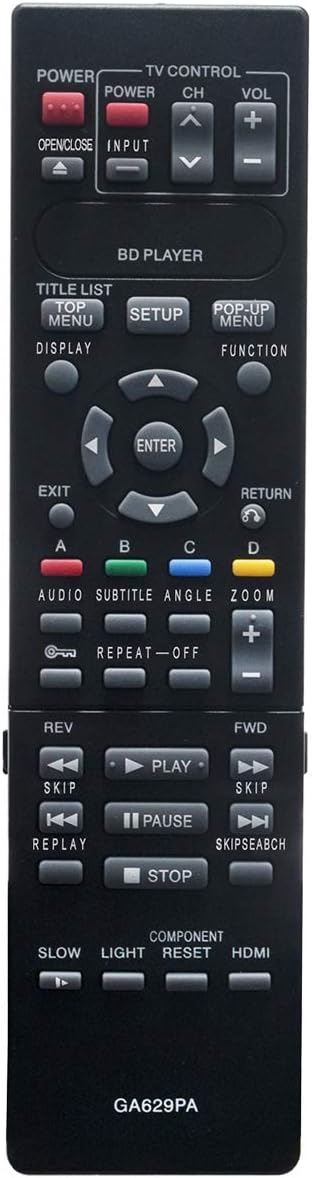
Image: A detailed view of the ZdalaMit GA629PA remote control, highlighting the layout and labels of its various buttons.
Key Functions:
- POWER: Turns the Blu-Ray DVD Player on or off.
- OPEN/CLOSE: Opens or closes the disc tray.
- INPUT: Selects the input source (if applicable).
- TV CONTROL (POWER, CH+/-, VOL+/-): Basic controls for a connected TV.
- TITLE LIST / TOP MENU: Accesses the disc's title list or top menu.
- SETUP: Enters the player's setup menu.
- POP-UP MENU / FUNCTION: Accesses the disc's pop-up menu or other functions.
- DISPLAY: Shows playback information on screen.
- Navigation Buttons (Up, Down, Left, Right, ENTER): Used to navigate menus and confirm selections.
- EXIT / RETURN: Exits a menu or returns to the previous screen.
- Color Buttons (A, B, C, D): Used for specific functions as indicated on screen or in the player's manual.
- AUDIO / SUBTITLE / ANGLE / ZOOM: Controls for audio tracks, subtitles, camera angles, and zoom features.
- REPEAT / OFF: Toggles repeat playback mode.
- Playback Controls (PLAY, PAUSE, STOP, FWD, REV, SKIP, REPLAY, SKIP SEARCH): Standard controls for disc playback.
- SLOW / LIGHT / COMPONENT RESET / HDMI: Additional function buttons.
For detailed information on specific functions, please refer to the original user manual of your Sharp Blu-Ray DVD Player model.
5. Maintenance
Battery Replacement:
When the remote control's range decreases or it becomes unresponsive, it is time to replace the batteries. Follow the steps in the "Setup: Installing Batteries" section to replace the two AAA alkaline batteries.
- Always replace both batteries at the same time.
- Do not mix old and new batteries, or different types of batteries.
- Remove batteries if the remote control will not be used for an extended period to prevent leakage.
- Dispose of used batteries according to local regulations.
Cleaning:
To clean the remote control, wipe it with a soft, dry cloth. Do not use liquid cleaners, sprays, or abrasive materials, as these can damage the remote's surface or internal components.
6. Troubleshooting
If you experience issues with your ZdalaMit GA629PA remote control, refer to the following common solutions:
- Remote not responding:
- Ensure batteries are inserted correctly with the correct polarity (+/-).
- Replace old batteries with new 1.5V AAA alkaline batteries.
- Check for any obstructions between the remote control and the Blu-Ray DVD Player's infrared sensor.
- Ensure you are within the effective operating range and pointing the remote directly at the player.
- Specific buttons not working:
- This remote is pre-programmed and does not require setup. If specific buttons are not working, ensure they are relevant to the current function or menu on your Blu-Ray DVD Player.
- Try replacing the batteries.
If the problem persists after trying these steps, please contact customer support.
7. Specifications
| Model Number | GA629PA |
| Brand | ZdalaMit |
| Compatible Devices | Sharp Blu-Ray DVD Players (BD-HP20U, BD-HP20, BD-HP20X, etc.) |
| Power Supply | 2 x 1.5V AAA Alkaline Batteries (not included) |
| Dimensions (L x W x H) | 5.7 x 1.6 x 0.6 inches (approx.) |
| Item Weight | 1.41 ounces (approx.) |
| Color | Black |
| Special Feature | Pre-Programmed, No Setup Required |
8. Warranty Information
Specific warranty details for the ZdalaMit GA629PA remote control may vary depending on the retailer and region of purchase. Please retain your proof of purchase for any warranty claims.
Generally, replacement remote controls come with a limited warranty covering manufacturing defects. For precise warranty terms and conditions, please refer to the documentation provided at the time of purchase or contact the seller directly.
9. Customer Support
If you have any questions, encounter issues not covered in this manual, or require further assistance with your ZdalaMit GA629PA remote control, please contact the seller or manufacturer's customer support.
Please have your product model number (GA629PA) and purchase information ready when contacting support.


