1. Introduction
This manual provides essential instructions for the safe and efficient operation of your ARISEN RockTeen Portable Bluetooth Speaker. Please read this manual thoroughly before using the product and retain it for future reference.
1.1 Package Contents
- ARISEN RockTeen Bluetooth Speaker
- USB Charging Cable
- Audio Cable (AUX)
- User Manual
- Warranty Card
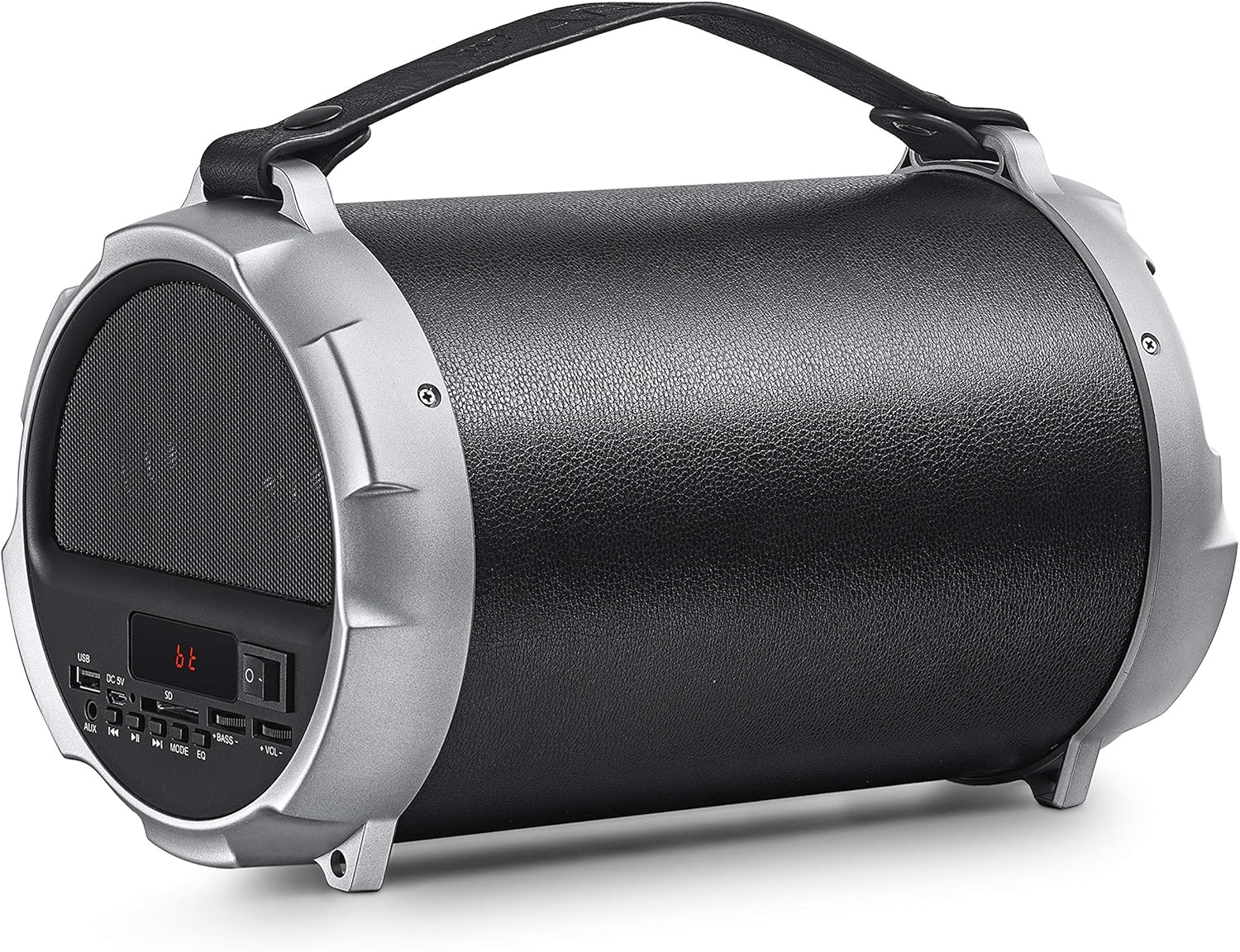
Figure 1.1: ARISEN RockTeen Portable Bluetooth Speaker. This image displays the speaker from an angled perspective, showcasing its cylindrical design, control panel on the left side, and integrated carrying handle.
2. Product Overview
2.1 Speaker Components and Controls
Familiarize yourself with the various parts and controls of your speaker:
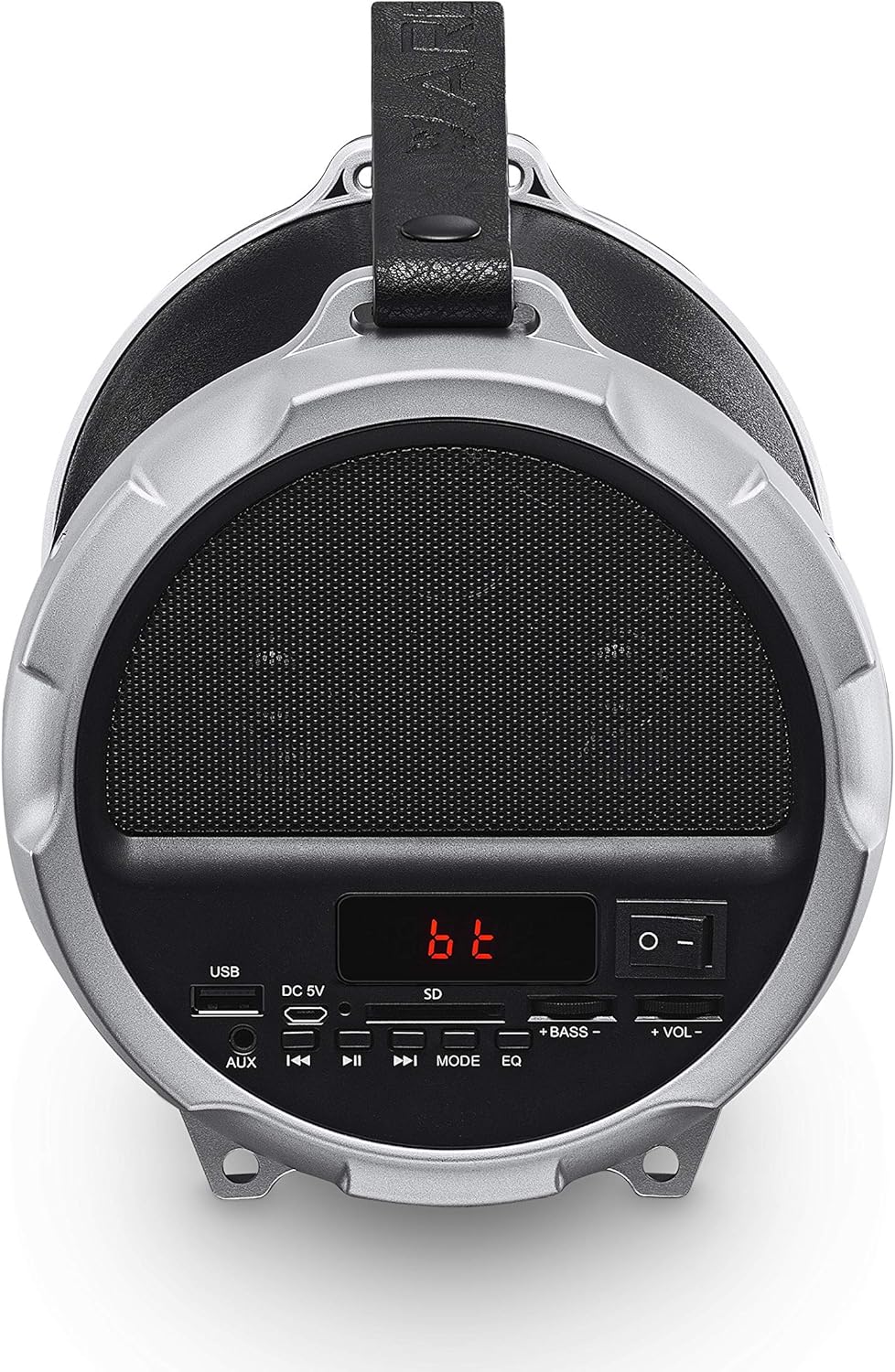
Figure 2.1: Close-up view of the ARISEN RockTeen speaker's control panel. The panel features a USB port, DC 5V charging port, AUX input, SD card slot, power switch, mode button, play/pause, track skip buttons, and volume/bass controls.
- USB Port: For USB flash drive playback.
- DC 5V Port: For charging the speaker.
- AUX Input: For connecting external audio devices via 3.5mm audio cable.
- SD Card Slot: For TF card playback.
- Power Switch: To turn the speaker On or Off.
- Mode Button: To switch between Bluetooth, FM Radio, USB, TF Card, and AUX modes.
- Play/Pause Button: To play or pause audio.
- Previous/Next Track Buttons: To skip tracks or tune radio stations.
- Volume/Bass Controls: Separate controls for adjusting overall volume and bass levels.
- EQ Button: To cycle through equalizer presets.
3. Setup
3.1 Charging the Speaker
- Connect the provided USB charging cable to the DC 5V port on the speaker.
- Connect the other end of the USB cable to a compatible USB power adapter (not included) or a computer's USB port.
- The charging indicator will illuminate. Allow approximately 3-4 hours for a full charge.
- Once fully charged, disconnect the charging cable.
Note: The rechargeable Li-ion battery provides up to 6 hours of music playback at 50% volume.
3.2 Powering On/Off
- To power on the speaker, slide the Power Switch to the 'ON' position.
- To power off the speaker, slide the Power Switch to the 'OFF' position.
4. Operating Instructions
4.1 Bluetooth Connection
- Ensure the speaker is powered on and in Bluetooth mode. If not, press the Mode button until "bt" appears on the display.
- Enable Bluetooth on your mobile device (smartphone, tablet, laptop).
- Search for available Bluetooth devices. Select "ARISEN RockTeen" from the list.
- Once paired, the speaker will emit a confirmation sound, and the display will indicate a successful connection.
- You can now play audio from your device through the speaker. The Bluetooth range is approximately 30 feet (10 meters).
4.2 FM Radio Operation
- Power on the speaker and press the Mode button to switch to FM Radio mode. The display will show the radio frequency.
- To auto-scan and save available stations, press and hold the Play/Pause button. The speaker will automatically search and store all strong signals.
- To manually tune or navigate through saved stations, use the Previous/Next Track buttons.
- To manually select a saved station, use the number buttons on the control panel (if available, otherwise use track buttons).

Figure 4.1: The ARISEN RockTeen speaker being used outdoors, demonstrating its FM Radio function. A hand is shown interacting with the control panel, with the display showing 'FM' and a frequency.
4.3 USB/TF Card Playback
- Insert a USB flash drive or TF (Micro SD) card into the respective slot on the control panel.
- The speaker will automatically switch to USB or TF card mode and begin playing audio files. If not, press the Mode button to select the correct source.
- Use the Play/Pause and Previous/Next Track buttons to control playback.
4.4 AUX Input Mode
- Connect one end of the provided audio cable to the AUX input port on the speaker.
- Connect the other end of the audio cable to the headphone jack or audio output of your external device.
- Press the Mode button until the speaker switches to AUX mode.
- Control playback and volume from your external device.
4.5 True Wireless Stereo (TWS) Function
The TWS function allows you to pair two ARISEN RockTeen speakers together for enhanced stereo sound. (Requires two ARISEN RockTeen speakers).
- Ensure both speakers are powered on and in Bluetooth mode, but not yet paired with any device.
- On one of the speakers, press and hold the Mode button for a few seconds until you hear a pairing tone. This speaker will become the primary unit.
- The two speakers will automatically connect to each other.
- Once connected, pair your mobile device to the primary speaker via Bluetooth as described in section 4.1.
- Audio will now play in stereo through both speakers.
4.6 Hands-Free Calling
When connected via Bluetooth to a smartphone, the speaker can be used for hands-free calls.
- Answer Call: Press the Play/Pause button once to answer an incoming call.
- End Call: Press the Play/Pause button once during a call to end it.
- Reject Call: Press and hold the Play/Pause button to reject an incoming call.
- Redial Last Number: Double-press the Play/Pause button to redial the last number.
4.7 Volume and Bass Adjustment
- Use the +VOL- knob to adjust the overall volume level.
- Use the +BASS- knob to adjust the bass intensity.
- Press the EQ button to cycle through available equalizer presets.
5. Maintenance
5.1 Cleaning
- Ensure the speaker is powered off and disconnected from any power source before cleaning.
- Use a soft, dry, lint-free cloth to wipe the exterior surfaces of the speaker.
- Do not use abrasive cleaners, waxes, or solvents as they may damage the finish.
- Avoid getting moisture into any openings.
5.2 Storage
- Store the speaker in a cool, dry place away from direct sunlight and extreme temperatures.
- If storing for an extended period, charge the battery to approximately 50% every few months to prolong its lifespan.
5.3 Battery Care
- Do not expose the battery to excessive heat or direct flame.
- Avoid fully discharging the battery frequently, as this can reduce its overall lifespan.
- If the speaker will not be used for a long time, charge it periodically to maintain battery health.
6. Troubleshooting
6.1 Common Issues and Solutions
- Speaker will not power on:
Ensure the battery is charged. Connect the speaker to a power source using the USB charging cable. - No sound:
Check the volume level on both the speaker and your connected device. Ensure the correct input mode (Bluetooth, AUX, USB, TF) is selected. Verify that the audio cable is securely connected in AUX mode. - Bluetooth connection fails:
Ensure the speaker is in Bluetooth pairing mode. Turn off Bluetooth on your device and then turn it back on. Remove "ARISEN RockTeen" from your device's Bluetooth list and attempt to re-pair. Ensure your device is within the 30-foot Bluetooth range. - FM Radio reception is poor:
Relocate the speaker to an area with better signal reception. Ensure no large metal objects are obstructing the signal. - USB/TF card not playing:
Ensure the USB drive or TF card is inserted correctly. Verify that the audio files are in a compatible format. Try a different USB drive or TF card.
7. Specifications
7.1 Technical Data
| Feature | Specification |
|---|---|
| Model Name | RockTeen |
| Horn Size | 2 inches |
| Subwoofer Size | 4 inches |
| Horn Output | 3W x 2, 4Ω |
| Subwoofer Output | 12W, 4Ω |
| Frequency Response | 100Hz - 20KHz |
| Power Supply | DC 5V |
| Bluetooth Version | 5.0 |
| Bluetooth Range | Up to 30 feet (10 meters) |
| Battery Life | Up to 6 hours (at 50% volume) |
| Compatible Devices | Laptop, Smartphone, Tablet |
| Control Method | Push Button |
| Connectivity Technology | Bluetooth, USB, AUX, TF Card |
| Impedance | 4 Ohms |
| Wattage (Total) | 12 Watts (Subwoofer) |
8. Warranty and Support
8.1 Warranty Information
Your ARISEN RockTeen Portable Bluetooth Speaker comes with a warranty. Please refer to the included Warranty Card for detailed terms and conditions, including the warranty period and coverage.
8.2 Customer Support
For any questions, technical assistance, or warranty claims, please contact ARISEN customer support. Refer to the contact information provided on your Warranty Card or the seller's details where you purchased the product.