
1. Introduction
Thank you for choosing the Aigostar Cookmate Portable Induction Cooktop. This manual provides essential information for the safe and efficient operation, maintenance, and troubleshooting of your appliance. Please read it thoroughly before first use and keep it for future reference.
2. Safety Instructions
To prevent injury or damage, always follow basic safety precautions when using electrical appliances. This includes, but is not limited to:
- Do not immerse the appliance, cord, or plug in water or other liquids.
- Ensure the voltage indicated on the appliance matches your local power supply before connecting.
- Keep the appliance out of reach of children.
- Do not operate the appliance if the cord or plug is damaged.
- Use only induction-compatible cookware with a base diameter between 12 cm and 26 cm.
- Do not place metallic objects such as knives, forks, spoons, or lids on the induction surface as they can become hot.
- Ensure adequate ventilation around the appliance during use.
- Unplug the appliance when not in use and before cleaning.
3. Product Overview
The Aigostar Cookmate features a sleek, circular design with intuitive controls and a durable glass-ceramic panel.
Components
- Glass-ceramic cooking surface
- Control panel with rotary knob and LED display
- Ventilation system
- Power cord
Control Panel
The control panel includes a central rotary knob for power/temperature adjustment, an LED display, and touch buttons for Timer, Lock, Function, and On/Off.
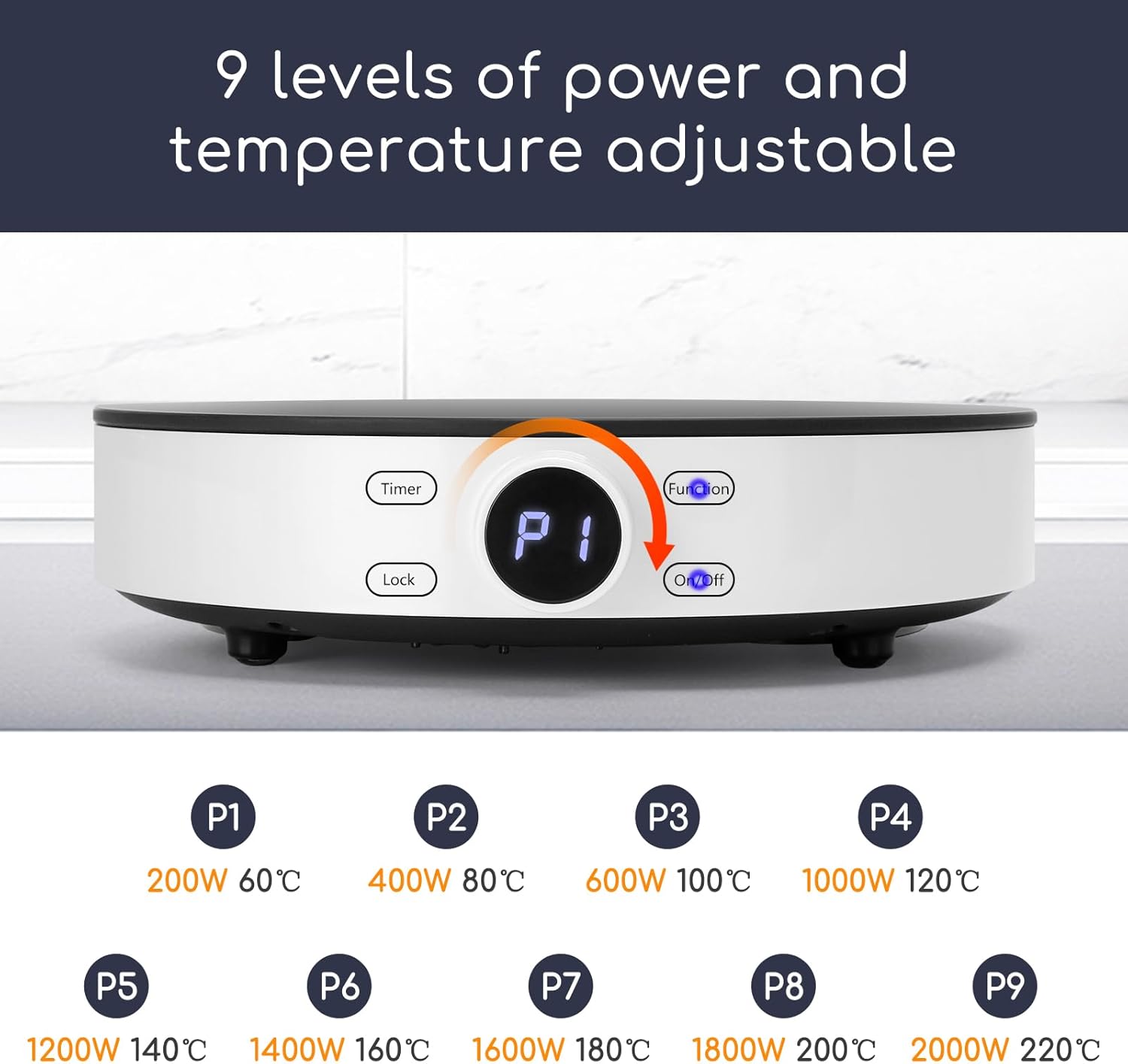
The image above shows the control panel with the central rotary knob, LED display, and various function buttons. The LED display indicates the selected power level or temperature.
4. Setup
Follow these steps to set up your induction cooktop for first use:
- Unpack the appliance and remove all packaging materials.
- Place the cooktop on a stable, flat, heat-resistant surface, ensuring adequate space around it for ventilation.
- Plug the power cord into a grounded electrical outlet. The appliance will emit a beep and the LED display will briefly light up, indicating it is in standby mode.
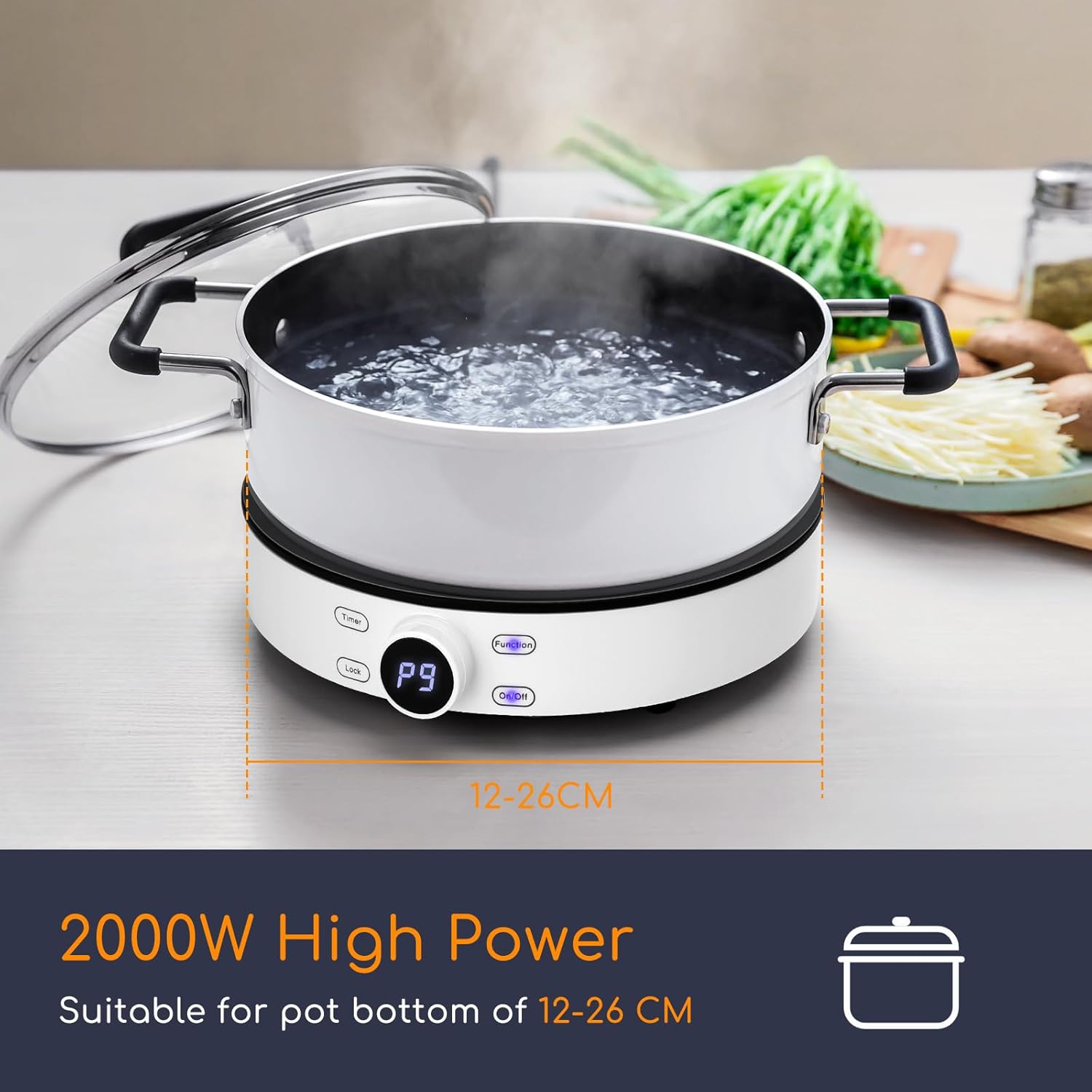
This image illustrates the Aigostar Cookmate placed on a kitchen counter, ready for use. Ensure the surface is stable and there is enough clearance for proper airflow.
5. Operating Instructions
5.1 Power On/Off
Press the On/Off button to turn the appliance on. The LED display will show the default power level. Press the On/Off button again to turn it off and enter standby mode.
5.2 Adjusting Power and Temperature
After turning on the cooktop, you can adjust the power or temperature settings:
- Power Levels: Rotate the central knob to select from 9 power levels, ranging from 200W to 2000W.
- Temperature Control: Press the Function button to switch to temperature mode. Rotate the central knob to set the temperature from 60°C to 220°C.

This image displays the cooktop's temperature control interface, showing the range of adjustable temperatures and power levels.
5.3 Timer Function
The cooktop features a timer function for convenient cooking:
- Press the Timer button.
- Rotate the central knob to set the desired cooking time, from 1 to 99 minutes.
- The cooktop will automatically turn off once the set time has elapsed.

The image shows the cooktop's LED display indicating a set timer, along with icons for child lock and automatic shutdown features.
5.4 Child Lock
To prevent accidental operation, especially by children:
- While the cooktop is operating, press and hold the Lock button for 3 seconds. All functions will be locked.
- To unlock, press and hold the Lock button again for 3 seconds.
5.5 Compatible Cookware
The Aigostar Cookmate is designed for use with induction-compatible cookware. Ensure your pots and pans have a magnetic base and a diameter between 12 cm and 26 cm.
- Compatible: Stainless steel pots, iron plates, iron frying pans, enamel cooking utensils, enamel kettles, iron pans.
- Incompatible: Ceramic, copper/aluminum, glass.
To test compatibility, place a magnet on the bottom of your cookware. If the magnet sticks, the cookware is suitable for induction.
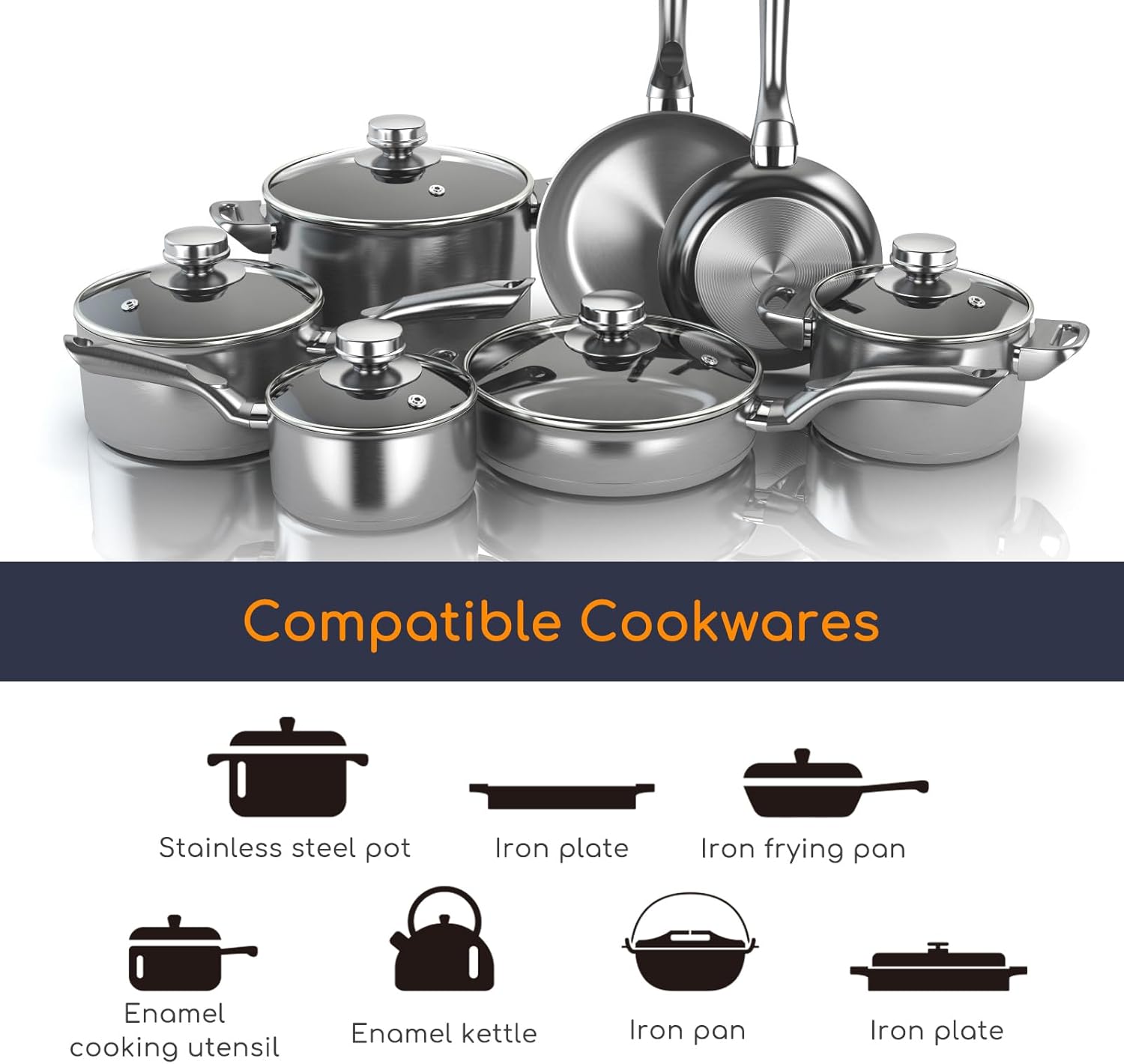
This image visually demonstrates different types of cookware, highlighting those suitable for induction cooking.

This diagram illustrates the simple magnetic test to determine if your cookware is compatible with an induction cooktop.
6. Maintenance and Cleaning
Proper maintenance ensures the longevity and optimal performance of your cooktop.
- Always unplug the appliance and allow it to cool completely before cleaning.
- Wipe the glass-ceramic surface with a soft, damp cloth. For stubborn stains, use a mild detergent specifically designed for ceramic cooktops.
- Do not use abrasive cleaners, scouring pads, or harsh chemicals, as these can scratch or damage the surface.
- The powerful fan helps dissipate internal heat. Ensure the ventilation openings are not blocked.

This image demonstrates the ease of cleaning the cooktop's glass-ceramic surface with a soft cloth.

This close-up shows the powerful fan designed for efficient heat dissipation, crucial for the cooktop's performance.
7. Troubleshooting
If you encounter any issues with your Aigostar Cookmate, refer to the table below for common problems and solutions.
| Problem | Possible Cause | Solution |
|---|---|---|
| Cooktop does not turn on | No power supply | Check if the power cord is securely plugged in and the outlet is functional. |
| Cooktop beeps and displays an error code (e.g., E0) | Incompatible or no cookware detected | Ensure you are using induction-compatible cookware with a base diameter between 12-26 cm. |
| Cooking stops unexpectedly | Overheating protection activated | Allow the cooktop to cool down. Ensure ventilation openings are not blocked. |
| Child lock is active | Controls are unresponsive | Press and hold the Lock button for 3 seconds to deactivate the child lock. |
8. Specifications
| Feature | Specification |
|---|---|
| Brand | Aigostar |
| Model Number | AIG-8433325207007 |
| Power | 2000 Watts |
| Power Levels | 9 levels (200W to 2000W) |
| Temperature Range | 60°C to 220°C |
| Timer | 1 to 99 minutes |
| Compatible Cookware Diameter | 12 cm to 26 cm |
| Material | Glass-ceramic |
| Dimensions (L x W x H) | 26 x 12 x 9 cm |
| Weight | 1.73 Kilograms |
| Automatic Shut-off | Yes |
| Special Feature | Portable |
9. Product Videos
The following video demonstrates general features and operation of an Aigostar induction cooktop. Please note that the model shown may differ slightly from your specific product (Aigostar Cookmate).
Video 1: Aigostar BlueFire Portable Induction Cooktop Demonstration. This video showcases the features and functionality of a portable induction cooktop from Aigostar, including touch controls and power settings.
10. Warranty and Support
Aigostar products are designed and manufactured to the highest quality standards. For warranty information and customer support, please refer to the warranty card included with your product or visit the official Aigostar website. Please retain your proof of purchase for any warranty claims.

