
1. Introduction
This instruction manual provides essential information for the safe and efficient installation, operation, and maintenance of the DIEHL METERING ULTRASONIC COOLING METER SHARKY 775 TYPE, Model 3045198. This device is designed for precise measurement of cooling energy in various industrial and commercial applications. Please read this manual thoroughly before attempting any installation or operation.
2. Safety Information
Always adhere to local regulations, safety standards, and best practices during the installation, operation, and maintenance of the cooling meter. Failure to follow these guidelines may result in personal injury, equipment damage, or inaccurate measurements.
- Installation and maintenance must only be performed by qualified and authorized personnel.
- Ensure all power sources are disconnected before performing any service or maintenance on the device.
- Verify that the system pressure and temperature are within the meter's specified limits before installation.
- Wear appropriate personal protective equipment (PPE) during installation and maintenance.
- Do not modify the meter or its components. Unauthorized modifications will void the warranty and may compromise safety.
3. Product Overview
The SHARKY 775 TYPE is an ultrasonic cooling energy meter designed for high-precision measurement. It features robust construction suitable for high-temperature applications and includes M-Bus communication for integration into building management systems.
Key Features:
- Ultrasonic Measurement: Provides accurate and stable flow measurement without moving parts, reducing wear and tear.
- Energy Calculation: Measures cooling energy in MWh.
- M-Bus Communication: Enables remote reading and integration with central systems.
- High Temperature Capability: Designed to operate reliably in systems with elevated temperatures.
- Pressure Rating: PN 16, suitable for common system pressures.
- Compact Design: Integrated unit for ease of installation.
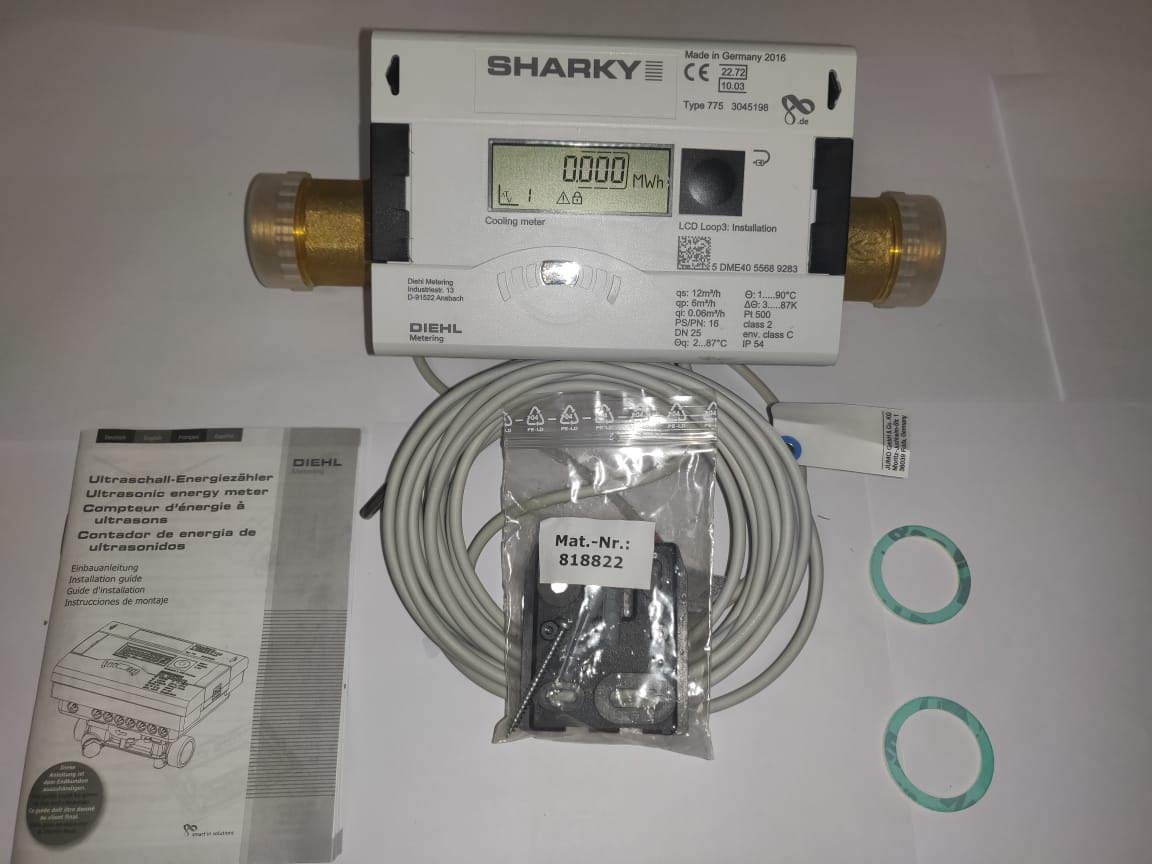
Figure 1: DIEHL METERING ULTRASONIC COOLING METER SHARKY 775 TYPE, Model 3045198. This image shows the overall appearance of the cooling meter, including its display and connection points.
4. Setup and Installation
Proper installation is crucial for the accurate and reliable operation of the cooling meter. Refer to the detailed installation instructions provided with the product packaging for specific diagrams and steps.
4.1 Pre-Installation Checks
- Verify that the meter's specifications (flow rate, pressure, temperature) match the system requirements.
- Ensure the installation site is clean, dry, and free from excessive vibrations.
- Confirm that all necessary tools and fittings (e.g., G5/4B connections, seals) are available.
4.2 Mechanical Installation
- Install the meter in the return pipe of the cooling circuit, ensuring the flow direction arrow on the meter matches the system flow.
- Maintain adequate straight pipe sections upstream and downstream of the meter as recommended by the manufacturer to ensure accurate flow measurement.
- Use appropriate gaskets and tighten connections to prevent leaks. The meter has a length of 260mm and G5/4B connections.
- Ensure the meter is not subjected to mechanical stress from the piping.
4.3 Electrical Connection (M-Bus)
- Connect the M-Bus communication cable to the designated terminals on the meter.
- Ensure proper polarity and secure connections.
- Integrate the M-Bus connection with your building management or data acquisition system according to the system's specifications.

Figure 2: DIEHL METERING ULTRASONIC COOLING METER SHARKY 775 TYPE with included accessories. This image displays the meter alongside its instruction manual, connection cables, and sealing gaskets, which are essential for proper installation.
5. Operating Instructions
Once installed and powered, the SHARKY 775 TYPE meter will automatically begin measuring and displaying cooling energy consumption.
5.1 Display Information
- The integrated LCD shows the accumulated cooling energy in MWh.
- The display may cycle through various parameters such as instantaneous flow rate, temperatures, and diagnostic codes. Refer to the specific product documentation for the display sequence and parameter meanings.
- A button on the meter's front panel typically allows manual cycling through the display parameters. Press briefly to advance to the next display value.
5.2 M-Bus Data Reading
The meter transmits measurement data via its M-Bus interface. Connect a compatible M-Bus master device to read data remotely. Consult the M-Bus protocol documentation for details on data registers and communication parameters.

Figure 3: Close-up view of the DIEHL METERING ULTRASONIC COOLING METER SHARKY 775 TYPE display. This image highlights the LCD screen, showing the energy reading in MWh, and the button for display navigation.
6. Maintenance
The SHARKY 775 TYPE cooling meter is designed for long-term, maintenance-free operation. However, periodic checks are recommended to ensure continued accuracy and reliability.
- Visual Inspection: Periodically inspect the meter for any signs of damage, leaks, or corrosion.
- Cleaning: Keep the meter's exterior clean. Use a soft, damp cloth for cleaning. Do not use abrasive cleaners or solvents.
- Battery Replacement: The meter contains an internal battery for power. The expected battery life is typically 6-10 years. When the battery is low, a warning may appear on the display. Battery replacement should only be performed by authorized service personnel.
- Calibration: Regular calibration is not typically required for ultrasonic meters under normal operating conditions. However, local regulations or specific application requirements may necessitate periodic re-calibration. Contact DIEHL METERING for calibration services.
7. Troubleshooting
This section provides guidance for common issues. For problems not listed here, or if issues persist, contact technical support.
| Problem | Possible Cause | Solution |
|---|---|---|
| No display / Meter off | Battery depleted or internal fault. | Contact authorized service personnel for battery replacement or inspection. |
| Inaccurate readings | Incorrect installation (e.g., wrong flow direction, insufficient straight pipe). Air bubbles in the system. Sensor fault. | Verify installation according to manual. Bleed air from the system. Contact support if issue persists. |
| M-Bus communication failure | Incorrect wiring. M-Bus master configuration error. Damaged M-Bus cable. | Check M-Bus wiring and polarity. Verify M-Bus master settings. Inspect cable for damage. |
| Leakage at connections | Improperly tightened connections. Damaged gaskets. | Ensure connections are tightened correctly. Replace damaged gaskets. |
8. Specifications
Technical specifications for the DIEHL METERING ULTRASONIC COOLING METER SHARKY 775 TYPE, Model 3045198.
| Parameter | Value |
|---|---|
| Brand | DIEHL |
| Model Type | SHARKY 775 TYPE |
| Part Number (P/N) | 3045198 |
| Function | Ultrasonic Cooling Meter |
| Nominal Flow Rate (QP) | 6 m³/h |
| Connection Size | G5/4B |
| Installation Length | 260 mm |
| Pressure Rating | PN 16 |
| Temperature Range | High Temperature (specific range depends on configuration) |
| Communication Interface | M-Bus |
| Cell Type | A-Cell |
| Manufacturer | DIEHL |
| Country of Origin | Germany |
| ASIN | B08DRCV5NL |
| UPC | 305250304916 |
9. Warranty Information
DIEHL METERING products are manufactured to high-quality standards. Specific warranty terms and conditions are typically provided with the product at the time of purchase or can be obtained directly from DIEHL METERING or your authorized distributor. Please retain your proof of purchase for warranty claims.
10. Support
For technical assistance, spare parts, or further information regarding the DIEHL METERING ULTRASONIC COOLING METER SHARKY 775 TYPE, Model 3045198, please contact your local DIEHL METERING representative or authorized distributor. You can also visit the official DIEHL METERING website for support resources and contact details.
When contacting support, please have the following information ready:
- Product Model: SHARKY 775 TYPE
- Part Number: 3045198
- Serial Number (S/N): (Refer to product label, e.g., 55689283)
- Date of Purchase
- A detailed description of the issue.

Figure 4: Product label showing model type, part number (P/N), and serial number (S/N). This label is crucial for product identification and support inquiries.


